
Tim Burton AI Portrait Generator
Upload any photo and watch AI redraw you as a gothic storybook character — same face, big soulful eyes, all wrapped in a moonlit dark-fairytale world.
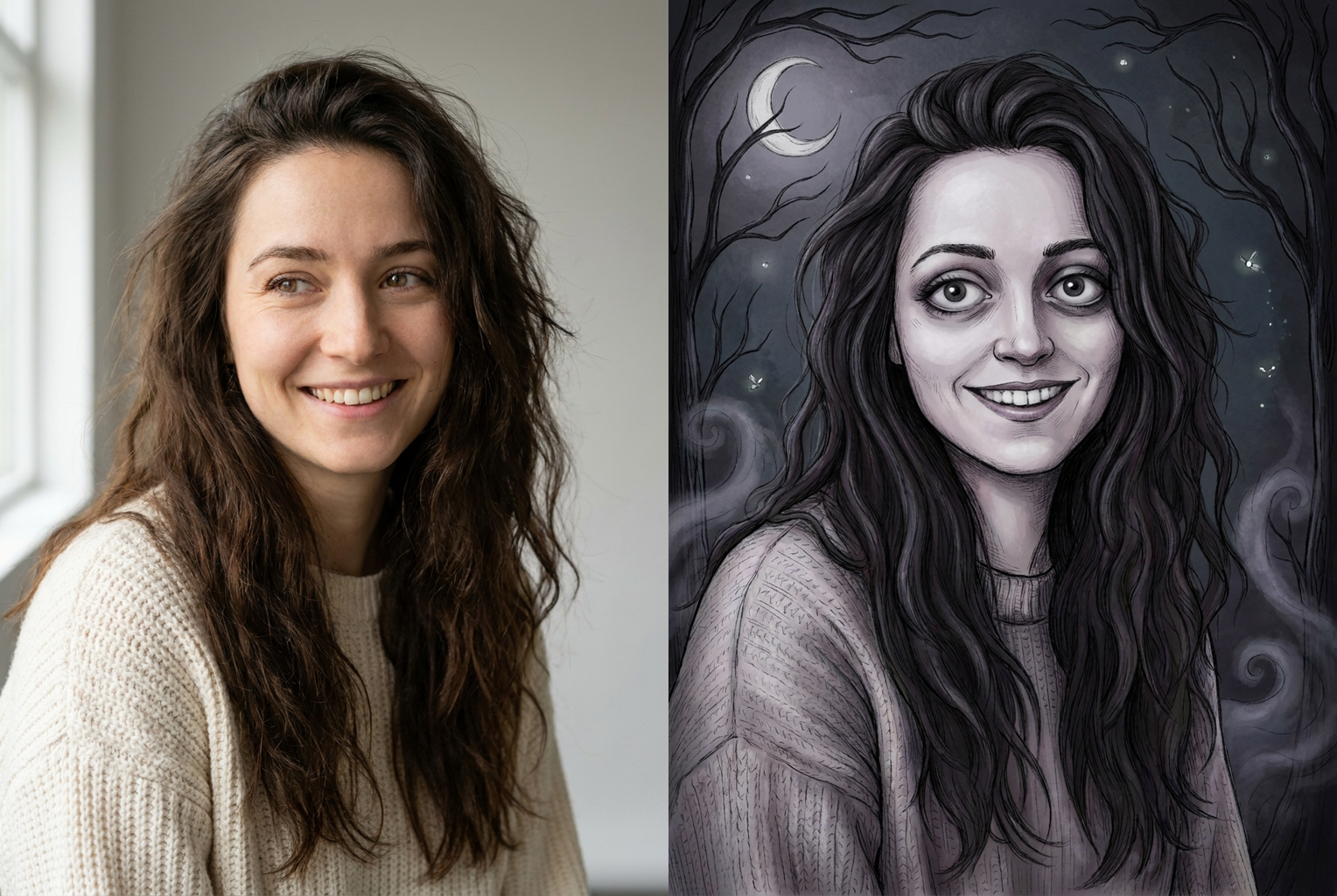
Warm smile, gothic glow
A bright everyday portrait becomes a soulful-eyed storybook character — same hair and smile, moonlit dark-fairytale mood.
AI-generated examples
Turn Your Photo into a Gothic Storybook Portrait
Drag & drop or click to upload
Supports PNG, JPG, WEBP • Max 20MB
Sign in to start generating
How it works
Upload a Photo
Choose a clear, well-lit photo where your face is easy to see — a selfie, a portrait, or a full-body shot all work beautifully.
AI Redraws You
The AI studies your face, hair, and expression, then hand-illustrates you with elongated proportions, big soulful eyes, and a moonlit gothic palette.
Download & Share
Your dark-fairytale portrait is ready in about a minute — save it in full resolution and use it as an avatar, poster, or spooky-season gift.
Tim Burton AI Portraits Made From Real Photos
Every example starts from an ordinary photo and is redrawn by the same generator into a moonlit gothic storybook portrait — same face, dark-fairytale style.
Warm smile, gothic glow
A bright everyday portrait becomes a soulful-eyed storybook character — same hair and smile, moonlit dark-fairytale mood.
A bright everyday portrait becomes a soulful-eyed storybook character — same hair and smile, moonlit dark-fairytale mood.
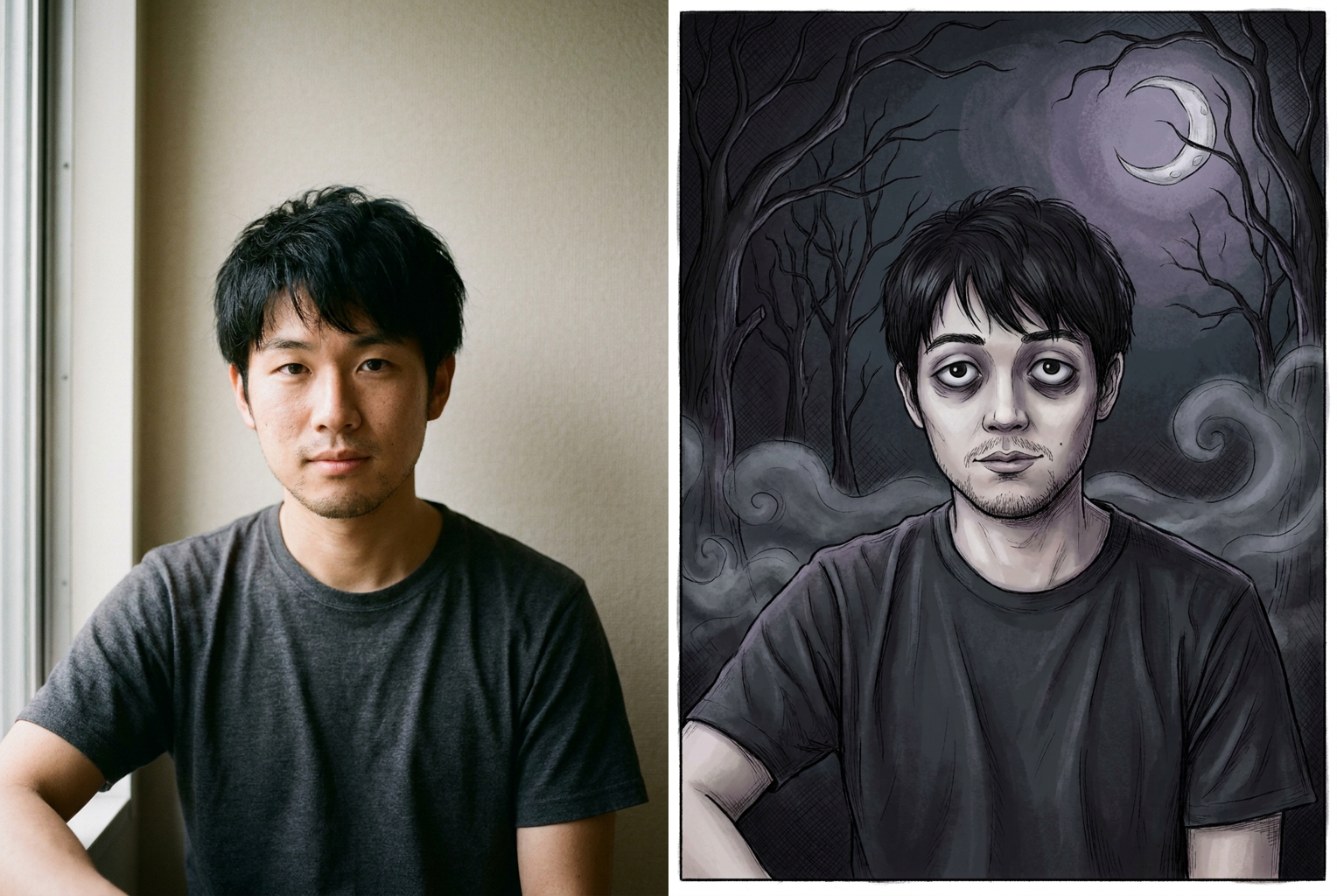
Calm gaze turned mysterious
A plain headshot is redrawn with elongated proportions and huge glassy eyes, keeping his short hair and stubble intact.
A plain headshot is redrawn with elongated proportions and huge glassy eyes, keeping his short hair and stubble intact.
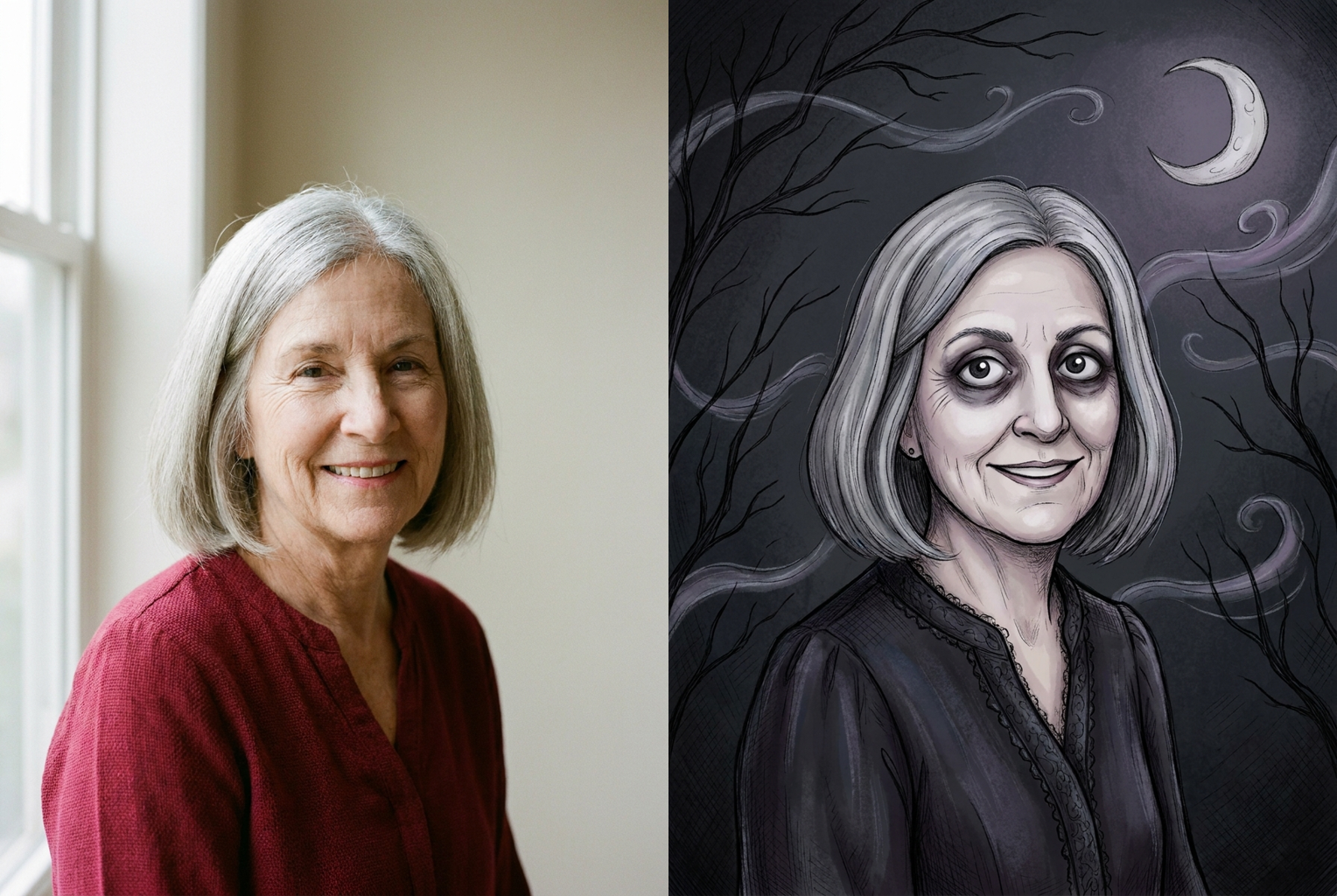
Silver bob, dark-fairytale charm
Her warm, recognizable features carry into a hauntingly gentle storybook portrait, silver bob and all.
Her warm, recognizable features carry into a hauntingly gentle storybook portrait, silver bob and all.
Why this tool
Still Unmistakably You
The AI keeps your face shape, hairstyle, hair color, and expression intact, so friends recognize you instantly — it's you, reimagined as a gothic storybook character.
Signature Dark-Fairytale Look
Gently elongated proportions, huge soulful rounded eyes, pale porcelain skin, and delicate linework capture that whimsical, slightly eerie animated-film feeling.
Moonlit Gothic Palette
Deep charcoal, inky blue-black, dusty violet, and faint silver, with swirling bare trees, curling fog, and a crooked crescent moon setting the scene.
Personality Carries Over
A warm smile stays warm and a serious gaze turns mysterious. The AI translates your mood into the illustration, not just your features.
No Art Skills Needed
No commissions, no drawing tablet, no prompt writing. Upload one photo, press one button, and get a finished gothic portrait in about a minute.
Endless Variations
Every generation is drawn fresh, so rerunning the same photo gives you new takes — and different photos capture different moods, outfits, and lighting.
The rundown
Tim Burton AI Portrait Generator: Turn Any Photo into a Gothic Storybook Character
The Tim Burton AI portrait generator takes an ordinary photo and redraws you as a character from a moonlit, hand-illustrated storybook. You know the look instantly: gently elongated bodies, enormous soulful eyes rimmed with soft shadow, pale porcelain skin, spindly limbs, and a world made of bare swirling trees, curling fog, and a crooked crescent moon. Instead of commissioning an artist or wrestling with drawing software, you simply upload a picture and let the AI handle every brushstroke. In about a minute you get a polished Tim Burton AI portrait that still looks unmistakably like you — the same face, hair, and expression, reimagined in that whimsical, slightly eerie dark-fairytale style, ready to download and share.
Under the hood, a Tim Burton AI portrait is produced by an image model that has learned how illustrated faces are shaped, shaded, and lit. When you upload your photo, the AI first reads your defining features — the geometry of your face, your hairstyle and hair color, and the emotion in your expression — and locks them in as anchors. Then it rebuilds you with storybook proportions: the head and eyes grow, the frame thins and stretches, the skin pales, and fine hand-drawn linework and crosshatch texture replace photographic detail. Because your anchors are preserved, the stylization transforms the mood and medium without erasing the person, which is what separates a true Tim Burton AI portrait from a generic character drawing.
What makes this gothic storybook portrait style so recognizable is its careful balance of cute and creepy. The oversized, glassy eyes make every character look vulnerable and dreamy, while the muted palette of charcoal, inky blue-black, dusty violet, and faint silver keeps the whole scene hushed and nocturnal. The AI leans into those cues: it surrounds you with leafless twisting branches, drifting wisps or fireflies, and a soft vignette that frames you like a page from an illustrated fable. The result feels handmade and cinematic at once — a Tim Burton style photo that could belong on a movie poster, a vinyl sleeve, or the cover of a spooky children's book.
Getting a great Tim Burton AI portrait starts with a good source photo. Pick an image where your face is well lit, in focus, and free of heavy shadows, sunglasses, or motion blur. Front-facing shots give the cleanest read on your features, but three-quarter angles and full-body photos also work and often produce more dramatic full-character illustrations. You do not need a plain background — the AI replaces it with a moonlit gothic scene anyway — but a clear subject helps the model concentrate on you. Natural expressions translate beautifully: a soft smile becomes gently melancholic, a confident stare turns mysterious, and a playful look gains a mischievous, storybook charm, so every Tim Burton AI portrait keeps its own emotional signature.
People reach for a gothic storybook portrait for all kinds of reasons. It is a natural fit for Halloween and spooky season — think haunting avatars, party invitations, costume inspiration, and seasonal cards — but the appeal runs year round. Fans of dark-whimsical animation use a Tim Burton style photo for profile pictures and fan art. Couples turn two photos into matching portraits for anniversaries and wall prints. Musicians and small brands use the look for moody cover art and merch mockups. Because every generation is drawn fresh, you can run the same photo several times and collect a little gallery of variations, each with its own lighting, pose energy, and atmosphere to choose from. Teachers and book clubs even use it to picture themselves inside the gothic fables they love, and tabletop players turn their selfies into eerie character portraits for campaigns and custom cards.
Compared with the manual alternatives, the Tim Burton AI portrait generator saves enormous time and effort. Commissioning a skilled illustrator in this style can take days or weeks and cost a significant amount, and learning to paint it yourself means mastering anatomy, shading, and a very specific color sensibility. Stock filters, on the other hand, tend to slap a flat overlay on your photo without truly redrawing you. This tool sits in the sweet spot: it performs a genuine illustration pass — rebuilding proportions, linework, and lighting from scratch — while keeping your identity intact, so you get an artist-quality Tim Burton AI portrait in a minute instead of a studio turnaround.
The workflow is intentionally simple so anyone can use it. Upload your photo, press generate, and the AI redraws you into the moonlit scene with no prompt writing, sliders, or layers to manage. Each run costs a single credit, which makes experimenting painless — try a selfie, then a full-body shot, then a photo with a different outfit or expression, and compare how the Tim Burton style photo treatment reinterprets each one. When you find the version you love, download it in high resolution. The output is sharp enough to print as a poster or sticker and crisp enough to use as a social avatar or wallpaper without any extra editing, and you can keep every variation you like.
To get started, choose your best-lit photo and generate your first Tim Burton AI portrait now. Within about a minute you will have a gothic, dark-fairytale version of yourself — big soulful eyes, pale skin, swirling trees, and a crescent moon overhead — that still looks like you at a glance. Rerun it to build a set of variations, make matching portraits for friends and family, or spin up a whole cast of storybook characters for spooky season. However you use it, the Tim Burton AI portrait generator turns a single everyday snapshot into a piece of personalized, hauntingly beautiful illustrated art, no sketchbook or design skills required.
Tim Burton AI Portrait Generator — Frequently Asked Questions
A Tim Burton AI portrait reimagines you as a character from a gothic animated storybook — gently elongated proportions, big soulful eyes, pale skin, and a moonlit dark-fairytale background. The AI keeps your real face, hairstyle, and expression, so the result is clearly you, just redrawn in that whimsical, slightly eerie illustrated style you love from spooky animated films.
Yes. The generator is built to preserve your identity. It reads your face shape, hair, and expression from the photo and carries them into the illustration, so the gothic version stays recognizable. The stylization changes the proportions, shading, and mood, but your defining features remain, which is exactly what makes a personalized portrait feel special rather than generic.
A clear, front-facing, well-lit photo gives the strongest result. Make sure your face is in focus and not hidden by heavy shadows, sunglasses, or motion blur. Simple backgrounds help the AI concentrate on you, though it will replace the background with a moonlit gothic scene anyway. Both selfies and portrait shots work, and full-body photos produce striking full-character illustrations.
No. The gothic storybook style is fully tuned into the tool, so you just upload a photo and generate. There is nothing to describe or configure — the AI handles the elongated proportions, soulful eyes, moonlit palette, swirling trees, and crescent moon automatically, giving you a cohesive dark-fairytale portrait without any writing or design knowledge.
Absolutely. The moonlit, slightly eerie aesthetic is perfect for Halloween avatars, invitations, costume inspiration, and seasonal social posts. Many people turn family or couple photos into matching gothic portraits for cards and decorations. The look fits any time you want a hauntingly beautiful, whimsical twist on a normal photo, not only in October.
Most portraits finish in about a minute. Each generation uses a single credit, so you can experiment freely — try different photos, poses, and outfits to find the version you love most. Because every run is drawn fresh, rerunning the same photo gives you new variations to compare, letting you pick the most striking gothic result.
Yes. Upload a photo with more than one person and the AI illustrates everyone together in the same cohesive dark-fairytale style, keeping each face recognizable. Couple portraits and small group shots make memorable gifts, profile pictures, and prints. For the cleanest result, choose a photo where every face is clearly visible and evenly lit.
Use it as a social avatar, a phone or desktop wallpaper, a printed poster, a sticker, or a personalized gift. The output is high resolution, so it holds up well in print as well as on screen. People love sharing their gothic portraits during spooky season, using them as band-and-fan art profile pictures, or framing them as quirky home decor.