
Real Freckles Filter
Add natural, realistic freckles to any selfie in seconds with an AI freckles filter that keeps your face exactly as it is.
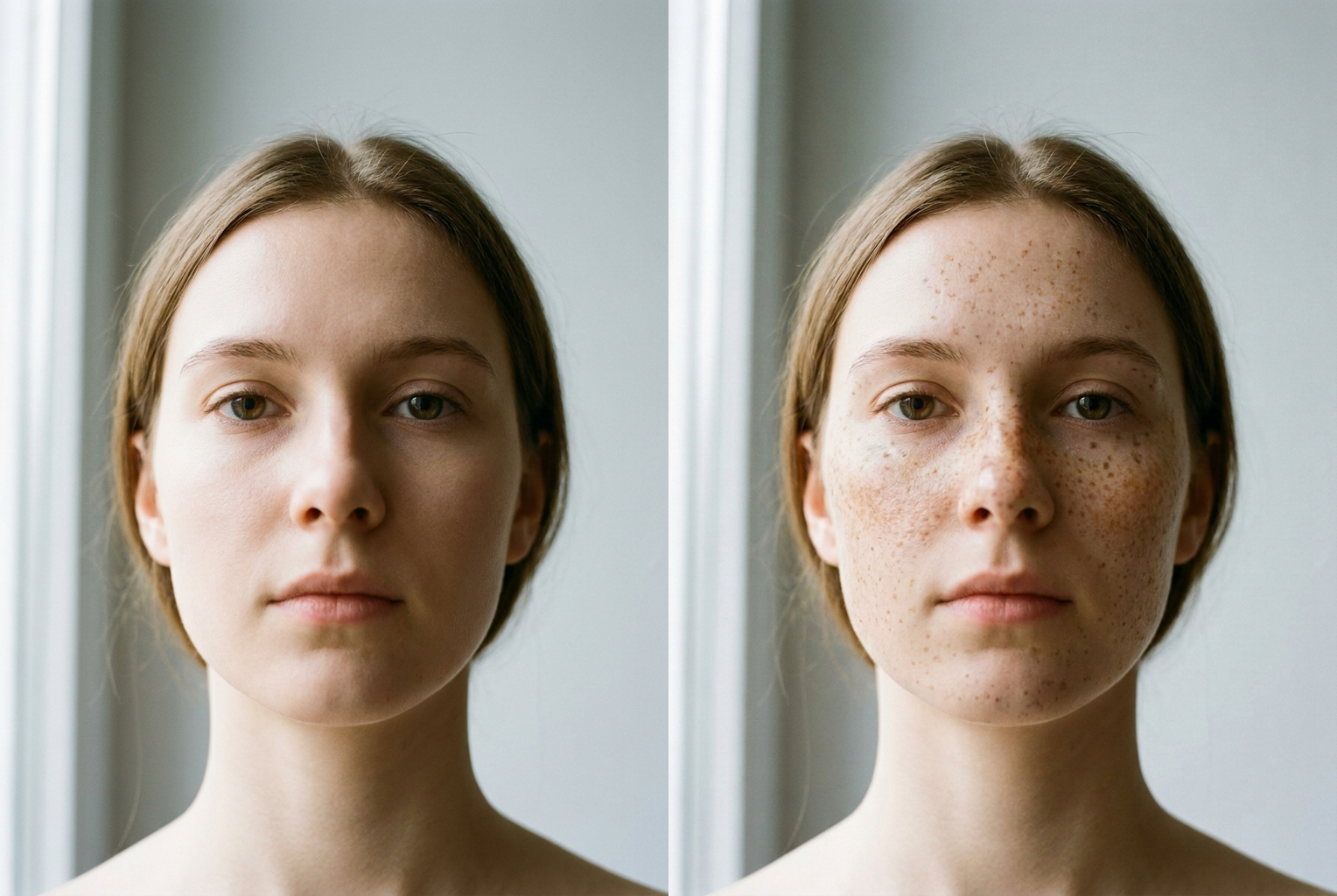
Fair skin, soft daylight
Natural freckles scattered across the nose and cheeks while the face stays identical.
AI-generated examples
Real Freckles Filter
Upload a photo and let the AI scatter natural, sun-kissed freckles across your face — no makeup, no drawing, no app download.
Drag & drop or click to upload
Supports PNG, JPG, WEBP • Max 20MB
Sign in to start generating
How it works
How the Real Freckles Filter Works
Three steps from a plain selfie to a freckled, sun-kissed portrait.
Upload Your Photo
Drop in any selfie or portrait — PNG, JPG, or WEBP up to 20MB. A clear, well-lit, front-facing shot where your whole face is visible gives the AI the most skin to work with and the most realistic result.
AI Adds Natural Freckles
The model maps the contours of your face and scatters fine, varied freckles across the nose, cheeks, and forehead, blending warm brown tones into your real skin tone while keeping pores and texture intact.
Download Your Freckled Look
Preview the result and download it in full resolution. Love it or want a different density? Run it again — each pass costs a single credit and takes only a few seconds.
Real Freckles Filter in Action
Real before-and-after results — upload a clear selfie and the AI scatters natural, sun-kissed freckles while keeping the same face.
Fair skin, soft daylight
Natural freckles scattered across the nose and cheeks while the face stays identical.
Natural freckles scattered across the nose and cheeks while the face stays identical.
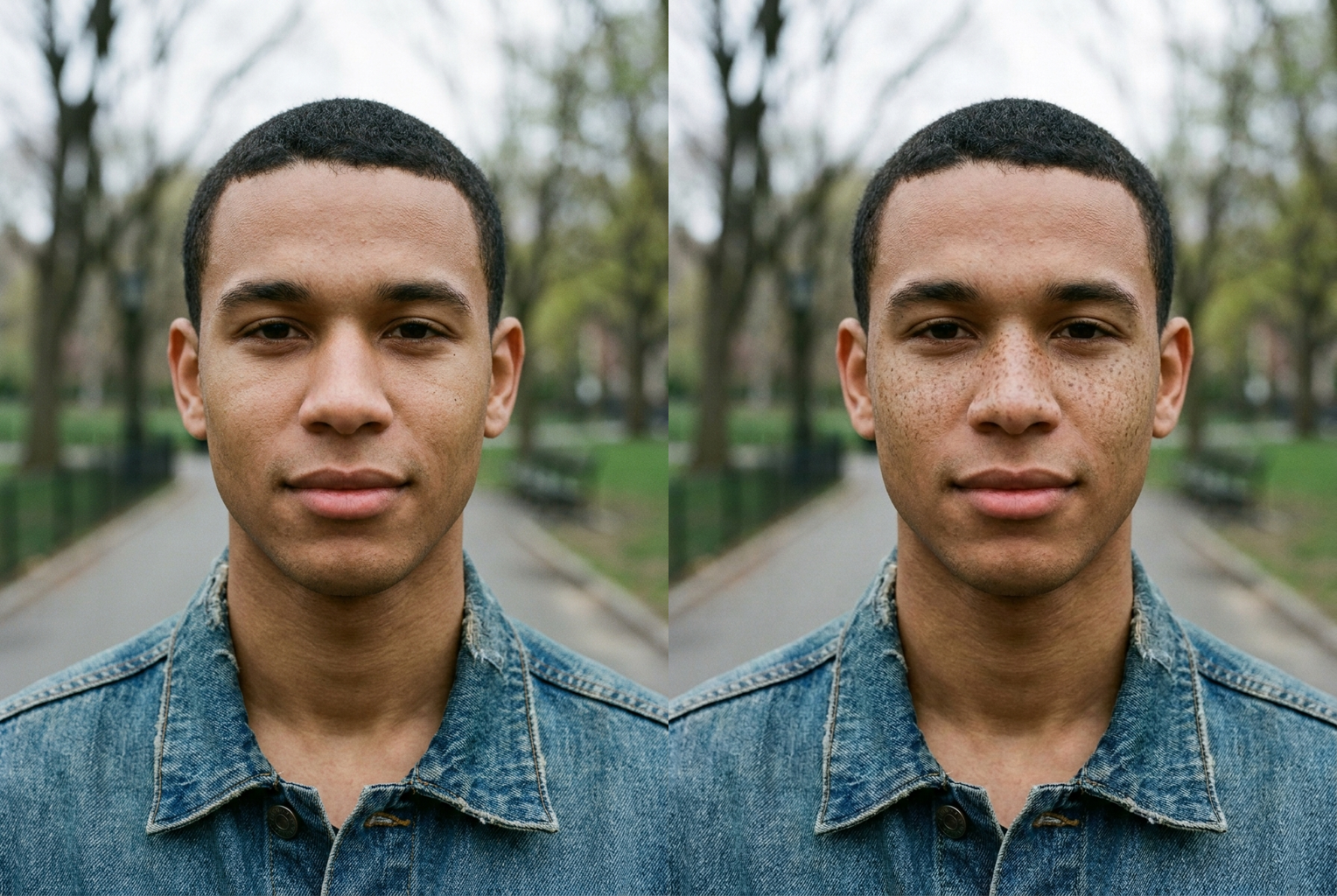
Medium skin, outdoors
A light, believable dusting of freckles added to a clear-skinned portrait.
A light, believable dusting of freckles added to a clear-skinned portrait.
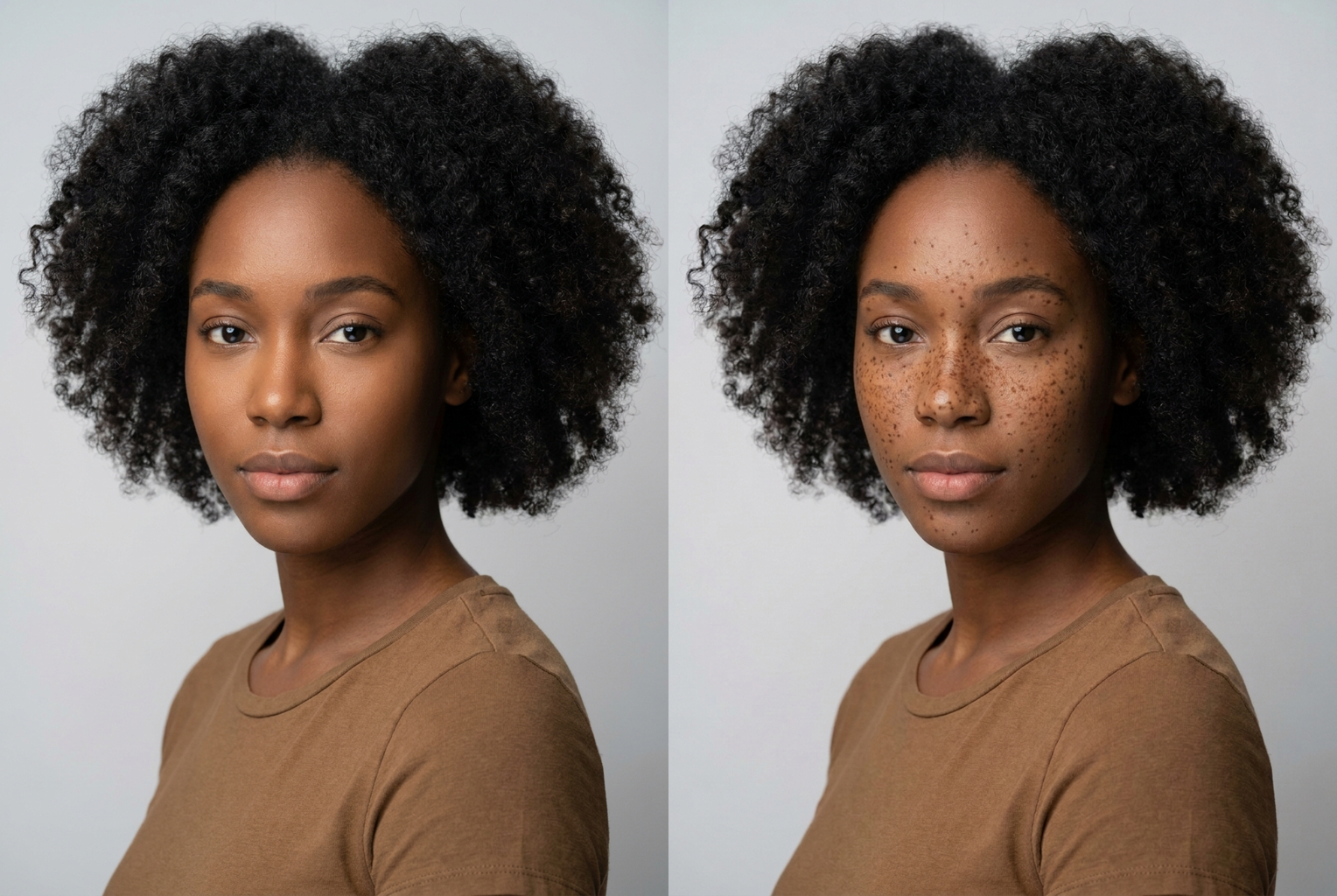
Deep skin tone
Freckle colour matched to a deeper complexion so it blends into the skin naturally.
Freckle colour matched to a deeper complexion so it blends into the skin naturally.
Why this tool
Why This Freckles Filter Looks Real
Most freckle apps drop identical dots on your face. This one paints freckles that actually belong to your skin.
Genuinely Natural Freckles
Freckles come in varied sizes and warm tones, denser across the nose and cheeks and sparser toward the edges — the way real sun-kissed freckles actually grow in.
Your Face Stays Yours
An identity-locked prompt preserves your bone structure, features, skin tone, and expression. The AI changes nothing except adding freckles on top of your real skin.
Real Skin Texture Kept
Pores and fine skin detail stay visible beneath the freckles, so the result reads as a real photo instead of a flat, over-smoothed filter.
Done in Seconds
No makeup, no henna, no manual editing. Upload, click, and the freckled version of your photo is ready in a few seconds for one credit.
Tones That Blend In
Freckle colour is matched to your complexion with soft browns and tans, so they sit in the skin rather than looking painted or stamped on.
Works in Your Browser
Nothing to install. The real freckles filter runs online on any phone or laptop, so you can try the look wherever you are.
The rundown
Real Freckles Filter: Add Natural, Photorealistic Freckles to Any Photo
Freckles have gone from something people once tried to cover up to one of the most searched-for beauty looks online, and the real freckles filter exists to give you that sun-kissed look in a single click. Instead of makeup, henna, or hours in a photo editor, you upload a selfie and the AI scatters natural, believable freckles across your face. The goal is simple: freckles that look like they grew in from a summer outdoors, not dots stamped on with a brush. That is the whole difference between a gimmicky overlay and a genuine real freckles filter that respects how real skin actually catches light, texture, and colour.
Under the hood, this real freckles filter uses an advanced image model that reads the geometry and lighting of your photo before it paints a single freckle. It identifies the bridge of your nose, the curve of your cheeks, and the plane of your forehead, then distributes fine freckles that follow those contours in three dimensions. Because the model understands depth and light, the freckles wrap around the shape of your face instead of lying flat on the surface. It also keeps your real pores and skin texture visible underneath, which is the detail cheap apps miss and the exact reason their results instantly read as fake. A good realistic freckles filter has to respect skin, not just stamp a pattern over it.
The look you get from this ai freckles filter is deliberately varied. Real freckles are never uniform: they cluster more densely across the nose and upper cheeks and thin out toward the jaw and hairline, and they come in a range of sizes and warm brown-to-tan tones. The real freckles filter mirrors that natural scatter, matching freckle colour to your own complexion so the result blends in rather than sitting on top. Whether you want a light dusting of natural freckles or a fuller, bolder sun-kissed spread, each generation lands in that believable middle ground where people have to look twice to tell they were added at all.
Getting a great result from the real freckles filter comes down to your source photo. Use a clear, front-facing shot in natural daylight where your whole face is visible and in focus. Avoid photos that already carry heavy beauty filters, deep shadows across the cheeks, or very low resolution, because the AI needs to see your true skin to place freckles convincingly. A plain selfie by a window, a portrait taken outdoors, or a straightforward headshot all work beautifully. If the first pass is not quite what you pictured, run it again — the placement varies slightly each time, so a couple of tries with the ai freckles filter gives you several natural options to choose from.
People reach for a freckle generator like this for all kinds of reasons. Some want to see how they would look with freckles before committing to freckle makeup or a cosmetic tattoo. Others are chasing the viral sun-kissed aesthetic for a new profile picture, a dating app photo, or a social post. Content creators use it to add warmth and personality to portraits, and plenty of people simply think freckles are cute and want to try the look on themselves, their friends, or a throwback photo. Whatever the reason, the point of a good real freckles filter is to add freckles to photo images in a way that feels effortless, natural, and genuinely flattering. Because it runs online in the browser, you can reach for the real freckles filter from your phone the moment inspiration strikes, with no download and no waiting.
The alternative to an ai freckles filter is slow and inconsistent. Drawing freckles with a brow pencil or freckle pen takes practice, smudges easily, and often photographs as muddy blotches instead of crisp, scattered speckles. Henna and semi-permanent cosmetic options commit you for days or weeks whether you end up liking them or not. A manual retouch in professional editing software can look great, but it demands real skill and a lot of time per photo. The real freckles filter collapses all of that into a few seconds and a single credit, giving you a clean, photorealistic result you can redo as many times as you like with zero mess and zero commitment.
Because the whole point is realism, the natural freckles photo editor is tuned to never touch your identity. The prompt behind the real freckles filter is locked to preserve your bone structure, features, eye colour, skin tone, hairstyle, and expression — it will not slim your face, reshape your nose, change your age, or alter your lighting. The only change is freckles added on top of your existing skin, which means the person in the output is unmistakably you, just freckled. That restraint is what keeps the result trustworthy enough to use as your actual profile photo rather than something that screams obvious edit the moment someone looks.
Trying the real freckles filter takes no app install and no design skills. Head to the tool, upload your photo, and click to generate — the freckled version is ready in seconds, and you can download it in full resolution to post, save, or share. New accounts start with free credits so you can test the look risk-free, and every additional run costs just one credit. If you have ever wondered how you would look with a scatter of natural, sun-kissed freckles, this realistic freckles filter is the fastest and most convincing way to find out. Upload a selfie, let the AI work, and keep the version that looks most like freckles you were born with. The real freckles filter costs nothing to try, so you can see what your own face looks like with a warm, believable scatter of freckles before you decide to generate more.
Real Freckles Filter FAQ
It is an AI photo tool that adds natural, realistic freckles to any face you upload. Instead of stamping identical dots, it scatters varied freckles across your nose, cheeks, and forehead and blends them into your real skin tone, so the freckled version looks like a genuine sun-kissed photo of you rather than an obvious filter effect.
No. The filter uses an identity-locked prompt that preserves your bone structure, features, eye colour, skin tone, hairstyle, and expression. The only thing it adds is freckles on top of your existing skin. It will not slim your face, reshape your nose, change your age, or alter your makeup or lighting beyond the freckles themselves.
Upload a clear, well-lit, front-facing photo where your whole face is visible and in focus. Natural daylight works best. Avoid heavy existing filters, dark shadows across the face, or very low-resolution images, since the AI needs to see your real skin clearly to place freckles that follow the natural contours of your face.
Each run produces a natural, balanced freckle density that is heavier across the nose and cheeks and lighter toward the edges. If you want a different look, simply run the photo again — the AI varies the exact placement each time, so you can generate a few versions and keep the one with the density you like best.
Yes. The freckle colour is matched to your complexion using soft warm browns and tans so the freckles blend into your skin rather than sitting on top as flat dots. The tool is designed to look natural across light, medium, and deep skin tones by tuning both the freckle colour and how softly they merge with your real skin.
You can try it on VO3.ai, and each generation costs one credit. New accounts start with free credits so you can test the look before deciding to generate more versions. There is no app to download and no subscription required just to try adding freckles to a photo.
Yes. Once you download your result you can use it as a profile picture, post it on social media, or save it for fun. The output is a standard high-resolution image. Please only upload photos of yourself or people who have agreed to be edited, and keep your usage respectful of others' likeness.
Drawing freckles with makeup or henna takes time, skill, and often looks patchy or washes out unevenly in photos. The real freckles filter gives you an instant, consistent, photorealistic result in seconds with no products, no mess, and no commitment — and you can undo it simply by keeping your original photo.