
Photogenic Filter
Upload any selfie and the photogenic filter rebuilds it into a polished, professional-looking portrait while keeping your face exactly the same.
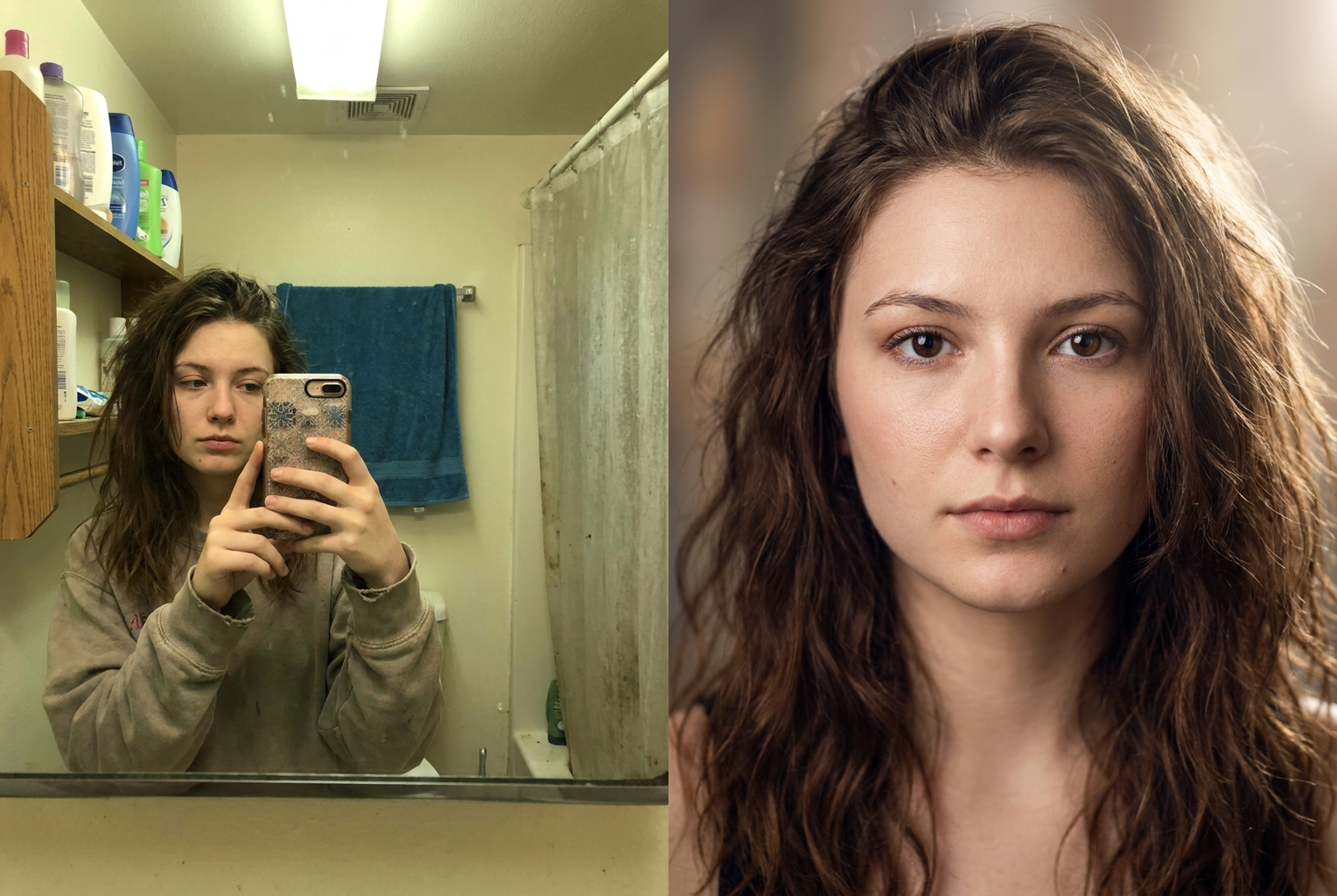
Bathroom Selfie → Studio Portrait
Before → After: harsh ceiling light and clutter replaced with soft key lighting and flattering bokeh
AI-generated examples
Photogenic Filter
Drop in a selfie and get a camera-ready, professionally lit portrait back — still unmistakably you.
Drag & drop or click to upload
Supports PNG, JPG, WEBP • Max 20MB
Sign in to start generating
How it works
How the Photogenic Filter Works
Three steps, about a minute, one credit. No editing skills and no studio required.
Upload Your Photo
Drop in any selfie, portrait, or casual snapshot. PNG, JPG, and WEBP are supported up to 20MB. A clear, front-facing photo where your whole face is well lit gives the AI the most detail to work with.
The AI Makes It Photogenic
The photogenic filter rebuilds the lighting into a soft studio setup, cleans skin while keeping real texture, adds a catchlight to the eyes, and blurs the background into flattering bokeh — all while locking your actual facial features in place.
Download Your Portrait
Your polished, magazine-quality portrait is ready in seconds. Download it in full resolution and use it as a profile picture, dating photo, LinkedIn headshot, or anywhere you want to look your best.
Photogenic Filter Examples
Ordinary phone photos rebuilt into polished, professional-looking portraits — same person, better photograph.
Bathroom Selfie → Studio Portrait
Before → After: harsh ceiling light and clutter replaced with soft key lighting and flattering bokeh
Before → After: harsh ceiling light and clutter replaced with soft key lighting and flattering bokeh
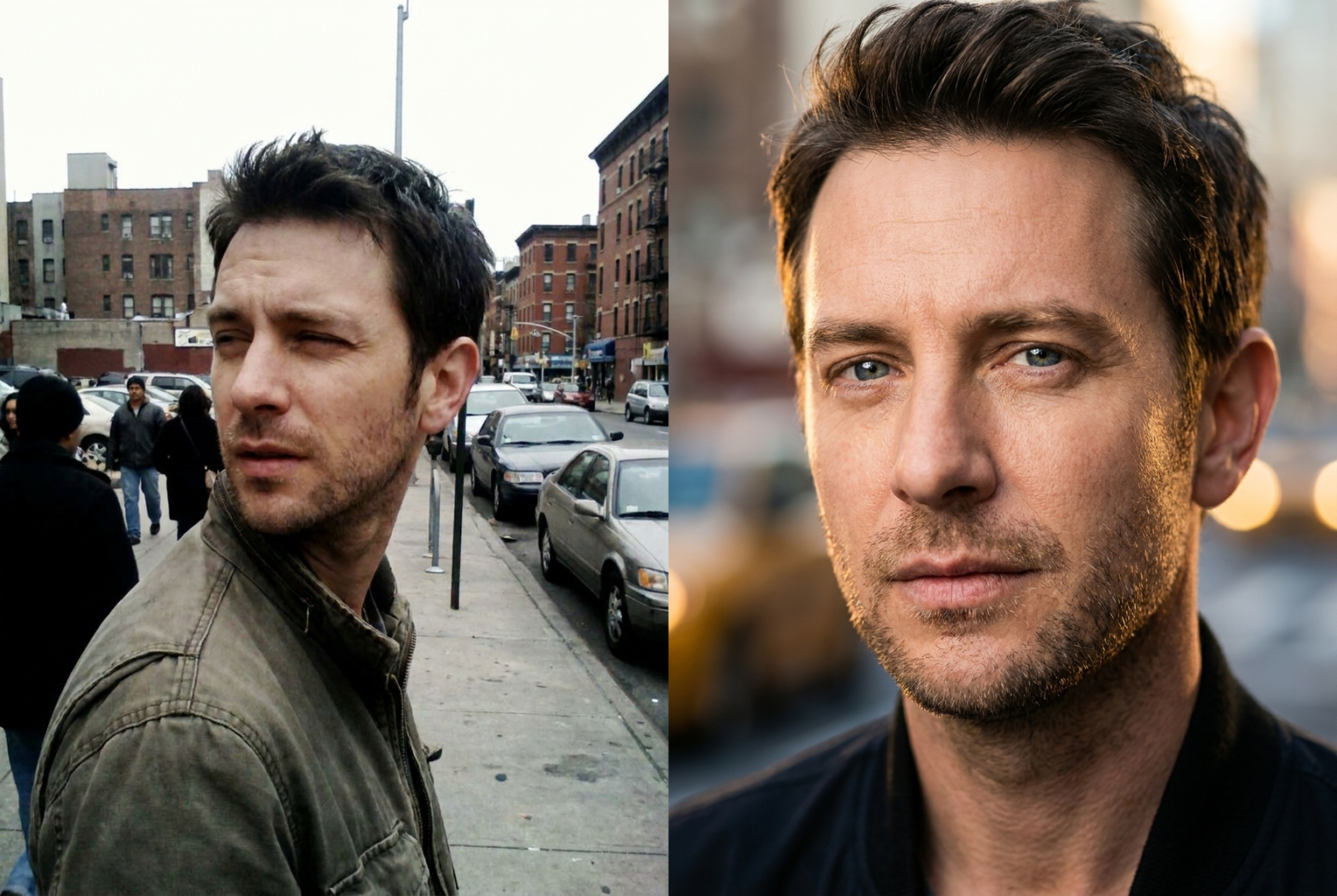
Street Snapshot → LinkedIn Headshot
Before → After: flat midday sun and busy street softened into a clean, professional headshot look
Before → After: flat midday sun and busy street softened into a clean, professional headshot look
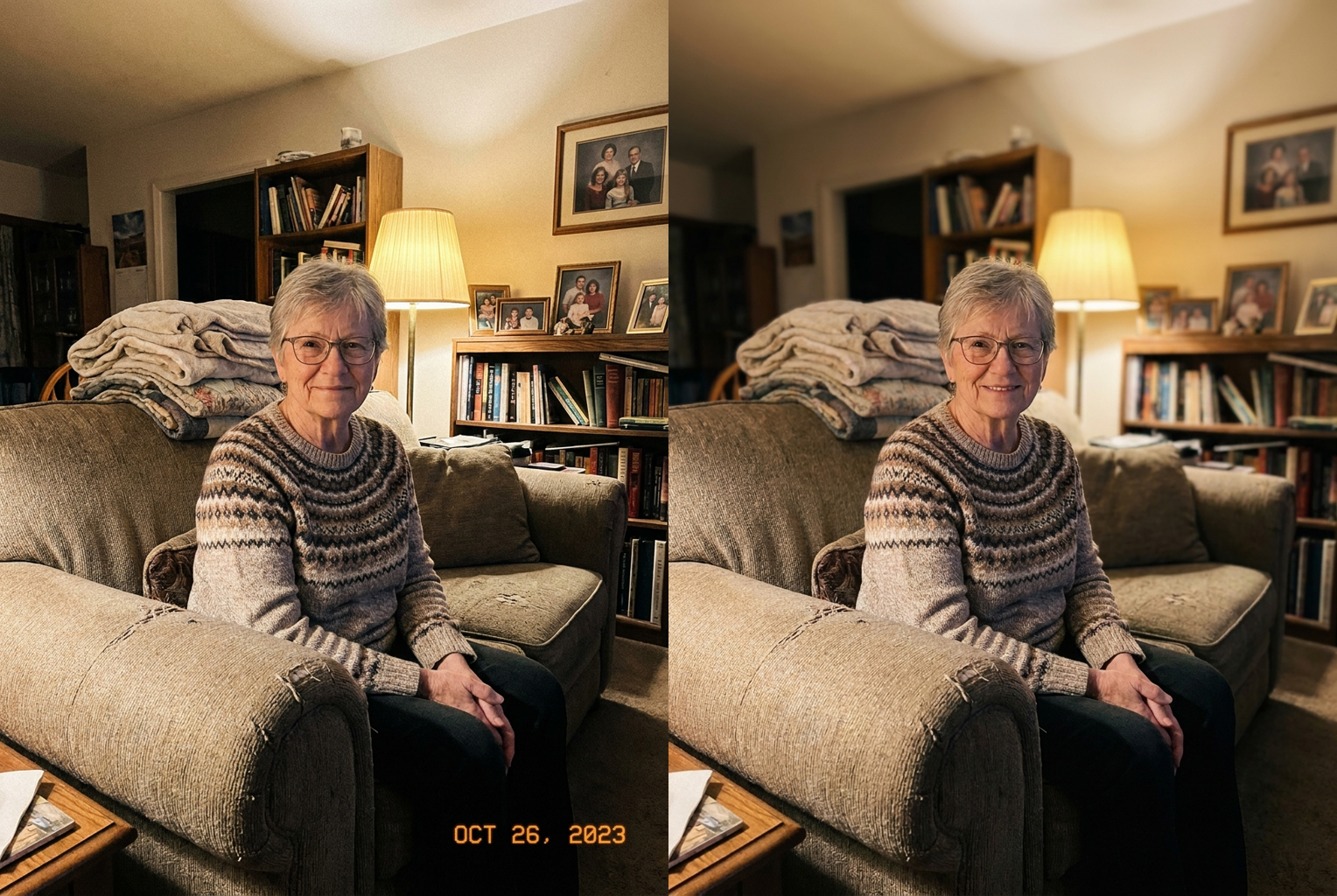
Dim Living Room → Framed Portrait
Before → After: grainy yellow indoor light turned into a warm, print-worthy portrait — glasses and grey hair kept
Before → After: grainy yellow indoor light turned into a warm, print-worthy portrait — glasses and grey hair kept
Why this tool
Why People Love the Photogenic Filter
A professional portrait look without a camera, a studio, or an editing app.
Your Face Stays Your Face
The prompt explicitly locks your bone structure, jawline, nose, eye shape, eye colour, and skin tone. Nothing gets slimmed or reshaped. People who know you will still recognise you instantly — only the photo quality changes.
Real Skin, Not Plastic
Instead of the over-smoothed look that cheap beauty apps produce, the photogenic filter keeps natural pores and texture while clearing up distractions, so your skin reads as healthy and real rather than airbrushed.
Studio-Grade Lighting
Harsh ceiling bulbs and flat phone lighting get rebuilt into a soft warm key light with gentle fill and a rim light, adding the depth and dimension that makes professional portraits pop.
Flattering Bokeh Background
A cluttered bedroom or busy street behind you is softened into a smooth, blurred backdrop with pleasing bokeh, drawing all the attention to your face the way a fast portrait lens would.
Professional Colour Grading
The AI applies a clean neutral-to-warm colour grade with balanced contrast, so your portrait has that polished, magazine-cover finish instead of the dull, washed-out tone of a raw phone snapshot.
One Credit, Seconds to Result
No photographer, no booking, no editing software. The photogenic filter costs a single credit and returns a download-ready portrait in about a minute, so you can try several photos and pick your favourite.
The rundown
Photogenic Filter: Turn Any Selfie Into a Professional Portrait
The photogenic filter is an AI photo tool that takes an ordinary selfie or snapshot and rebuilds it into a polished, camera-ready portrait — without changing who you are. Most people are not un-photogenic; they are simply photographed badly, under flat ceiling lights, with a cluttered background and a phone camera that crushes the colour. The photogenic filter fixes the photograph rather than the person, rebuilding the lighting, depth, and finish that separate a professional portrait from a casual snap. Upload one image and you get back a version of yourself that looks like it was shot in a studio, while your face, features, and expression stay unmistakably your own. No account with a photographer, no editing software, and no guesswork — just one clear photo in and a far better one out.
Under the hood, the photogenic filter runs your photo through an advanced image model guided by a carefully tuned prompt. The prompt does two jobs at once. First, it locks your identity: bone structure, jawline, nose, eye shape and colour, skin tone, age, and hairstyle are all preserved, and the model is explicitly told not to slim or reshape anything. Second, it applies a professional makeover around that identity — new lighting, cleaner skin, better colour, and a softened background. Because the AI understands faces and photographic lighting, the photogenic filter can relight a portrait as if a softbox and reflector had been set up for you, something that is impossible with ordinary slider-based photo apps.
What makes this different from a beauty app is restraint. A typical smoothing filter melts away pores, enlarges eyes, and narrows jaws until the result looks plastic and barely resembles the original. The ai photogenic filter takes the opposite approach: it keeps natural skin texture, true proportions, and your real features, and instead improves the things that genuinely make photos look good. That means soft, directional key lighting with a gentle fill and rim light, a bright catchlight in the eyes, balanced contrast, a clean neutral-to-warm colour grade, and crisp, magazine-cover sharpness. The effect is subtle enough that friends will say you look great, not that you look edited. In practice the photogenic filter behaves like a retoucher who respects the original — it enhances the photograph while leaving the person untouched, which is exactly why the output still feels honest.
Getting a strong result is mostly about the photo you feed in. A clear, front-facing shot where your whole face is visible and reasonably well lit gives the photogenic photo filter the most to work with. Avoid deep shadows across half your face, sunglasses that hide the eyes, or tiny low-resolution thumbnails. A plain bathroom selfie works fine — the tool is designed to rescue everyday photos, so you do not need a good picture to start, only a clear one. If the first pass is not quite right, it costs a single credit to try another source photo and compare.
The use cases are everywhere a first impression matters. People use the photogenic filter to upgrade a LinkedIn headshot, replace a flat dating-app selfie with something that actually gets matches, refresh a professional website or speaker bio, create a consistent profile picture across social platforms, or simply produce a nice portrait of themselves for a gift or a print. Creators and small businesses use it to make founder photos and team pages look cohesive without booking a photographer for everyone. Travellers and parents use the photogenic filter to turn a once-in-a-trip snapshot into a keepsake worth framing. Whatever the destination, the goal is the same: look like the best, most professional version of yourself.
Compared with the manual alternative, the value is obvious. A professional portrait session means finding a photographer, booking a slot, paying a studio fee, travelling, posing, and then waiting days for edited files. Doing it yourself means learning lighting, buying gear, and spending hours in editing software. The make my photo photogenic workflow collapses all of that into one upload and about a minute of processing for a single credit. You are not paying for a person's time or a studio's overhead — you are paying for the one thing you actually wanted, which is a better photograph of yourself.
The results hold up because the photogenic filter treats a portrait the way a real photographer does. Instead of stacking generic presets, it reasons about where the light should fall on your face, how the background should drop away to make you stand out, and how the colours should sit so your skin looks healthy rather than orange or grey. That is why the output reads as a genuine photograph rather than an obvious edit. You can run the same image a second time or try a different expression, and because each attempt is inexpensive, it is easy to keep going until you land on the portrait you are proud to use. A good photogenic filter result does not shout that it was generated; it simply looks like the day everything about the shot went right, from the light to the background to the colour.
Getting started takes seconds. Upload your photo, let the photogenic filter do its work, and download the finished portrait in full resolution — no editing skills, no studio, and no subscription required to generate a single image. Keep a clear, well-lit source shot handy, try a couple of options, and pick the one that looks most like you on a great day. Whether you need a sharper professional headshot, a dating photo that finally does you justice, or just a portrait worth printing, the ai photogenic filter turns the photo you already have into the one you wish you had.
Photogenic Filter — Frequently Asked Questions
No — that is the core design of the tool. The prompt instructs the model to preserve your facial structure, features, skin tone, and age, and forbids slimming or reshaping. What changes is everything around your identity: skin clarity, lighting, colour grade, and background. The goal is you on your best day with a great photographer, not a different person.
A clear, front-facing shot where your whole face is visible and reasonably well lit gives the best results. Avoid heavy shadows across the face, sunglasses, or very low-resolution images. Selfies, casual snapshots, and phone portraits all work well — the photogenic filter is built to rescue ordinary photos, not just good ones.
Yes. Beauty apps tend to over-smooth skin and warp features until you look plastic and unlike yourself. The photogenic filter instead keeps real skin texture and your true features, and focuses on what actually makes portraits look professional: lighting, depth, colour, and background separation.
Absolutely — those are two of the most common uses. The output looks like a professionally shot headshot or portrait, which performs far better than a flat phone selfie. Download the full-resolution image and upload it anywhere you want to make a strong first impression.
The photogenic filter is tuned for single-person portraits, so it works best when one face fills the frame. With group photos the lighting and background treatment still apply, but facial detail is strongest when the tool has one clear subject to focus on.
Yes. The prompt preserves your hairstyle and the defining details of your appearance, including facial hair and glasses, because those are part of how you actually look. The tool enhances the photo around them rather than editing them out.
Each generation costs one credit. That makes it affordable to run the same photo a couple of times or try different source shots and keep whichever portrait you like best. There is no subscription required to generate a single image.
Images you create from your own photos are yours to use, including on professional profiles, websites, and marketing. As always, only upload photos of people who have agreed to be edited, and follow the platform's content rules about who and what you generate.