
Matcha Filter
Upload any photo and the matcha filter grades it in soft, creamy matcha-green and oat-milk tones — cozy, hazy, and aesthetic — without changing your face or scene.
Matcha Filter
Drag & drop or click to upload
Supports PNG, JPG, WEBP • Max 20MB
Sign in to start generating
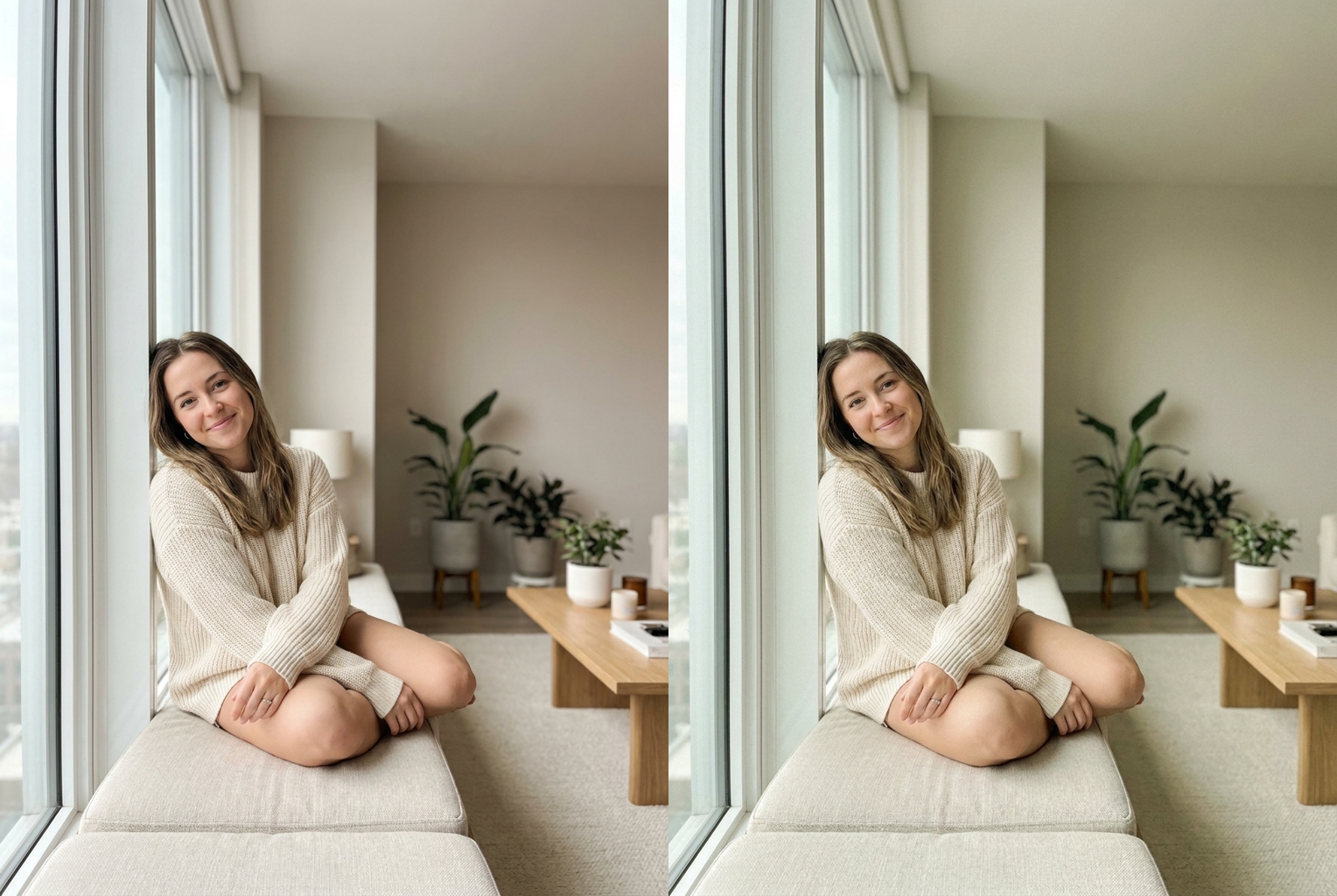
Window Selfie → Matcha
Before → After: a plain daylight window portrait graded into soft matcha and oat-milk tones with a gentle haze, skin kept natural
AI-generated examples
1. Upload Your Photo
Drop in any selfie, outfit shot, coffee-table flat lay, or everyday snapshot. PNG, JPG, and WEBP are supported up to 20MB. Photos with soft, even light take the matcha grade most convincingly.
2. AI Applies the Matcha Grade
The model reads your image and re-grades it into creamy matcha and sage greens with warm oat-milk tones, a gentle haze, and soft grain — while locking your face, features, and clothing exactly in place.
3. Download the Result
In under a minute you get a full-resolution, watermark-free image with that cozy matcha aesthetic, ready to post or set as a wallpaper. Not quite right? Run it again for a softer or greener take.
Matcha Filter Before & After
Real results from the matcha filter — the same photo graded into a soft, creamy matcha-green aesthetic while the person and scene stay exactly the same.
Window Selfie → Matcha
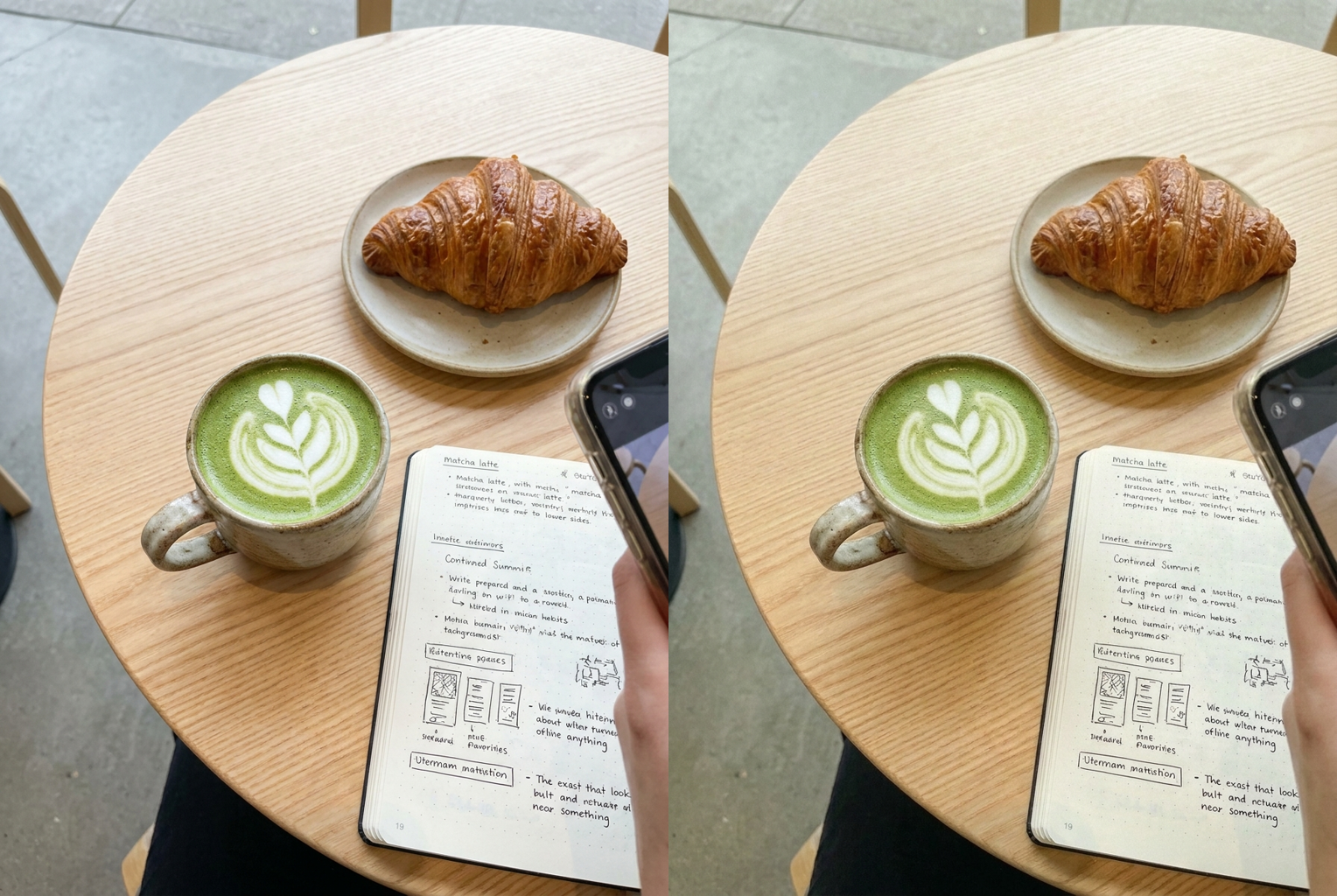
Café Flat Lay → Matcha
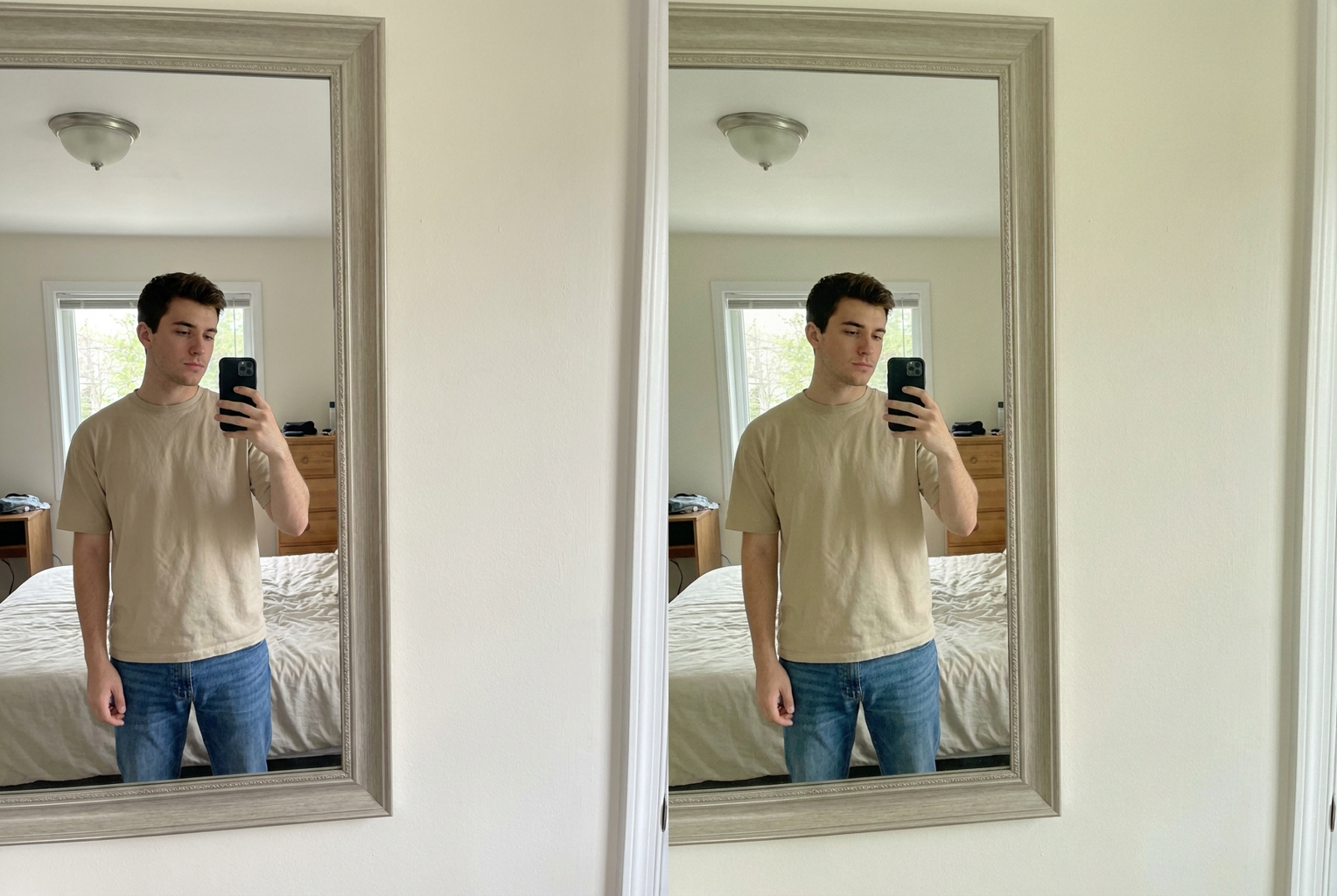
Outfit Mirror → Matcha
Creamy Matcha Colour Grade
The whole frame shifts toward soft matcha and sage greens with warm cream and oat-milk tones — the milky, muted look people chase in matcha-latte flat lays and cozy café photos.
Your Face Stays Your Face
The prompt locks your bone structure, features, eye colour, skin tone, hair, and clothing. Only colour, tone, and atmosphere change, and skin stays warm and healthy — never literally green.
Soft, Hazy Aesthetic
Lifted shadows, low creamy contrast, fine film-like grain, and a delicate warm-green haze give your photo that calm, editorial matcha aesthetic instead of a harsh green overlay.
Keeps the Scene Intact
Backgrounds and surroundings stay coherent instead of being replaced. The AI grades what is already there, so the picture still reads as your real photo — just styled in matcha tones.
Works on Any Subject
Portraits, outfit photos, food and drink flat lays, room corners, and travel shots all take the grade. Anywhere you want a soft green-tinted mood, the matcha filter fits.
One Click, One Credit
No presets to hunt for, no curves or masks to touch. Upload, press one button, and get a finished matcha-toned image for a single credit — no subscription, no watermark.
Matcha Filter: Give Any Photo a Soft Matcha-Green Aesthetic
The matcha filter takes any ordinary photo and re-grades it into the soft, creamy, matcha-green aesthetic that has spread across feeds full of latte flat lays, cozy café corners, and gently muted outfit shots — all without changing your face or replacing the scene. The look is instantly recognisable: milky sage and matcha greens, warm oat-milk and cream tones, lifted shadows, low contrast, and a light hazy grain that makes everything feel calm and editorial. The trouble is that landing it by hand means fiddling with colour curves, split-toning, and grain until the balance feels right. This matcha filter bakes that whole recipe into one button, so a photo shot on a normal phone in normal light can carry the same styled, matcha-latte mood in seconds.
Under the hood, the matcha filter runs a large image-to-image model with an identity-locked instruction set. When you upload a picture, the model receives both your image and a carefully tuned prompt that spells out exactly what may change and what must stay fixed. Palette, warmth, haze, contrast, grain, and the green split-tone are all fair game; your face, bone structure, eye colour, skin tone, hair, and clothing are explicitly locked, and the instruction forbids adding people or reshaping the subject. Because that prompt is built into the page rather than left for you to write, you get a believable matcha aesthetic on every run without knowing anything about colour grading — the tool quietly handles that part for you.
What separates this from a crude green overlay is where the colour goes. A basic app just dumps a flat green tint over the whole frame, which turns skin sickly and kills the softness the aesthetic depends on. The matcha filter instead places the green with intent: a warm matcha-green tint sits in the highlights, a cooler sage tone settles into the shadows, and skin is kept warm and healthy so people still read as themselves. On top of that it lifts the blacks for a milky haze, drops the contrast to keep things gentle, and lays down a fine film-like grain. That is why the output of this matcha ai filter reads as a considered edit rather than a filter slapped on after the fact.
Photo choice shapes the result more than anything else you control. Give the matcha filter a reasonably sharp image shot in soft, even light, and it has a clean base to build the creamy tone and gentle haze into. A selfie near a window, an outfit shot, a matcha-latte flat lay, a plant-filled corner, or a travel snapshot all give the model plenty to work with. What holds results back is missing information rather than bad information: a very dark, heavily blurred, or strongly colour-cast image leaves the AI little to re-tone. Using the matcha filter online means it can restyle the colour dramatically, but it cannot rebuild detail the camera never recorded.
People reach for this tool in a lot of recurring situations. Café and food photos are the most common — a matcha latte, a breakfast spread, or a desk setup gets the cohesive green-and-cream mood that ties a whole grid together. Outfit and mirror shots take on that soft, muted editorial feel. Beyond that: profile pictures that want a calmer palette, plant and interior corners, aesthetic wallpapers, small-shop product photos, and travel albums that you want to feel unified. Anywhere a picture would feel better with a gentle, cozy, green-toned mood, the matcha filter earns its place as a one-click matcha aesthetic filter.
Compared with doing this by hand, the gap is mostly time and skill. A creator achieves the same matcha aesthetic in a photo editor by pulling colour curves toward green, split-toning the highlights and shadows separately, lifting the black point for haze, softening the contrast, and dialling in grain — techniques that take real practice and several minutes per image to get right without wrecking skin tone. The matcha filter compresses all of that into roughly thirty seconds and one credit, which changes how you use it: instead of carefully grading a single hero shot, you can run a whole set of photos and keep the ones that land, so your feed stays consistent with almost no effort.
In practice the matcha filter is worth running more than once. Because the model is not fully deterministic, the same source photo produces meaningfully different takes on separate runs — the green lands softer or richer, the haze thickens or clears, the grain shifts. Generating two or three versions and picking a favourite reliably beats accepting the first output, and each attempt costs the same single credit. It is also worth trying two or three different source photos rather than only your favourite, since the image you like most is not always the one with the cleanest, softest light for the model to grade into a natural, believable matcha scene.
Getting started with the matcha filter takes no setup at all — no account wizard, no software install, no presets to hunt through. Upload a photo using the tool at the top of this page, press the button, and wait under a minute for a full-resolution download with no watermark. New accounts include free credits, so your first pass through the matcha filter online costs nothing, and failed generations refund automatically. Images you create are yours to use, including commercially, provided you hold the rights to the photo you upload and have permission from anyone else pictured in it. If your photos feel a little flat and you want that soft, cozy, matcha-green mood without learning to colour-grade, the matcha filter gives it to you in about thirty seconds.
Matcha Filter — Frequently Asked Questions
It re-grades your image into a soft, creamy matcha aesthetic. The AI shifts the palette toward gentle matcha and sage greens with warm oat-milk and cream tones, lifts the shadows for a hazy softness, lowers contrast, and adds fine film-like grain. Your face, the people, and the scene itself stay the same — only the colour, tone, and atmosphere change, so the result looks like your photo styled around a matcha latte.
No. The prompt is written to keep skin warm, natural, and healthy while the green sits in the highlights, shadows, and background rather than on your face. The overall mood reads matcha, but you still look like yourself with believable skin tone. If a result ever feels too green for your taste, run it again — each take lands slightly differently, and you can keep the softest one.
Every generation costs one credit, and new accounts start with free credits, so your first few tries cost nothing. There is no subscription required and no watermark on your download. If you run out, credits can be topped up, and each run — including re-running the same photo for a softer or greener take — costs the same single credit.
A reasonably sharp photo shot in soft, even light gives the AI the cleanest base to grade. Selfies near a window, outfit shots, cozy café and food flat lays, plant corners, and travel snapshots all take the matcha aesthetic beautifully. Very dark, blurry, or heavily colour-cast images are harder to grade cleanly, since the tool can re-tone light but cannot invent detail the camera never captured.
Usually between fifteen and forty seconds, depending on queue load and image size. You can leave the page open while it runs. If a generation fails, your credit is returned automatically, so a failed attempt never costs you anything — just try again, ideally with a slightly clearer source photo.
Yes. The model is not fully deterministic, so running the same photo again produces a slightly different take — the green lands softer or richer, the haze shifts, the grain varies. Many people generate two or three versions and keep their favourite. Each run costs one credit, so it is cheap to try a couple of moods before you post.
Yes. The matcha aesthetic is popular for exactly this — matcha lattes, breakfast tables, desk setups, plant corners, and outfit flat lays all take the grade well. Because there is no face to preserve in those shots, the AI simply applies the creamy green tone and soft haze across the whole frame, giving product and lifestyle photos a cohesive, cozy matcha look.
Yes. Images you generate are yours to use, including for social media, marketing, prints, and client work, provided you hold the rights to the photo you upload and have permission from anyone else pictured in it. Please do not run the tool on photos of people who have not agreed to it, or use it to create misleading images of public figures.
Still have questions? Contact Support