
Lofi Dusk Filter
Upload any photo and the lofi dusk filter regrades it into a dreamy twilight aesthetic — muted lavender-and-indigo tones, soft film grain, and a cozy nostalgic glow — without changing your face or scene.
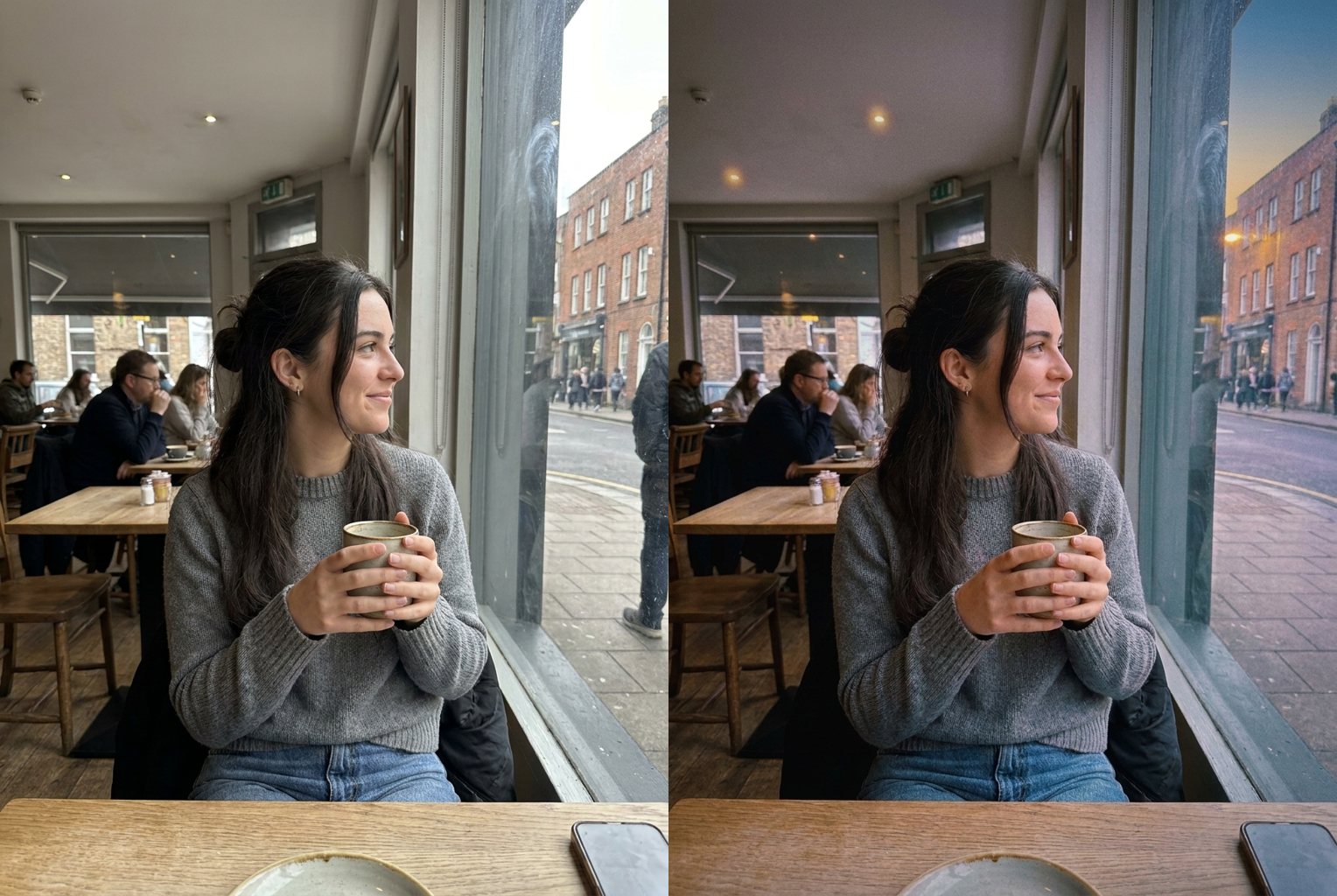
Bright Cafe → Lofi Dusk
Before → After: a flat daytime cafe portrait regraded into muted lavender-and-indigo dusk tones with soft grain and a cozy glow
AI-generated examples
Lofi Dusk Filter
Drag & drop or click to upload
Supports PNG, JPG, WEBP • Max 20MB
Sign in to start generating
How it works
Upload Your Photo
Drop in any portrait, street shot, or everyday snapshot. PNG, JPG, and WEBP are supported up to 20MB. Photos with some sky, window light, or an open background give the dusk tones the most room to breathe.
AI Regrades to Dusk
The model reads your image and rebuilds the colour and light into a lo-fi twilight mood — muted lavender and indigo tones, lifted matte shadows, soft grain, and a gentle glow — while locking your face, features, and clothing in place.
Download the Result
In under a minute you get a full-resolution, watermark-free image with a dreamy lofi dusk vibe, ready to post, print, or set as a wallpaper. Not quite the mood you wanted? Run it again for a fresh take.
Lofi Dusk Filter Examples
Real before-and-after results. Each photo is regraded into a dreamy lofi dusk aesthetic while the person and scene stay exactly the same.
Bright Cafe → Lofi Dusk
Before → After: a flat daytime cafe portrait regraded into muted lavender-and-indigo dusk tones with soft grain and a cozy glow
Before → After: a flat daytime cafe portrait regraded into muted lavender-and-indigo dusk tones with soft grain and a cozy glow
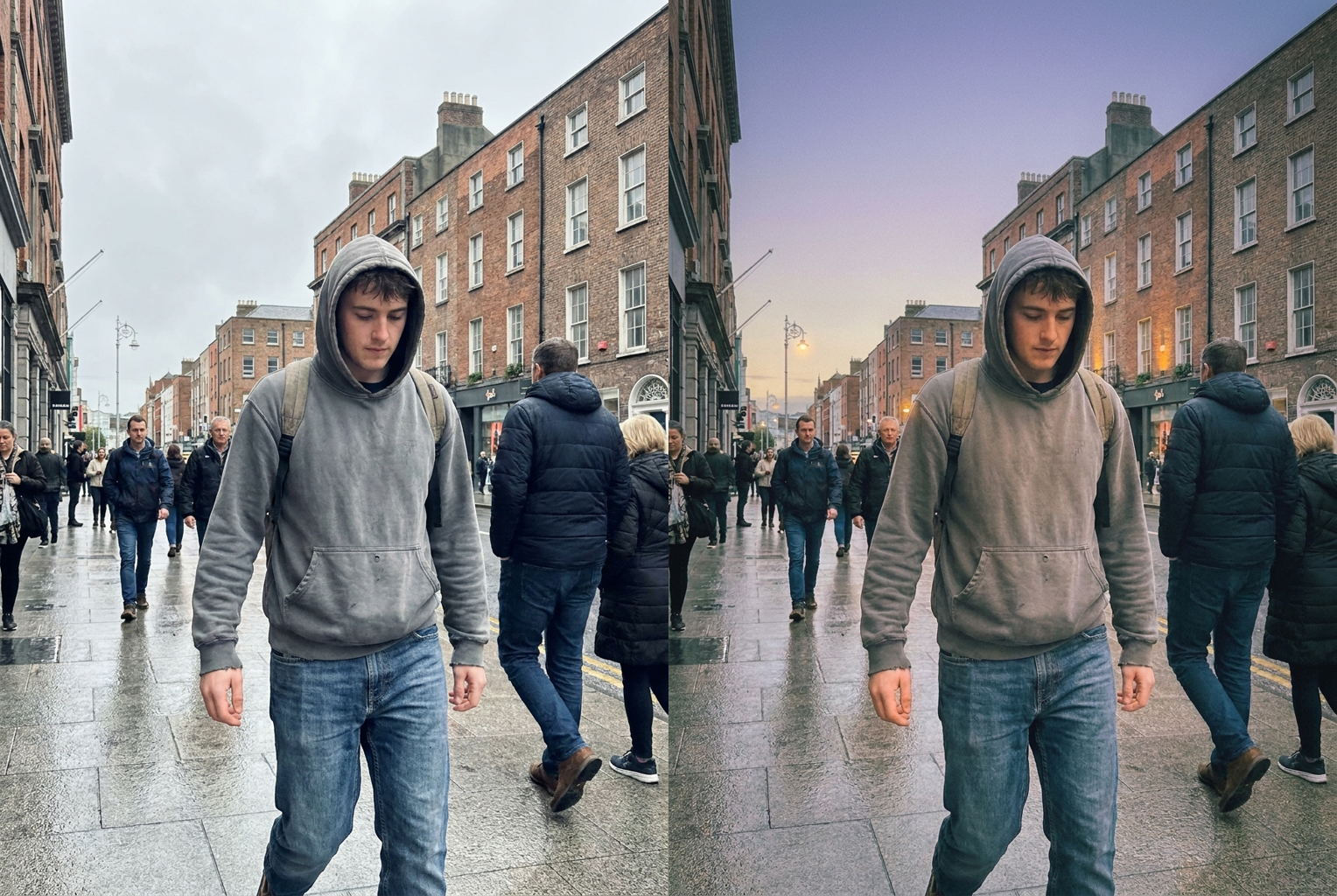
Grey Street → Twilight Vibe
Before → After: an overcast grey street shot turned into a calm blue-hour dusk scene with warm amber accents and film grain
Before → After: an overcast grey street shot turned into a calm blue-hour dusk scene with warm amber accents and film grain
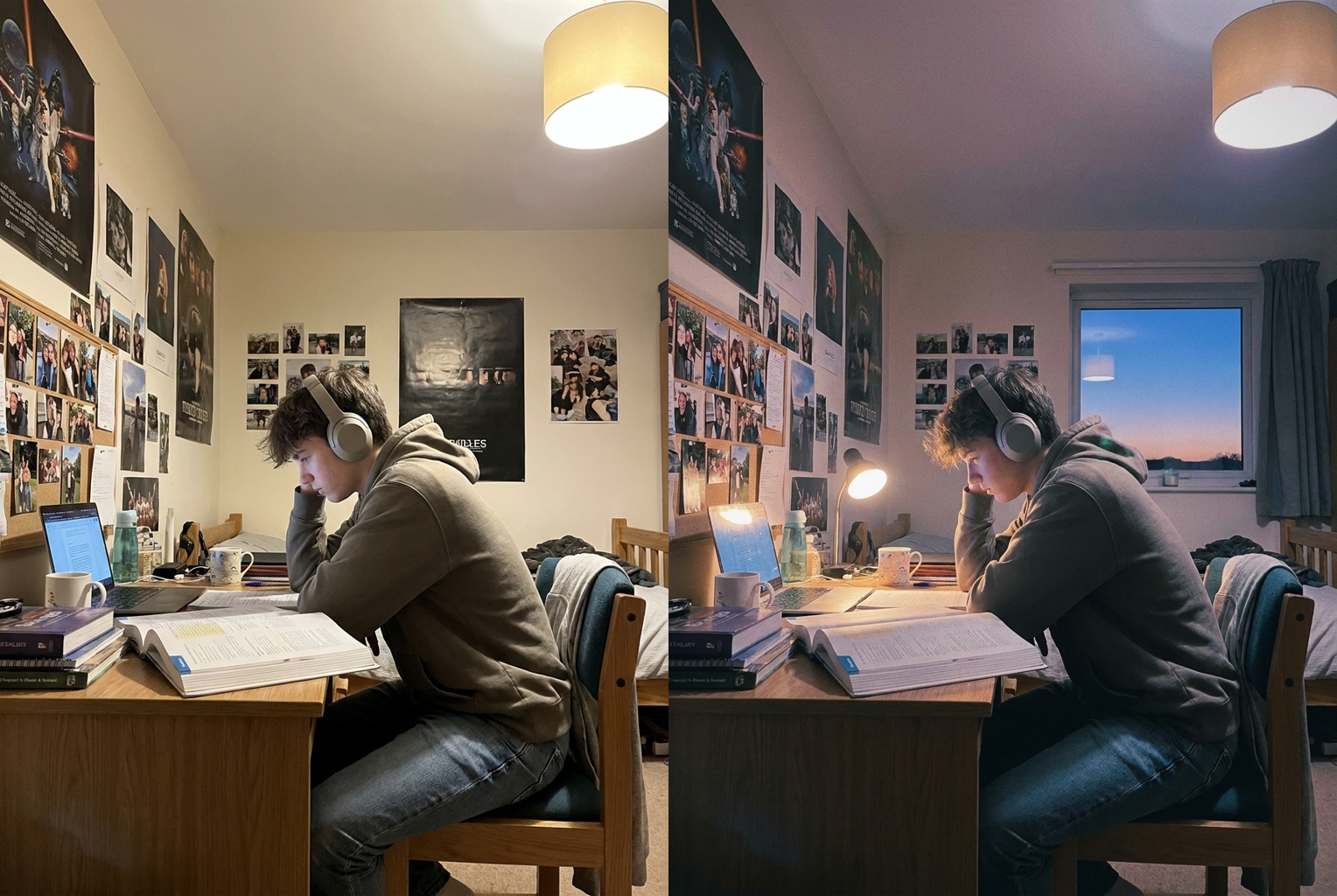
Plain Bedroom → Cozy Lo-Fi
Before → After: an everyday bedroom desk snapshot regraded into a nostalgic lo-fi dusk mood with soft bloom and grain
Before → After: an everyday bedroom desk snapshot regraded into a nostalgic lo-fi dusk mood with soft bloom and grain
Why this tool
Muted Twilight Palette
Not a flat purple overlay. The AI shifts your whole frame toward dusty lavender, faded indigo, cool teal shadows, and soft amber highlights — the exact desaturated colour grade that defines the lo-fi dusk look.
Your Face Stays Your Face
The prompt locks your bone structure, features, eye colour, skin tone, hair, and clothing. Only the colour, light, grain, and atmosphere change — you stay unmistakably yourself in the finished dusk edit.
Soft Grain & Gentle Bloom
A fine layer of analog film grain, a subtle vignette, and a soft glow around light sources give the photo that nostalgic, cozy lo-fi texture instead of a clean, clinical digital look.
Keeps the Scene Intact
Backgrounds, sky, and surroundings stay coherent instead of being replaced. The AI regrades and relights what is already there so the picture still reads as your photo at dusk.
Calm, Cozy Dusk Mood
The result carries the quiet, dreamy feeling of the blue hour just after sunset — the same relaxed, lived-in atmosphere people chase in lo-fi album art and aesthetic edits.
One Click, One Credit
No presets to buy, no layers, no manual colour grading. Upload, press one button, and get a finished lofi dusk image for a single credit — no subscription, no watermark.
The rundown
Lofi Dusk Filter: Turn Any Photo Into a Dreamy Twilight Aesthetic
The lofi dusk filter takes any ordinary photo and regrades it into the muted, dreamy twilight look made famous by lo-fi hip-hop album art and aesthetic anime frames — soft lavender-and-indigo tones, lifted matte shadows, analog film grain, and the calm glow of the blue hour just after sunset — without changing your face or replacing the scene. The lo-fi aesthetic is built on a feeling: quiet, nostalgic, a little melancholy, and unmistakably cozy. Recreating that mood by hand means fighting colour curves, grain plug-ins, and careful masking, and even then it rarely lands. This lofi dusk filter rebuilds the whole atmosphere in one pass, so a photo shot at noon or under flat indoor light can carry the same dusky, lived-in warmth.
Under the hood, the lofi dusk filter runs a large image-to-image model with an identity-locked instruction set. When you upload a picture, the model receives both your image and a carefully tuned prompt that spells out exactly what may change and what must stay fixed. Colour grade, saturation, shadow lift, grain, bloom, vignette, and the overall dusk atmosphere are all fair game; your face, bone structure, eye colour, skin tone, hair, and clothing are explicitly locked, and the instruction forbids adding people or reshaping the subject. Because that prompt is baked into the page rather than left for you to write, you get a believable lofi filter on every run without knowing anything about prompt engineering — the tool quietly handles that part for you.
What separates a real regrade from a cheap overlay is how the colours interact with the light already in your photo. A basic app just dumps a purple gradient over the whole frame, which flattens everything and looks fake the moment you look closely. The lofi dusk filter instead treats your image like film: it desaturates the palette toward dusty lavender and faded indigo, cools the shadows into teal, keeps a hint of warm amber where the last light would linger, then lays fine grain and a soft vignette over the top. That is why the output of this dusk filter reads as a real moment captured on an old camera at twilight rather than a filter slapped on afterward.
Photo choice shapes the result more than anything else you control. Give the lofi dusk filter a reasonably sharp image with some visible background, window light, or open sky, and it has room to build convincing depth, glow, and atmosphere. A portrait near a window, a street snapshot, a bedroom scene, or a landscape all give the model plenty to work with. What holds results back is missing information rather than bad information: a very dark, heavily blurred, or already-filtered image leaves the AI little to regrade. As a lofi photo filter, it can reshape colour and mood dramatically, but it cannot reconstruct detail the camera never recorded in the first place.
People reach for this tool in a lot of recurring situations. Music creators and playlist makers want cover art and story frames that match the lofi aesthetic of their tracks. Social feeds built around a moody, muted palette use it to keep every post visually consistent. Beyond that: profile pictures that want a softer, dreamier vibe, phone and desktop wallpapers, study-with-me and late-night content, journaling and mood-board images, and nostalgic edits of old travel or bedroom photos. Anywhere a picture would feel better bathed in a calm, cozy twilight glow, the lofi dusk filter earns its place as a one-click aesthetic dusk filter.
Compared with doing this manually, the gap is mostly time and skill. A retoucher achieves the same look in a photo editor using split-toning, desaturation curves, matte shadow adjustments, grain and bloom plug-ins, and a hand-placed vignette — techniques that take months to learn and fifteen to thirty minutes per image to execute convincingly. The lofi dusk filter compresses all of that into roughly thirty seconds and one credit, which changes how you use it: instead of guarding one precious edit, you can run several photos and keep the best. That speed is what makes a consistent lofi filter aesthetic realistic to maintain across a whole feed rather than a one-off experiment.
In practice the dusk filter is worth running more than once. Because the model is not fully deterministic, the same source photo produces meaningfully different takes on separate runs — the tones drift cooler or warmer, the grain sits heavier or lighter, the glow and vignette move around the frame. Generating two or three versions and picking a favourite reliably beats accepting the first output, and each attempt through the lofi dusk filter costs the same single credit. It is also worth trying two or three different source photos rather than only your favourite, since the image you like most is not always the one with the cleanest base for the model to regrade into a natural, believable twilight scene.
Getting started with the lofi dusk filter takes no setup at all — no account wizard, no software install, and no sliders or presets to learn. Upload a photo using the tool at the top of this page, press the single button, and wait under a minute for a full-resolution download with no watermark and nothing else to configure. New accounts include free credits, so your first lofi dusk photo editor run costs nothing, and failed generations refund automatically. Images you create are yours to use, including commercially, provided you hold the rights to the photo you upload and have permission from anyone else pictured in it. If you have a photo that would feel right with a calm, nostalgic twilight mood, the lofi dusk filter gives it that dreamy dusk atmosphere in about thirty seconds.
Lofi Dusk Filter — Frequently Asked Questions
It regrades and relights your image into a dreamy twilight aesthetic. The AI shifts your colours toward muted lavender, indigo, and teal tones, lifts the shadows into a soft matte, adds fine film grain and a gentle glow, and gives everything the calm mood of dusk just after sunset. Your face and the scene stay the same — only the colour, light, and texture change.
No. That is the core constraint of the tool. The prompt explicitly tells the model to keep your face, bone structure, eye colour, skin tone, hair, and clothing exactly as uploaded, and forbids slimming or reshaping. Everything it edits — colour grade, shadows, grain, atmosphere — sits around you rather than on your features, so people who know you will still recognise you instantly.
Every generation costs one credit, and new accounts start with free credits, so your first few tries cost nothing. There is no subscription required and no watermark on your download. If you run out, credits can be topped up, and each run — including re-running the same photo for a warmer or moodier take — costs the same single credit.
A reasonably sharp photo with some visible background, window light, or open sky, ideally shot in soft, even light so the AI has a clean base to regrade. Portraits, street shots, and outdoor scenes work especially well. Very dark, blurry, or heavily filtered images give the model less to work with, since it can reshape colour and light but cannot invent detail the camera never captured.
It is the muted, dreamy look popularised by lo-fi hip-hop album art and aesthetic anime frames: desaturated twilight colours, soft purple-and-blue tones, lifted matte shadows, analog grain, and a warm, nostalgic calm. Think of the quiet blue hour just after sunset with a film-camera texture over it. This filter rebuilds that whole mood on a photo that was originally shot in plain light.
Usually between fifteen and forty seconds, depending on queue load and image size. You can leave the page open while it runs. If a generation fails, your credit is returned automatically, so a failed attempt never costs you anything — just try again, ideally with a slightly clearer source photo.
Yes. The model is not fully deterministic, so running the same photo again produces a slightly different take — the tones land cooler or warmer, the grain sits heavier or lighter, the glow moves. Many people generate two or three versions and keep their favourite. Each run costs one credit, so it is cheap to try a couple of moods.
Yes. Images you generate are yours to use, including for social media, marketing, prints, and client work, provided you hold the rights to the photo you upload and have permission from anyone else pictured in it. Please do not run the tool on photos of people who have not agreed to it, or on public figures to create misleading images.