
Im So Sorry AI Trend Generator
Create the over-the-top glamour photo that powers the Im So Sorry AI trend from any selfie, with your real face kept intact.
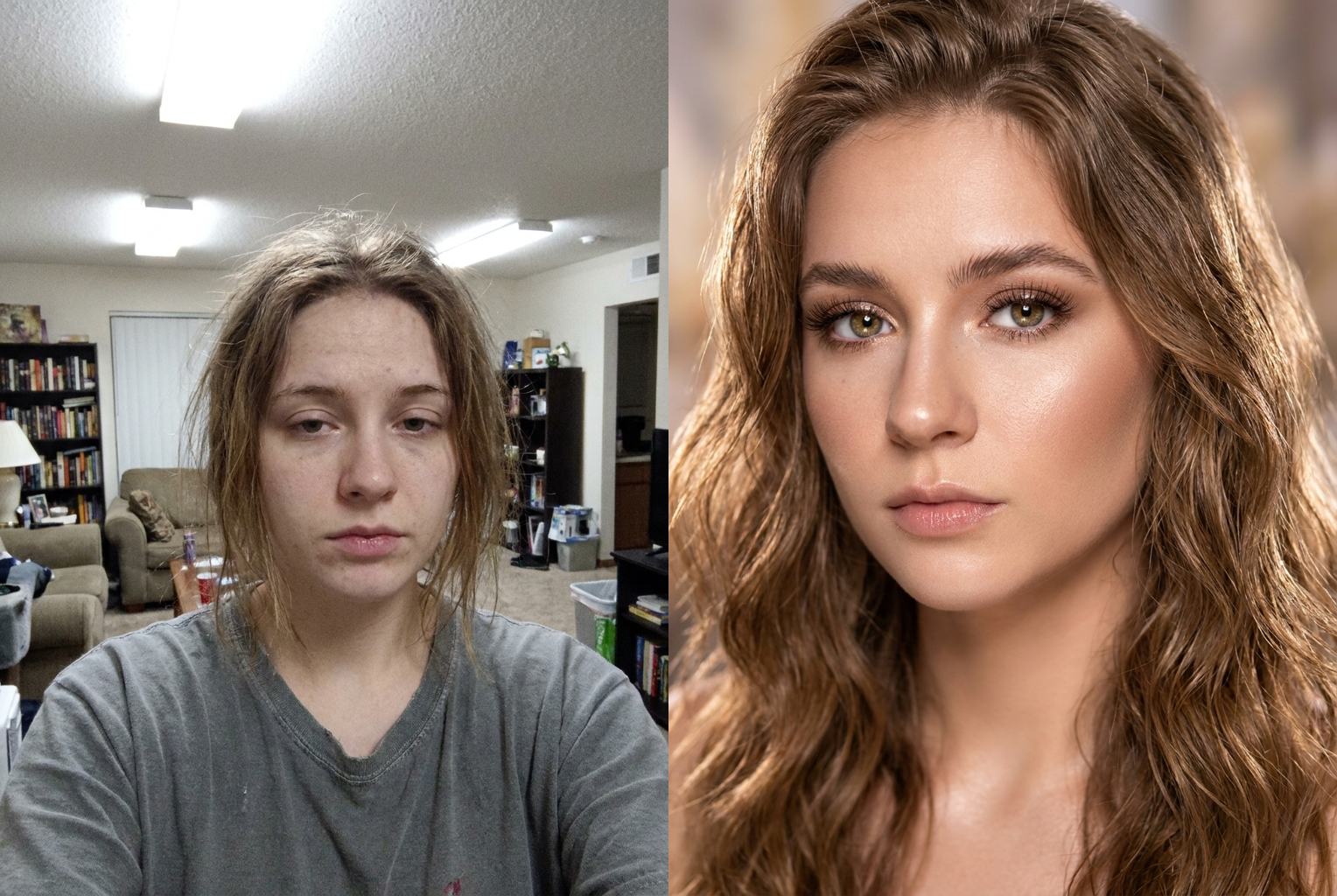
Selfie Glow-Up
Before → After: tired indoor selfie reworked into a dewy magazine-cover frame, same face
AI-generated examples
Im So Sorry AI Trend Generator
Upload a selfie and get the idealized, too-good-to-be-true glam photo that the Im So Sorry reveal is built on.
Drag & drop or click to upload
Supports PNG, JPG, WEBP • Max 20MB
Sign in to start generating
How it works
How the Im So Sorry AI Generator Works
Three steps turn an ordinary selfie into the dramatic glow-up frame that opens the trend.
Upload Your Selfie
Drop in any clear, front-facing selfie or portrait. PNG, JPG, and WEBP up to 20MB work best. A well-lit photo where your whole face is visible gives the AI the most detail to build the glam version from.
The AI Glams You Up
An identity-locked prompt rebuilds your photo into an exaggerated beauty-campaign portrait: dewy skin, sparkling eyes, glossy styled hair, sculpted makeup, and magazine lighting, while your real facial structure stays recognizable.
Download and Build the Reveal
Your glam frame is ready in under a minute at full resolution. Drop it as the first slide of your carousel, then end with your real photo for the Im So Sorry punchline. Run it again for a different styling take.
Im So Sorry Glow-Ups Made With This Generator
Real before-and-after frames produced with the generator's own identity-locked template.
Selfie Glow-Up
Before → After: tired indoor selfie reworked into a dewy magazine-cover frame, same face
Before → After: tired indoor selfie reworked into a dewy magazine-cover frame, same face
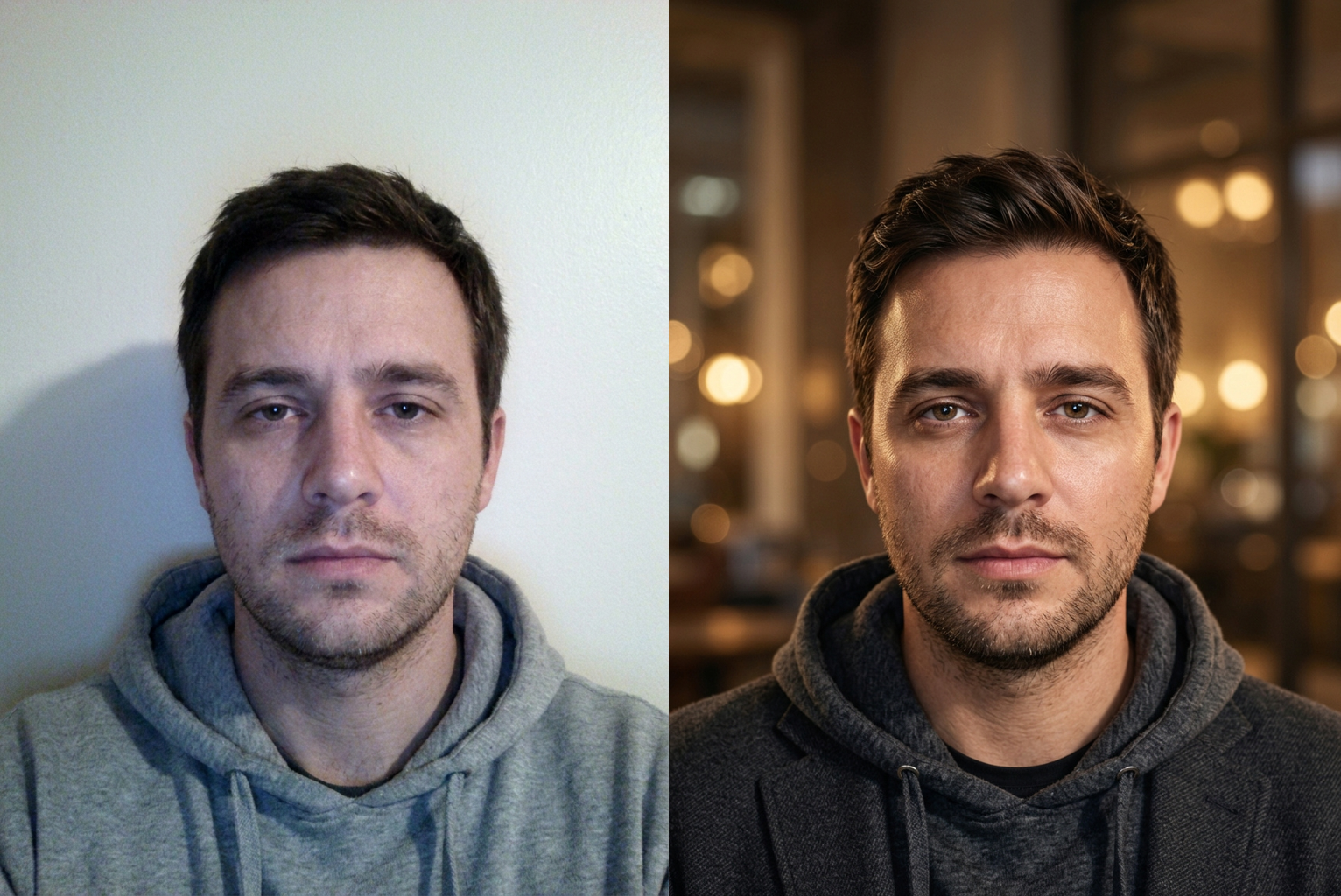
Headshot Glow-Up
Before → After: harsh flash snapshot turned into a groomed cinematic beauty portrait
Before → After: harsh flash snapshot turned into a groomed cinematic beauty portrait
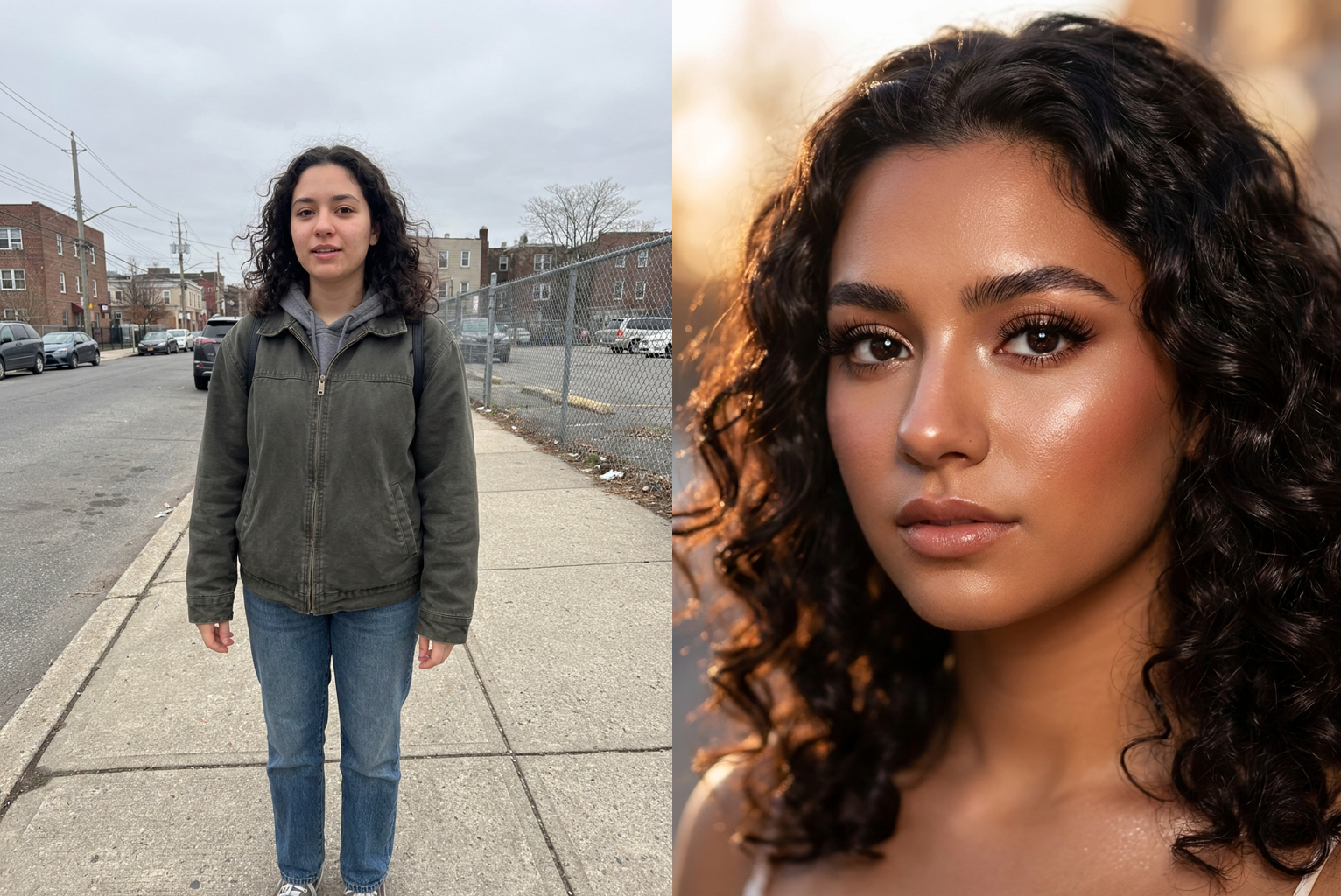
Outdoor Glow-Up
Before → After: flat overcast candid elevated to a glowing golden-hour editorial look
Before → After: flat overcast candid elevated to a glowing golden-hour editorial look
Why this tool
Why Creators Use This Im So Sorry AI Generator
Everything you need to nail the reveal format without a photo-editing app.
Your Face Stays Yours
The prompt is locked to preserve your bone structure, eye colour, skin tone and hairline, so the glam frame is clearly still you, which is exactly what makes the reveal land.
Ready in Under a Minute
No layers, sliders, or retouching skills. Upload once and the finished glow-up photo comes back in seconds, ready to slot into your carousel.
Editorial-Grade Glow
Dewy skin, defined eyes, glossy hair and campaign lighting are baked into the template, giving you a magazine-cover look every time.
Full-Resolution Output
Download a crisp, high-resolution image that still looks sharp when cropped to a vertical 9:16 carousel slide or a square post.
Consistent Across Faces
The same template flatters a wide range of ages, skin tones and features, so friends and followers can all join the trend with matching energy.
Free and Unlimited Tries
Rerun the same selfie as many times as you like to get the exact level of glam you want before you post.
The rundown
Im So Sorry AI Trend Generator: Create the Perfect Glow-Up Reveal
The Im So Sorry AI trend is one of the most shared reveal formats on social media right now, and this generator exists to let you make it in seconds from a single selfie. The idea is simple but irresistible: you open a photo carousel with a dramatically idealized, AI-glammed version of yourself, then flip to your real, unedited picture at the end with a cheeky apology caption. The whole joke depends on that first frame looking impossibly polished while still being recognizably you, and that is exactly what the Im So Sorry AI generator is tuned to produce. Instead of fiddling with editing apps or chasing complicated prompt recipes, you upload once and get a post-ready frame that matches the look everyone is sharing.
Under the hood, the tool is an image-to-image model guided by a carefully written, identity-locked prompt. When you upload your photo, the AI does not invent a new face. It keeps your bone structure, jawline, nose shape, eye colour, skin tone and hairline, then rebuilds everything around them: it smooths and brightens skin while keeping natural texture, enhances and sharpens the eyes, adds glossy styled hair, sculpts editorial makeup, and relights the whole scene with soft magazine-cover lighting and a dreamy blurred background. The result is the beauty-campaign look that makes the Im So Sorry AI trend so satisfying to reveal. Because the heavy lifting is handled by the model, you do not need to understand lighting setups, retouching passes or color grading to get a professional-looking frame on the very first try.
What makes this approach different from a basic filter is restraint in the right places. A lot of glow-up tools quietly slim your face, change your features, or push your look so far that the final image no longer resembles you. That breaks the trend completely, because the reveal only lands when viewers can see that the glam frame and the real photo are the same person. The Im So Sorry AI generator deliberately preserves identity and only changes grooming, styling, lighting and photo quality, so your glow-up stays believable even while it is obviously idealized.
Getting a great result starts with your source photo. Upload a clear, front-facing selfie or portrait with even lighting, where your whole face is visible and nothing is covering it. A plain, unedited photo is ideal, because the stronger and more honest your starting image is, the bigger the contrast when you add it back as the final reveal slide. Skip heavy shadows, sunglasses, extreme angles and busy group shots. If your first try looks too intense or too subtle, simply run the same photo again, since every pass gives a slightly different styling take on the Im So Sorry AI trend look. Many creators generate two or three versions and pick the one with the most dramatic contrast against their real photo before committing to a post.
The use cases go well beyond a single viral post. Creators use the Im So Sorry AI generator to make glow-up carousels, before-and-after transformations, dramatic profile-picture upgrades, and playful couple or friend group versions where everyone posts their own reveal. Because the output is a clean, high-resolution image with no watermark, you can crop it to a vertical 9:16 slide for a carousel, a square for a feed post, or keep it full size for a thumbnail. The same glam frame also works as a standalone fantasy portrait if you just want to see your most editorial self. The flexibility is a big reason the im so sorry ai generator has become a go-to for people who want one upload to serve several posts at once.
Compared with doing this by hand, the time savings are enormous. Recreating the Im So Sorry AI trend manually would mean layering retouching, dodging and burning, relighting, hair and makeup edits, and background blur in a photo editor, which can take an experienced editor the better part of an hour per image. This generator collapses that entire workflow into one upload and a few seconds of processing, with no software to learn and no subscription to a desktop editing suite. For anyone chasing a fast-moving trend, being able to produce the frame while the format is still hot is the whole point.
A quick word on posting responsibly: because the glam frame is a realistic AI-generated image, both TikTok and Instagram ask creators to label AI content, and it is good practice to keep that tag on even when your carousel ends with your genuine photo. The trend works best when the reveal feels honest and self-aware rather than deceptive, and the built-in punchline, your real face, is what keeps it fun. Using the Im So Sorry AI generator this way lets you lean into the joke instead of actually catfishing anyone. Audiences respond to that wink of self-awareness, and it is part of why the format keeps spreading across both short-video platforms and photo feeds without feeling mean-spirited.
Getting started takes less than a minute. Upload your selfie, let the Im So Sorry AI trend template do its work, download the finished glam portrait, and build your carousel with your real photo as the closing slide. There is nothing to install, each run costs a single credit, and you can try as many variations as you like until the glow-up is exactly as dramatic as you want. Whether you are jumping on the format for the first time or refining a version you have already posted, this is the fastest way to turn a normal photo into a scroll-stopping reveal. Keep a few of your favourite glam frames on hand and you will always be ready the next time the Im So Sorry AI trend cycles back around your feed.
Im So Sorry AI Trend Generator — Frequently Asked Questions
The Im So Sorry AI trend is a photo-carousel format where a creator opens with a dramatically idealized, AI-glammed version of themselves, then reveals their real, unedited photo at the end as a playful punchline. The humour comes from the gap between the too-perfect first slide and reality, usually captioned with a tongue-in-cheek apology for the glow-up.
Upload a clear selfie and let the generator create your exaggerated glam frame. Post that image as the first slide of a carousel, add any middle slides you want, and finish with your real, untouched photo. The sudden switch from the glossy AI version to the genuine photo is what makes the reveal work.
Yes. The template is built around identity preservation, so your facial structure, eye colour, skin tone and hairline stay recognizable. It enhances skin, lighting, hair and makeup rather than reshaping you, which is important because the reveal only lands when viewers can tell the glam frame is still the same person.
You can try it for free, and each generation costs a single credit. There is no watermark on your download, and you can rerun the same photo as many times as you want to dial in the amount of glow before you post your carousel.
Use a clear, front-facing selfie or portrait with even lighting where your whole face is visible. Avoid heavy shadows, sunglasses, or group shots. A simple, unedited photo actually works best because it gives the strongest before-and-after contrast when you add your real image as the final reveal slide.
Most portraits finish in well under a minute. Processing time can vary slightly with demand and image size, but you will usually have your glam frame back in seconds, ready to download at full resolution and drop into your post.
Yes, the output is a standard high-resolution image you can post anywhere. Keep in mind that both platforms ask creators to label realistic AI-generated images, so it is good practice to add the AI-content tag even when your carousel ends with your real photo.
The template is designed to flatter a wide range of ages, skin tones, hairstyles and features, so it works for most portraits. Because the glow-up is intentionally over-the-top, it reads as obviously idealized, which is exactly the look the trend is going for.