
Goodbye 2026 Welcome 2027 AI
Upload one photo and turn it into a festive Goodbye 2026, Welcome 2027 New Year celebration portrait in seconds.
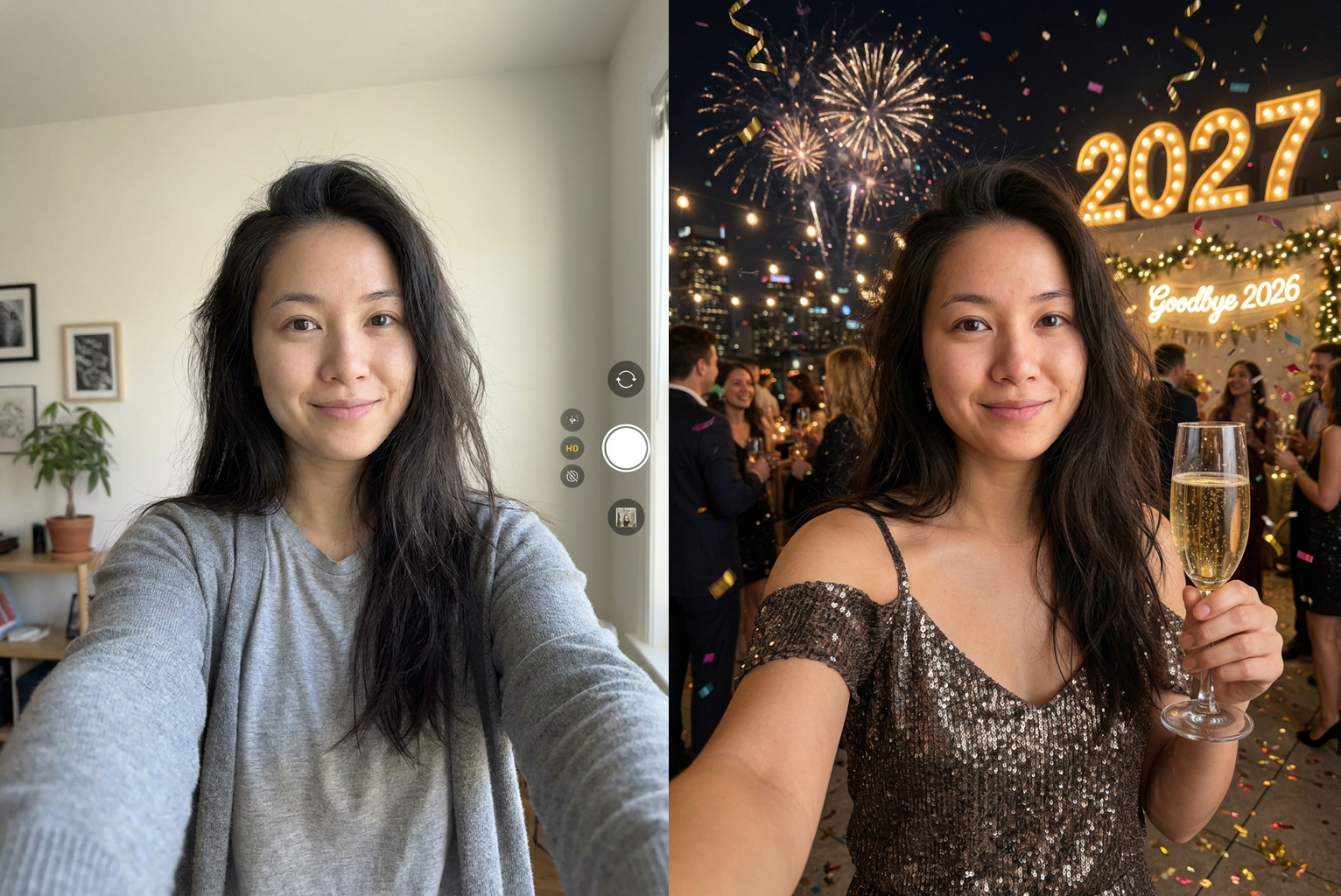
Selfie to countdown portrait
A plain indoor selfie becomes a festive Goodbye 2026, Welcome 2027 celebration shot.
AI-generated examples
Goodbye 2026 Welcome 2027 AI Photo Generator
Upload a selfie and step into a midnight countdown scene with confetti, fireworks, and glowing 2027 numerals — your face kept exactly as it is.
Drag & drop or click to upload
Supports PNG, JPG, WEBP • Max 20MB
Sign in to start generating
How it works
How the Goodbye 2026 Welcome 2027 Generator Works
Three steps, under a minute, one credit. No design skills and no editing app required.
Upload Your Photo
Drop in any selfie, portrait, or group snapshot. PNG, JPG, and WEBP are supported up to 20MB. A clear, front-facing photo where your face is well lit and fully visible gives the AI the most to work with.
The AI Builds Your New Year Scene
The model keeps your face locked and rebuilds everything around you: glowing golden 2027 numerals, a Goodbye 2026 banner, flying confetti, bokeh fairy lights, and soft fireworks — a complete midnight countdown celebration.
Download and Share
Your festive portrait is ready in seconds at full resolution. Download it for your New Year post, set it as a profile picture, or run the same photo again for a slightly different celebration take.
Goodbye 2026 Welcome 2027 Examples
Real before-and-after results generated with this tool's own built-in prompt.
Selfie to countdown portrait
A plain indoor selfie becomes a festive Goodbye 2026, Welcome 2027 celebration shot.
A plain indoor selfie becomes a festive Goodbye 2026, Welcome 2027 celebration shot.
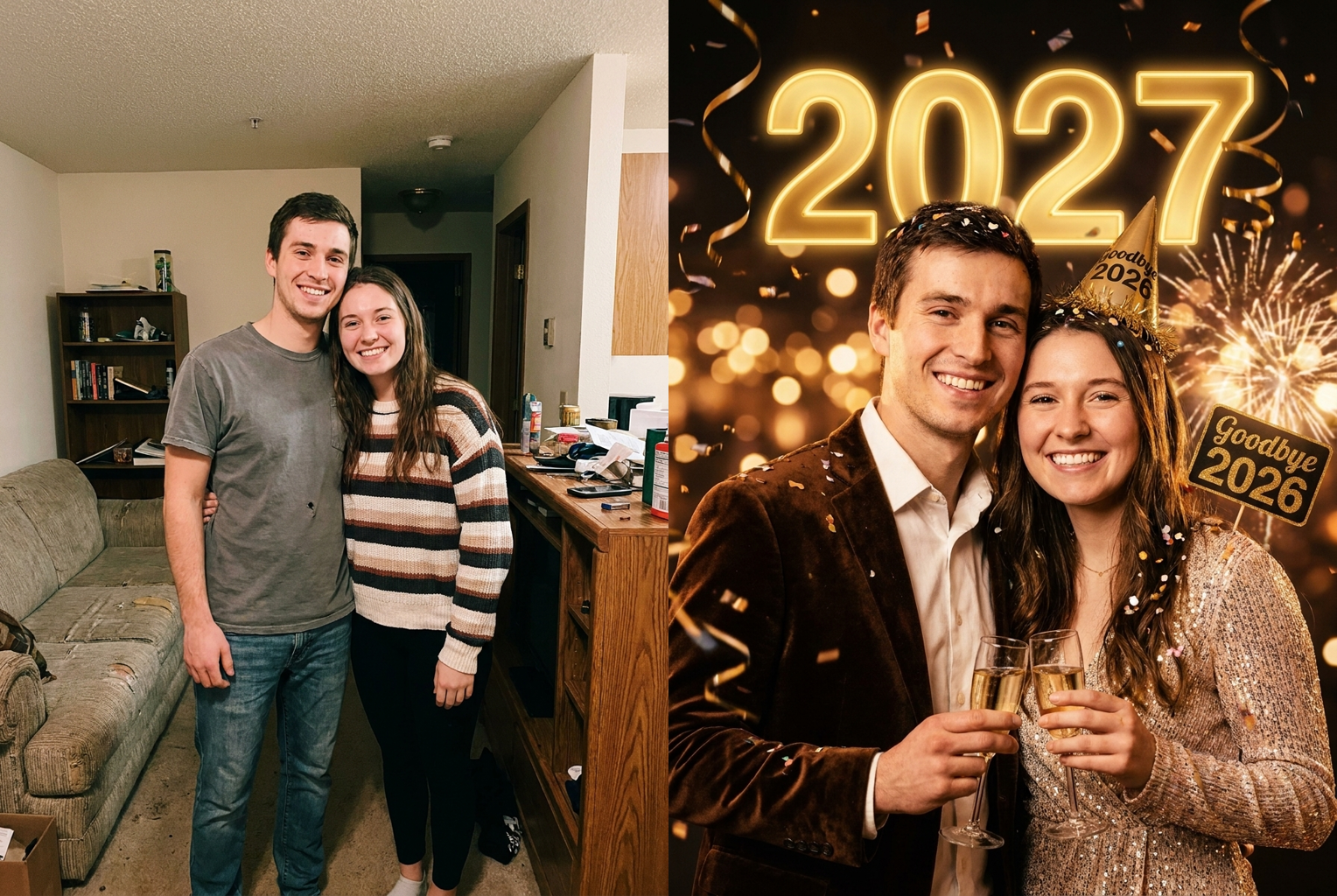
Couples celebration
Both faces are preserved while the midnight party scene is built around the couple.
Both faces are preserved while the midnight party scene is built around the couple.
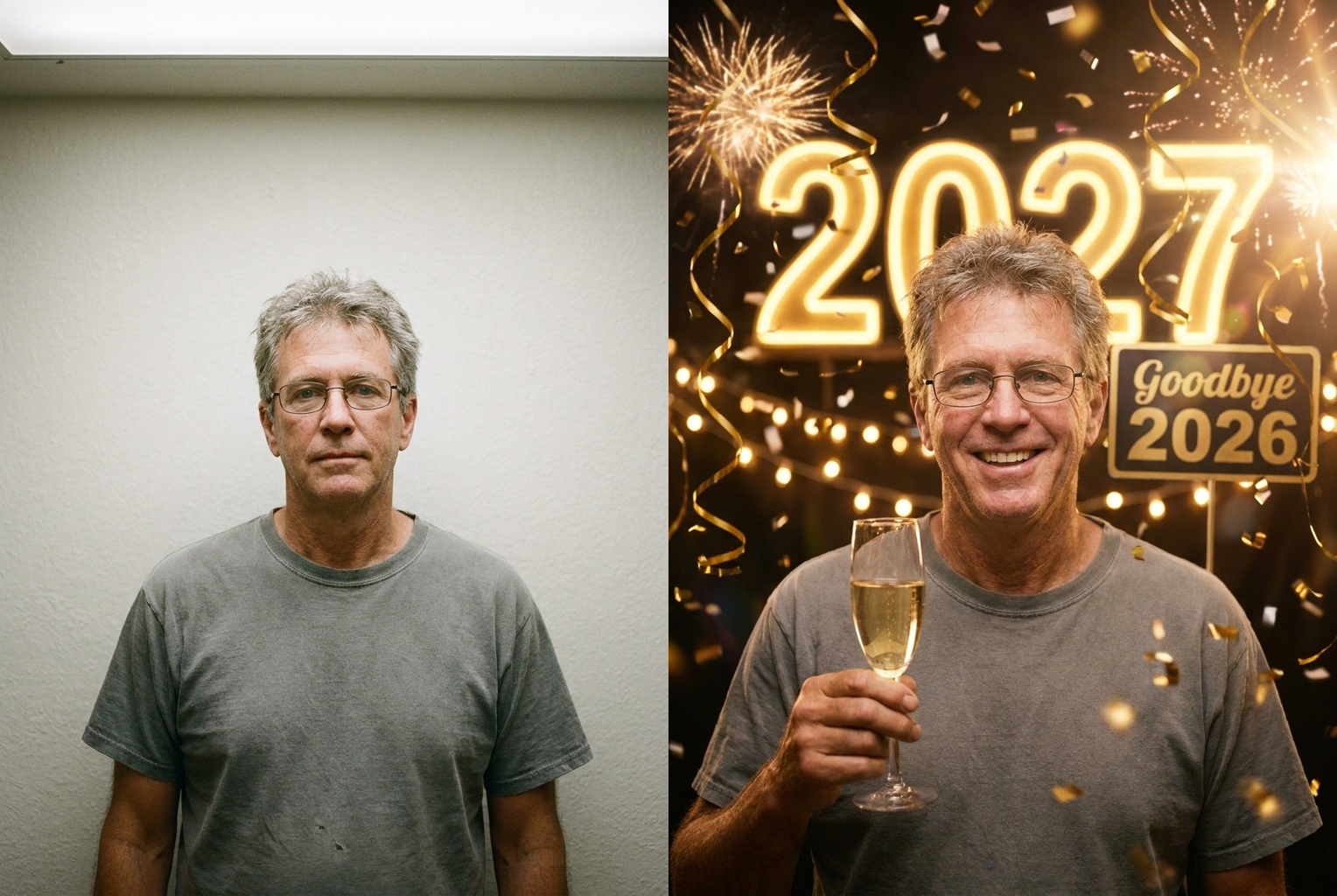
Any age, any photo
Identity, glasses and age are kept exactly — only the New Year scene is added.
Identity, glasses and age are kept exactly — only the New Year scene is added.
Why this tool
Why People Love This New Year Photo Tool
Everything you need to ring in 2027 with a scroll-stopping photo — and nothing you don't.
Your Face Stays Your Face
The prompt explicitly locks your bone structure, jawline, nose, eye colour, and skin tone. Nothing is slimmed or reshaped, so friends and family recognise you instantly inside the celebration scene.
Real Countdown Atmosphere
Glowing 2027 numerals, a Goodbye 2026 sign, flying confetti, gold streamers, bokeh lights, and soft fireworks combine into a believable midnight party backdrop rather than a flat sticker overlay.
Ready in Seconds
No timeline, no layers, no learning curve. Upload one photo and the finished New Year portrait lands in under a minute, so you can post it before the countdown even ends.
Works for Groups and Couples
Solo selfies, couples, friends, or family group shots all work. Everyone in the frame keeps their own face while the celebration scene is built around the whole group.
Warm Cinematic Lighting
The AI relights your photo with a warm, soft key light and gentle lens flare so you look like the subject of a professional New Year editorial shoot, not a cut-out on a busy background.
Full-Resolution, Watermark-Free
Download a crisp, high-resolution image you can print, share to any platform, or send straight into the group chat. No watermark sits across your celebration photo.
The rundown
Goodbye 2026 Welcome 2027 AI Photo Generator
The Goodbye 2026 Welcome 2027 AI photo generator turns a single ordinary selfie into a festive New Year 2027 celebration portrait in seconds. Instead of hunting for the perfect party backdrop or learning a complicated photo editor, you upload one picture and the AI rebuilds the entire scene around you — glowing golden 2027 numerals, a tasteful Goodbye 2026 sign, flying confetti, gold streamers, warm bokeh fairy lights, and soft fireworks bursting in the night sky. The result is a photo that looks like it was taken at a real midnight countdown, with you as the clear star of the moment. It is the fastest and easiest way to say goodbye 2026 welcome 2027 with an image that people will actually stop scrolling to look at and share.
Under the hood, the tool runs on an advanced image model guided by a carefully tuned, identity-locked prompt. When you upload your photo, the model reads your face, lighting, and pose, then regenerates the environment around you while holding your identity fixed. This is the key difference between a genuine goodbye 2026 welcome 2027 portrait and a cheap sticker overlay: the confetti sits naturally in the air, the fireworks glow behind you with believable depth, and the 2027 numerals cast real light onto the scene instead of floating flatly on top. Everything is composed and relit as one coherent photograph, not a stack of clip-art layers dumped on top of your selfie in a basic editor.
Identity preservation is the feature people care about most, and it is built directly into the prompt. The model is explicitly instructed to keep your bone structure, jawline, nose, eye colour, skin tone, hairstyle, and age exactly as they appear in your original photo, and it is forbidden from slimming your face, reshaping your features, or changing your ethnicity. That means your goodbye 2026 welcome 2027 image still looks unmistakably like you — the person in the finished New Year portrait is you on a great night, not a stranger wearing your face. Friends and family should recognise you instantly, which is exactly what makes a personalised greeting land so well.
The generator is deliberately simple to use. There is no prompt box to fill in, no sliders, and no design skills required, because the festive celebration prompt is already written and tuned for you. For the best goodbye 2026 welcome 2027 results, start with a clear, well-lit, front-facing photo where your whole face is visible. Avoid heavy shadows, sunglasses, and very low-resolution images. A bright selfie, a clean portrait, or a group photo where each face is easy to see will all produce sharp, convincing results. As a rule of thumb, the better and brighter your source photo, the more polished and realistic your final New Year portrait will be.
There are countless ways to use a goodbye 2026 welcome 2027 photo once you have it. Post it as your New Year celebration social story or feed photo, set it as a fresh profile picture to open the new year, or send it as a personal greeting to friends and family who are tired of plain text wishes. Couples can make a shared 2027 countdown portrait, groups of friends can turn one ordinary party snapshot into a polished keepsake, and families can create a warm image to print as a card or frame on the wall. A single generated picture quietly does the work of a photographer, a party venue, and a graphic designer all at once.
Compared with the manual alternative, the time savings are dramatic. Building this kind of scene by hand would mean sourcing a party background, masking yourself out of your original photo, adding confetti and firework assets, matching the lighting, hand-designing the 2027 numerals, and blending everything so it looks real — easily an hour of fiddly work for someone who already knows the software, and far longer for anyone who does not. The goodbye 2026 welcome 2027 generator collapses that entire workflow into one upload and one click. You get a magazine-quality New Year celebration portrait in under a minute, without owning, installing, or learning any editing tools at all.
Each generation costs a single credit and finishes in seconds, so experimenting is cheap and fast. If the first result is not quite the mood you want, simply run the same photo again — the model introduces small natural variations in the confetti, lighting, and fireworks each time, so you can quickly compare takes and pick your favourite. Many people make a few versions and choose the strongest one to post right at midnight. Because every goodbye 2026 welcome 2027 image downloads clean and watermark-free at full resolution, you are free to print it, share it on any platform, or use it as a long-term profile picture without any logo getting in the way of your celebration.
Getting started takes less time than reading this paragraph. Upload your photo, press the button, and let the AI build your New Year 2027 scene while you wait. In under a minute you will have a festive, high-resolution portrait ready to share with the world. Whether you want a solo 2027 countdown shot, a couple's celebration, or a group photo for the whole crew, the goodbye 2026 welcome 2027 generator gives you a personal, scroll-stopping way to close out the old year and welcome the new one. Say goodbye 2026 welcome 2027 with a photo that genuinely feels like a celebration — and start 2027 looking your best. There is no better moment than the end of the year to give your online presence a fresh, festive refresh, and no faster way to do it than a single upload that turns the page from one year into the next in a single, memorable frame.
Goodbye 2026 Welcome 2027 Generator FAQ
It takes one photo you upload and rebuilds the scene around you into a New Year celebration: glowing 2027 numerals, a Goodbye 2026 sign, confetti, fairy lights, and soft fireworks. Your face and identity are kept exactly as they are, so it looks like a real photo of you taken at a midnight countdown party rather than a template with your head pasted on.
No. That is the core design constraint. The prompt instructs the model to preserve your facial structure, features, skin tone, hairstyle, and age, and forbids slimming or reshaping. What changes is everything around you: the background, lighting, confetti, and festive 2027 details. The goal is you at a great New Year party, not a different person wearing your face.
No. The celebration prompt is already tuned and built in, so you only need to upload a photo and press the button. There is nothing to write, no settings to configure, and no design experience required. If you want a slightly different result, just run the same photo again — small natural variations appear each time.
A clear, well-lit, front-facing photo where your whole face is visible gives the best results. Avoid heavy shadows, sunglasses, or very low resolution. Selfies, portraits, couple shots, and group photos all work. The sharper and brighter your original photo, the more convincing the final New Year celebration portrait will look.
Yes. Group photos, couples, and family shots are fully supported. Each person in the frame keeps their own face and identity while the AI builds the shared countdown scene around everyone. For the cleanest result, use a group photo where each face is clearly visible and reasonably well lit.
Each generation takes under a minute and costs one credit. New accounts start with free credits, so you can create your first New Year portrait without paying. If you want several variations or photos for a whole group, each additional image is just one more credit.
No. You download a clean, full-resolution image with no watermark across it. That means you can post it to any social platform, print it as a card or keepsake, set it as a profile picture, or drop it straight into a group chat without any logo or banner getting in the way of your celebration.
Absolutely — that is exactly what it is made for. A personalised Goodbye 2026, Welcome 2027 portrait makes a far more memorable New Year greeting than a plain text message. Share it as a story, a post, or a direct message to send friends and family a festive, personal way to ring in 2027.