
Godfather AI Photo
Upload a photo, describe a scene, and the Godfather AI Photo generator restyles it into a cinematic mafia-don portrait while keeping your face exactly the same.
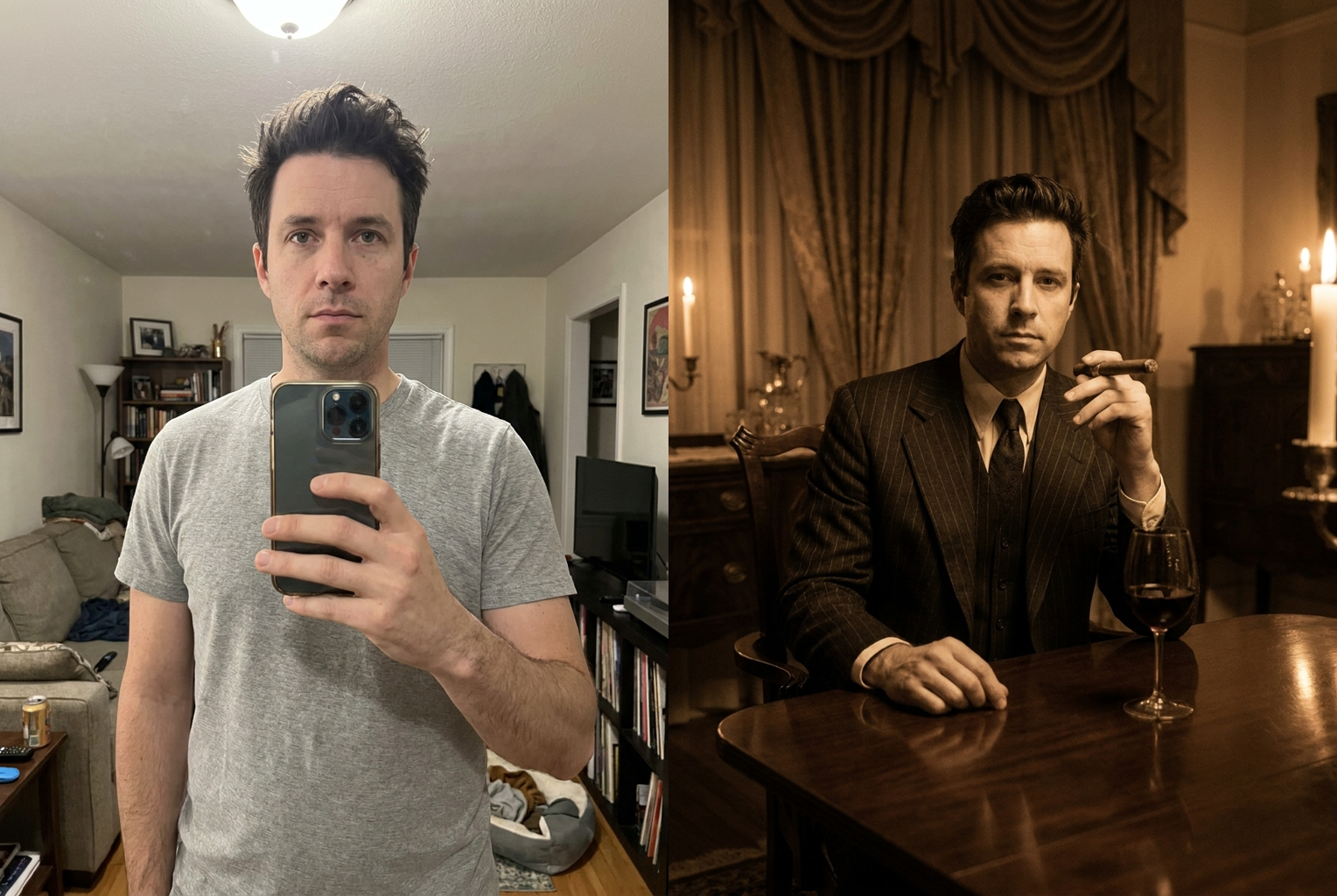
Plain selfie → candlelit don
Scene: candlelit table, pinstripe suit, cigar — same face, cinematic crime-drama styling.
AI-generated examples
Godfather AI Photo Generator
Upload a photo and become the cinematic head of the family — your face kept exactly intact.
Drag & drop or click to upload
Supports PNG, JPG, WEBP • Max 20MB
Sign in to start generating
How it works
How the Godfather AI Photo Generator Works
Three steps from a plain photo to a movie-grade mafia portrait.
Upload your photo
Pick a clear, well-lit photo with the face fully visible. Front-facing portraits and half-body shots give the most convincing, cinematic results.
Describe the scene
Type the mood you want — a candlelit dinner-table don, a pinstripe-suited figure in a dim study, a stark black-and-white 1940s portrait. Add props and lighting cues for a closer match.
Get your portrait
The generator restyles wardrobe, lighting, and atmosphere into an old-world crime-drama look while keeping your face intact, then hands you a high-resolution image to download.
Godfather AI Photo examples
Each portrait below was made with this tool's own prompt — same person, recast as the cinematic head of the family.
Plain selfie → candlelit don
Scene: candlelit table, pinstripe suit, cigar — same face, cinematic crime-drama styling.
Scene: candlelit table, pinstripe suit, cigar — same face, cinematic crime-drama styling.
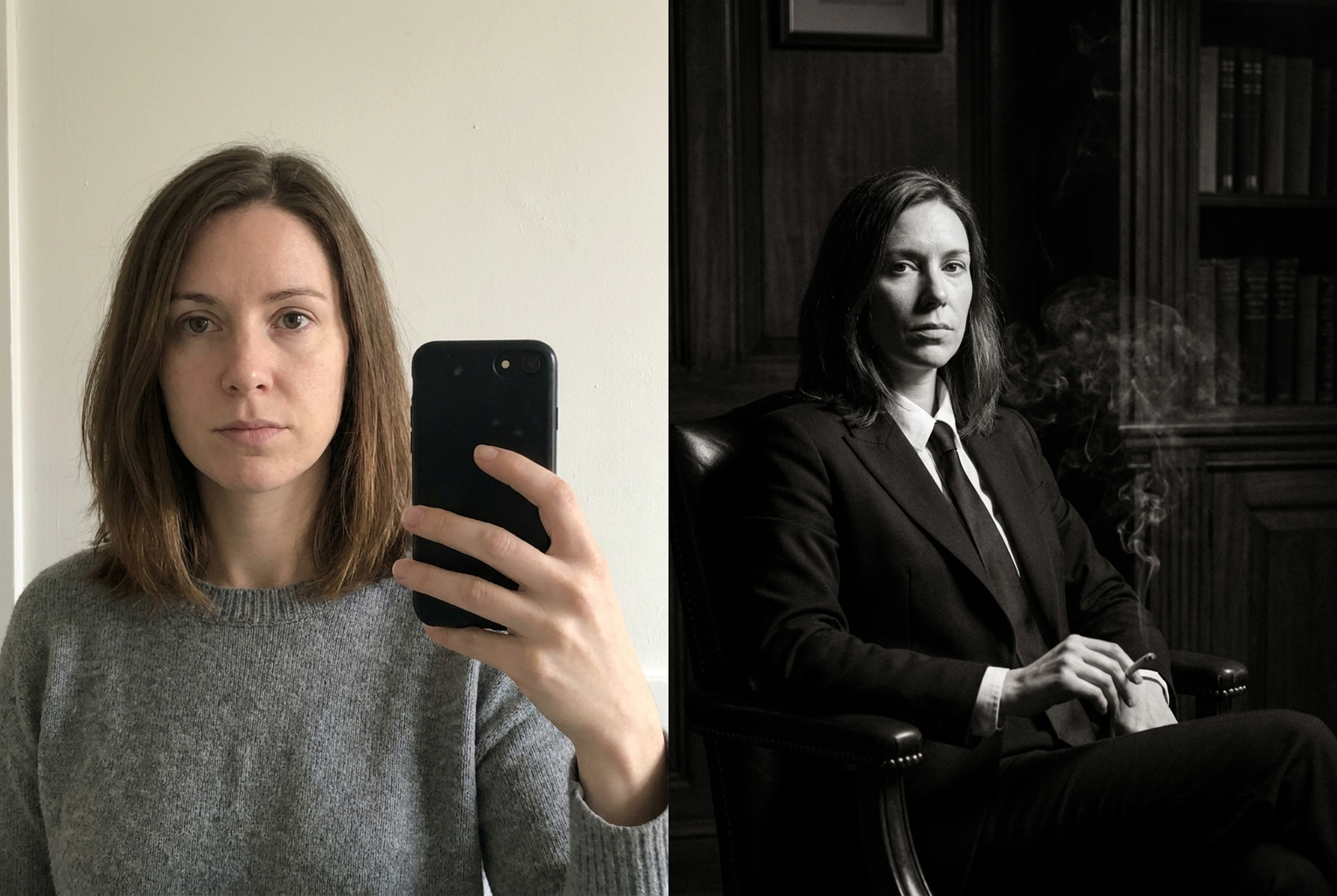
Plain photo → B&W formal portrait
Scene: black-and-white formal portrait, dark study — identity kept, high-contrast cinematic mood.
Scene: black-and-white formal portrait, dark study — identity kept, high-contrast cinematic mood.
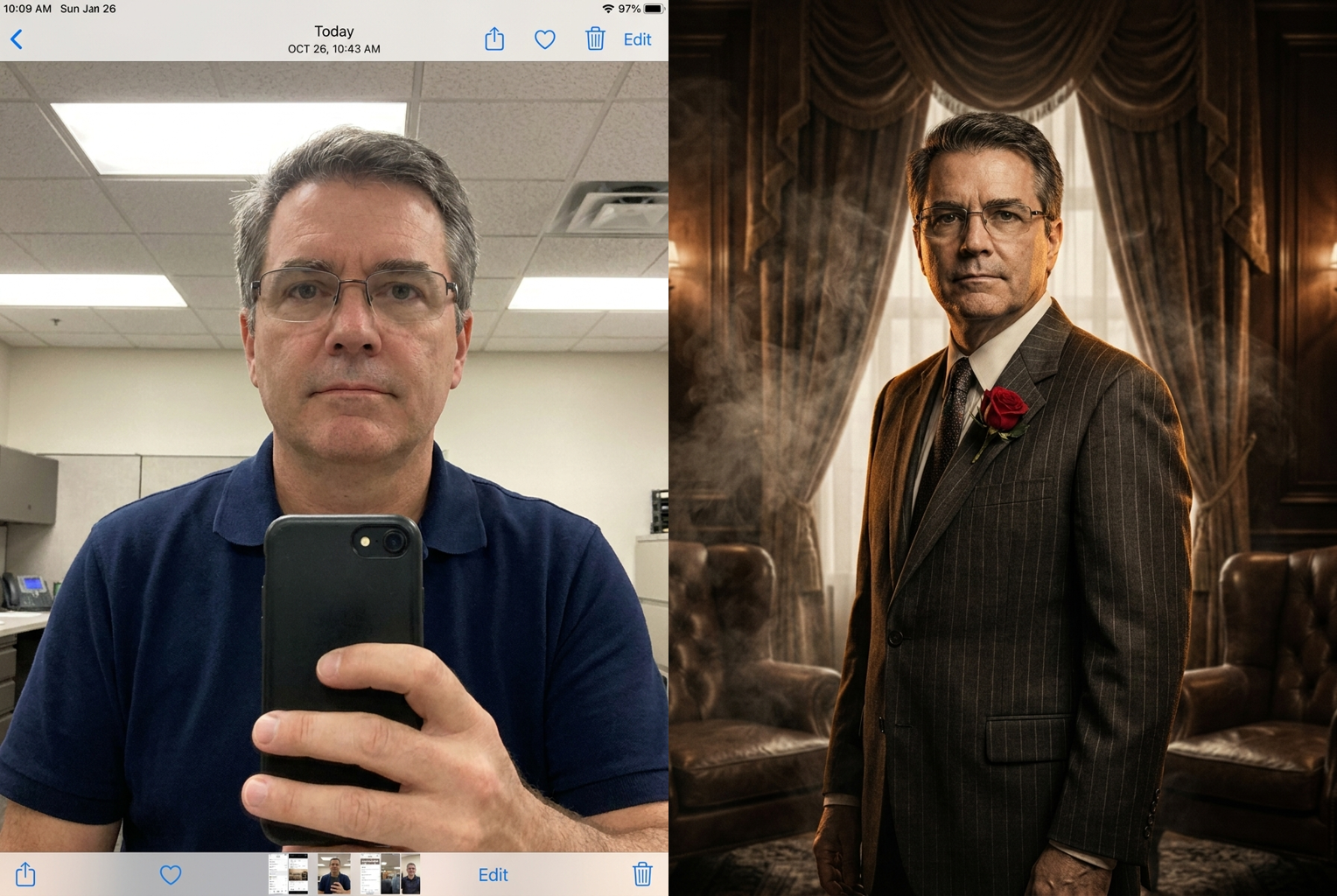
Plain photo → smoky-study patriarch
Scene: smoky study, pinstripe suit, rose boutonniere — same person, old-world elegance.
Scene: smoky study, pinstripe suit, rose boutonniere — same person, old-world elegance.
Why this tool
Why use this Godfather AI Photo generator
Your face stays you
The prompt locks your facial features, skin tone, and hair. Only wardrobe, lighting, and atmosphere change — so the portrait is unmistakably you, just cast as the head of the family.
True cinematic grading
Warm amber key light, deep chiaroscuro shadows, sepia-tinted color, and subtle film grain recreate the look of a classic crime-drama still rather than a flat filter.
Describe any scene
Dinner-table meeting, smoky study, garden wedding, black-and-white formal portrait — type the setting and the model builds the whole mood around you.
Results in seconds
No studio, no vintage wardrobe rental, no manual editing. A full movie-grade portrait is ready moments after you upload your photo.
Photoreal, not cartoon
Realistic skin texture, natural shadows, and believable fabric keep the output looking like a real photograph, not an illustration or a pasted cutout.
High-resolution download
Save a crisp, share-ready image for profile pictures, posters, party invites, or a themed gift — with no watermark burned across your portrait.
The rundown
Godfather AI Photo Generator: Turn Any Photo Into a Cinematic Mafia Portrait
The Godfather AI Photo generator is an online tool that transforms an ordinary photo into a cinematic, old-world crime-drama portrait while keeping the person's face and identity completely intact. Instead of renting a vintage three-piece suit, booking a photographer, and dressing a 1940s set, you upload one picture, describe the mood you want, and let the tool handle the rest. The appeal of a godfather ai photo is universal: almost everyone has wondered what they would look like as the composed, commanding figure seated at the head of the table. This generator answers that in seconds rather than hours, and it never replaces your face with a stranger's. The result is a polished mafia portrait that still reads, unmistakably, as you — just recast in the dramatic lighting and tailored wardrobe of a classic crime saga.
Behind the scenes, the Godfather AI Photo generator runs an advanced image-to-image model. When you upload a picture, the model first locks the geometry of your face — the spacing of your eyes, your jawline, your nose, your hairline — and treats those features as fixed anchors. It then repaints everything else: it dresses you in period-appropriate tailoring, rebuilds the room into a dim, opulent interior, and relights the whole frame with warm amber key light and deep falloff shadows. Because the face is preserved as a constraint rather than regenerated from scratch, the finished godfather ai photo looks like a real still of you on a film set, not a lookalike. This is what separates a convincing transformation from a generic filter that flattens and distorts the subject.
Style coverage is broad. A single godfather ai photo session can produce a candlelit dinner-table scene with a cigar and a glass of wine, a solitary figure brooding in a smoke-filled study, a crisp black-and-white 1940s formal portrait, or a sunlit garden-wedding tableau straight out of the genre's opening act. The model understands the visual grammar of the style: chiaroscuro lighting, sepia and desaturated color grading, heavy drapes and leather chairs, pinstripe and herringbone fabrics, and the subtle film grain that makes an image feel shot on celluloid. You can lean fully cinematic or keep it understated and editorial. Whether you want a menacing crime-drama portrait or a dignified, elder-statesman feel, the same tool adapts its lighting, wardrobe, and set dressing to the direction you type, so no two portraits need to look alike.
Getting a great godfather ai photo comes down to two things: a clean source photo and a specific prompt. Start with a well-lit, front-facing image where your face is sharp and unobstructed — skip heavy sunglasses, extreme angles, and dim snapshots, since they give the model less to anchor to. Then describe the scene concretely. Instead of typing 'make me look cool,' try 'seated at a candlelit mahogany table, pinstripe suit, red rose boutonniere, cigar, warm shadows' or 'black-and-white formal portrait, fedora, dark study, single hard light.' Name the wardrobe, the props, the lighting, and the setting. The more cinematic detail you provide, the closer the mafia portrait ai output lands to the picture in your head. If the first pass is not quite right, adjust one element — the lighting, the suit, the backdrop — and regenerate rather than rewriting everything.
People reach for a godfather ai photo for all kinds of reasons. It makes a striking profile picture for social media, an eye-catching poster for a mafia-themed party or casino night, a personalized birthday or Father's Day gift, and a fun centerpiece for group chats and office challenges. Content creators use the look for thumbnails and skits; couples turn engagement photos into dramatic cinematic portraits; friend groups generate a whole 'family' set for a themed event. Because the output is a high-resolution file with no burned-in watermark, it is ready to print, frame, or post straight away. The transformation carries a built-in story — power, loyalty, old-world elegance — which is exactly why a single well-made portrait tends to get more reactions than an ordinary selfie ever would.
The manual alternative is slow and expensive. Achieving this look the traditional way means sourcing a vintage suit, finding a location with the right interior, hiring a photographer who understands dramatic lighting, and then spending hours in editing software color-grading and adding grain. A godfather ai photo collapses that entire pipeline into a single upload and a short prompt. You are not paying for a studio day or a wardrobe rental, and you are not gambling on whether the photographer nails the mood. You can also iterate freely — try ten different scenes for the cost of ten credits — which simply is not practical with a physical shoot. For most people, the AI route delivers a result that is most of the way to a professional cinematic portrait at a tiny fraction of the time and cost.
The workflow is deliberately simple. Upload, describe, generate, download — and if you want variety, regenerate with a fresh prompt. Each run costs one credit, so exploring a candlelit table, a black-and-white portrait, and a smoky study is inexpensive and fast. Results come back in seconds, already graded and grain-matched, with realistic skin texture and natural shadows rather than the plasticky, over-smoothed finish that cheaper filters produce. Because the godfather ai photo tool preserves identity on every pass, you can build a consistent set of images of the same person across several different scenes — useful for a themed photo series, a storyboard, or a gift album. Everything renders at a resolution high enough to print, so your favorite frame can move from screen to wall without looking soft or pixelated.
Getting started takes less than a minute. Choose a clear photo of the person you want to transform, write a one-line description of the scene — the setting, the wardrobe, the lighting, the props — and hit generate. Within seconds you will have a cinematic godfather ai photo that keeps your face exactly as it is while wrapping you in the tailored suits, warm shadows, and old-world atmosphere of the genre. Try a few different directions to find the portrait that feels most like you at your most composed and commanding. Whether it is for a profile picture, a party, a gift, or just the thrill of seeing yourself as the head of the family, this is the fastest way to turn a single snapshot into a portrait worth framing.
Godfather AI Photo — FAQ
No. The generation prompt explicitly instructs the model to keep your face, facial features, skin tone, and hair exactly as in your original photo. Only wardrobe, lighting, grooming, and atmosphere are restyled into the crime-drama look. That identity preservation is the whole point — you are seeing yourself cast as the patriarch, not a different person wearing a costume.
A clear, well-lit photo where your face is fully visible and in focus. Front-facing portraits and half-body shots work best, because the model has more of your features and posture to preserve. Avoid heavy sunglasses, extreme angles, or very low-light images, since they give the generator less identity information to anchor to.
A short description gives the best results, but you can keep it simple. Even a few words like 'dim study, cigar, pinstripe suit' steer the scene. The more you describe lighting, setting, and wardrobe, the closer the output matches the exact Godfather AI Photo mood you have in mind.
No. This is an independent AI styling tool that recreates a general vintage, cinematic crime-drama aesthetic — warm shadows, tailored suits, old-world interiors. It is not affiliated with, endorsed by, or connected to any film studio, franchise, or rights holder, and it does not use any copyrighted characters or film footage.
Usually just a few seconds. Once you upload a photo and submit, the image-to-image model processes everything in one pass and returns your finished portrait. There is no queue, no manual retouching, and no render waiting room — refresh the look as many times as you like with different prompts.
Yes. The style works for anyone — the tool restyles whoever is in the photo into the elegant, powerful crime-family aesthetic while keeping their identity. For the cleanest result, use a photo with one clearly visible face; group photos can work, but single-subject portraits preserve features most reliably.
Profile pictures, social posts, party and theme-night invites, birthday gifts, poster prints, or just a fun portrait to share. You receive a high-resolution file with no burned-in watermark. As with any stylized portrait, use it responsibly and avoid implying real-world claims about yourself or anyone else.
Each generation uses one credit, the same flat cost as every other tool on the platform. You can regenerate with new prompts to explore different scenes — a candlelit table, a black-and-white formal portrait, a smoky study — and only spend a single credit per image you create.