
Flower Bouquet of Me AI
Upload any photo and the flower bouquet of me AI reimagines you inside a lush bouquet of flowers while keeping your real face and expression.
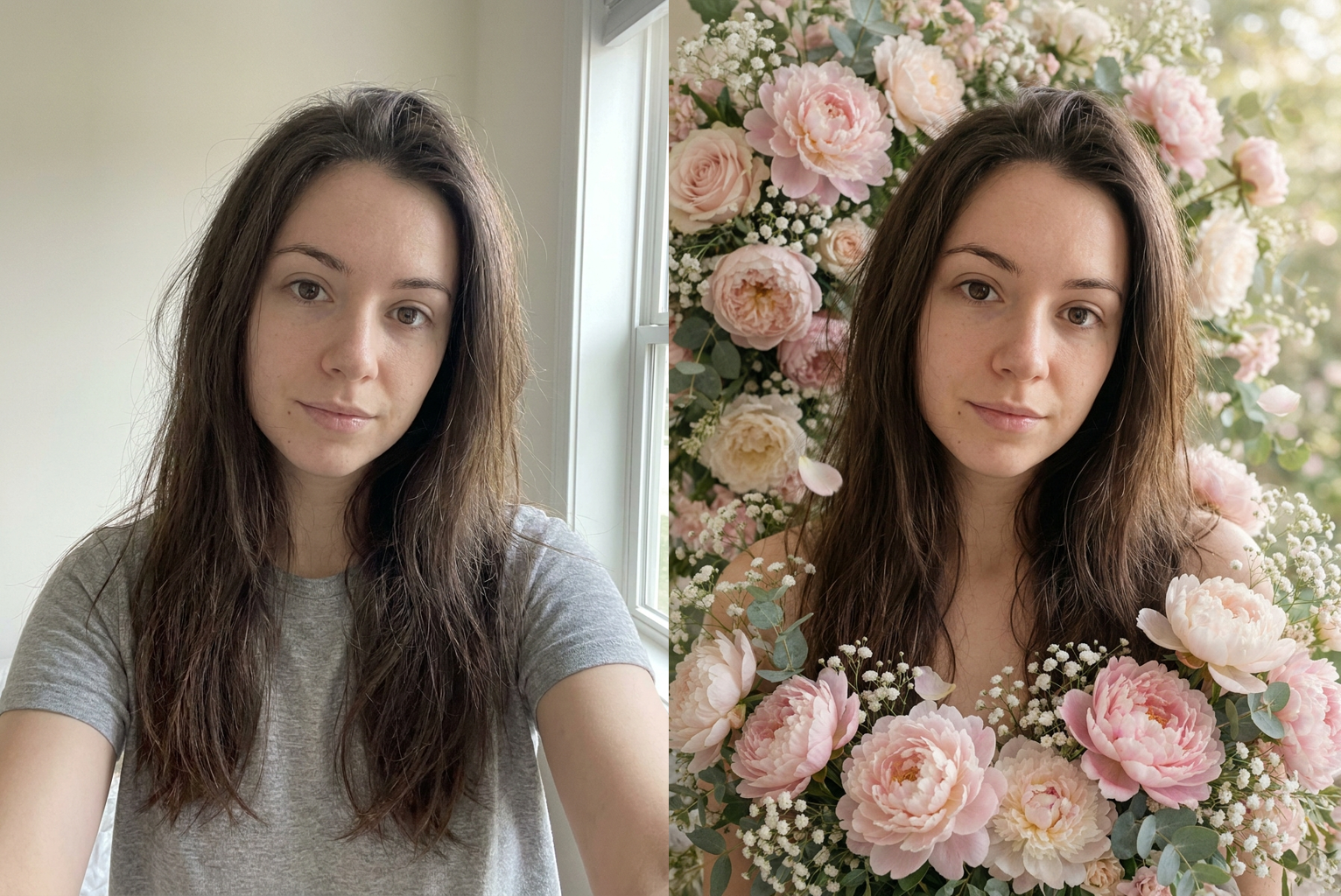
Soft pink peonies
Plain grey-tee selfie reimagined inside a bouquet of blush pink peonies and baby's breath.
AI-generated examples
Flower Bouquet of Me AI
Upload one photo and see yourself blooming inside a dreamy bouquet of flowers in seconds.
Drag & drop or click to upload
Supports PNG, JPG, WEBP • Max 20MB
Sign in to start generating
How it works
How the Flower Bouquet of Me AI Works
Three steps, about a minute, one credit.
Upload Your Photo
Drop in any clear selfie or portrait. PNG, JPG, and WEBP are supported. A well-lit, front-facing photo where your face and shoulders are visible gives the AI the most to work with.
AI Wraps You in Blooms
The model keeps your face, skin tone, and expression, then surrounds you with a lush arrangement of roses, peonies, and wildflowers so you appear to emerge from the heart of the bouquet.
Download & Share
Get a high-resolution floral portrait ready for your profile, a card, or your feed. Not quite right? Type a flower color and regenerate for a fresh bouquet.
Flower Bouquet of Me AI Examples
Real before-and-after transformations generated with this tool — one photo in, a dreamy floral portrait out.
Soft pink peonies
Plain grey-tee selfie reimagined inside a bouquet of blush pink peonies and baby's breath.
Plain grey-tee selfie reimagined inside a bouquet of blush pink peonies and baby's breath.
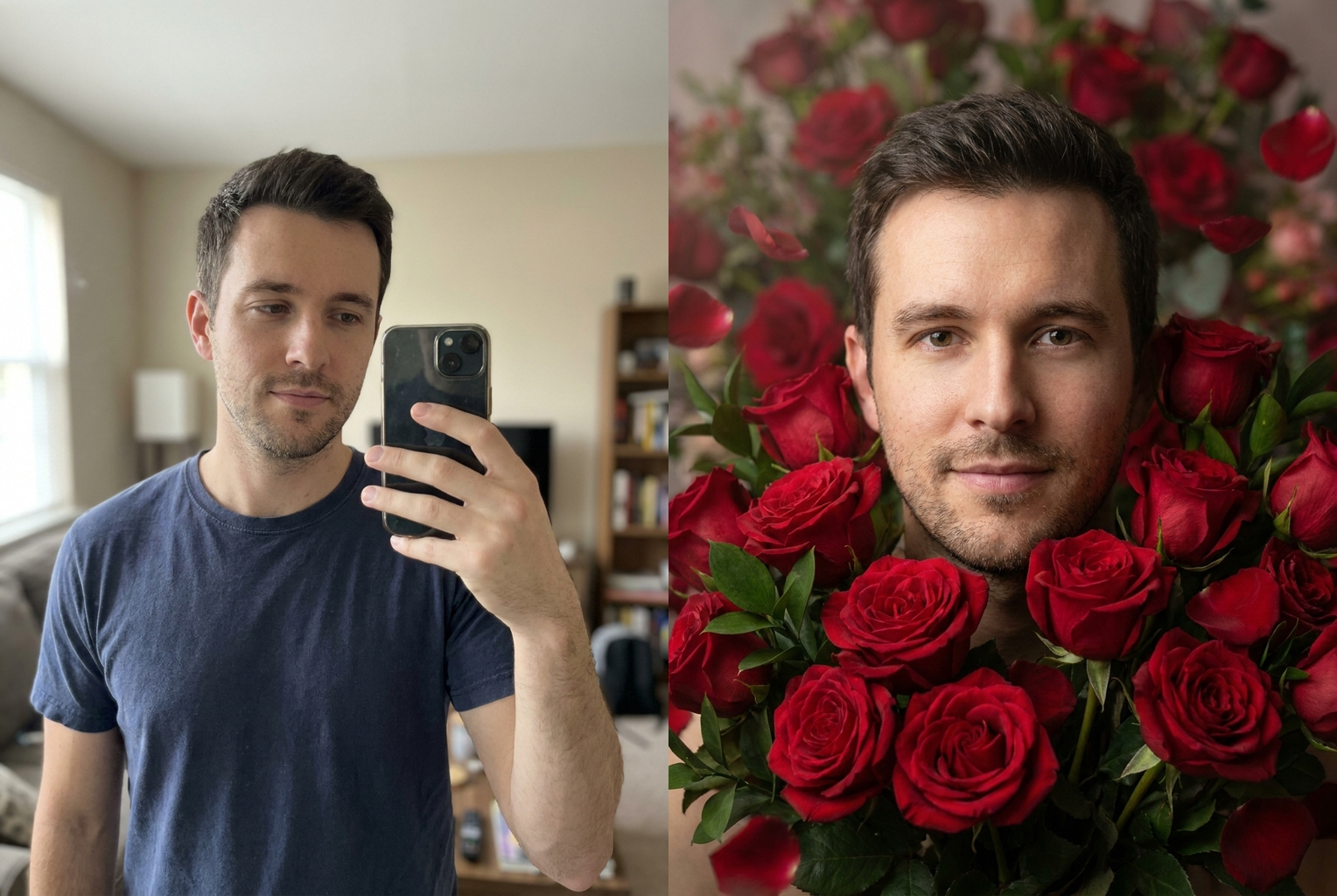
Deep red roses
Plain navy-shirt selfie transformed into a dramatic bouquet of deep red roses.
Plain navy-shirt selfie transformed into a dramatic bouquet of deep red roses.
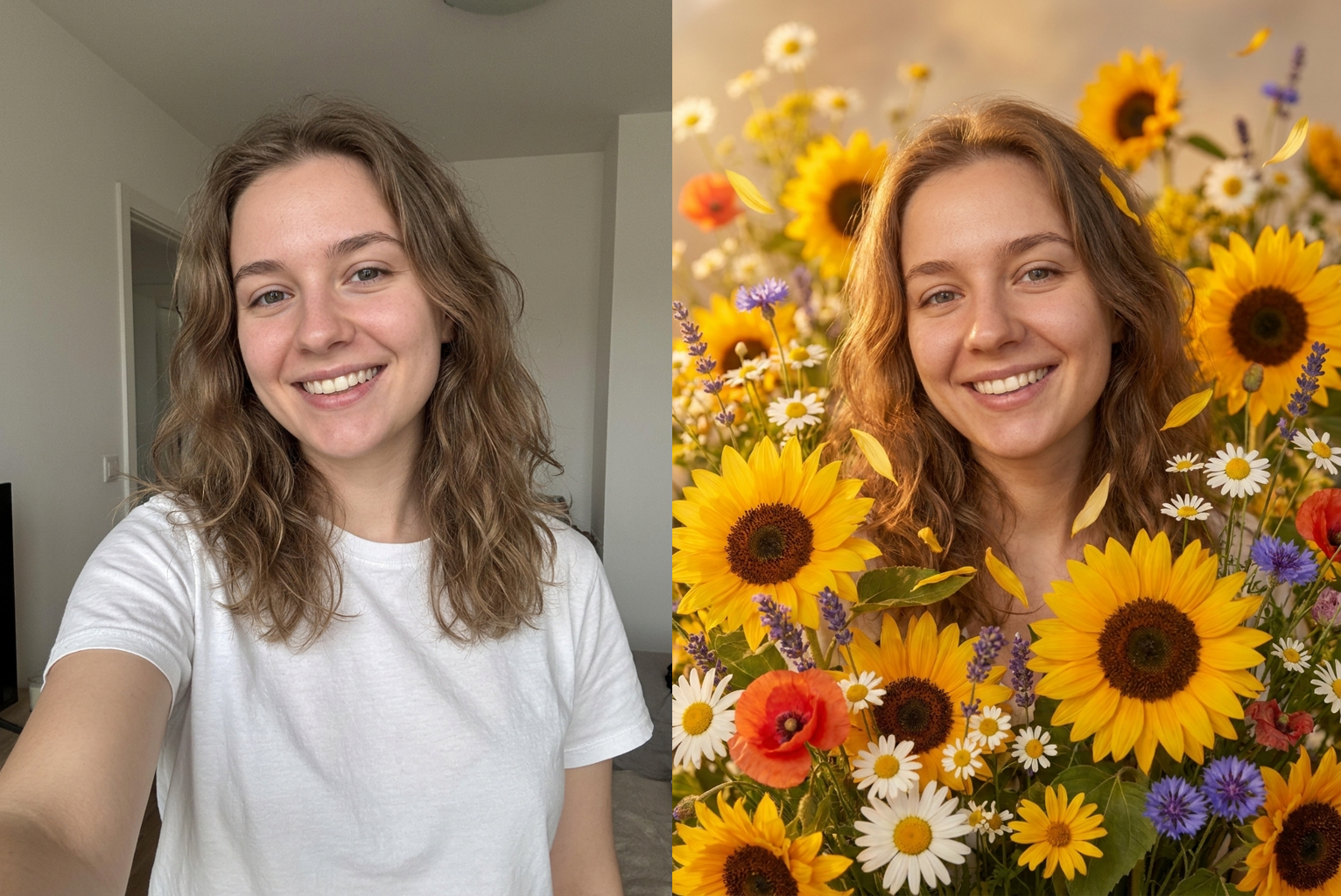
Sunflowers & wildflowers
Plain white-top selfie turned into a bright bouquet of sunflowers and meadow wildflowers.
Plain white-top selfie turned into a bright bouquet of sunflowers and meadow wildflowers.
Why this tool
Why Use This Flower Bouquet of Me AI
Everything you need for a dreamy floral portrait, none of the photoshoot.
Keeps Your Real Face
Identity preservation comes first — the person blooming inside the bouquet is unmistakably you, not a generic AI face.
Lush, Realistic Blooms
Detailed roses, peonies, ranunculus, wildflowers, soft greenery, and drifting petals give every portrait a rich, botanical finish.
Any Flower or Color
Type soft pink peonies, red roses, or bright sunflowers, or leave it blank for a beautiful default bouquet.
Results in Seconds
No studio, no fresh flowers to buy. Upload one photo and your floral portrait is ready in well under a minute.
Runs in Your Browser
Works on mobile and desktop with nothing to install — generate anywhere, then download instantly.
One Credit Per Image
Each floral portrait costs a single credit, so you can experiment across flowers and palettes until you love the result.
The rundown
Flower Bouquet of Me AI: Turn Any Selfie Into a Dreamy Floral Portrait
The flower bouquet of me ai turns an ordinary selfie into a dreamy portrait where you bloom from the heart of a lush bouquet. You have probably seen the floral trend fill your feed and wondered how people get that soft, petal-wrapped look without a studio, a florist, or a professional camera. That is exactly what this tool does: you upload a single clear photo of yourself, and the AI surrounds you with realistic roses, peonies, and wildflowers while keeping your real face intact. The result reads like a fine-art portrait shot in a flower-filled set, even though you never left your room. Instead of buying fresh flowers and arranging lighting, you get a polished floral look from one upload. In short, the flower bouquet of me ai does the styling, arranging, and photography for you.
Behind the scenes, the flower bouquet of me ai uses an advanced image-to-image model that understands both faces and botanical detail. When you upload your picture, the model isolates your facial features, skin tone, and expression, then builds an overflowing bouquet around them: layered petals, soft greenery, and blooms that fall naturally around your face and shoulders. Because the model preserves identity first and styles the flowers second, the person in the final image is unmistakably you — not a stranger tucked into a bunch of flowers. That priority is what separates a genuine face bouquet generator from a cheap filter that flattens every face into the same look. Your face is treated as fixed reference data and the bouquet as flexible set dressing, so the transformation feels grounded rather than pasted together.
Style range is where the flower bouquet of me ai really earns its place. The default look leans into a tasteful, richly colored arrangement, but you can steer it in any direction with a short description. Ask for soft pink peonies and baby's breath, a bold wall of red roses, cheerful sunflowers and daisies, or a wild, meadow-style mix with trailing greenery. Whether you want a romantic pastel palette, a moody dark-and-dramatic bouquet, or a bright spring burst, the generator adapts the flowers, colors, and lighting while keeping the natural petal-wrapped silhouette that makes the petal face trend look so striking. You can go delicate and airy or dense and maximalist depending on the mood you are after.
For the best result from the flower bouquet of me ai, start with a clear, front-facing picture where your face is visible and well lit. Avoid heavy shadows, sunglasses, or busy backgrounds that compete with the flowers, since the model works from what it can actually see. A simple head-and-shoulders shot is ideal because the bouquet frames your face directly; a half-body pose still works and leaves room for a larger arrangement. If your first result comes out too dark, try a brighter source image; if the flowers crowd your face too much, upload a photo with a little more space around your head. When you use the description box, be specific — 'soft blush peonies with eucalyptus and drifting petals' guides the turn my photo into flowers effect far better than a single word, and that detail is what makes the flower bouquet of me ai feel personal rather than generic.
People reach for a flower bouquet of me ai for all kinds of reasons. It is a lovely way to make a birthday or anniversary surprise, to refresh a profile picture with something soft and artistic, or to create a keepsake portrait for Mother's Day, Valentine's Day, or a wedding season. Content creators use the look for thumbnails and story backdrops; friends make matching floral portraits just for fun; some people print the result as a card or framed gift. Because each image is generated in seconds and costs a single credit, you can experiment freely — try different flowers and palettes in the description box and build a whole gallery of flower bouquet ai portrait images in one sitting with the flower bouquet of me ai.
Compare that to the manual alternative. A real floral portrait means buying armfuls of fresh flowers, arranging them without wilting, finding good light, setting up a camera, and then editing the shot to blend everything together — often with a photographer and a florist involved. A flower bouquet of me ai collapses that entire production into one upload. There is no flower budget, no scheduling, and no waiting for a shoot. You keep complete control: don't like the first result, change the flowers and regenerate. This approach gives you the polished outcome of a studio session with none of the logistics or expense, and because it is non-destructive you can always go back to your original photo and start over.
The workflow is deliberately simple. Upload your photo, optionally type a flower color or type, let the face bouquet generator process it, and download a high-resolution portrait you can post or print anywhere. Most images finish in well under a minute. Because the tool retains natural skin texture and realistic petal detail instead of over-smoothing everything, the output holds up even at full size on a phone screen. If you want variety, run the same photo a few times with different descriptions — the model introduces subtle changes in the blooms, lighting, and framing on each pass, so you end up with a small collection of floral portraits rather than one flat copy to choose from.
Getting started takes seconds and no design skill. Upload a clear selfie, add an optional flower description, generate, and your portrait from the flower bouquet of me ai is ready to share — no apps to install, no editing software, and no photoshoot to plan. A good flower bouquet of me ai runs right in your browser, works on mobile and desktop, and the first result is usually all you need. Whether you are making a heartfelt gift, upgrading a profile picture, or simply curious how you would look blooming inside a bouquet, this is the quickest way to find out. Upload your photo above and create your first floral portrait now.
Flower Bouquet of Me AI — FAQ
It is a tool that takes a normal photo of you and reimagines you inside a lush bouquet of flowers. You upload a selfie and the AI keeps your real face while surrounding you with realistic roses, peonies, and petals, so you appear to bloom from the center of the arrangement. The result looks like a dreamy fine-art floral portrait you never had to stage.
Yes. Identity preservation is the tool's first priority. It isolates your facial features, skin tone, and expression from the photo you upload, then builds the bouquet around them. The person framed by the flowers is recognisably you rather than a stranger, as long as your source photo shows your face clearly and in good light.
Absolutely. Type a description like 'soft pink peonies and baby's breath' or 'bright sunflowers and daisies' in the optional box, and the generator follows it. Leave the box blank and it produces a beautiful default bouquet. Because results vary slightly each run, you can regenerate the same photo to explore different blooms, palettes, and moods.
Use a clear, front-facing picture where your face and shoulders are well lit and unobstructed. Avoid sunglasses, heavy shadows, or busy backgrounds that hide your features. A simple head-and-shoulders shot works best, since the flowers frame your face — the model needs to see you clearly to blend the bouquet naturally around you.
Most floral portraits finish in well under a minute. You upload your image, the AI processes it, and a high-resolution result appears ready to download. If you want variety, run the same photo again immediately with a different flower or color and the tool will produce a fresh bouquet each time.
Each generation costs one credit, so a single floral portrait is inexpensive and you can keep experimenting. There is no subscription required to try it, and you only spend a credit when you actually generate an image, not while uploading or adjusting your photo or typing a flower description.
Your uploaded photo is used only to generate your floral portrait and is not shared or sold. Treat the output like any image you create online — download the results you want to keep. If privacy matters to you, upload a photo you are comfortable using and remove any sensitive details from the background before generating.
None at all. There is no software to learn and no manual retouching. You upload a selfie, optionally type a flower color, press generate, and download the finished portrait. The whole point of the tool is to hand you a polished, gallery-quality floral portrait without a photographer, fresh flowers, or any Photoshop knowledge on your part.