
AI Emoji Baby Generator
Upload any emoji and watch AI turn it into an adorable, hyper-realistic baby — same expression, same colors, same tiny props.
Turn Any Emoji into an Adorable Real Baby
Drag & drop or click to upload
Supports PNG, JPG, WEBP • Max 20MB
Sign in to start generating
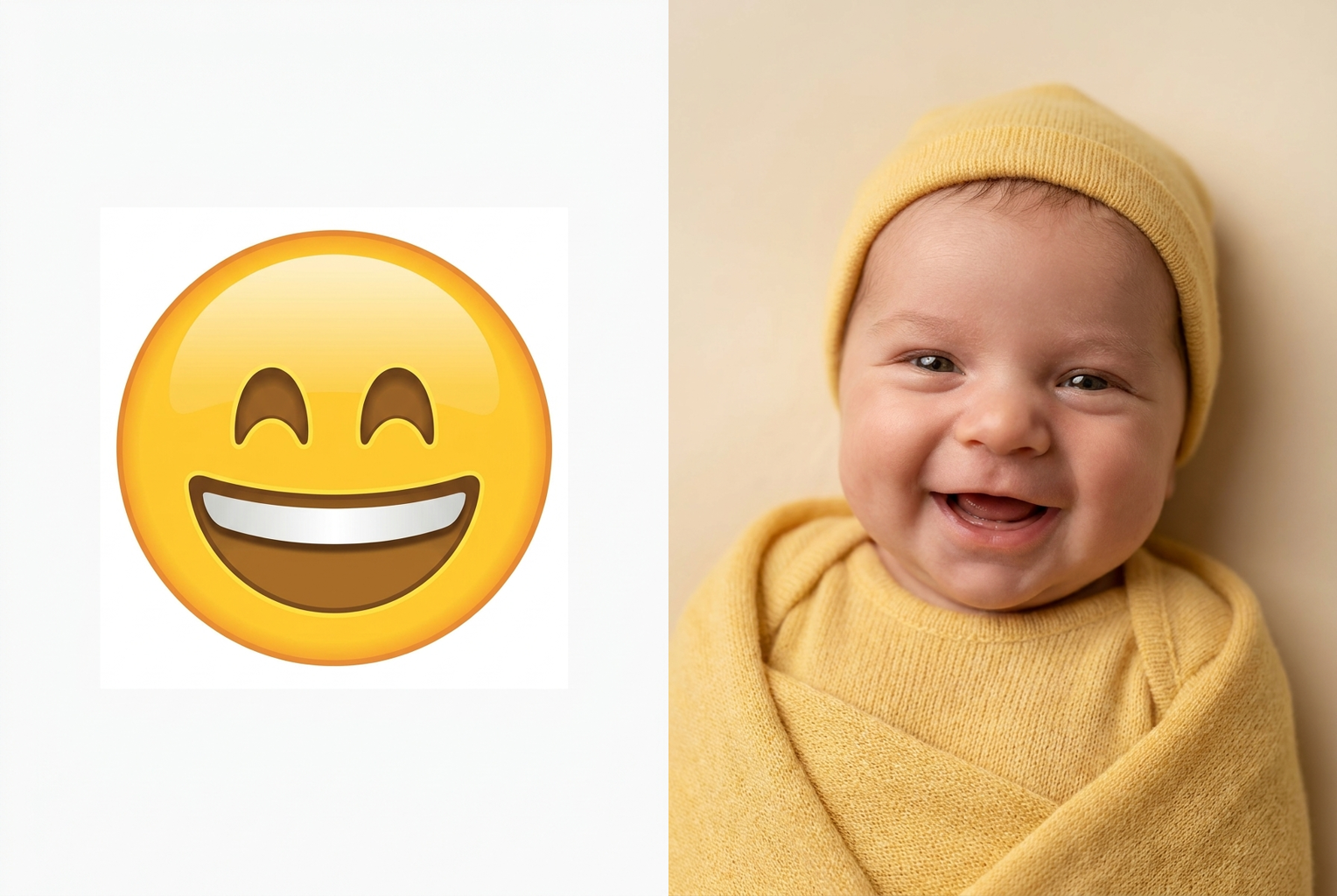
Grinning Emoji → Baby
The wide beaming grin becomes a giggling baby in a cheerful yellow onesie
AI-generated examples
1. Upload an Emoji
Screenshot or save any emoji — 😀 😭 😎 🥰 😇 — and upload the image. Clear, large emojis on a plain background work best.
2. AI Turns It into a Baby
The AI reads the emoji's expression, colors, and props, then renders a photorealistic baby that keeps every recognizable detail.
3. Download & Share
Your emoji baby is ready in about a minute — save it in full resolution and drop it in the group chat.
Emoji Babies Made with This Tool
Real before-and-after results generated with the exact prompt this page uses — upload an emoji and get the same style.
Grinning Emoji → Baby
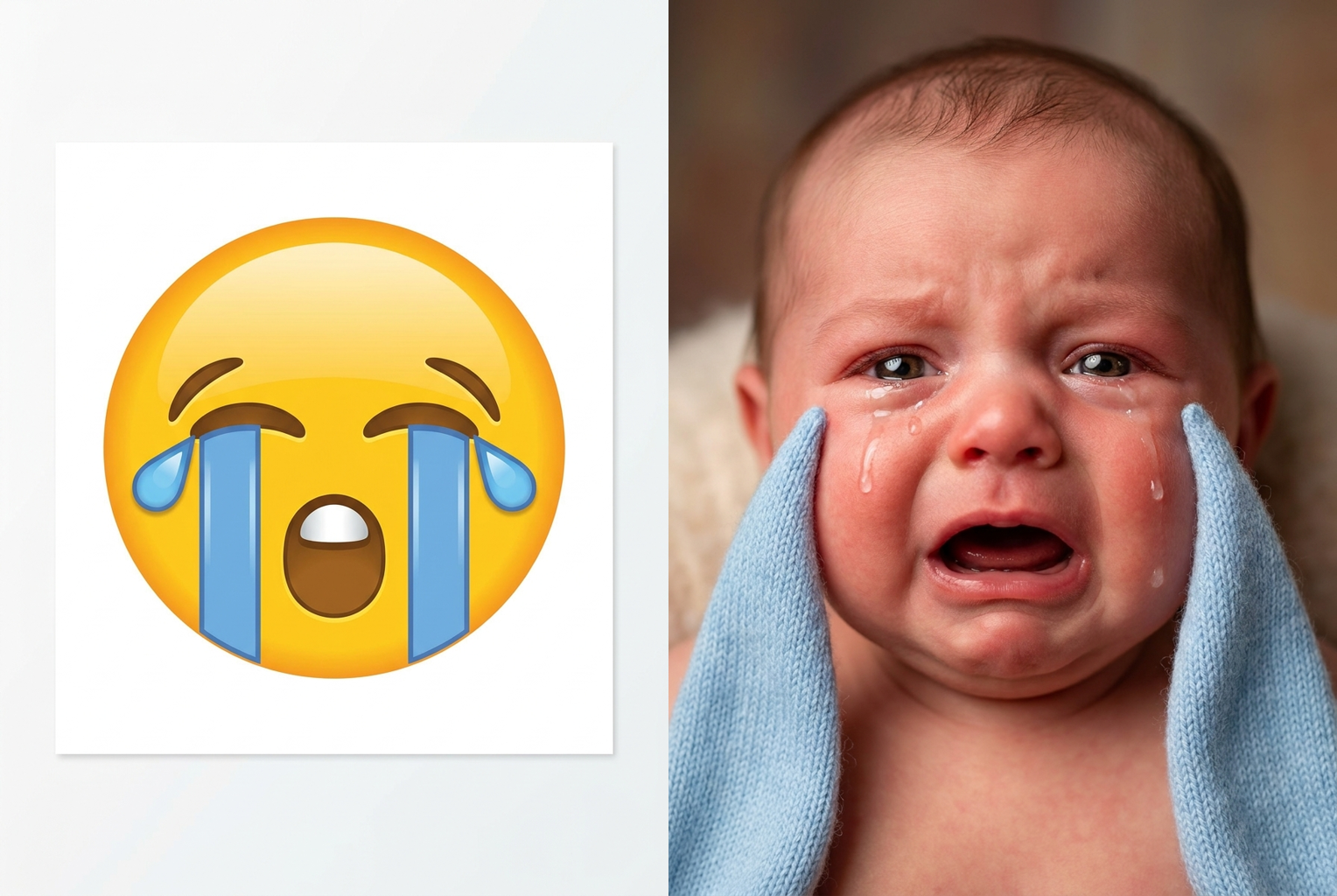
Crying Emoji → Baby
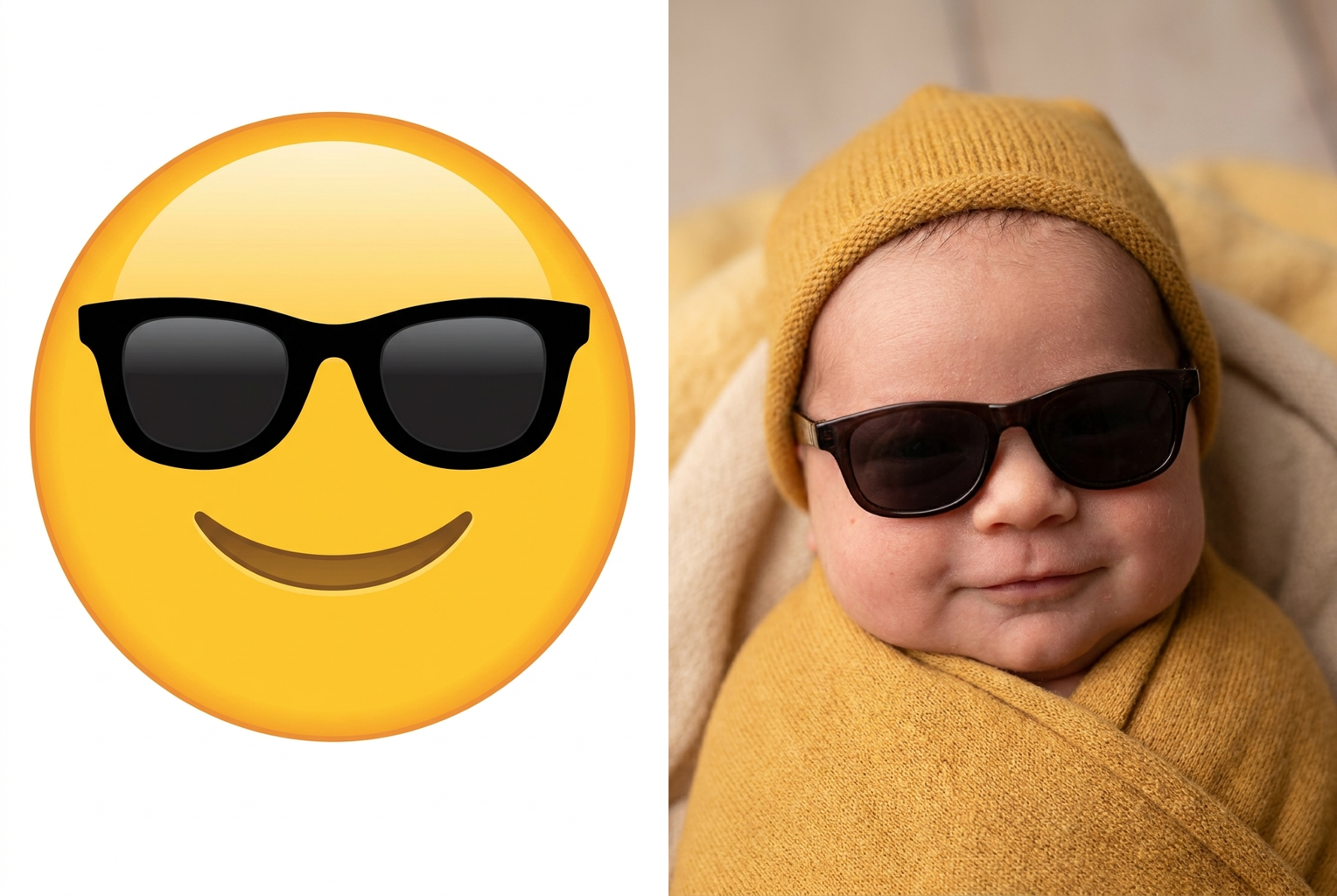
Cool Emoji → Baby
Expression Carries Over
A grinning emoji becomes a giggling baby, a crying emoji becomes a teary pout, an angry emoji becomes a red-faced tantrum — the mood always survives the transformation.
Colors Stay True
The emoji's dominant color flows into the baby's onesie, hat, blanket, or background, so a yellow emoji gives a cheerful yellow baby and a red one gives a flustered red-cheeked baby.
Props Become Real
Sunglasses, party hats, halos, tears, tongues out, and rosy cheeks all reappear as adorable real-world baby versions instead of flat emoji graphics.
Studio-Quality Photorealism
Soft lighting, shallow depth of field, chubby cheeks, and realistic newborn skin texture make each result look like a professional baby portrait, not a cartoon.
No Skills, No Prompts
No prompt writing, no editing, no waiting on an artist. Upload one emoji, press one button, and the AI handles the entire render in about a minute.
Endless Emoji Babies
There are thousands of emojis to try, and every run is a fresh render — build a whole nursery of emoji babies from your favorite reactions.
AI Emoji Baby Generator: Turn Any Emoji into a Real Baby
Emojis already carry a whole personality in one tiny symbol — so what happens when you make them human? An emoji baby generator answers that question in about a minute. Upload any emoji image and the AI reimagines it as a single, hyper-realistic human baby that keeps everything you love about the original: the expression, the color, the little props. A grinning 😀 becomes a beaming, giggling baby. A sobbing 😭 becomes a teary, quivering pout. A cool 😎 becomes a baby in impossibly tiny sunglasses. The magic of a good emoji baby generator is that the result doesn't just look like a generic cute baby — it looks unmistakably like *that* emoji, rendered in flesh, chubby cheeks, and studio lighting.
Under the hood, this emoji baby generator runs on a state-of-the-art image transformation model guided by a carefully tuned instruction. Rather than pasting a filter over the emoji, the model actually interprets it: it detects the facial expression, reads the dominant color, and spots any accessories — sunglasses, a party hat, a halo, tears, a stuck-out tongue — before rebuilding all of it as a photorealistic newborn. The color theme flows into the baby's onesie, hat, blanket, or background, so a yellow emoji yields a cheerful yellow-clad baby and a red angry emoji yields a red-faced, flustered one. That translation step is exactly what separates a real turn emoji into baby result from a random AI baby that has nothing to do with your input.
The range of emojis you can feed it is enormous, and that is half the fun. Face emojis with strong expressions are the sweet spot for any emoji baby generator: laughing, crying, heart-eyes, sleeping, angry, shocked, and the classic cool-with-sunglasses all become instantly readable babies. Prop-heavy emojis are even better, because the AI turns flat graphics into adorable real-world versions — the party-hat emoji becomes a baby in a real cone hat mid-celebration, the halo emoji becomes an angelic baby with a soft glow, the sunglasses emoji becomes a shockingly stylish infant. With thousands of emojis to try, a single baby emoji generator session can produce an entire nursery of different personalities.
Input choice is the biggest lever on quality. Give the emoji baby generator a large, clear emoji on a plain background so the model can read every pixel of the expression and props. Screenshots of a single emoji work great; crowded images with lots of tiny emojis do not, because the AI needs one clear subject to build the baby around. The stronger the emoji's expression, the more obvious the match: a wildly grinning emoji produces a baby whose joy is impossible to miss, while a subtle, neutral emoji produces a calmer, less dramatic result. If a run feels too tame, pick a more expressive emoji and try again — the emoji baby generator thrives on bold, unmistakable faces, and the emoji baby filter rewards clarity over subtlety every time. Lighting in the source barely matters, since the emoji is flat; what matters is that the expression and props read cleanly.
Once you have your emoji baby, the uses pile up fast, which is exactly why the emoji baby generator caught on as more than a one-off gimmick. The most popular use is the reaction image: a photorealistic crying baby or laughing baby lands ten times harder in a group chat than the plain emoji ever did. Friends run their favorite emojis and post matching sets — the sleepy baby, the angry baby, the heart-eyes baby — as a little cast of characters. People use them as playful profile pictures, meme templates, birthday-card art, and story stickers. Because the babies are AI-generated and not real people, they are completely safe to share anywhere, which is part of why the emoji baby trend spread so quickly across TikTok, Instagram, and group chats in the first place.
You could try describing all of this to a general-purpose image tool by hand, but that is a losing game — putting an emoji's exact expression, color, and props into words is slow and rarely lands. A dedicated emoji baby generator skips the prompt engineering entirely: it looks at the actual emoji you uploaded, extracts the details automatically, and applies one finely tuned baby-portrait formula with consistent, photorealistic polish. That single-purpose focus is why a purpose-built baby emoji generator reliably beats both the blank-prompt approach and any manual editing attempt. You get the trend-perfect result on the first try, without touching a slider or writing a single word of prompt.
The workflow is deliberately minimal. Upload your emoji, press the button, and the emoji baby generator returns a finished, high-resolution baby portrait in about a minute — no style menus, no editing skills, no waiting on an artist. Each run costs a single credit, so experimenting is cheap: rerun the same emoji for fresh poses and lighting, or feed it a dozen different emojis to build a full collection. Every render is drawn from scratch, so no two babies are identical even from the same emoji, yet they all share the same clean, wholesome, studio-photo style. Results download in full resolution, sharp enough to post anywhere or print as a card.
Getting started takes less than a minute. Scroll up, upload your favorite emoji, and click generate — the emoji baby generator handles everything else, and new users get free credits to try it without paying anything. Whether you want the ultimate crying-baby reaction image, a matching set of emoji babies for your friends, or just to see what 😎 looks like as an actual infant in tiny shades, the answer is one upload away. There is nothing to install and nothing to learn, so the emoji baby generator works the same on your phone or your laptop, right in the browser. Fair warning: emoji babies are dangerously shareable, and once your group chat sees the first one, everyone will be racing to turn their favorite emoji into a baby too.
AI Emoji Baby Generator — Frequently Asked Questions
It takes an emoji image you upload and reimagines it as a single hyper-realistic human baby. The AI reads the emoji's expression, dominant color, and any props, then renders a photorealistic baby portrait that keeps those details — so a smiling face becomes a beaming baby and a cool emoji becomes a baby in tiny sunglasses. The result looks like a real studio photo, not a cartoon.
Face emojis with a clear expression give the most fun results — grinning, crying, laughing, heart-eyes, angry, sleeping, and cool-with-sunglasses are all favorites. Emojis with distinctive props like a party hat, halo, or tears translate especially well because the AI turns those props into real baby accessories. Upload a large, clear emoji on a plain background so the AI can read every detail.
Yes — that is the whole point. The AI is explicitly instructed to carry the emoji's expression, color theme, and props into the baby. A yellow smiling emoji becomes a cheerful baby in a yellow onesie; a red angry emoji becomes a flustered, red-cheeked baby mid-tantrum. The stronger and clearer the emoji's expression, the more obvious the match will be in the final photo.
This tool is tuned for emoji images, so it reads best when the input is an actual emoji. If you upload a human photo it will still attempt a baby-style render, but the results are most reliable and most fun with clear emoji graphics. For turning your own photo into other styles, try our other photo tools — this one is built specifically for the emoji-to-baby trend.
Most emoji babies are ready in about a minute. Each generation costs one credit, and new users get free credits at signup, so you can try the emoji baby generator without paying anything. There are no settings to configure — upload the emoji, click the button, and the AI does the rest automatically.
Absolutely, and most people do. Because there are thousands of emojis and every run is a fresh render, you can build an entire collection — the laughing baby, the sleepy baby, the sunglasses baby, the angry baby — and post them as a matching set. They make hilarious group-chat drops, reaction images, and profile pictures.
Yes. Every generation is drawn from scratch, so the same emoji can produce slightly different babies — different poses, lighting, and outfit shades — while keeping the same expression and colors. Generate a few and keep your favorite. It costs one credit per run, so experimenting stays cheap.
Yes. The tool is designed to produce cute, wholesome, family-friendly baby portraits from emoji graphics — think of it as a fun reaction-image maker. The babies are AI-generated and not real people, so you can freely share them in chats, on social media, or as playful profile pictures without any privacy concerns.
Still have questions? Contact Support