
Couple Back Tattoo AI Generator
Upload a couple photo, pick a style, and the AI previews it as a photorealistic couple back tattoo so you can see the design on real skin before you commit.
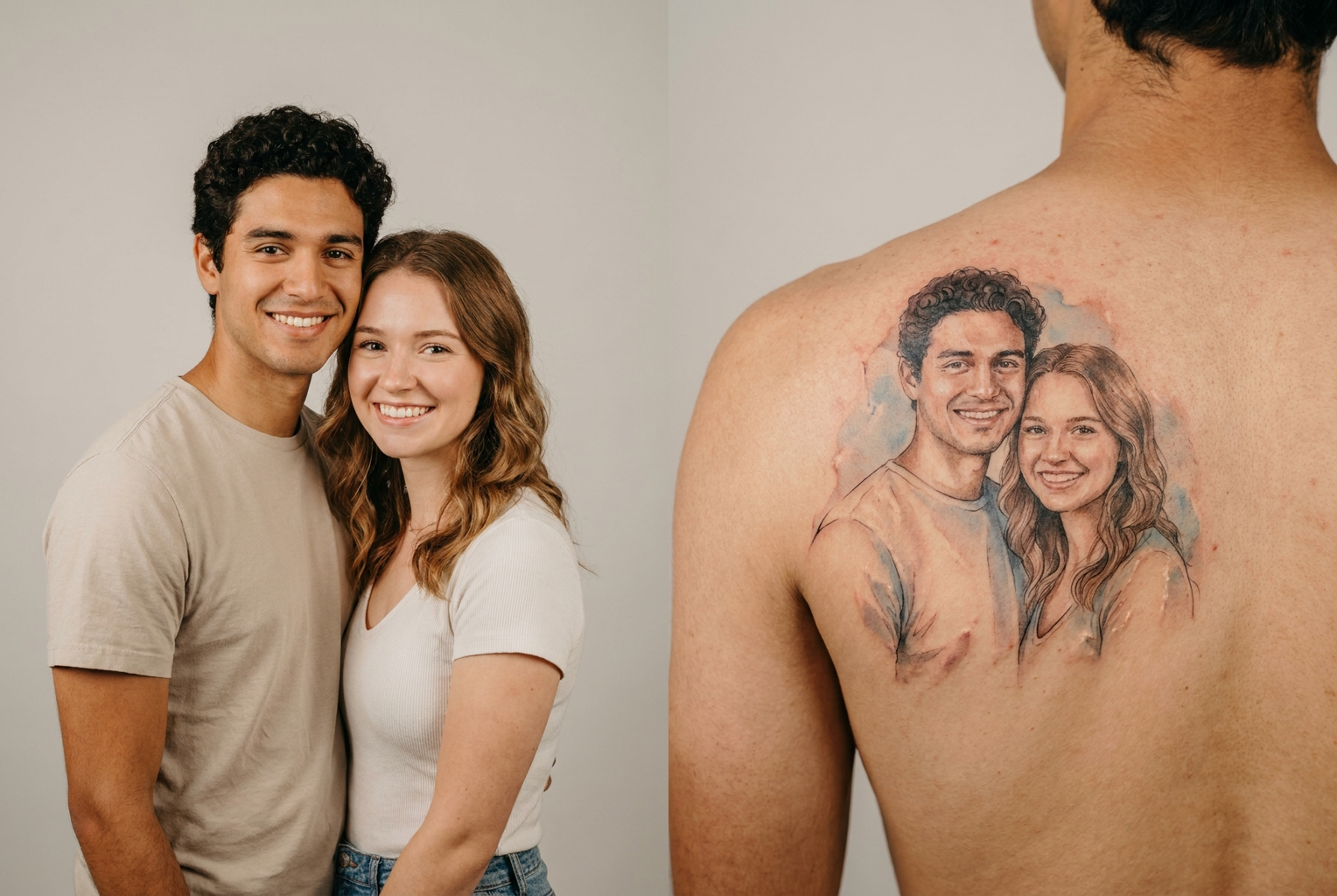
Couple photo → watercolor back tattoo
Style: "soft watercolor portrait" — muted color washes around a recognizable double portrait.
AI-generated examples
Couple Back Tattoo AI Generator
Turn your favorite couple photo into a photorealistic back tattoo preview in seconds.
Drag & drop or click to upload
Supports PNG, JPG, WEBP • Max 20MB
Sign in to start generating
How it works
Upload your couple photo
Choose a clear photo where both faces are well lit and easy to see. Close, front-facing shots give the AI the most detail to turn into a believable portrait tattoo.
Pick a tattoo style
Describe the look you want — fine-line black and grey, bold blackwork, soft watercolor, or realism. Being specific about linework and shading gets you a result that matches what a real artist could ink.
See it on real skin
The AI renders your couple as a detailed back tattoo on a realistic human back, with natural shading and body contouring. Download the preview or try another style for free.
Couple back tattoo previews
Real previews generated from a couple photo — the same two faces rendered as a back tattoo in three different styles.
Couple photo → watercolor back tattoo
Style: "soft watercolor portrait" — muted color washes around a recognizable double portrait.
Style: "soft watercolor portrait" — muted color washes around a recognizable double portrait.
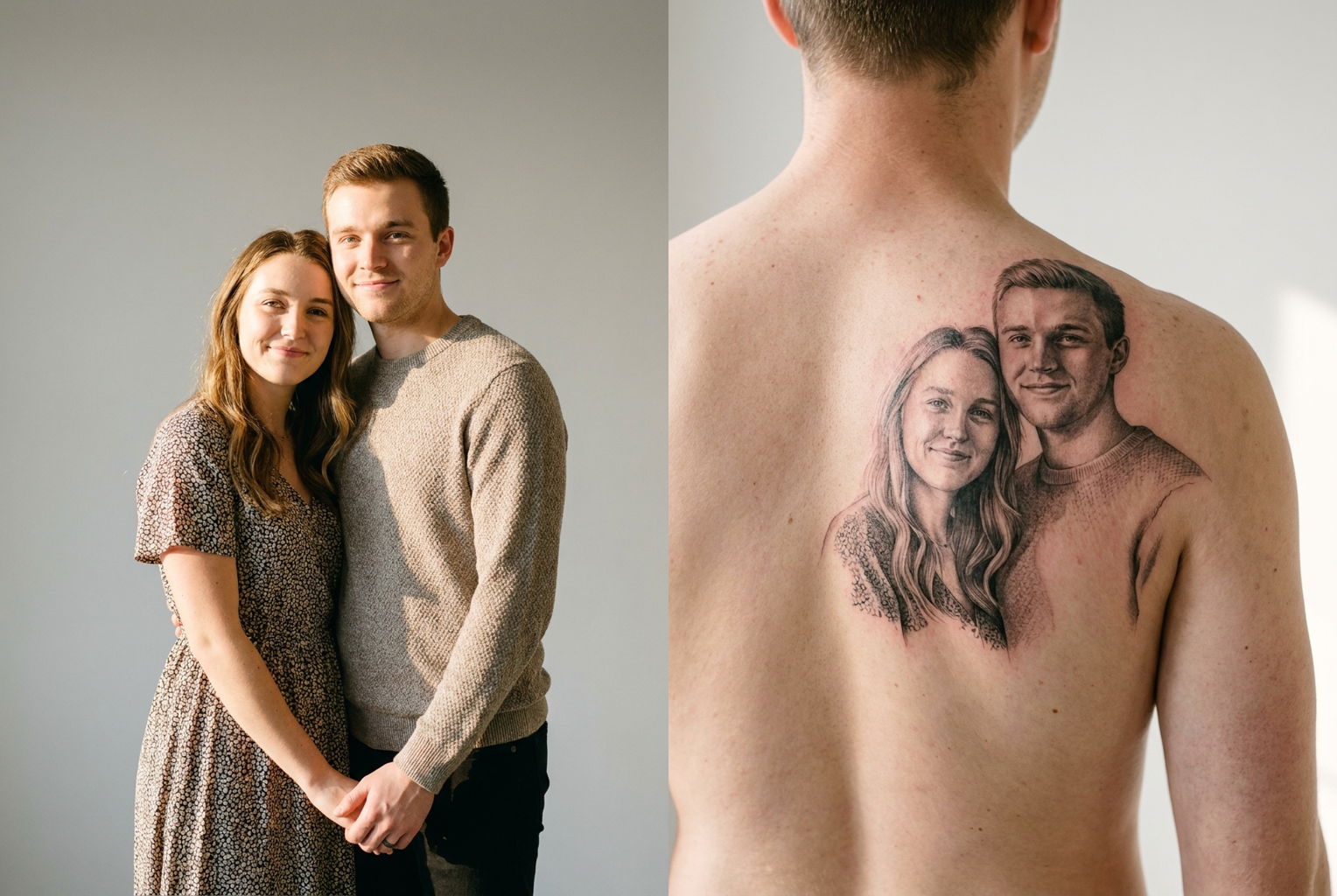
Couple photo → fine-line back tattoo
Style: "fine-line black and grey realism" — both faces kept recognizable, rendered as a soft double portrait on skin.
Style: "fine-line black and grey realism" — both faces kept recognizable, rendered as a soft double portrait on skin.
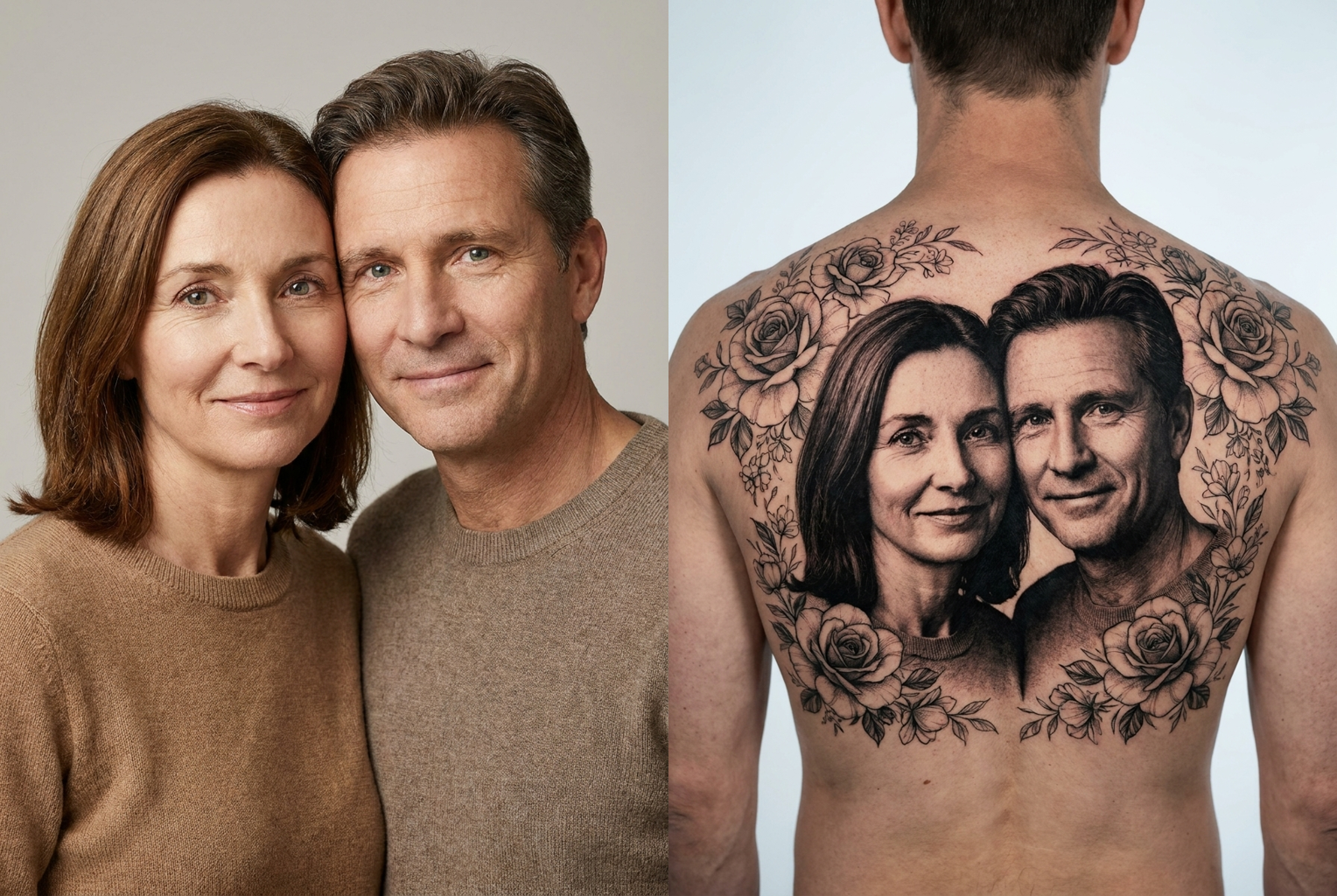
Couple photo → bold blackwork tattoo
Style: "bold blackwork with floral framing" — high-contrast double portrait framed by roses.
Style: "bold blackwork with floral framing" — high-contrast double portrait framed by roses.
Why this tool
Built for couples
The couple back tattoo generator keeps both partners recognizable in a single piece, so the finished portrait reads as the two of you together rather than two random faces.
Photorealistic on skin
Designs are rendered on a real-looking back with accurate shading, ink saturation, and contouring that follows the muscles — it looks like a healed tattoo, not a flat sticker pasted on.
Any tattoo style
Fine-line, black and grey realism, bold blackwork, watercolor, portrait realism, or minimal linework — describe the style and the AI renders your couple portrait in that direction.
Preview before you commit
A back piece is permanent and expensive. Previewing a couple back tattoo first lets you test placement, size, and style risk-free before you ever book a session or pay a deposit.
Results in seconds
No sketching, no design fees, no back-and-forth emails. Upload a photo, type a style, and get a finished back tattoo preview in moments, then iterate as many times as you like.
Works in the browser
Nothing to install. The tool runs online on desktop and mobile, so you can test couple tattoo ideas anywhere and download the result instantly to share with your artist.
The rundown
Couple Back Tattoo AI Generator: Preview Your Design on Skin
A couple back tattoo is one of the most meaningful pieces of body art two people can share — a portrait of each other carried permanently across the shoulders and spine. But because a back piece is large, expensive, and permanent, most couples hesitate: what will our faces actually look like inked on skin, and will the likeness survive the leap from photo to tattoo? This free couple back tattoo generator answers those questions in seconds. Upload a single photo of the two of you, choose a style, and the AI renders a photorealistic preview of your portrait as a tattoo on a real-looking back, so you can fall in love with the idea before you ever sit in the chair. Instead of imagining the design or trusting a rough sketch, you get a concrete image to react to, refine, and share.
The tool is built on an advanced image model that understands both faces and skin. When you upload your photo, it reads the likeness of both partners and redraws them as tattoo artwork, then composites that artwork onto a realistic human back with correct shading, ink saturation, and contouring that follows the muscles. The result is not a flat sticker pasted onto a body — it is a believable couple back tattoo that bends with the shoulder blades and catches studio light the way healed ink really does. That realism is exactly what makes a preview useful for planning a serious piece. A convincing couple back tattoo mockup also helps your artist, who can see the scale and placement you have in mind and quote the work more accurately from the start.
Style is where you get to experiment. A couple back tattoo can be rendered in fine-line black and grey for a soft, photographic feel, in bold blackwork for high contrast and longevity, in portrait realism for lifelike faces, or in watercolor for a looser, artistic mood. Simply describe the look in the style box — mention the linework, the shading, and any framing elements such as florals, banners, or lettering. The more specific you are, the closer the AI back tattoo portrait lands to what a real artist could actually ink, and the easier it is to compare directions side by side. Because style drives so much of how a back piece ages, previewing several versions of the same couple back tattoo helps you choose a look that will still read clearly years from now, not just one that looks striking on day one.
Getting a sharp result comes down to the photo you start with. The best source image is high-resolution and front-facing, with even lighting and both faces close together and clearly visible. Avoid sunglasses, hats, heavy shadows, and busy backgrounds, since anything that hides a face makes the portrait harder to reproduce. If your first couple back tattoo preview is not crisp enough, crop tighter on the two faces and generate again. A tight, well-lit crop almost always produces a stronger, more recognizable tattoo portrait than a wide, cluttered shot.
Couples reach for this tool at every stage of planning. Some use the couple back tattoo generator to surprise a partner with a proposal for matching ink, saving a preview to reveal at the right moment. Others are already booked and want to test placement and size before the session so the appointment runs smoothly. Many simply want to see several styles — realism versus blackwork, framed versus freestanding — so they can walk into a consultation with a clear reference instead of a vague idea. Beyond couples, people preview solo portraits of a child, a parent, or a pet, since the same AI back tattoo portrait process works for any face you upload. However you plan to use it, the goal is the same: replace guesswork with a clear picture, and make a permanent decision feel safe. A single shared couple tattoo reference can turn weeks of indecision into one confident yes.
The value of previewing first is hard to overstate. A back piece can take multiple sessions and cost hundreds or thousands, and unlike a drawing on paper, it cannot be undone. Seeing a couple back tattoo rendered on skin lets you catch problems early: a portrait that sits too high, a style that feels too busy, or faces that read better larger. Testing those decisions with a free preview removes the guesswork and the pressure, so the conversation with your artist starts from something concrete you can both react to rather than an abstract hope.
Using the generator takes under a minute from start to finish. Upload your couple photo, type the tattoo style you want, and the AI produces a finished preview you can download immediately. Because each render costs just one credit, you can explore freely — try black and grey, then blackwork, then a watercolor version, and keep the one that moves you. Save your favorites, share them with your partner, and bring the strongest image to your tattoo studio as a visual brief that communicates far more than words ever could. Many couples generate a whole set of couple back tattoo options in a single sitting, then narrow down together, which turns a stressful permanent decision into a relaxed, creative evening.
Ready to see your portrait on skin? Upload a photo and let the couple back tattoo generator turn the two of you into a realistic back tattoo preview right now. Remember that the image is a planning tool, not a substitute for a licensed artist — a professional will adapt the design to your body and ink it safely. But as a way to picture a shared couple back tattoo, compare styles with a true-to-life couple tattoo photo generator, and commit to a design with confidence, nothing beats seeing it rendered on real skin before the needle ever starts.
Couple Back Tattoo AI Generator — Frequently Asked Questions
It is an online AI tool that turns a photo of you and your partner into a realistic back tattoo preview. You upload a couple photo, describe the style you want, and the AI renders your faces as a detailed portrait tattoo on a human back so you can see the idea on real skin before visiting a studio.
Yes. The prompt instructs the AI to keep both people in your uploaded photo clearly recognizable and to render them as the tattoo artwork. For the best likeness, upload a sharp, well-lit photo where both faces are visible and not blocked by sunglasses, hats, or heavy shadows.
Almost any style you can describe. Fine-line black and grey, bold blackwork, portrait realism, soft watercolor, neo-traditional, and minimal linework all work. Mention the linework, shading, and any framing elements like florals or lettering, and the AI renders your couple portrait in that direction so you can compare several looks.
It is a preview only. The image shows what a couple back tattoo could look like on skin so you can plan placement, size, and style. Take the result to a licensed tattoo artist, who will adapt the design to your body and ink it safely. The AI does not replace a professional artist.
Yes. While the tool is tuned for couple portraits, you can upload a single face to preview a solo back tattoo portrait, or a photo of a loved one, pet, or family member. The AI renders whoever is in the photo as the tattoo artwork on a realistic back.
A high-resolution, front-facing photo with even lighting and both faces close together gives the cleanest result. Avoid busy backgrounds, extreme angles, and low light. If the first preview is not sharp enough, crop tighter on the faces and generate again for a stronger portrait.
Each generation uses one credit, and new users can try the couple back tattoo generator for free. There are no design fees and no appointment needed to preview an idea. You only pay a tattoo studio later if you decide to get the finished piece inked for real.
Yes. Every preview can be downloaded and shared, which makes it easy to send a reference to your tattoo artist or compare options with your partner. Many people generate several styles, pick a favorite, and bring that image to a consultation as a starting point.