
Cartoon in Real Life AI
Drop a friendly cartoon character into any real photo — the wholesome imaginary-friend effect, with your face kept completely real.
Cartoon in Real Life AI
Upload a real photo and a cute cartoon character appears in your scene. 1 credit per image.
Drag & drop or click to upload
Supports PNG, JPG, WEBP • Max 20MB
Sign in to start generating
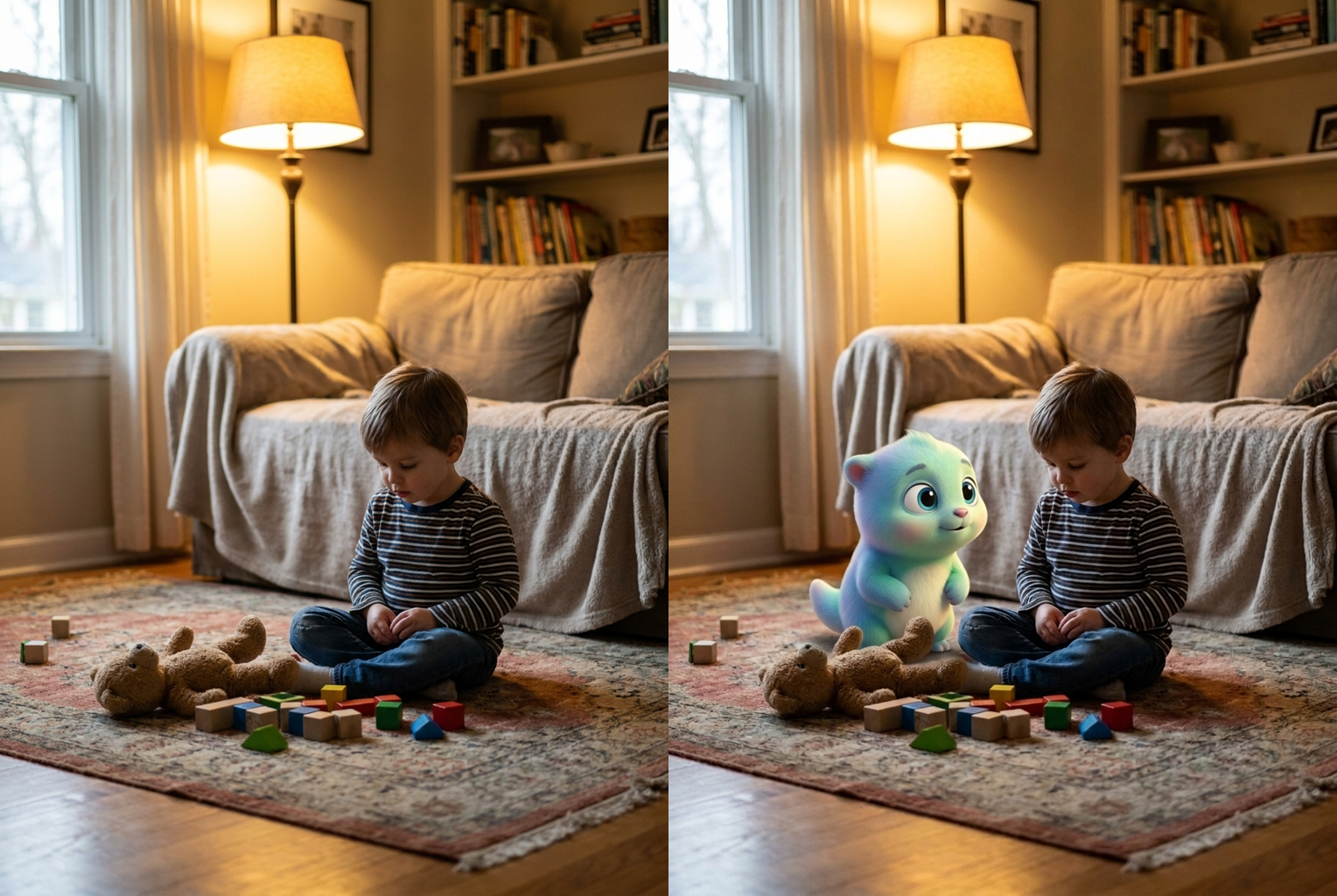
Living Room
Before → After: a cozy living-room snapshot with a pastel cartoon creature sitting alongside
AI-generated examples
How the Cartoon in Real Life Effect Works
Three steps, about thirty seconds, no masking or compositing software required.
1. Upload Your Real Photo
Drop in any everyday snapshot — a selfie, a street photo, a shot from your bedroom or a night walk. PNG, JPG and WEBP up to 20MB work. A clear photo with visible faces and natural lighting gives the AI the most to blend against.
2. AI Drops In a Cartoon Companion
The tool reads the depth, perspective and lighting of your scene, then composites an original 3D cartoon character into the frame — matching shadows, grain and color so it looks like it was really standing there when the photo was taken.
3. Download and Share
In about thirty seconds you get a finished image where a friendly cartoon character lives inside your real photo. Save it in full resolution and post the weirdcore 'imaginary friend' moment straight to TikTok, Reels or your group chat.
Before and After
Real outputs from this tool, made with the exact prompt the page uses. Your original photo on the left, the cartoon-guest version on the right.
Living Room
Why This Cartoon in Real Life Tool Looks So Convincing
Most apps turn you into a cartoon. This one keeps your photo real and drops a matched cartoon character into the scene.
Photoreal Compositing
The cartoon character is blended with matched lighting, contact shadows, perspective and film grain, so it reads as genuinely present in the scene instead of a flat sticker slapped on top.
Your Face Stays You
Real people in the photo are never redrawn. Faces, hair, outfits and the whole background stay exactly as shot — only the new cartoon companion is added to the frame.
Original Character Design
Every companion is an original, wholesome cartoon creature with soft pastel colors and a glossy 3D finish — no copyrighted mascots, just a cute friend that fits your shot.
Done in Seconds
No masking, no layer work, no compositing software. Upload a photo and the AI handles perspective, lighting and blending automatically in roughly half a minute.
Works With Any Scene
Cozy cafes, neon night streets, messy bedrooms, sunny parks — the effect adapts the character's lighting and mood to whatever real environment you upload.
Weirdcore Imaginary-Friend Vibe
That uncanny, wholesome 'it was always there' feeling is baked in, giving your posts the exact surreal tone driving the trend across short-video feeds.
Cartoon in Real Life AI: Drop a Cartoon Character Into Any Photo
The cartoon in real life effect takes an ordinary photograph and drops a friendly animated character into it, so the finished image looks like a cute cartoon creature was genuinely standing in your scene when the shutter clicked. It is the inverse of a cartoon-me filter: instead of redrawing you, the cartoon in real life look keeps your photo, your face and your whole world completely real, then adds one wholesome imaginary-friend companion to the frame. That single twist is what gives the trend its uncanny, heart-warming charm — a hand-drawn-feeling character quietly living inside a real photograph. It is playful, a little surreal, and instantly readable, which is exactly why the effect spread so fast across short-video feeds and group chats.
Under the hood, the cartoon in real life generator studies your uploaded image before it changes anything. A diffusion model reads the perspective, depth, light direction and color temperature of the scene, works out where a character could plausibly stand, and then paints an original 3D cartoon companion into that spot. It matches the creature's shading, contact shadow, film grain and grading to the surrounding photo so the blend holds up under a second look. Crucially, the real people are locked: their faces, hair and clothing are preserved untouched, which is why the result feels like a cartoon character in a real photo with your real friends still fully themselves rather than a fully redrawn illustration. The AI is doing careful compositing work, not just pasting a sticker on top.
Style-wise, the tool leans into a soft, glossy, Pixar-adjacent look: rounded geometry, big expressive eyes, pastel colors and a gentle rim light that helps the character sit inside your scene. Because the environment stays photographic, you get a deliberately surreal contrast — a squishy animated friend next to a very real cafe table, sidewalk or bedroom. That contrast is the whole point of the cartoon in real life aesthetic, and it reads especially well in the moody, slightly weirdcore night shots that pushed the effect across short-video feeds this season. Whether your photo is bright and cheerful or dim and cinematic, the character's lighting is tuned to match, so the cartoon in real life blend never feels like it was dropped in from a different world.
Getting a clean composite comes down to your source photo. Feed the cartoon in real life tool a sharp, well-lit image with a bit of empty space beside the subject and the AI has room to place the character and cast a believable shadow. A cafe selfie by a window, a person walking a neon-lit street at night, or a kid sitting on a living-room floor all work beautifully. Avoid very dark, blurry or heavily filtered originals, since a muddy input makes it harder for the model to match grain and lighting convincingly. If the first result places the companion somewhere odd, just run it again — each pass reconsiders the scene and often finds a more natural pose or position for the character.
Creators are using the effect in a lot of playful ways. Some build a whole photo series where the same cartoon companion follows them from scene to scene like a secret friend; others use a single striking shot as a meme or a wholesome reveal for a caption. It is a natural fit for TikTok and Reels storytelling, for birthday or holiday cards, for couple and pet photos, and it is the easiest way to put a cartoon in your photo, and for anyone who wants their feed to feel a little more magical. Because the character is original, every cartoon in real life post stays safe to share without borrowing a branded mascot, and the consistent art style means a batch of images reads as one cohesive little story.
Doing this by hand is genuinely hard. To fake a cartoon in real life shot manually, an artist would model or draw a character, mask it into the plate, hand-paint shadows, match the film grain and grade the whole thing — often an hour or more of compositing per image. The AI collapses that pipeline into a single upload. You are not paying for a designer's afternoon; you get a matched, blended result in about thirty seconds, and you can regenerate variations until the placement feels right. That speed is what turns a fiddly visual-effects job into something you can do on your phone between messages, which is why the cartoon in real life look has become so accessible.
The workflow stays deliberately simple. Upload your photo, let the model analyze the scene and composite the character, then review the before-and-after: your untouched original on one side and the finished cartoon-guest frame on the other. If the pose or position is not quite right, run it again for a fresh take — each pass may nudge the companion to a new spot or expression. Once you are happy, download the full-resolution image and it is ready to post, print or send. There are no watermarks buried in the corner and no complicated export settings to wrestle with — the finished picture is simply yours to keep.
Getting started takes seconds. There is nothing to install, no compositing software to learn and no design skill required — just bring a photo you love and let the cartoon in real life generator do the blending. Your first runs are covered by free credits, and each generation after that is a single credit, so it is cheap to experiment with different photos and scenes. Upload a shot, watch a friendly cartoon character quietly appear in your real world, and share the wholesome, slightly surreal moment that has everyone doing a double take. This cartoon in real life generator turns a tricky visual-effects trick into a one-tap upload. Once you see your first cartoon in real life image, you will want to make a whole collection.
Cartoon in Real Life AI FAQ
It keeps your uploaded photo fully real — the same people, faces, outfits and background — and seamlessly composites a cute original cartoon character into the frame. The result looks like a friendly animated creature was genuinely standing in your scene when the shot was taken, giving that surreal imaginary-friend feeling that spread across short-video feeds. The whole blend happens automatically in about thirty seconds.
No. This tool does the opposite of a cartoon-me filter. Real people in your photo are never redrawn — your face, hairstyle, skin tone, expression and clothing stay exactly as they were shot. Only the new cartoon companion is added to the scene, so you and your friends still look completely like yourselves next to the animated character.
No. The AI generates an original, wholesome cartoon companion — a rounded pastel 3D creature with big friendly eyes — rather than copying any branded or copyrighted mascot. That keeps your images safe to post and share while still delivering the cute, slightly uncanny look people love about the trend.
Clear, well-lit everyday photos work best: selfies, street shots, room interiors or outdoor scenes. Natural lighting and some visible empty space next to the subject give the AI room to place the character and match shadows convincingly. Very dark, blurry or heavily filtered images make a clean blend harder, so start with a sharp original for the strongest result.
Each image costs 1 credit. New accounts get free credits to try the effect, and you can regenerate as many times as you like — each fresh run may place the cartoon companion in a slightly different pose or spot in your scene, so it is worth trying a couple of variations to pick the most natural-looking composite.
Yes. Upload photos one at a time and run each through the tool to build a whole series featuring your cartoon companion across different scenes — a cafe, a night street, your living room. Because the character design stays consistent in style, the images feel like they belong to the same wholesome, weirdcore story when you post them together.
Not at all. The point of this tool is to skip masking, layering and manual blending entirely. You upload a photo, the AI reads the scene's perspective and lighting, drops in the character and matches the shadows and grain for you. There is nothing to install and no design skills required — just a photo and one click.
The images you generate are yours to download and post. Because the cartoon companion is an original design rather than a licensed character, you avoid the copyright headaches of using a branded mascot. As always, make sure you have the right to use the underlying photo you upload, especially if it features other people.
Still have questions? Contact Support