
Bob Haircut Filter
Upload one photo and the bob haircut filter shows you with the viral bob in seconds — same face, brand-new haircut, no scissors required.
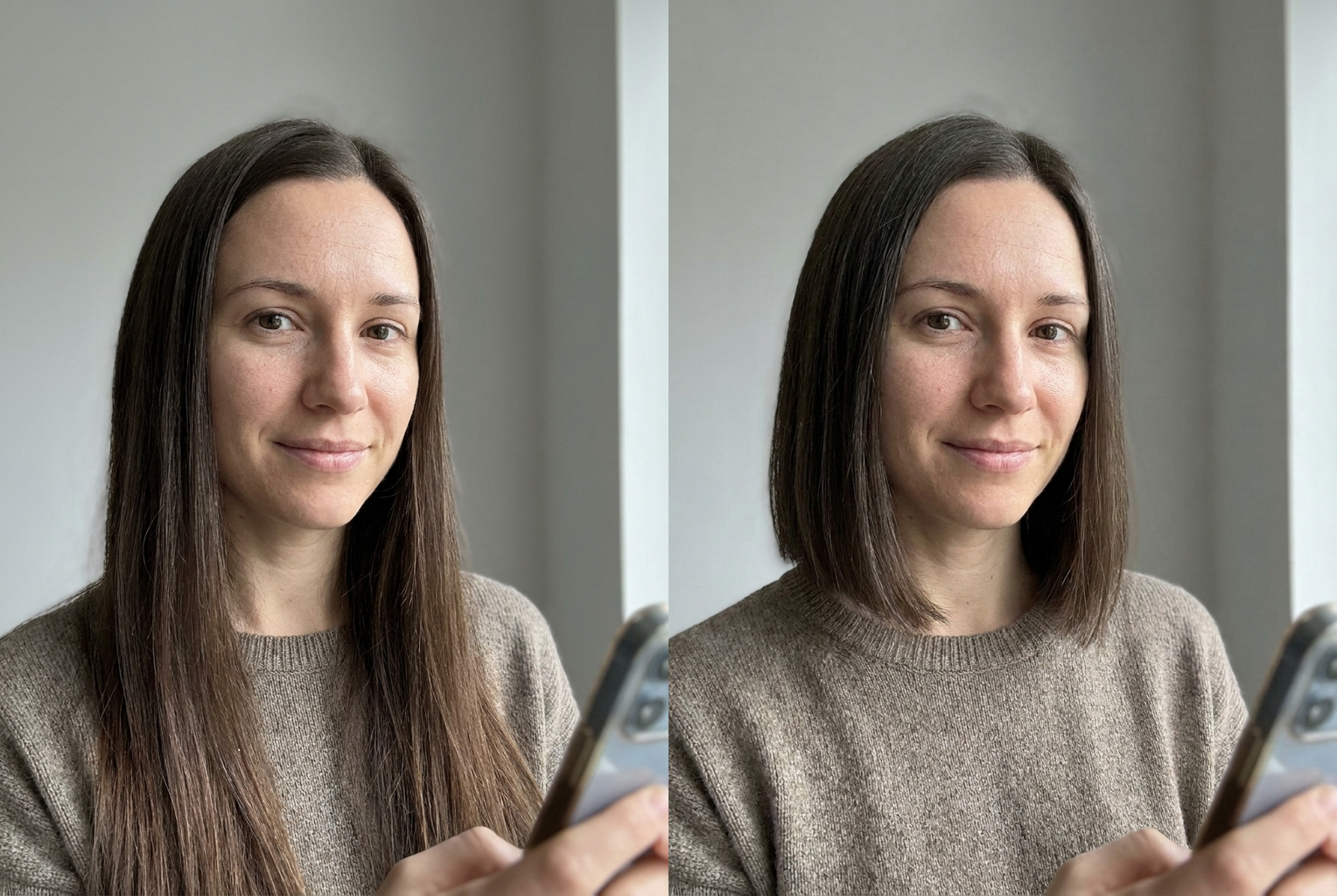
Long brown → blunt bob
Shoulder-length hair cut to a sharp chin-length bob — same face, same color, brand-new cut.
AI-generated examples
See Yourself With a Bob
Upload a clear photo and get an instant, photorealistic preview of yourself with the viral bob haircut — your face stays exactly the same.
Drag & drop or click to upload
Supports PNG, JPG, WEBP • Max 20MB
Sign in to start generating
How it works
How the Bob Haircut Filter Works
Three steps, about ten seconds, zero commitment.
Upload your photo
Pick a clear, front-facing selfie where your face and hairline are fully visible. Good lighting and a plain background give the cleanest results.
Let the AI do the cut
The filter detects your hair and replaces it with a realistic chin-length bob, while locking your face, skin tone, and expression in place.
See the before and after
In seconds you get a photorealistic preview of yourself with a bob. Download it, share the transformation, or prank a friend.
Before & After: The Viral Bob, On Real Photos
Each example was generated with this tool's own filter — one source photo, one click, same face. Only the hair becomes a bob.
Long brown → blunt bob
Shoulder-length hair cut to a sharp chin-length bob — same face, same color, brand-new cut.
Shoulder-length hair cut to a sharp chin-length bob — same face, same color, brand-new cut.
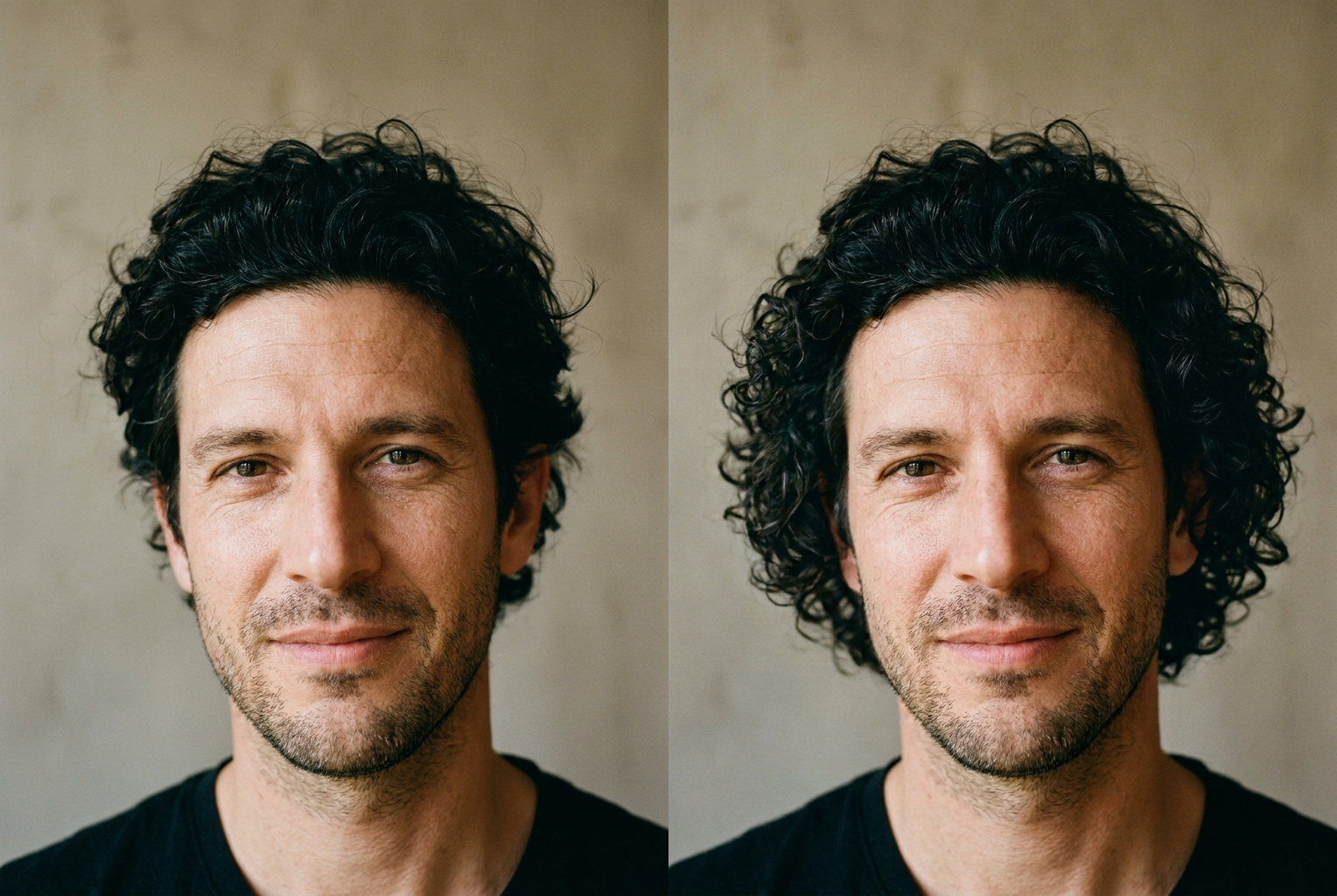
Curly black → curly bob
A full curly bob that keeps the natural texture — the filter works on any hair type and any gender.
A full curly bob that keeps the natural texture — the filter works on any hair type and any gender.
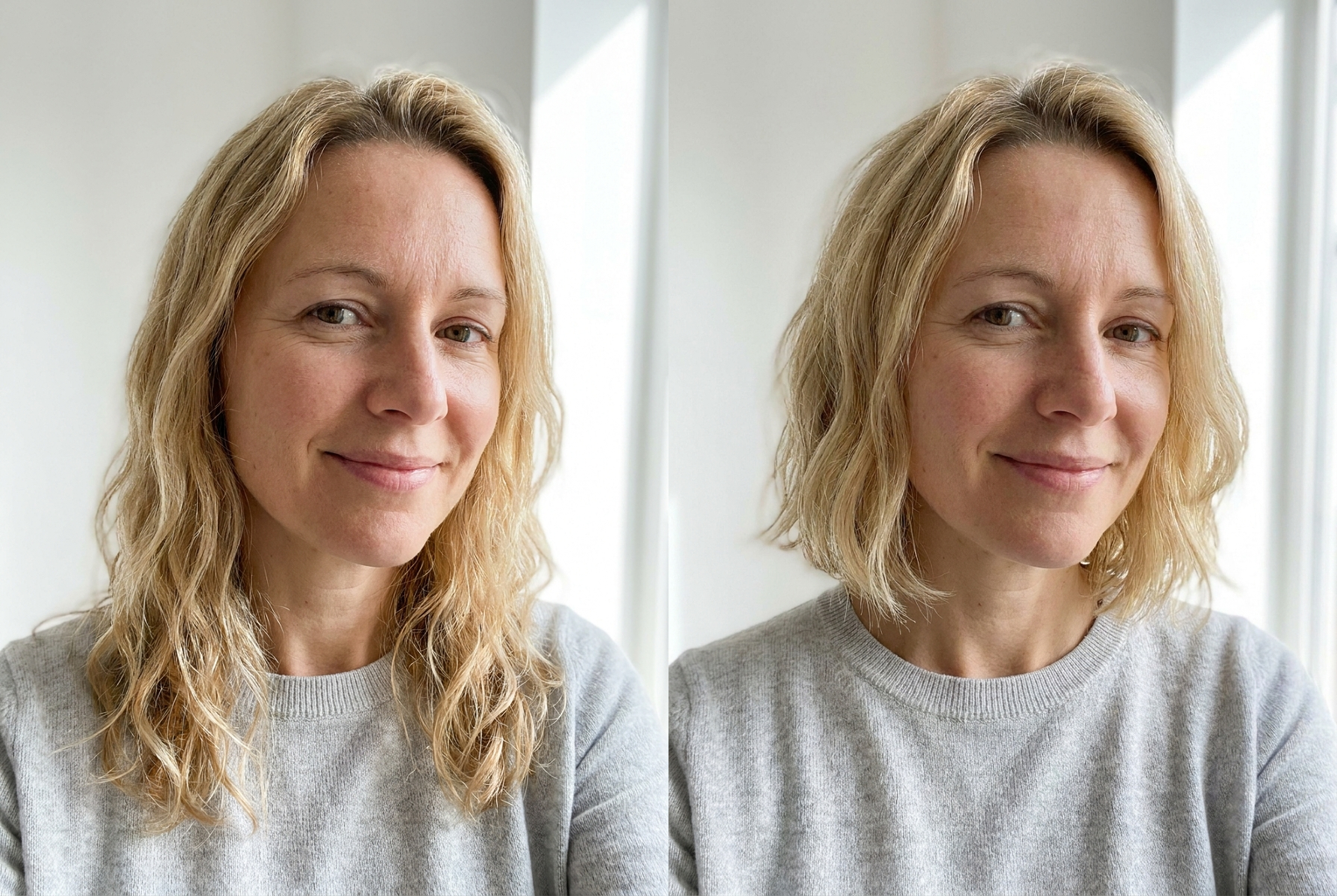
Long blonde → wavy bob
Long waves shortened to a soft wavy bob, keeping the exact blonde and the same smile.
Long waves shortened to a soft wavy bob, keeping the exact blonde and the same smile.
Why this tool
Why This Bob Filter Looks Real
Photorealistic bob
The bob is rendered with real individual strands, a natural hairline, and lighting matched to your photo — it looks like a genuine salon photo, not a sticker.
Your face stays yours
The AI is instructed to preserve your facial features, face shape, skin tone, and expression exactly. Only the hair changes, so the preview is honest.
Instant results
No app install, no CapCut template, no editing skills. Upload a selfie and the bob haircut filter returns a finished image in seconds.
Works for everyone
Any starting hair length, color, or texture, and any gender. Long hair, curly hair, even a buzz cut — the filter adds a believable bob to all of them.
Salon-ready downloads
Save the high-resolution before-and-after and bring it to your stylist so you both see exactly the same target cut.
Prank-ready
The transformation is convincing enough to fool friends and family — the reason the viral bob filter prank took over feeds in the first place.
The rundown
Bob Haircut Filter: Try the Viral Bob on Your Own Photo
The bob haircut filter is the AI effect behind one of the year's most-shared beauty trends: upload a single selfie and watch yourself transform into someone with a sharp, chin-length bob. It answers the question that stops people in front of every mirror — would a bob actually suit me? Instead of booking a salon appointment, committing to the scissors, and spending months growing your hair back if you hate it, you let the bob haircut filter show you the result first. There is nothing to install, no template to learn, and no editing skill required. One photo and one click produce a realistic preview of your own face wearing the exact haircut that has been flooding feeds all year.
What makes this bob filter feel so convincing is the model doing the work underneath it. When you submit your photo, a state-of-the-art image editing model identifies your hair, understands where your hairline and face begin, and regenerates only the hair as a clean chin-length bob. Your facial features, face shape, skin tone, eye color, and expression are locked in place, so the person looking back is unmistakably you. The new hair is not a wig graphic pasted over your head — strands fall naturally around your jaw, the blunt bottom edge sits where a stylist would cut it, and the lighting on the bob matches the lighting in your original shot. That realism is exactly why the viral bob haircut filter fools friends and family so easily.
The classic look the bob haircut filter creates is the blunt, chin-length bob with a straight-cut bottom edge — the silhouette that drove the trend — but the result adapts to you. If your photo shows a round face, the bob frames it; if you have a long face, the same cut reads differently, and you get to see that before you decide. The filter keeps your natural hair color and texture by default, so a person with dark wavy hair gets a dark wavy bob and a blonde gets a blonde one. Because it works from your real features rather than a generic model, the bob filter gives you a preview that is actually about your head, not a lookbook photo of a stranger who happens to have great hair.
A few simple habits make the bob haircut filter shine. Start with a clear, front-facing photo in good light where your face and current hairline are visible — daylight beats a dim bathroom, and a plain background helps the AI separate your hair cleanly from the scene. Avoid hats, heavy shadows across the face, and very low-resolution images, since the model can only work with what it can see. A relaxed, natural expression tends to produce the most believable before-and-after, because the only thing that changes between the two images is the hair. If your first result is close but you want to see it again, you can reupload and run the bob hair filter as many times as you like.
People reach for the bob haircut filter for more reasons than the viral prank. The most practical is the pre-salon sanity check: see yourself in the exact cut you are considering, screenshot it, and bring that image to your appointment so you and your stylist are picturing the same thing. Others use it to settle a long-running debate with themselves about going short, to plan a dramatic post-breakup change without the regret, or simply to join the trend and post their own transformation. Parents run their kids' photos through it for a laugh, and plenty of people try it on a pet photo just to see the chaos. The bob haircut filter handles all of these uses from the same single upload. Whatever the reason, the appeal is the same — a big, irreversible-looking change that costs nothing and reverses with the back button.
Before tools like this, previewing a bob meant holding your hair up in the mirror and squinting, or scrolling salon lookbooks full of models who look nothing like you. Neither answers the real question, because a haircut lives or dies by how it meets your specific face shape, jawline, and features. A bob haircut filter renders the cut on your actual face with photographic realism, which is why the preview feels decisive in a way a reference photo never can. And unlike a real haircut, the preview is instant, free of commitment, and endlessly repeatable — you can see yourself with a bob in the time it takes to find the salon's phone number, and change your mind just as fast.
The workflow is intentionally simple: upload your photo, press the button, and let the AI cut the hair. Each result arrives in high resolution and costs a single credit, ready to download or share. Because the generation is fast, the bob filter doubles as a quick experiment station — run your photo, look at the before and after side by side, and decide in seconds. Many people keep their favorite transformation as a personal reference, adding it to the running list of styles they have been curious about. When you finally sit in the salon chair, you arrive with something far better than a description or a picture of a celebrity: a realistic photo of your own head already wearing the bob.
Getting started with the bob haircut filter takes less than a minute. Choose a recent, well-lit selfie, upload it above, and let the AI show you the version of yourself with a bob. New users get free credits at sign-up, so you can test the bob haircut filter on a real decision — or just for the fun of a convincing prank — before spending anything. Credits are shared across every tool on the site, so the same balance also powers video generation and the other photo tools. Upload a photo, give yourself a bob, and finally see the haircut you have been wondering about — no scissors, no regret, no waiting for it to grow back.
Bob Haircut Filter FAQ
It is an AI photo tool that shows you with a chin-length bob. You upload a selfie, and the filter replaces your current hair with a realistic bob while keeping your face exactly the same. It recreates the viral TikTok and CapCut bob effect in your browser, with no app to install and no template to learn — just one photo and one click.
No. The generation prompt explicitly instructs the model to keep your facial features, face shape, skin tone, and expression exactly as they are and to change only the hair. That identity preservation is the whole point — you are seeing your real face with a new bob, not a lookalike or a different person wearing the cut.
A clear, front-facing photo in good lighting where your face and current hairline are fully visible — a well-lit selfie or headshot is ideal. Avoid hats, heavy shadows across the face, and very low-resolution images. A plain background helps the AI separate your hair cleanly from the scene and produces a more believable before and after.
Yes. The filter adds a believable bob regardless of your starting length, color, or texture. Long hair is shortened to the jaw, curly hair becomes a curly or waved bob, and even a buzz cut or very short hair can be regenerated into a full chin-length bob. It works for any gender and any hair type.
The bob is rendered with real individual strands, a natural hairline, and lighting matched to your photo, so it reads as a genuine salon photo rather than a pasted-on wig. It is realistic enough to prank friends. Real-world results still depend on your hair's density and growth, so treat the image as a highly accurate reference to discuss with your stylist.
That is exactly why the trend took off. The transformation is convincing enough that people genuinely believe you cut your hair. Upload your photo, generate the bob, and send the result — or post the before and after. Because your face is preserved perfectly, the only thing that looks different is the haircut, which is what sells the prank.
Each bob preview costs 1 credit, and new users receive free credits at sign-up to try the tool. Credits are shared across all of the site's AI tools, so the same balance also works for video generation and the other photo filters. You can run several photos through the bob haircut filter before deciding whether to buy more.
Yes. Your photo is processed securely for your generation request only. We do not use your uploads to train models or share them with third parties, and you stay in control of the results you choose to download or share. Nothing is posted anywhere unless you decide to share it yourself.