
AI Saree Photo Generator
Upload any photo and the AI saree photo generator dresses you in a beautifully draped traditional saree while keeping your real face and features.
AI Saree Photo Generator
Upload one photo and see yourself in an elegant, richly detailed saree in seconds.
Drag & drop or click to upload
Supports PNG, JPG, WEBP • Max 20MB
Sign in to start generating
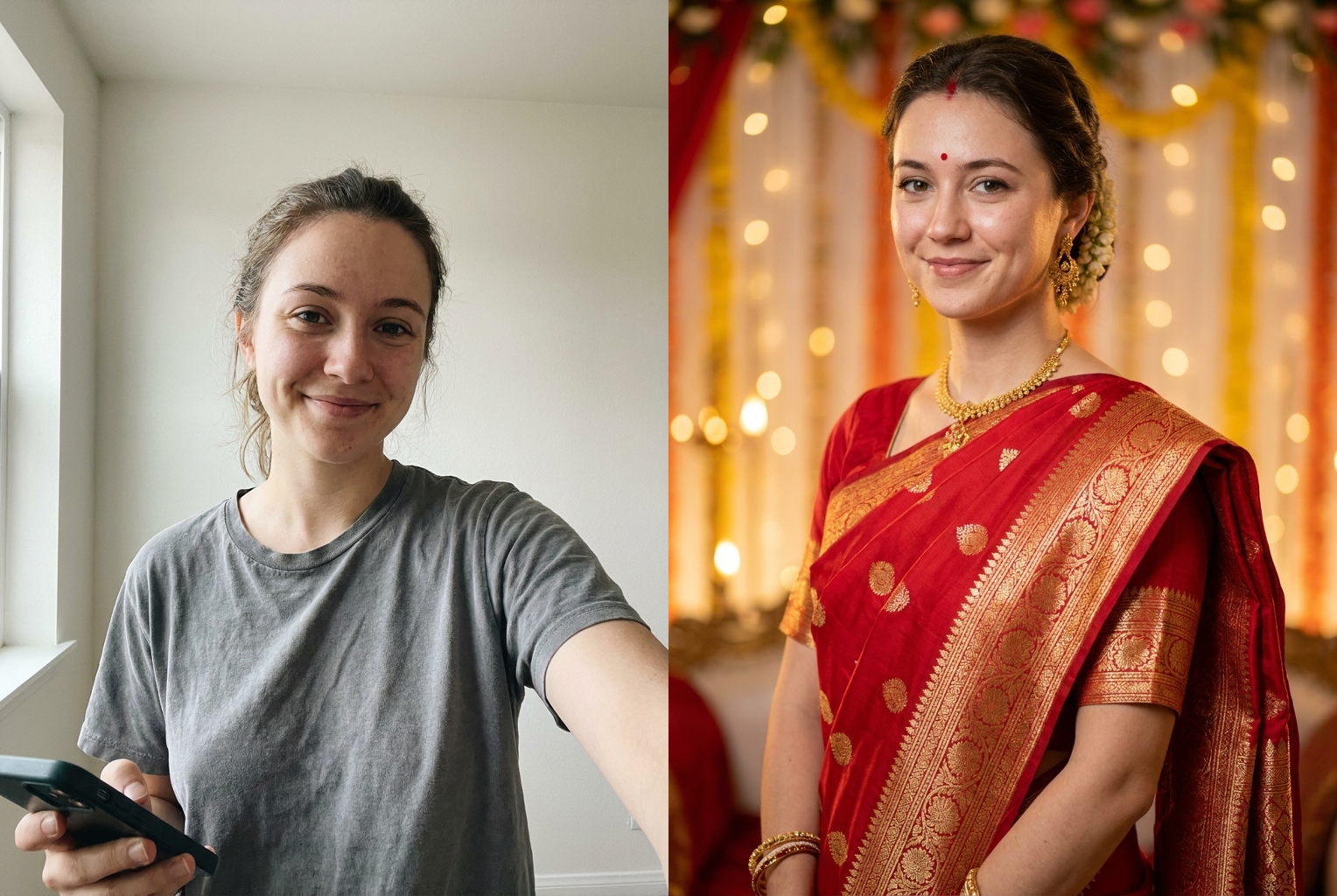
Red Banarasi wedding
Plain t-shirt selfie draped into a red Banarasi silk saree with gold zari.
AI-generated examples
How the AI Saree Photo Generator Works
Three steps, about a minute, one credit.
1. Upload Your Photo
Drop in any clear selfie or portrait. PNG, JPG, and WEBP are supported. A well-lit, front-facing photo where your face and shoulders are visible gives the AI the most to work with.
2. AI Drapes the Saree
The model keeps your face, skin tone, and body shape, then dresses you in a flowing traditional saree with detailed borders, a graceful pallu, and tasteful jewelry and makeup to match.
3. Download & Share
Get a high-resolution saree portrait ready for your profile, a festive card, or your feed. Not quite right? Type a color or occasion and regenerate for a fresh look.
AI Saree Photo Generator Examples
Real before-and-after transformations generated with this tool — one photo in, an elegant saree portrait out.
Red Banarasi wedding
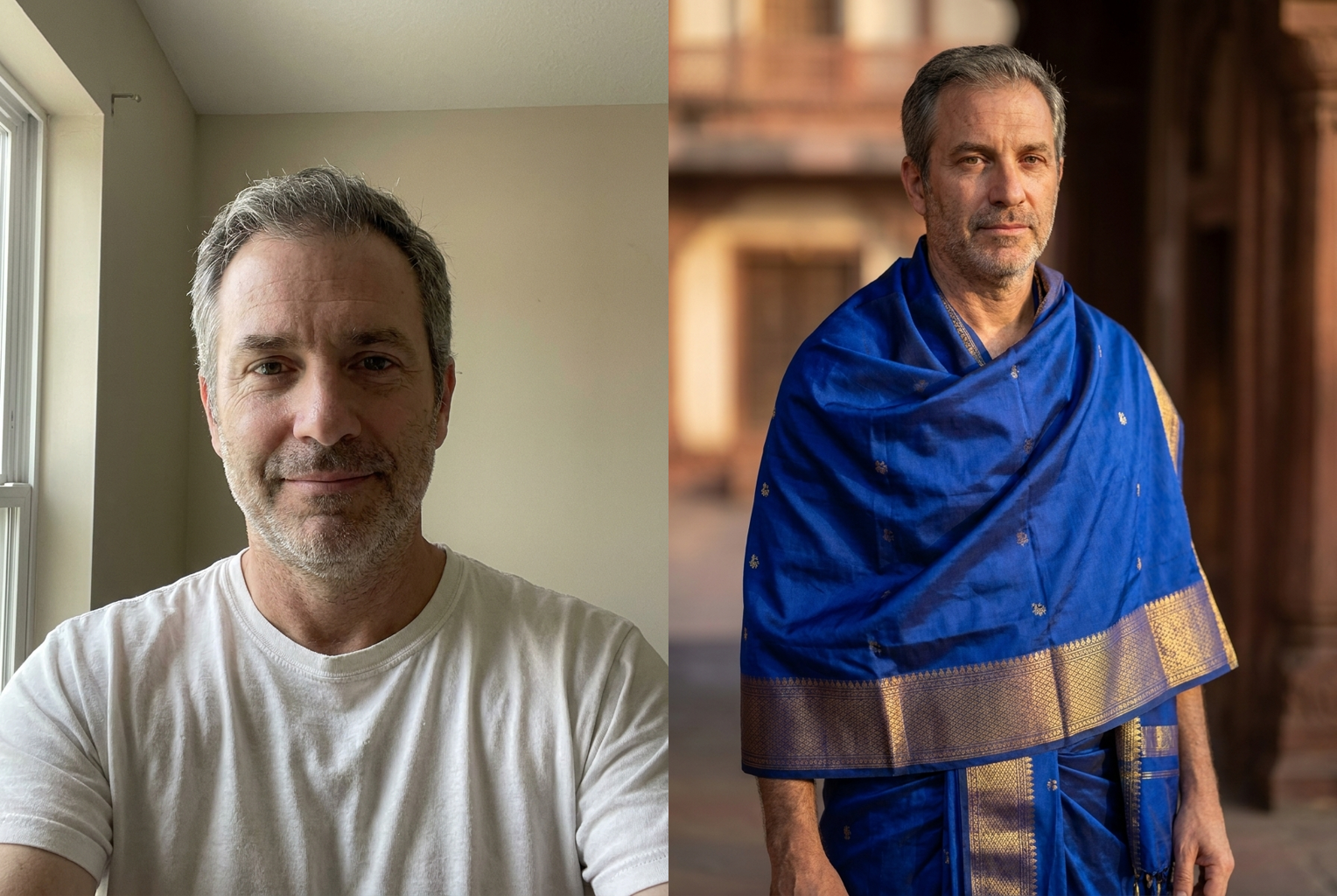
Royal blue festive
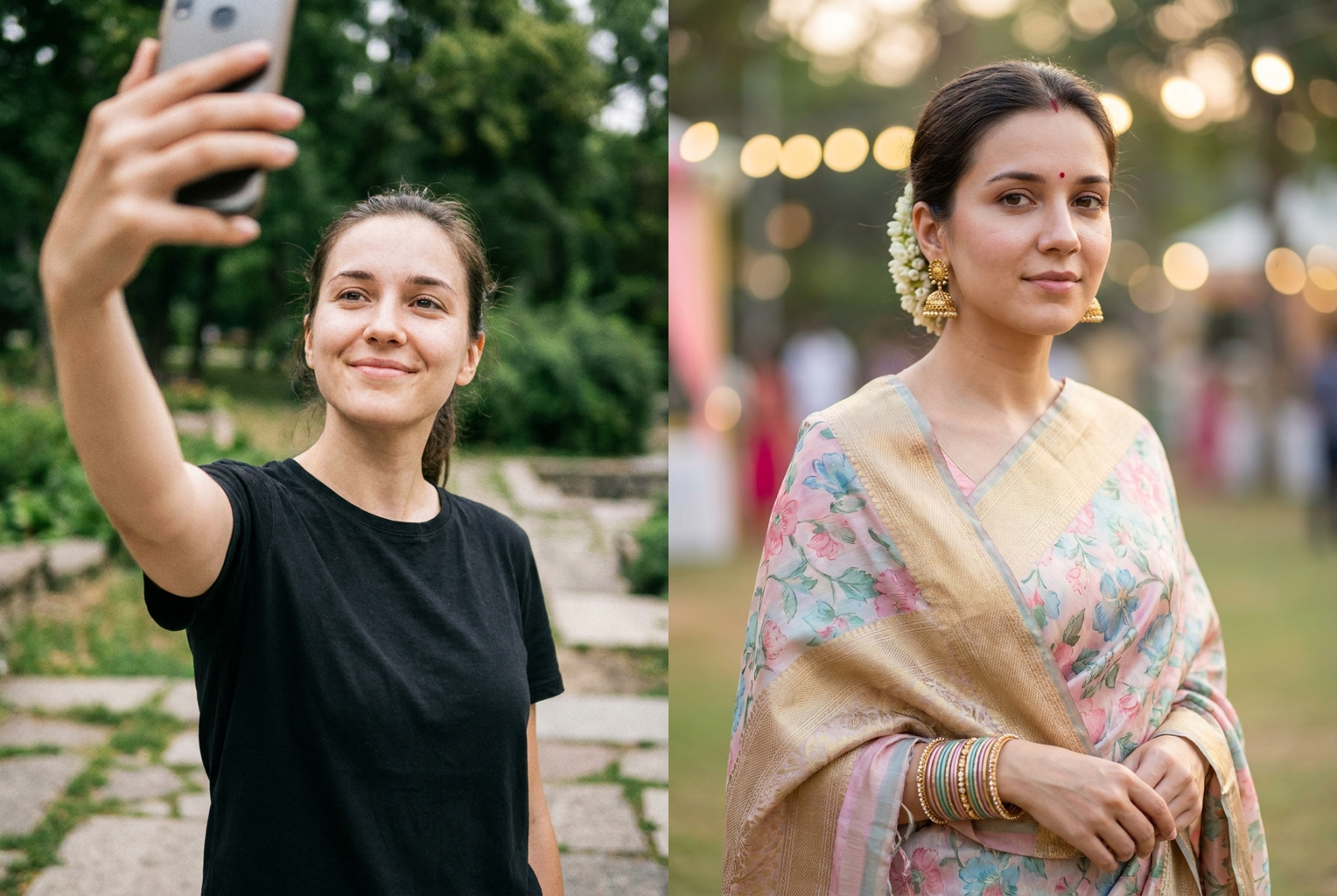
Pastel floral festival
Why Use This AI Saree Photo Generator
Everything you need for a stunning saree portrait, none of the studio booking.
Keeps Your Real Face
Identity preservation comes first — the person in the saree is unmistakably you, not a generic AI model.
Rich Fabric & Jewelry
Detailed woven borders, a flowing pallu, bangles, earrings, and a subtle bindi give every portrait an authentic, festive finish.
Any Color or Occasion
Type a silk red Banarasi, a pastel floral drape, or a royal-blue wedding saree, or leave it blank for a beautiful default.
Results in Seconds
No boutique visit or draping session. Upload one photo and your saree portrait is ready in well under a minute.
Runs in Your Browser
Works on mobile and desktop with nothing to install — generate anywhere, then download instantly.
One Credit Per Image
Each saree photo costs a single credit, so you can experiment across colors and settings until you love the result.
AI Saree Photo Generator: Turn Any Selfie Into an Elegant Saree Portrait
The ai saree photo generator turns an ordinary selfie into a graceful, richly draped saree portrait in seconds. You have probably wished you could see yourself in the perfect silk drape without booking a boutique fitting or hiring a photographer for a festival shoot. That is exactly what this tool does: you upload a single clear photo of yourself, and the AI rebuilds your outfit as an elegant traditional saree while keeping your real face intact. The result reads like a professional portrait captured in a studio or at a wedding, even though you never left your room. Instead of hunting for the right fabric, tailor, and lighting, you get a polished saree look from one upload. In short, the ai saree photo generator does the styling, draping, and photography for you.
Behind the scenes, the ai saree photo generator uses an advanced image-to-image model that understands both faces and clothing. When you upload your picture, the model isolates your facial features, skin tone, and body shape, then reconstructs your outfit as a flowing saree: detailed woven borders, a graceful pallu over the shoulder, and fabric that falls naturally with your pose. Because the model preserves identity first and styles the drape second, the person in the final image is unmistakably you — not a stranger wearing your outfit. That priority is what separates a genuine saree photo generator from a cheap saree filter ai that flattens every face into the same look. Your face is treated as fixed reference data and the saree as flexible set dressing, so the transformation feels grounded rather than pasted together.
Style range is where the ai saree photo generator really earns its place. The default look leans into a tasteful, richly detailed silk drape, but you can steer it in any direction with a short description. Ask for a red Banarasi saree for a wedding, a royal-blue silk saree with gold zari, a pastel floral drape for a festival, or a soft vintage saree ai finish with muted tones and a heritage backdrop. Whether you want a high-fashion bollywood saree photo with dramatic jewelry, a classic retro saree portrait with film-grain warmth, or a crisp modern studio frame, the generator adapts the color, fabric, and setting while keeping the natural, authentic saree silhouette that makes the portrait feel real.
For the best result from the ai saree photo generator, start with a clear, front-facing picture where your face is visible and well lit. Avoid heavy shadows, sunglasses, or busy backgrounds that hide your features, since the model works from what it can actually see. A simple standing or half-body pose gives the tool room to drape a full saree; a tight head-and-shoulders crop still works but focuses on the upper drape, pallu, and jewelry. If your first result comes out too dark, try a brighter source image; if the drape looks off, upload a photo taken straight-on rather than at a steep angle. When you use the description box, be specific — 'emerald-green silk saree with gold border for a reception' guides the photo to saree conversion far better than a single word.
People reach for an ai saree photo generator for all kinds of reasons. It is a fast way to preview a wedding or festival outfit before you commit, to refresh a profile picture with something elegant and cultural, or to create a matching family set for Diwali, Eid, or a reception. Content creators use it for thumbnails and story backdrops; small boutiques use it to show a customer how a fabric might look draped; friends make them just for fun. Because each image is generated in seconds and costs a single credit, you can experiment freely — try different colors and occasions in the description box and build a whole gallery of saree portraits in one sitting with the ai saree photo generator.
Compare that to the manual alternative. A real saree photoshoot means buying or renting the fabric, finding a tailor and a draping expert, booking a studio or venue, arranging jewelry and makeup, and hoping the lighting cooperates — often with a photographer in tow. An ai saree photo generator collapses that entire production into one upload. There is no fitting fee, no scheduling, and no waiting for a tailor. You keep complete control: don't like the first result, change the color and regenerate. This ai saree editor approach gives you the polished outcome of a studio session with none of the logistics or expense, and because it is non-destructive you can always go back to your original photo and start over.
The workflow is deliberately simple. Upload your photo, optionally type a saree color or occasion, let the ai saree photo generator process it, and download a high-resolution portrait you can post or print anywhere. Most images finish in well under a minute. Because the tool retains natural skin texture and realistic fabric folds instead of over-smoothing everything, the output holds up even at full size on a phone screen. If you want variety, run the same photo a few times with different descriptions — the model introduces subtle changes in drape, lighting, and setting on each pass, so you end up with a small collection of saree portraits rather than one flat copy to choose from.
Getting started takes seconds and no design skill. Upload a clear selfie, add an optional saree description, generate, and your portrait from the ai saree photo generator is ready to share — no apps to install, no editing software, and no photoshoot to plan. A good ai saree photo generator runs right in your browser, works on mobile and desktop, and the first result is usually all you need. Whether you are previewing a festival outfit, upgrading a profile picture, or simply curious how you would look in a stunning silk drape, the saree photo generator is the quickest way to find out. Upload your photo above and create your first saree portrait now.
AI Saree Photo Generator — FAQ
It is a tool that takes a normal photo of you and dresses the same person in an elegant traditional saree. You upload a selfie and the AI rebuilds your outfit as a beautifully draped saree with realistic fabric, borders, and jewelry, while keeping your real face. The result looks like a professional saree portrait taken in a studio you never had to visit.
Yes. Identity preservation is the tool's first priority. It isolates your facial features, skin tone, and body shape from the photo you upload, then styles the saree and setting around them. The person in the finished saree portrait is recognisably you rather than a generic face, as long as your source photo shows your face clearly and well lit.
Absolutely. Type a description like 'red Banarasi silk saree for a wedding' or 'pastel floral saree for a festival' in the optional box, and the generator follows it. Leave the box blank and it produces a tasteful default drape. Because results vary slightly on each run, you can regenerate the same photo to explore different colors, borders, and settings.
Use a clear, front-facing picture where your face and shoulders are well lit and unobstructed. Avoid sunglasses, heavy shadows, or busy backgrounds that hide your features. A standing or half-body pose gives the model room to drape a full saree, but a head-and-shoulders shot works too — it will focus on the upper drape, pallu, and jewelry.
Most saree photos finish in well under a minute. You upload your image, the AI processes it, and a high-resolution result appears ready to download. If you want variety, run the same photo again immediately with a different color or occasion and the tool will produce a fresh drape each time.
Each generation costs one credit, so a single saree portrait is inexpensive and you can keep experimenting. There is no subscription required to try it, and you only spend a credit when you actually generate an image, not while uploading or adjusting your photo or typing a saree description.
Your uploaded photo is used only to generate your saree image and is not shared or sold. Treat the output like any image you create online — download the results you want to keep. If privacy matters to you, upload a photo you are comfortable using and remove any sensitive details from the background before generating.
None at all. There is no software to learn and no manual retouching. You upload a selfie, optionally type a saree color, press generate, and download the finished portrait. The whole point of the tool is to hand you a polished, boutique-quality saree look without a photographer, a draping session, or any Photoshop knowledge on your part.
Still have questions? Contact Support