
AI Photo Restoration
Upload a scratched, faded or torn photo and get a clean, sharp, full-color version back in seconds — faces preserved exactly as they were.
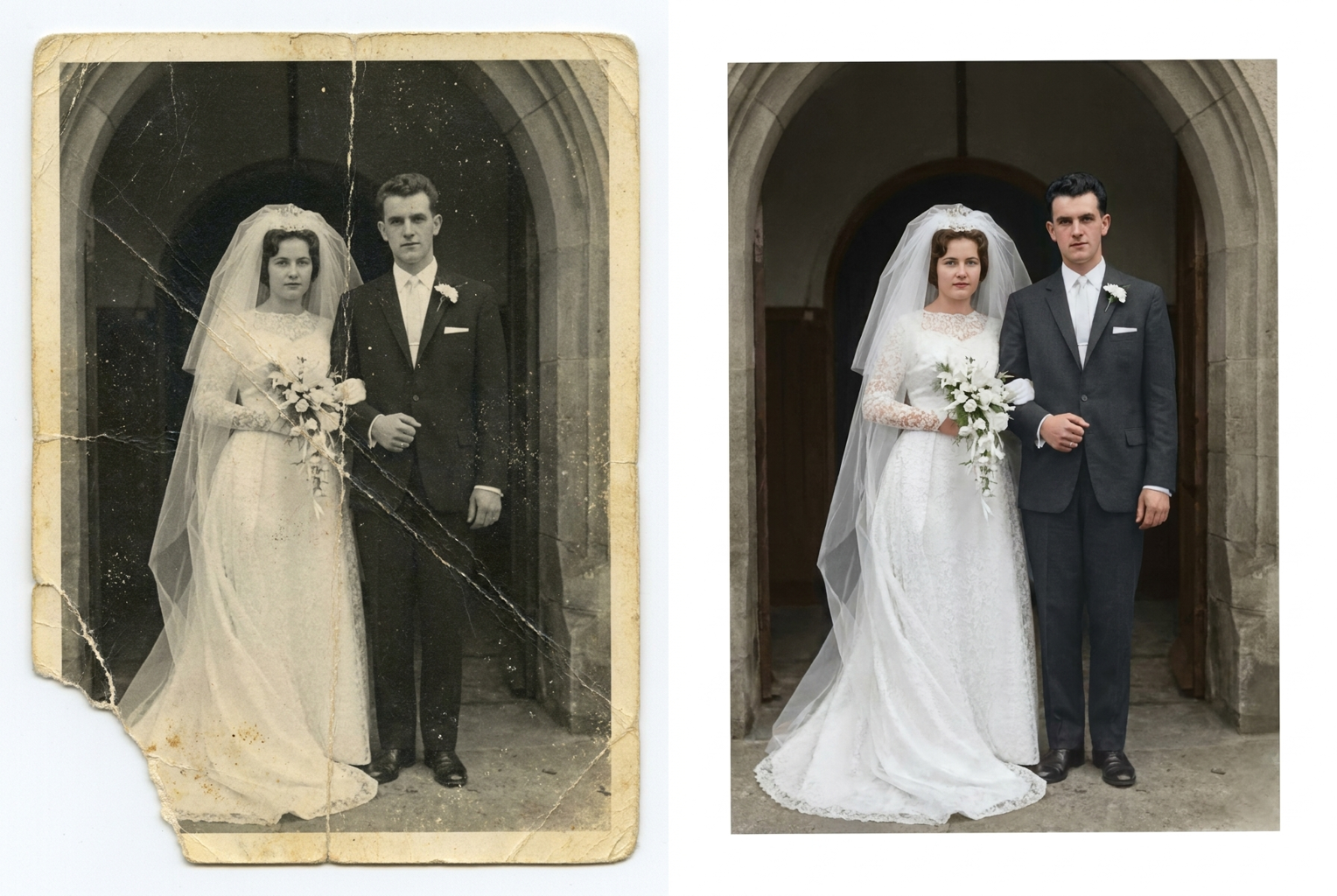
1960s Wedding Portrait
Creased, scratched black-and-white wedding photo — repaired and colorized in one pass
AI-generated examples
AI Photo Restoration
Bring damaged and faded photos back to life — scratches repaired, details sharpened, colors recovered, faces untouched.
Drag & drop or click to upload
Supports PNG, JPG, WEBP • Max 20MB
Sign in to start generating
How it works
How It Works
From a damaged print to a restored picture in three steps — no editing skills needed.
Upload Your Old Photo
Scan or photograph the damaged print and upload it. Scratched, torn, faded, stained or black-and-white photos all work.
AI Restores Every Detail
The AI repairs scratches and tears, removes stains and noise, sharpens blurred details, recovers contrast and adds realistic color where it's missing.
Download the Restored Photo
Get a clean, high-resolution PNG in about 15 seconds — ready to print, frame, share with family or archive digitally.
Restoration Examples
Real before-and-after results from the exact restoration prompt this tool uses.
1960s Wedding Portrait
Creased, scratched black-and-white wedding photo — repaired and colorized in one pass
Creased, scratched black-and-white wedding photo — repaired and colorized in one pass
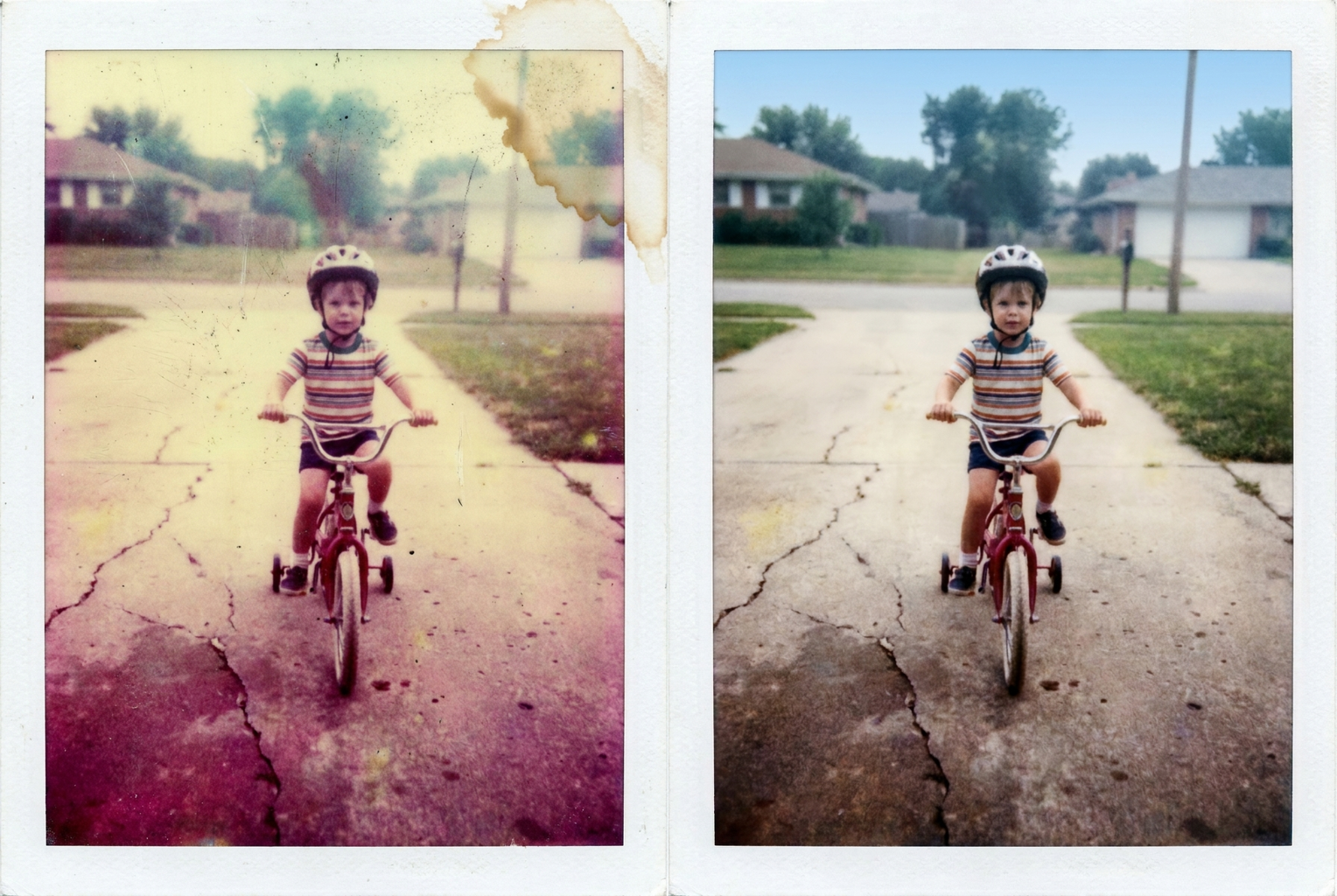
Faded 1980s Snapshot
Color-shifted, water-stained family snapshot — original colors and detail recovered
Color-shifted, water-stained family snapshot — original colors and detail recovered
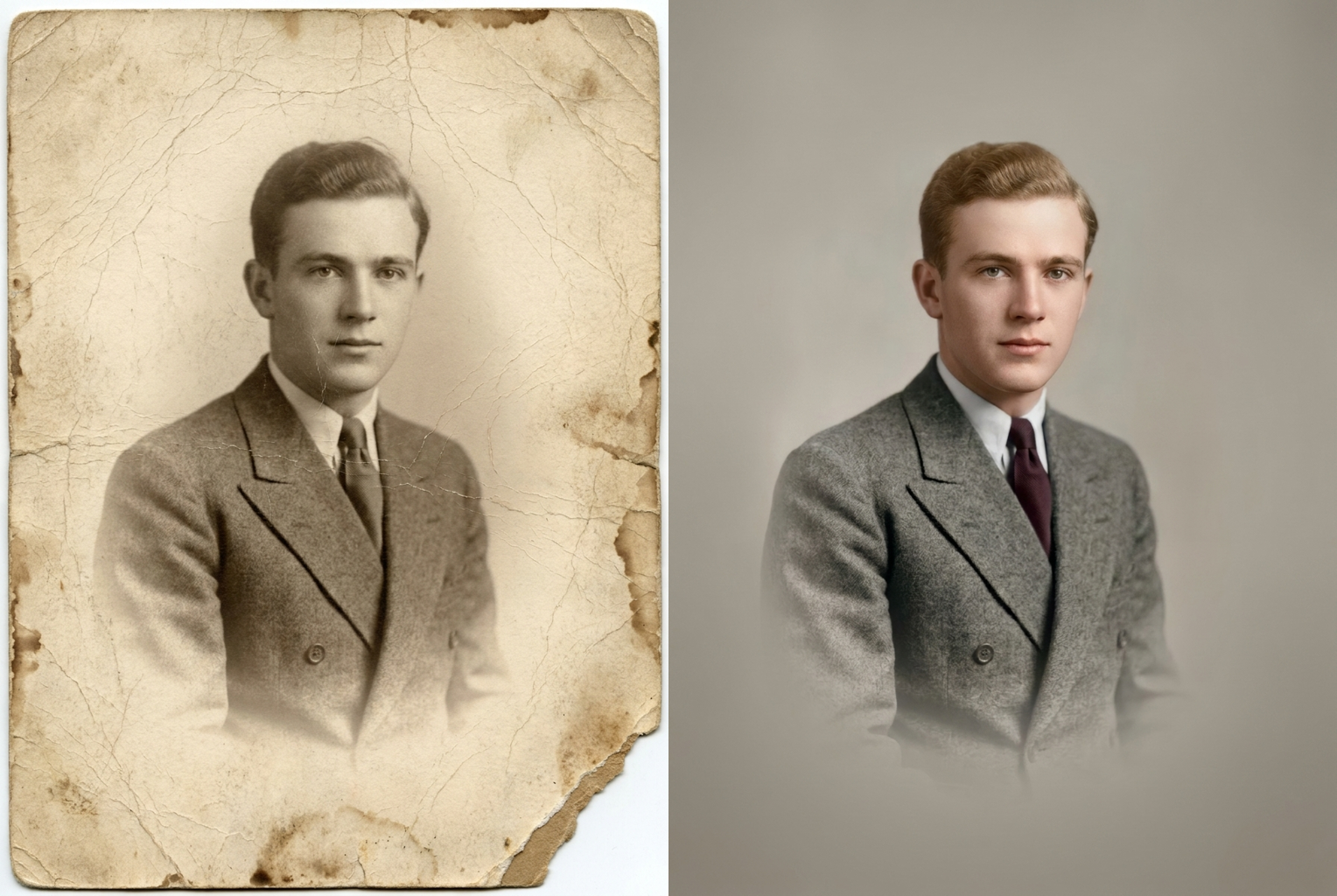
1940s Sepia Portrait
Cracked, stained sepia studio portrait — restored, sharpened and colorized
Cracked, stained sepia studio portrait — restored, sharpened and colorized
Why this tool
Why Restore Photos with VO3 AI
Professional archival restoration used to take hours of manual retouching. Now it takes one click.
Faces Stay Exactly the Same
The AI is strictly instructed to preserve every person's face, features, age and expression. It repairs the damage around them — it never reinvents your grandmother.
Repairs Physical Damage
Scratches, tears, creases, water stains and even small missing corners are reconstructed seamlessly, using the surrounding image as reference.
Realistic Colorization
Black-and-white and sepia photos are colorized with natural, period-accurate tones — skin that looks like skin, not a tinted filter.
Seconds, Not Weeks
A professional restoration studio takes days and charges per photo. The AI delivers comparable results in around 15 seconds for 1 credit.
Sharpens Faded Details
Decades of fading blur edges and flatten contrast. The AI recovers fine detail in faces, clothing and backgrounds while keeping the photo authentic.
Made for Family Archives
Restore wedding portraits, childhood snapshots, military photos and heirloom prints — then share high-resolution copies with the whole family.
The rundown
AI Photo Restoration: Restore Old, Damaged and Faded Photos in One Click
Every family has a box of photographs that time has not been kind to — wedding portraits with creases down the middle, childhood snapshots gone yellow, a grandfather's military photo with a torn corner. AI photo restoration brings those pictures back. Upload a scan or even a phone photo of the damaged print, and the AI repairs scratches, tears and stains, removes decades of fading, sharpens soft details and can add realistic color to black-and-white images — all in a single automatic pass. What once required hours of expert retouching in a professional studio now happens in about fifteen seconds, and the restored file arrives as a clean, high-resolution image ready to print, frame or share with relatives.
The technology behind AI photo restoration is a generative image model trained on enormous collections of photographs, both pristine and damaged. That training teaches it what real faces, fabrics, skies and rooms look like, so when it encounters a scratch across a cheek or a missing corner of sky, it can reconstruct the damaged region convincingly from context. Unlike simple sharpening filters that just boost edges, the model understands the content of your picture: it distinguishes a crease in the paper from a wrinkle in a shirt, film grain from fabric texture, and a water stain from a shadow. This is why an old photo restorer powered by modern AI can handle damage that traditional automatic tools always failed on. The result is a genuine AI photo restoration engine rather than a one-trick filter: the same model that repairs a tear can rebuild texture, balance exposure and infer color, because it reasons about the photograph as a whole.
The restoration pass covers the full range of problems old photos accumulate. Physical damage — scratches, tears, creases, dust, spots and stains — is repaired seamlessly. Fading and discoloration are reversed, recovering the contrast and tonal depth the print had when it was new. Blurred or soft details are sharpened naturally, without the halos and artifacts of crude enhancement. And if your picture is black-and-white or sepia, the same pass can colorize old photos with period-plausible, realistic tones: natural skin, believable foliage, era-appropriate clothing colors. You do not need separate repair, enhancement and colorization tools — one ai photo restoration upload handles everything. If a first pass leaves a stubborn mark behind, simply run the restored image through again — a second pass usually clears the remaining damage.
The most important promise of a trustworthy AI photo restoration tool concerns faces. Our restoration prompt explicitly instructs the model to keep every person's face, facial structure, expression, age and pose exactly as they appear in the original photograph. The AI repairs the damage around and across a face — it does not beautify anyone, make them younger, or replace their features with a generic invented face. That distinction matters enormously for family photos: the entire point of restoring a picture of your mother as a child is that it still looks like your mother as a child, only without the scratches.
Getting a good result from AI photo restoration starts with a decent capture of the original. If you have a scanner, scan the print at 300 DPI or higher; if you only have your phone, photograph the print flat under bright, even light, avoiding glare and shadows, and fill the frame with the photo. The AI can work with imperfect captures, but the more of the original detail it can see, the more faithfully it can restore old photos. Very small prints, heavily blurred images or photos where a face is almost entirely destroyed may restore less precisely, since the model has less genuine information to work from — though results on even badly damaged pictures are often striking. For treasured originals it is worth capturing the print twice — once straight on and once at a slight angle to dodge reflections — and restoring whichever scan shows more detail.
People reach for AI photo restoration at very specific moments. Preparing a memorial slideshow when the only photos of a loved one are faded prints from the 1960s. Building a family tree and wanting ancestors' portraits to look dignified rather than deteriorated. Surprising parents on an anniversary with their wedding photos restored and colorized. Digitizing a family archive before the originals degrade further. Genealogists, local historians and archivists use an old photo restorer to make portraits and documents legible again, while creators use restored images in documentaries, tribute videos and heritage projects. Schools and local museums even rely on AI photo restoration for exhibitions, reviving photographs of buildings, teams and street scenes that would otherwise stay locked away in fragile albums.
Compare that with the manual alternative. Professional restoration studios charge per photograph, often significantly more for colorization, and turnaround is measured in days or weeks. Doing it yourself in an image editor means learning clone stamps, healing brushes, frequency separation and hand-painted color layers — a genuine craft that takes years to master. Choosing instead to fix old photos online with AI photo restoration costs a single credit per image, finishes in seconds, and requires no skill beyond uploading a file. For a shoebox of a hundred family prints, that is the difference between a project you finish this weekend and one that never happens. And unlike mailing an irreplaceable original to a studio, restoring a digital scan means the fragile print itself never leaves your house.
Getting started takes under a minute. Sign up for VO3 AI and you receive free credits to try your first restorations, with each pass costing just 1 credit. Upload your damaged photo, click Restore Photo, and download the high-resolution result — no watermarks, yours to print and share. The same account gives you every other VO3 tool, from image generation to AI video, so once your restored portraits are ready you can even animate them into short living-memory clips. Rescue the pictures your family thought were lost: with AI photo restoration, the box in the attic becomes an album again.
Frequently Asked Questions
Scratches, tears, creases, dust, spots, stains, water damage, fading, discoloration, noise and small missing areas are all handled in one pass. The AI reconstructs damaged regions using the surrounding image as reference, so even a torn corner or a crease across a face can usually be repaired seamlessly.
No. The restoration prompt explicitly instructs the AI to keep every person's face, features, expression, age and pose exactly as in the original. It repairs damage on and around faces but never beautifies, de-ages or reinvents anyone — the person in the restored photo is still recognizably the same person.
Yes. If your photo is black-and-white or sepia, the same restoration pass adds realistic, period-accurate color — natural skin tones, believable clothing and background colors. If the photo already has color, the AI recovers the faded original tones instead of repainting them.
A flatbed scan at 300 DPI or higher is ideal. If you only have a phone, lay the print flat under bright, even light, avoid glare and shadows, hold the camera parallel to the photo and fill the frame. The more original detail the AI can see, the more faithful the restoration.
The AI reconstructs missing areas from context, so moderate damage restores convincingly. If a large portion of a face is completely destroyed, the model has less genuine information to work from and results may be less precise. It's still worth trying — results on badly damaged photos are often surprisingly good.
Each restoration costs 1 credit, and new users receive free credits on sign-up to try the tool. Credits are shared across all VO3 AI tools, including image generation and video generation, so unused credits never go to waste.
No. Photos are processed securely for your restoration request only. We do not use your uploads to train models and we do not share them with third parties. Your family archive stays yours.
Restored photos are output at high resolution (1024px+) in PNG format with no watermark — suitable for printing at standard photo sizes, framing, family sharing and digital archiving. For very large prints, you can additionally run the result through an upscaler.