
AI Party Portrait Generator
Upload a photo, describe a party theme, and the AI Party Portrait Generator turns it into a glamorous celebration portrait while keeping your face exactly the same.
AI Party Portrait Generator
Upload a photo, choose a party theme, and get a glamorous, photorealistic celebration portrait in seconds — same face, elevated style.
Drag & drop or click to upload
Supports PNG, JPG, WEBP • Max 20MB
Sign in to start generating
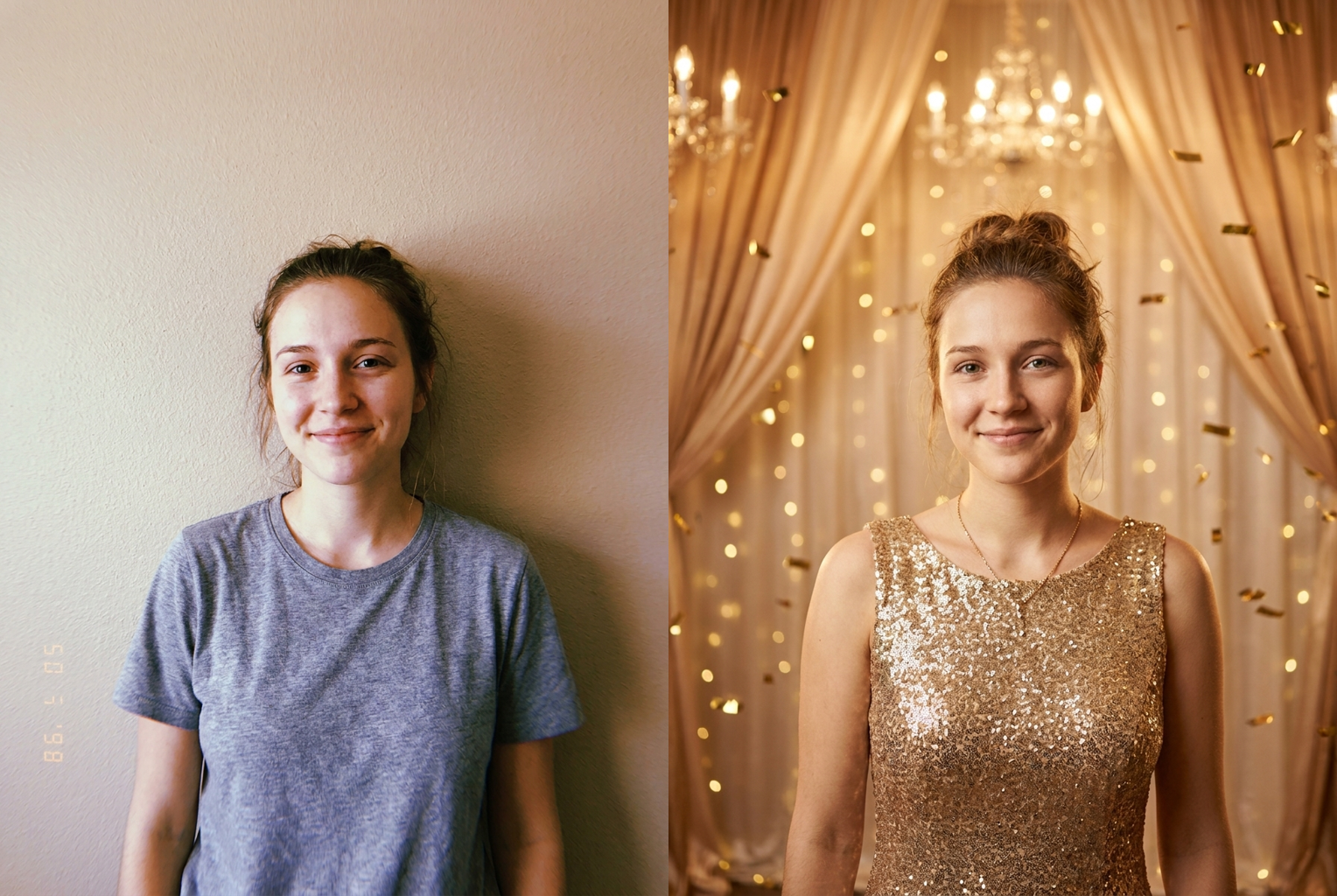
Plain selfie → gold glam gala
Theme: "gold glam gala with champagne tones and sparkle" — same face, luxurious celebration styling.
AI-generated examples
How the AI Party Portrait Generator works
Three quick steps take you from an everyday photo to a polished party portrait.
1. Upload your photo
Pick a clear, well-lit photo where the face is fully visible. Front-facing portraits and half-body shots give the cleanest, most flattering party-portrait results.
2. Describe the party theme
Type the celebration vibe you want — a gold glam gala, a neon birthday, a black-tie New Year's Eve. Add colors, mood, and sparkle for a closer match.
3. Get your glam portrait
The AI restyles the scene and wardrobe glamour while keeping your face and identity intact. Download the photorealistic result or try another theme for free.
See the AI Party Portrait Generator in action
Every example below was made by uploading one photo and describing a party theme — same face, elevated celebration style.
Plain selfie → gold glam gala
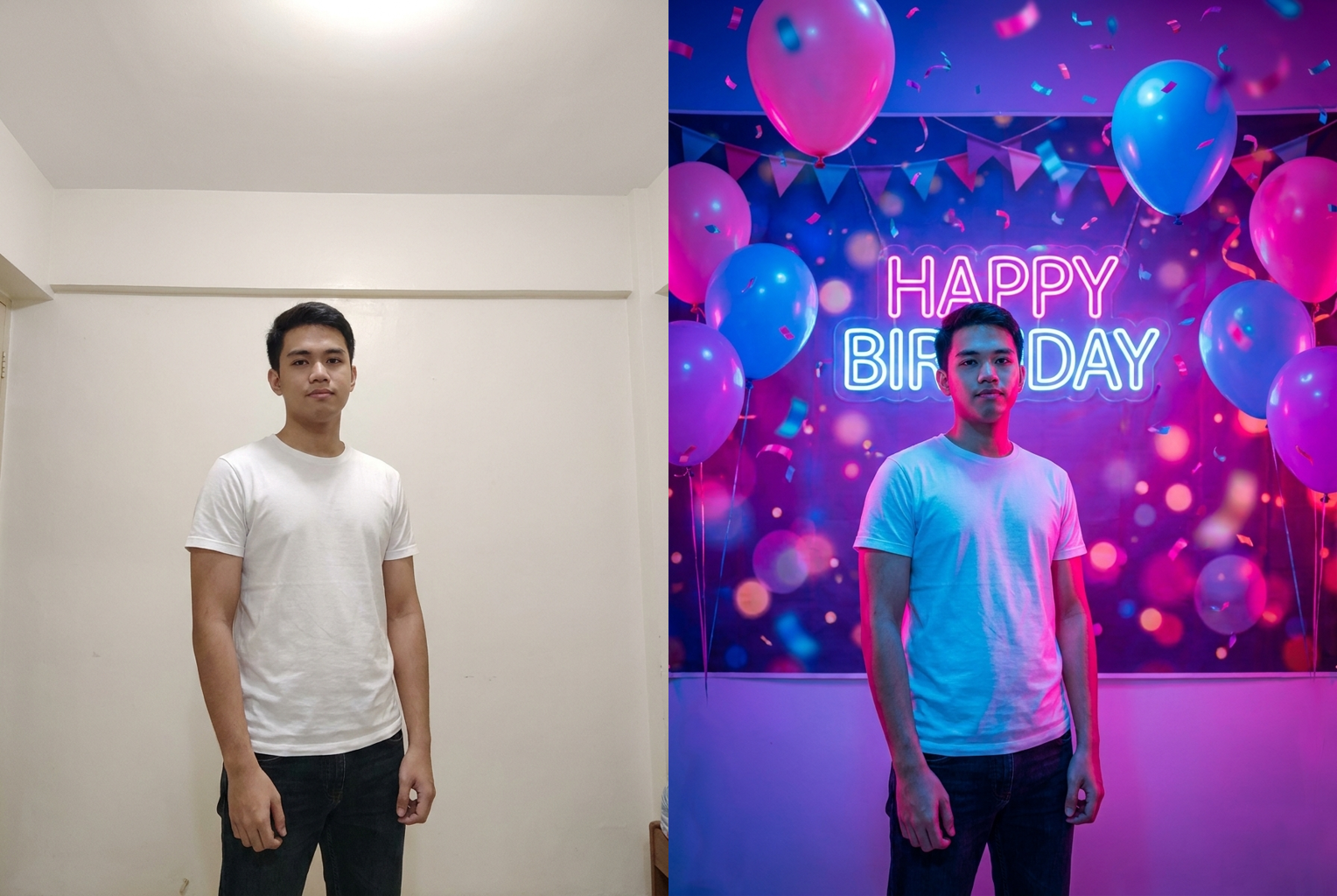
Plain photo → neon birthday party
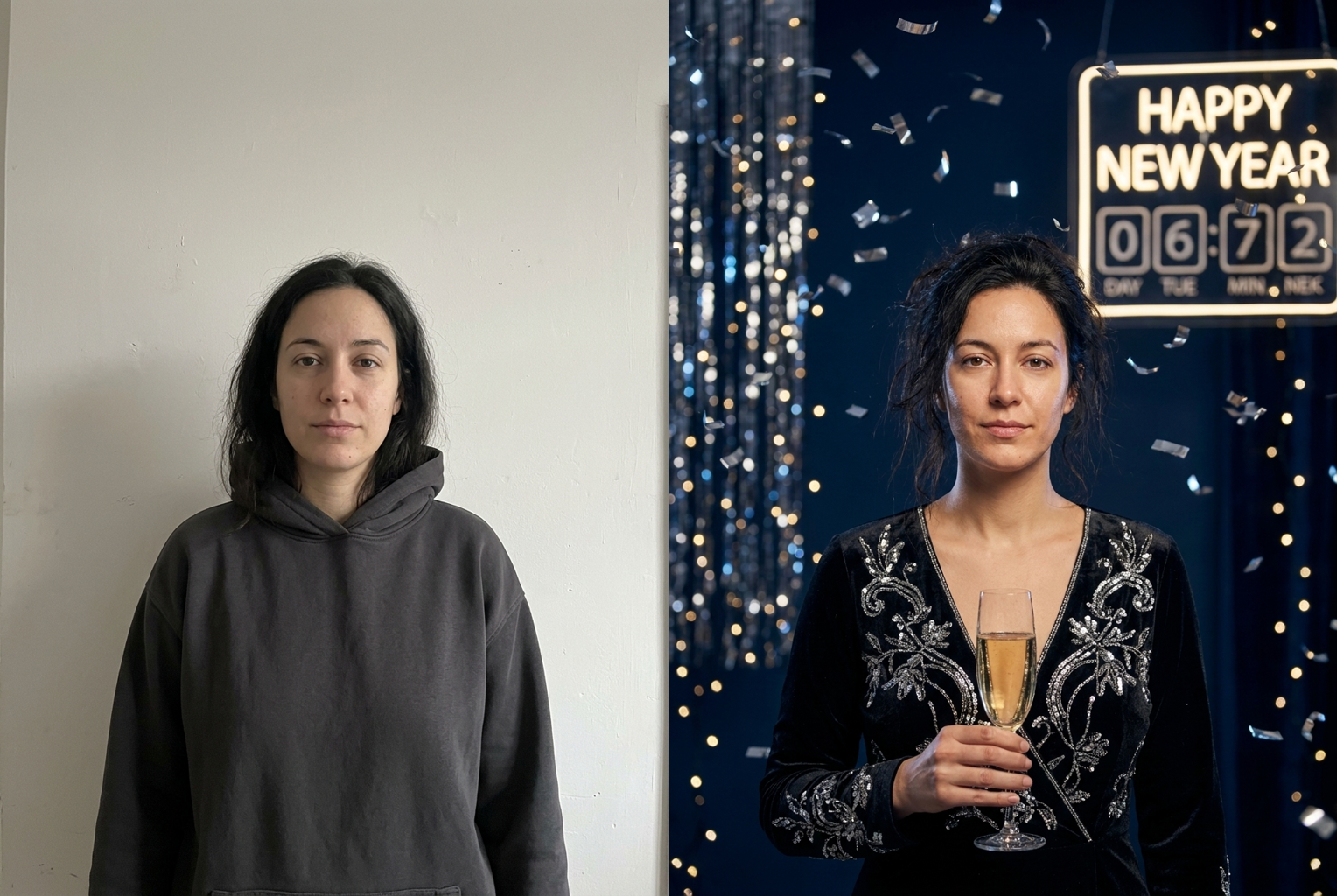
Plain photo → black-tie NYE
Why creators love the AI Party Portrait Generator
Your face stays you
The prompt locks your facial features, skin tone, and hair. Only the styling, lighting, and party atmosphere change — so the portrait is unmistakably you, just dressed up for the occasion.
Any party theme
Gold glam galas, neon birthdays, disco nights, black-tie soirees, festive holidays — if you can describe the celebration, the generator can render it in a matching style.
Magazine-quality finish
Editorial color grading, flattering studio-style lighting, tasteful bokeh, and realistic skin texture give every portrait a polished, professional-photoshoot look.
Elegant sparkle and mood
Party lighting, gentle glow, confetti, and celebration backdrops set the scene automatically, so your portrait feels like a real moment at a beautiful event.
Results in seconds
No photoshoot, no editing skills, no waiting. Describe a theme and get a finished party portrait in moments, then iterate as many times as you like.
Works in your browser
Nothing to install. The tool runs online on desktop and mobile, so you can create a glam party portrait anywhere and download it instantly.
AI Party Portrait Generator: Turn Any Photo Into a Glam Celebration Shot
The AI Party Portrait Generator is an online tool that turns an ordinary photo into a glamorous celebration portrait, while keeping the person's face and identity exactly the same. Instead of booking a studio, hiring a stylist, or spending hours editing, you simply upload a picture, type the party theme you want in plain language, and let the model do the work. Within seconds the AI Party Portrait Generator returns a photorealistic image of the same person styled for a beautiful event — the lighting glows, the atmosphere sparkles, and the finish looks like a professional photoshoot. It transforms a single snapshot into a party-ready portrait you can share, print, or use for invitations. Because everything is driven by a short text description, the ai party portrait generator feels less like a rigid filter and more like a personal photographer and stylist you can direct in plain words, adapting instantly to whatever celebration you have coming up.
Under the hood, the ai party portrait generator relies on an advanced image model that understands both facial structure and the visual language of celebrations. When you upload a photo, the model reads your features, pose, and lighting, then wraps your theme prompt in careful instructions that isolate what should change. The face, skin tone, and hair are preserved, while the styling, wardrobe glamour, backdrop, and mood are regenerated to fit the party you described. Because the transformation is targeted rather than a full redraw, the result stays anchored to the real you, which is exactly what makes a glam party photo feel authentic instead of uncanny. That same targeted approach is why the tool handles tricky details — jewelry, hair highlights, or soft party lighting — more gracefully than a blunt filter would.
Theme coverage is deliberately broad. The AI Party Portrait Generator can render a gold party portrait ai look with champagne tones and shimmer, a neon birthday scene bursting with color, a disco night with mirror-ball glow, a black-tie soiree, a festive holiday gathering, a New Year's Eve countdown, or an elegant cocktail evening. You are not limited to a fixed set of presets — because the tool is driven by your own words, the range of celebration styles is only as narrow as your imagination. Want deep emerald and gold for a gala, or hot-pink neon for a birthday? Describe it, and the generator will attempt exactly that, giving you an ai celebration portrait tuned to your event.
Getting a great result comes down to two things: a clean photo and a clear description. Start with a sharp, well-lit image where the face is fully visible and not heavily cropped. Then describe a single, coherent party theme rather than piling on contradictory ideas. Include the color palette, the mood, and the level of sparkle — for example, 'a gold glam gala with champagne tones, soft bokeh lights, and elegant sparkle' gives the ai party portrait generator far more to work with than 'make it fancy'. Mentioning wardrobe details, a backdrop, or a lighting style can push the portrait even closer to the look in your head.
The practical uses are everywhere. People create standout birthday images and save-the-dates, dress up a plain selfie for a party invitation, or refresh their social feed with a glamorous celebration shot. Event hosts preview a theme before committing to decor. Content creators and small businesses make festive promo art for holidays and launch parties. Even as a quick ai portrait maker, the tool helps you turn a casual photo into something polished for a profile picture. Because each attempt is fast and cheap, a glam party portrait becomes an everyday creative option instead of a rare, expensive event. Families also use the ai party portrait generator to give everyone a matching celebration look for a group theme, generating one portrait per person so an entire party shares the same polished, cohesive style.
Compared with the manual alternative, the advantages stack up quickly. Producing this look by hand means a real photoshoot or hours of retouching: adjusting lighting, adding sparkle and bokeh, restyling wardrobe, and grading color so everything feels cohesive. That takes an experienced editor a long time per image. The AI Party Portrait Generator collapses that entire workflow into a single sentence and a few seconds of processing. And unlike a physical shoot, it lets you try bold or extravagant themes — a couture gala, a neon rave, a vintage glamour night — with zero cost and zero commitment, so experimentation is genuinely free.
The workflow itself is intentionally simple. Upload your photo, type the party theme into the description box, and generate. If the first pass isn't perfect, refine the wording — narrow the color palette, specify the mood, or add a detail you left out — and try again. Each generation is a fresh interpretation, so small prompt changes lead to meaningfully different portraits. Because the ai party portrait generator preserves your face every time, you can line up several versions of the same photo in different celebration styles and compare them side by side, making it easy to settle on the portrait that fits your event best. Treating the ai party portrait generator as a quick iteration loop — describe, generate, refine, repeat — is the fastest way to move from a plain photo to a striking, photorealistic celebration portrait you are genuinely proud to share.
Getting started takes less than a minute. There's nothing to download and no editing experience required — the tool runs right in your browser on desktop or mobile. Upload a photo, describe the celebration you're imagining, and preview yourself styled for it almost instantly. Whether you're planning a birthday, designing an invitation, building festive content, or just having fun reinventing a selfie, the AI Party Portrait Generator turns one picture into a full celebration. As a browser-based ai portrait maker built for real events, it keeps the process light: no accounts full of settings to learn, no complicated timelines, just a photo and a theme. Pick a photo, write your first party theme, and watch your glam portrait come to life.
AI Party Portrait Generator FAQ
No. The generation prompt explicitly instructs the model to keep your face, facial features, skin tone, and hair exactly as they appear in your original photo. Only the styling, wardrobe glamour, lighting, and party atmosphere are changed. That identity preservation is what makes each portrait believable — you are seeing the real you dressed up for a celebration, not a different person.
Almost any celebration you can describe. Gold glam galas, black-tie soirees, neon and disco birthday parties, festive holiday gatherings, New Year's Eve countdowns, cocktail nights, and elegant dinner events all work well. The more specific you are about the colors, mood, and sparkle you want, the closer the finished party portrait matches the vibe in your head.
A sharp, well-lit photo where the face is clearly visible gives the best results. Front-facing portraits and half-body shots work especially well because the tool has a clean view of your features. Avoid heavily cropped, blurry, or very dark photos, since those give the model less to work with and can reduce the realism of the final portrait.
Start with a clear photo and describe one coherent party theme rather than mixing many conflicting ideas. Mention the color palette, the mood, and the level of sparkle you want. If the first result isn't quite right, refine your description and generate again — each attempt is fast and inexpensive, so you can dial in the look over a few tries.
Yes. Many people use the party portrait generator to make eye-catching birthday images, save-the-date graphics, invitation art, and celebration social posts. Because you can match the theme to your event — colors, mood, and style — the portrait fits naturally into whatever you're planning, and you can generate several versions to pick your favorite.
Your upload is used only to generate your result. We don't publish your photos or share them with anyone. You decide what to download and where to post it, so you can experiment with different party themes privately and only share the portraits you're happy with.
Each generation uses one credit, and you can try as many party themes as you like. There's no subscription required to experiment — upload a photo, describe a celebration look, generate, tweak, and repeat until you get a portrait you love. Fast, cheap iteration is part of what makes the tool fun to use.
You can download your portraits and use them for personal projects, social posts, invitations, and celebration graphics. For commercial or brand use, make sure you have the rights to the original photo and that the finished image doesn't misrepresent a real person or event. When in doubt, use photos you own and keep the styling clearly creative.
Still have questions? Contact Support