
AI Outfit Changer
Upload a photo, describe any outfit, and the AI Outfit Changer replaces the clothing while keeping your face, pose, and background exactly the same.
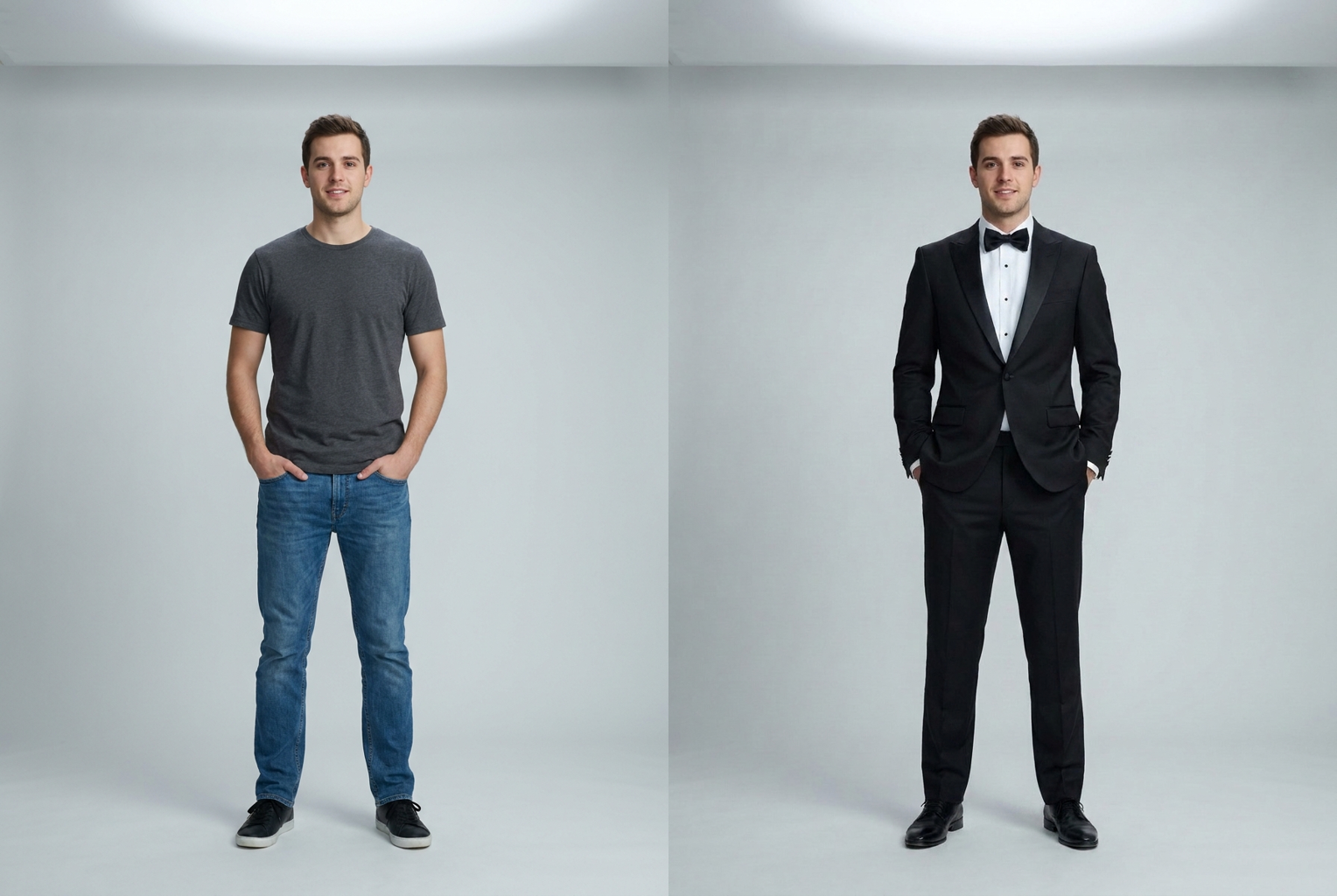
Casual tee → black tuxedo
Prompt: "a tailored black tuxedo with satin lapels and a bow tie" — same face and pose, formal new outfit.
AI-generated examples
AI Outfit Changer
Upload a photo, type the outfit you want, and preview yourself wearing it in seconds — same face, same pose, brand-new clothes.
Drag & drop or click to upload
Supports PNG, JPG, WEBP • Max 20MB
Sign in to start generating
How it works
Upload your photo
Choose a clear photo where the person and their current clothing are fully visible. Front-facing shots with even lighting give the cleanest, most realistic outfit swaps.
Describe the outfit
Type the clothing you want — the garment, color, fabric, and style. Be specific: 'a tailored charcoal three-piece suit' beats 'nice clothes'. Add accessories if you like.
Get your new look
The AI replaces only the clothing, keeping your face, hair, body, pose, and background intact. Download the photorealistic result or try another outfit for free.
See the AI Outfit Changer in action
Every example below was made by uploading one photo and describing a new outfit — same face, same pose, completely different clothes.
Casual tee → black tuxedo
Prompt: "a tailored black tuxedo with satin lapels and a bow tie" — same face and pose, formal new outfit.
Prompt: "a tailored black tuxedo with satin lapels and a bow tie" — same face and pose, formal new outfit.
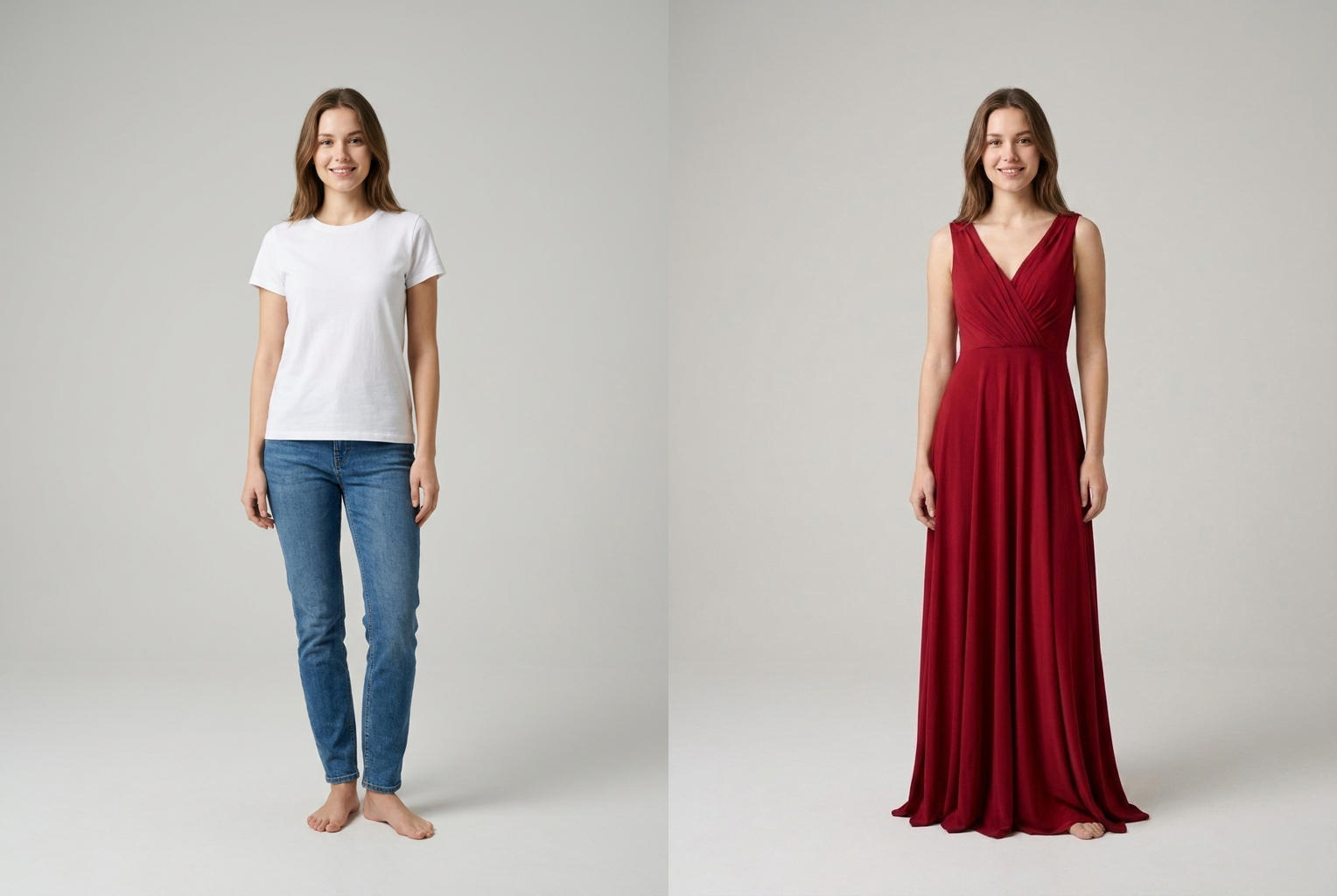
Jeans & tee → red evening gown
Prompt: "a flowing floor-length red evening gown" — identity kept, everyday clothes swapped for eveningwear.
Prompt: "a flowing floor-length red evening gown" — identity kept, everyday clothes swapped for eveningwear.
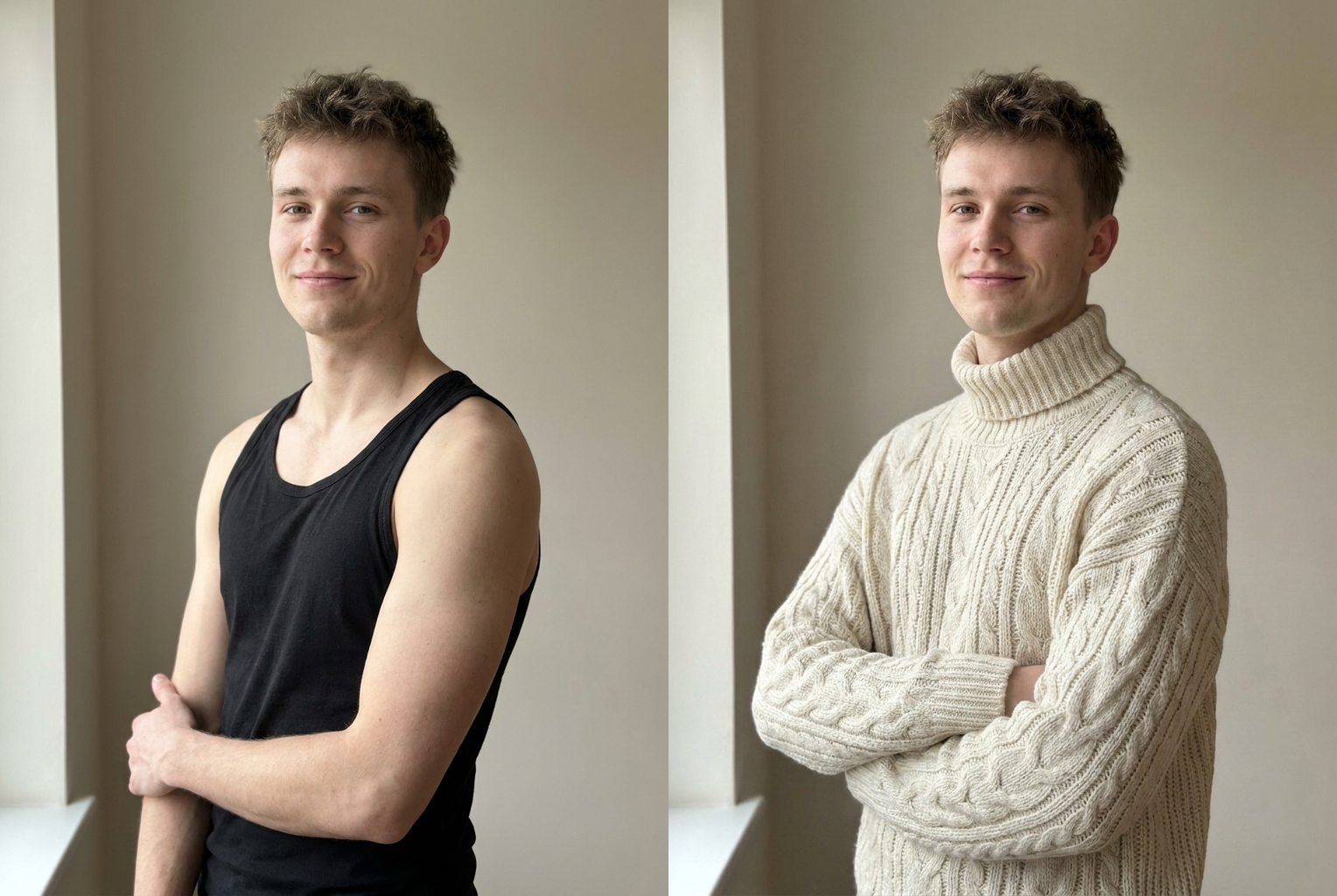
Tank top → cream knit sweater
Prompt: "a cream oversized chunky knit turtleneck" — same person, cozy seasonal outfit.
Prompt: "a cream oversized chunky knit turtleneck" — same person, cozy seasonal outfit.
Why this tool
Photorealistic clothing
New outfits are rendered with real fabric texture, natural folds, and shadows matched to your photo — it looks like a genuine photo of you wearing the clothes, not a flat cutout.
Your identity stays intact
The prompt locks your face, skin tone, hair, and body shape. Only the outfit changes, so the result is unmistakably you — just dressed differently.
Any style you can describe
Formal suits, wedding gowns, streetwear, cosplay, seasonal fashion, uniforms, vintage looks — if you can write it, the AI outfit changer can render it.
Pose and background preserved
Your stance, angle, and surroundings are kept unchanged, so the swap sits naturally in the original scene instead of looking pasted on.
Results in seconds
No fitting rooms, no photo editing skills, no waiting. Type an outfit and get a finished preview in moments, then iterate as many times as you want.
Works in the browser
Nothing to install. The tool runs online on desktop and mobile, so you can restyle any photo wherever you are and download the result instantly.
The rundown
AI Outfit Changer: Change Clothes in Any Photo Instantly
The AI Outfit Changer is an online tool that swaps the clothing in any photo for a completely different outfit, while keeping the person's face, pose, and surroundings exactly the same. Instead of booking a photoshoot, learning complicated photo-editing software, or physically trying on clothes, you simply upload a picture, type the outfit you want in plain language, and let the model do the rest. Within seconds the AI Outfit Changer returns a photorealistic image of the same person wearing the new clothing — the fabric drapes naturally, the fit follows the body, and the lighting matches the original shot. It turns a single photo into an endless wardrobe you can explore one description at a time.
Under the hood, the ai outfit changer relies on an advanced image model that understands both the structure of a human body and the semantics of clothing. When you upload a photo, the model reads the person's silhouette, pose, and the boundaries of their current garments. Your text prompt is then wrapped in careful instructions that isolate the clothing region: the model is told to preserve the face, skin tone, hair, body shape, and background, and to regenerate only the outfit. Because the change is targeted rather than a full redraw, the result stays anchored to the real photo, which is exactly what makes an ai clothes changer feel trustworthy instead of uncanny. This targeted approach is also why the ai outfit changer handles tricky cases — layered clothing, folded arms, or partial occlusion — more gracefully than a naive paste-over would, because it reasons about the whole scene before committing to a single new garment.
Style coverage is deliberately broad. The AI Outfit Changer can render tailored suits and tuxedos, elegant evening gowns and wedding dresses, relaxed streetwear, seasonal looks like winter coats or summer linens, cosplay and fantasy costumes, sports kits, uniforms, traditional and cultural dress, and vintage fashion from any decade. You are not limited to a fixed catalog of presets — because the tool is driven by your own words, the range of outfits is only as narrow as your imagination. Want a velvet blazer in deep emerald, or a flowing pastel maxi dress with a floral print? Describe it, and the outfit swap tool will attempt exactly that. Many people use the ai outfit changer to audition an entire capsule wardrobe from a single photo, generating one look after another until they find the direction that feels right for the occasion they have in mind.
Getting a great result comes down to two things: a clean photo and a clear description. Start with a sharp, well-lit image where the person stands out from the background and the clothing you want to replace is fully visible. Then describe a single, coherent outfit rather than piling on contradictory ideas. Include the garment, the color, the fabric, and the fit — for example, 'a fitted double-breasted navy wool coat over a white turtleneck' gives the ai outfit changer far more to work with than 'something stylish'. Mentioning accessories, sleeve length, or a neckline can push the result even closer to the look in your head.
The practical uses are everywhere. Shoppers preview how a style might look on them before buying, so they waste less money on clothes that don't suit them. Content creators and influencers refresh their feed with new looks without a new photoshoot for each one. People planning weddings, proms, and interviews test formal outfits in advance. Cosplayers and roleplayers visualize a costume before sewing a stitch. Even professionals use a virtual outfit try-on to compare a suit against a blazer for a headshot. Because each attempt is fast and cheap, the tool fits naturally into everyday styling decisions instead of being a rare, expensive event.
Compared with the manual alternative, the advantages stack up quickly. Editing clothing by hand in traditional software takes real skill: masking the garment, warping fabric to follow the body, matching light and shadow, and blending edges so nothing looks pasted. That can take an experienced editor an hour per image. The AI clothes changer collapses that entire workflow into a single sentence and a few seconds of processing. And unlike a physical fitting room, it lets you try wild or expensive looks — a couture gown, a period costume, a designer suit — with zero cost and zero commitment, so experimentation is genuinely free.
The workflow itself is intentionally simple. Upload your photo, type the outfit into the description box, and generate. If the first pass isn't perfect, refine the wording and try again — narrow the color, specify the fabric, or add a detail you left out. Each generation is a fresh interpretation, so small changes to your prompt lead to meaningfully different results. Because the AI Outfit Changer preserves your pose and background every time, you can line up several versions of the same photo in different outfits and compare them side by side, making it easy to settle on the look that works best. Treating the ai outfit changer as a rapid iteration loop — describe, generate, refine, repeat — is the fastest way to move from a rough idea to a polished, photorealistic result you are genuinely happy with.
Getting started takes less than a minute. There's nothing to download and no editing experience required — the ai outfit changer runs right in your browser on desktop or mobile. Upload a photo, describe the outfit you're curious about, and preview yourself wearing it almost instantly. Whether you're planning what to buy, building content, testing a costume, or just having fun reinventing your style, the AI Outfit Changer turns one picture into a full dressing room. Pick a photo, write your first outfit, and see how quickly your new look comes to life.
AI Outfit Changer — Frequently Asked Questions
No. The generation prompt explicitly instructs the model to keep your face, facial features, skin tone, hair, body shape, and pose exactly as they are in the original photo, and to replace only the clothing. That identity preservation is what makes the preview believable — you are seeing your real self in a new outfit, not a different person.
Almost anything you can describe in words. Tailored suits and tuxedos, wedding dresses, casual streetwear, seasonal fashion, cosplay and costumes, sports kits, traditional dress, uniforms, and vintage looks all work. The more specific your description — garment, color, fabric, and fit — the closer the result matches what you had in mind.
A full-body or three-quarter shot gives the outfit changer the most to work with, but half-body and portrait photos also work well for tops, jackets, and dresses. Just make sure the clothing you want to replace is clearly visible and not heavily cropped or hidden by other objects.
Start with a sharp, well-lit photo where the person is clearly separated from the background. Describe one coherent outfit rather than mixing many conflicting ideas, and mention fabric and color for accuracy. If the first result isn't quite right, refine your description and generate again — each attempt is fast and cheap.
The tool works best with a single clearly visible subject. If a photo has multiple people, the AI focuses on the most prominent one. For clean, predictable outfit swaps, upload a photo where one person is the clear center of attention.
Your upload is used only to generate your result. We don't publish your photos or share them. You control what you download and where you post it, so you can experiment with different looks privately before deciding to share anything.
Each generation uses one credit, and you can try a different outfit as many times as you like. There's no subscription required to experiment — describe an outfit, generate, tweak, and repeat until you get a look you love.
You can download your results and use them for personal projects, social posts, and style planning. For commercial or brand use, make sure you have the rights to the original photo and that the depicted clothing doesn't misrepresent a real product or person.