
AI Headshot Generator
Upload a plain selfie and get a professional studio headshot — business attire, studio lighting, and a clean background — while still looking exactly like yourself.
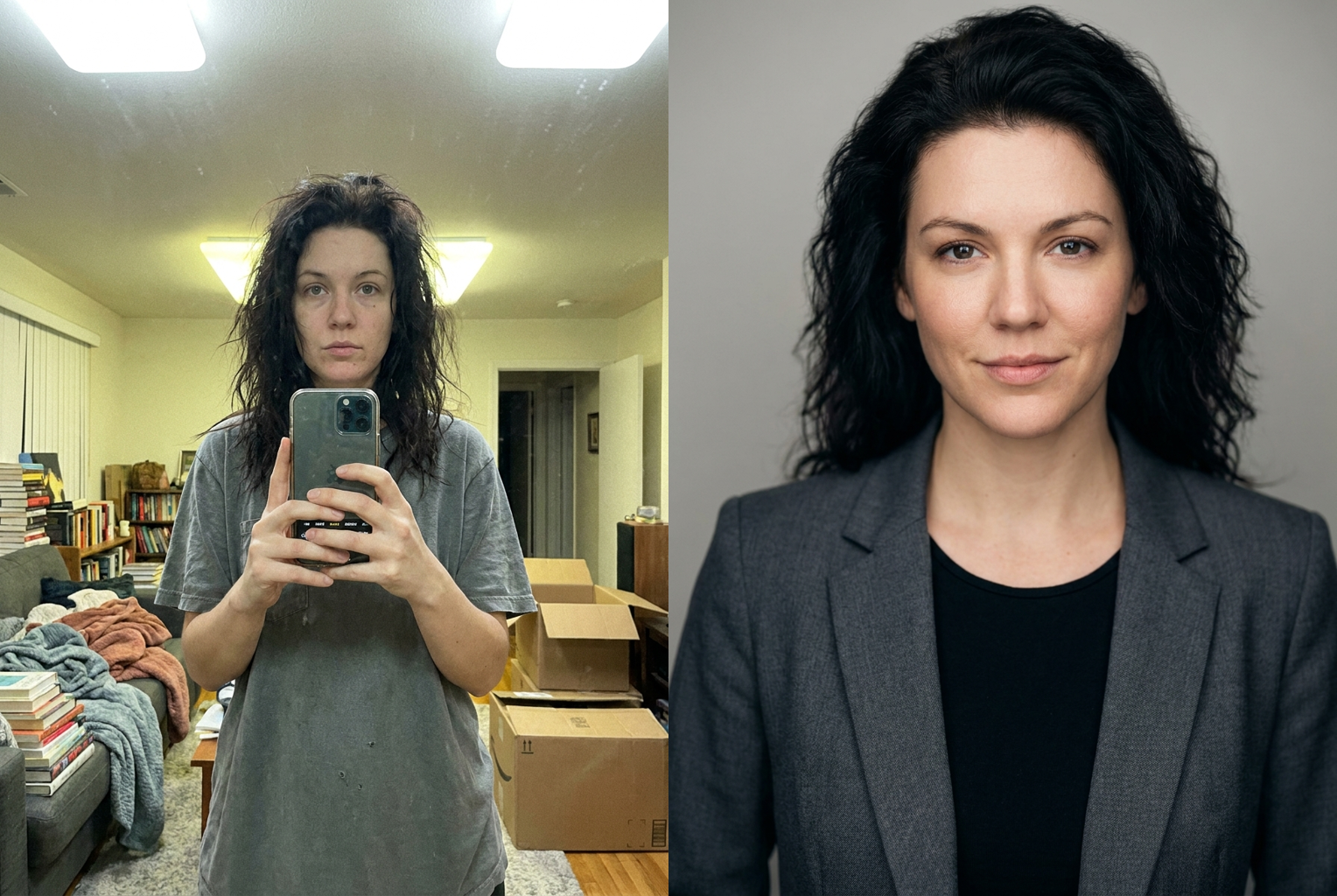
Casual Selfie → LinkedIn Headshot
Before → After: living-room selfie becomes a studio-lit corporate portrait in a neutral blazer, same face kept exactly
AI-generated examples
AI Headshot Generator
Drag & drop or click to upload
Supports PNG, JPG, WEBP • Max 20MB
Sign in to start generating
How it works
Upload a Selfie
Drop in any clear, front-facing photo of yourself — a phone selfie is fine. PNG, JPG, and WEBP up to 20MB. The more visible and in-focus your face, the better the headshot the AI can build.
AI Builds Your Headshot
The identity-locked prompt dresses you in business attire, rebuilds studio lighting, and drops in a clean neutral background — all while keeping your real face, hairstyle, and skin tone untouched.
Download & Use It
In under a minute you get a full-resolution, watermark-free corporate portrait ready for LinkedIn, your résumé, a company directory, or a speaker bio. Run it again for a different look for one credit.
AI Headshot Examples
Every example below is a real before-and-after produced by this tool's own headshot prompt — a plain selfie in, a professional studio portrait out, same face preserved.
Casual Selfie → LinkedIn Headshot
Before → After: living-room selfie becomes a studio-lit corporate portrait in a neutral blazer, same face kept exactly
Before → After: living-room selfie becomes a studio-lit corporate portrait in a neutral blazer, same face kept exactly
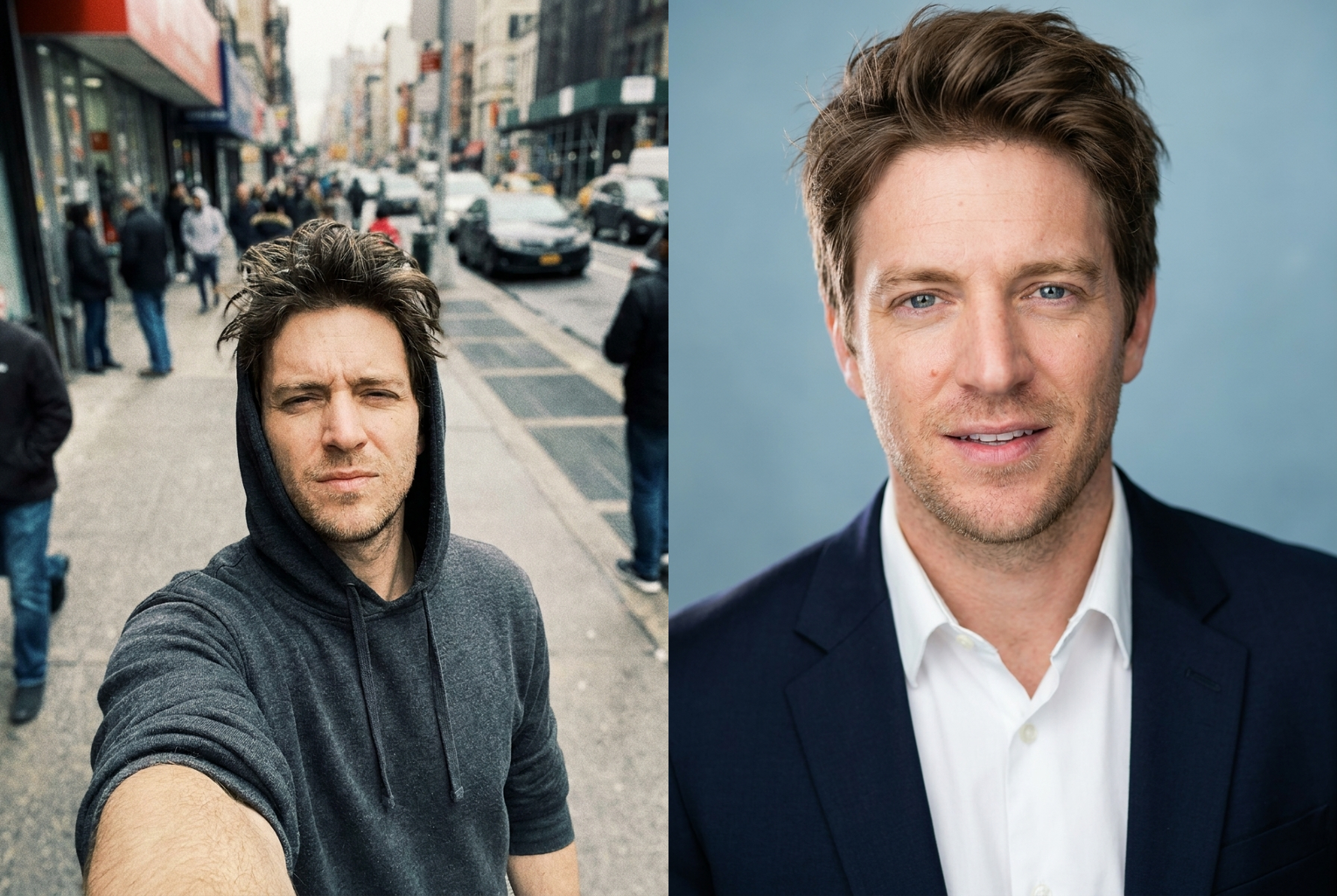
Hoodie Selfie → Corporate Headshot
Before → After: outdoor hoodie selfie becomes a polished business portrait with studio lighting, identity preserved
Before → After: outdoor hoodie selfie becomes a polished business portrait with studio lighting, identity preserved
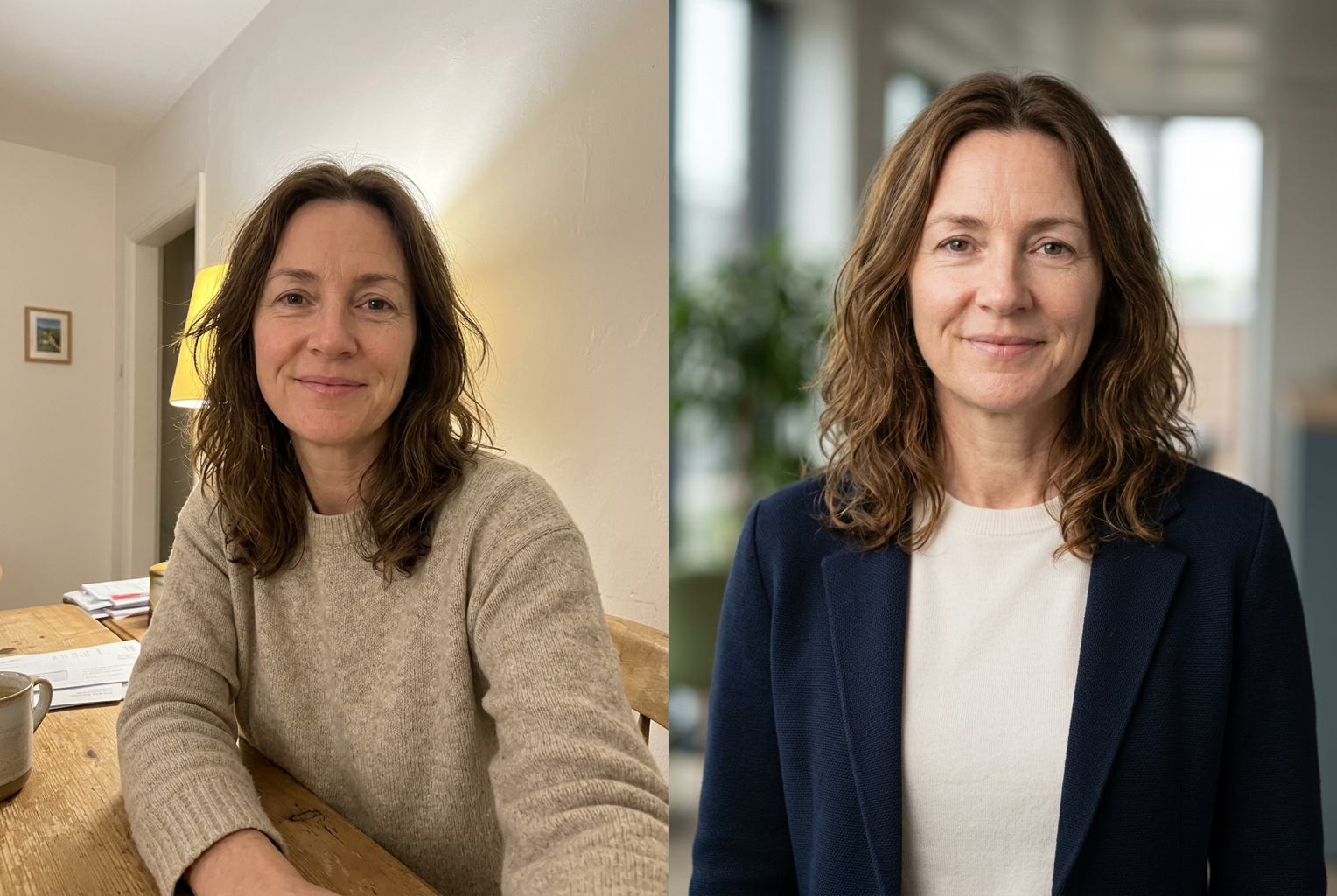
Kitchen Selfie → Executive Headshot
Before → After: warm kitchen snapshot becomes an executive portrait against clean office bokeh, same person
Before → After: warm kitchen snapshot becomes an executive portrait against clean office bokeh, same person
Why this tool
You Still Look Like You
The prompt locks your bone structure, jawline, nose, eye colour, skin tone, and hairstyle. Colleagues and clients recognise you instantly — it looks like a photo you sat for, not a stranger.
Real Studio Lighting
Flat phone flash and yellow room bulbs are replaced with a soft key light, gentle fill, and catchlights in the eyes — the single biggest reason a professional headshot reads as professional.
Business Attire, Auto-Styled
A well-fitted blazer, collared shirt, or smart knit in a neutral tone is added to suit you, so a casual selfie in a hoodie becomes a polished corporate portrait without a wardrobe change.
Clean Neutral Background
Cluttered rooms fall away into a smooth grey, soft-blue, or office-bokeh backdrop with shallow depth of field, so your face is the only thing the viewer's eye lands on.
Natural Skin, Not Plastic
Temporary blemishes and shine are cleaned up while pores and real texture stay. You get a good-skin day, not the airbrushed mannequin look that gives AI portraits a bad name.
One Credit, No Studio
No booking, no photographer, no editing software. Upload, press one button, and get a finished high-resolution headshot for a single credit in about thirty seconds.
The rundown
AI Headshot Generator: Turn a Selfie Into a Professional Portrait
The AI headshot generator takes an ordinary phone selfie and returns the studio portrait you would otherwise pay a photographer for — business attire, soft studio lighting, and a clean neutral background — without turning you into someone else. That last part matters more than it sounds. A headshot only works if the people who meet you recognise you from it, so the entire tool is built around keeping your real face intact while upgrading everything around it. Upload a casual photo and the AI headshot generator treats your identity as fixed and rebuilds the wardrobe, the lighting, and the backdrop, which is exactly what a good portrait photographer and retoucher would do on a real shoot.
Under the hood, the AI headshot generator runs a large image-to-image model with an identity-locked instruction set. When you upload a selfie, the model receives both your image and a carefully tuned prompt that spells out what may change and what may not. Clothing, lighting direction, colour temperature, background, framing, and overall photo quality are all fair game. Your bone structure, jawline, nose shape, eye colour, skin tone, hairstyle, age, and ethnicity are explicitly locked, and the instruction forbids slimming or reshaping. Because that prompt is baked into the page rather than left to you to write, every run produces a consistent professional headshot without you knowing anything about prompt engineering — the tool quietly handles that part.
A convincing headshot is really four upgrades stacked together, and the AI headshot generator applies all four in one pass. Attire comes first: a casual hoodie or t-shirt is replaced with a well-fitted blazer, collared shirt, or smart knit in a neutral tone that suits you. Lighting is next and does the heaviest lifting — flat phone flash and yellow indoor bulbs give way to a soft key light with gentle fill and catchlights in the eyes, the detail that most separates a snapshot from a corporate headshot. Then the background: cluttered rooms melt into a smooth grey, soft-blue, or office-bokeh backdrop. Finally the skin is cleaned of temporary blemishes and shine while pores and real texture stay, so the result reads as good skin rather than plastic.
Photo choice matters more than anything else you control. Give the AI headshot generator a clear, front-facing selfie where your whole face is visible and reasonably sharp, ideally shot in daylight or any even, diffuse light. A window-lit selfie at arm's length is close to ideal, and a plain expression with a hint of a smile photographs best. What holds results back is missing information rather than bad information: a heavily backlit silhouette, a face half-hidden behind sunglasses or a hand, an extreme upward angle, or a tiny crop pulled from a group photo. The model can fix dull light, weak attire, and a messy background, but it cannot reconstruct detail the camera never recorded.
People reach for a linkedin headshot generator in a handful of recurring situations. Job seekers need a polished profile photo fast and cannot wait a week for a studio slot. New hires get asked for a headshot for the company directory on day one. Founders, consultants, and freelancers need a portrait for their website, pitch deck, or press kit. Speakers and authors need a clean bio photo at short notice. In every one of these cases, running your best existing selfie through a business headshot maker costs a credit instead of a booking, and you can have it in the time it takes to read this paragraph.
Compared with the manual alternative, the gap is mostly time, money, and scheduling. A professional headshot session means booking a photographer, travelling to a studio, sitting for the shoot, then waiting days for retouched files — and paying accordingly. A skilled retoucher can rebuild attire, lighting, and background by hand in a photo editor, but that is hours of masking and dodge-and-burn work per image and years of skill to do well. The AI headshot generator compresses all of it into roughly thirty seconds and one credit, which changes how you use it: instead of agonising over one expensive shot, you generate several and simply keep the best professional headshot of the batch.
In practice the tool rewards a little experimentation. Because the model is not fully deterministic, the same selfie produces meaningfully different takes on separate runs — the blazer colour shifts, the background tone changes, the key light moves a few degrees. Generating two or three versions and picking a favourite reliably beats accepting the first output, and each attempt costs the same single credit. It is also worth trying two or three different source selfies rather than only your favourite, since the photo you like most is not always the one with the cleanest facial detail for the model to work from. A quick before-and-after comparison usually makes the winning corporate headshot ai result obvious within a minute.
Getting started with the AI headshot generator takes no setup at all — no account wizard, no software install, no photographer to schedule. Upload a selfie using the tool at the top of this page, press the button, and wait under a minute for a full-resolution download with no watermark. New accounts include free credits, so your first professional headshot costs nothing, and failed generations refund automatically. The images you create are yours to use, including for LinkedIn, résumés, company sites, email signatures, and conference bios, provided you hold the rights to the selfie you upload. If your profile picture is a cropped holiday snap you have quietly disliked for two years, the AI headshot generator makes replacing it a thirty-second job.
AI Headshot Generator — Frequently Asked Questions
No — identity preservation is the whole point. The prompt instructs the model to keep your facial structure, features, skin tone, hairstyle, and age exactly, and forbids slimming or reshaping. What changes is everything around your identity: your clothing becomes business attire, the lighting becomes studio-grade, and the background becomes a clean neutral backdrop. The goal is a photo of you on your best day, not a different person wearing your face.
Every headshot costs one credit, and new accounts start with free credits, so you can create your first professional headshot without paying anything. There is no subscription required and no watermark on your download. If you run out, credits can be topped up, and each attempt — including re-runs of the same selfie for a different attire or background take — costs the same single credit.
A clear, front-facing selfie where your whole face is visible and reasonably in focus. Even, diffuse light such as daylight from a window beats a dark room. Avoid heavy sunglasses, hands over your face, extreme angles, or tiny low-resolution crops from a group photo. The AI can rebuild lighting, attire, and background, but it cannot invent facial detail that the camera never captured in a blurry or dark image.
Yes — a LinkedIn headshot is the most common use. The output is framed from the upper chest up with business attire, studio lighting, and a clean background, which is exactly the format LinkedIn, company directories, and résumés expect. Images you generate are yours to use for professional and commercial purposes, provided you hold the rights to the selfie you upload.
Usually between fifteen and forty seconds, depending on queue load and image size. You can leave the page open while it runs. If a generation fails, your credit is returned automatically, so a failed attempt never costs you anything — just try again, ideally with a slightly clearer source selfie.
Yes. The model is not fully deterministic, so running the same selfie twice produces slightly different results — the attire colour, background tone, and lighting angle can shift. Many people generate two or three versions and pick the strongest one. Each run costs one credit, so it is cheap to explore a few takes before settling on your final headshot.
Yes. The prompt adapts the attire and styling to suit the subject, so it works equally well for men and women across corporate, creative, academic, medical, and small-business contexts. If you want a specific vibe, run a couple of generations and keep the one whose attire and background best match your industry — a lawyer and a startup founder can both look right.
Yes. Headshots you generate are yours to use, including for LinkedIn, résumés, company websites, email signatures, conference bios, and press kits. You are responsible for holding the rights to whatever selfie you upload, and you should only upload photos of yourself or people who have given you permission. Do not use the tool on public figures or minors to create misleading images.