
AI Halloween Costume Generator
Upload a photo, describe any costume, and the AI Halloween Costume Generator dresses you in it while keeping your face and pose exactly the same.
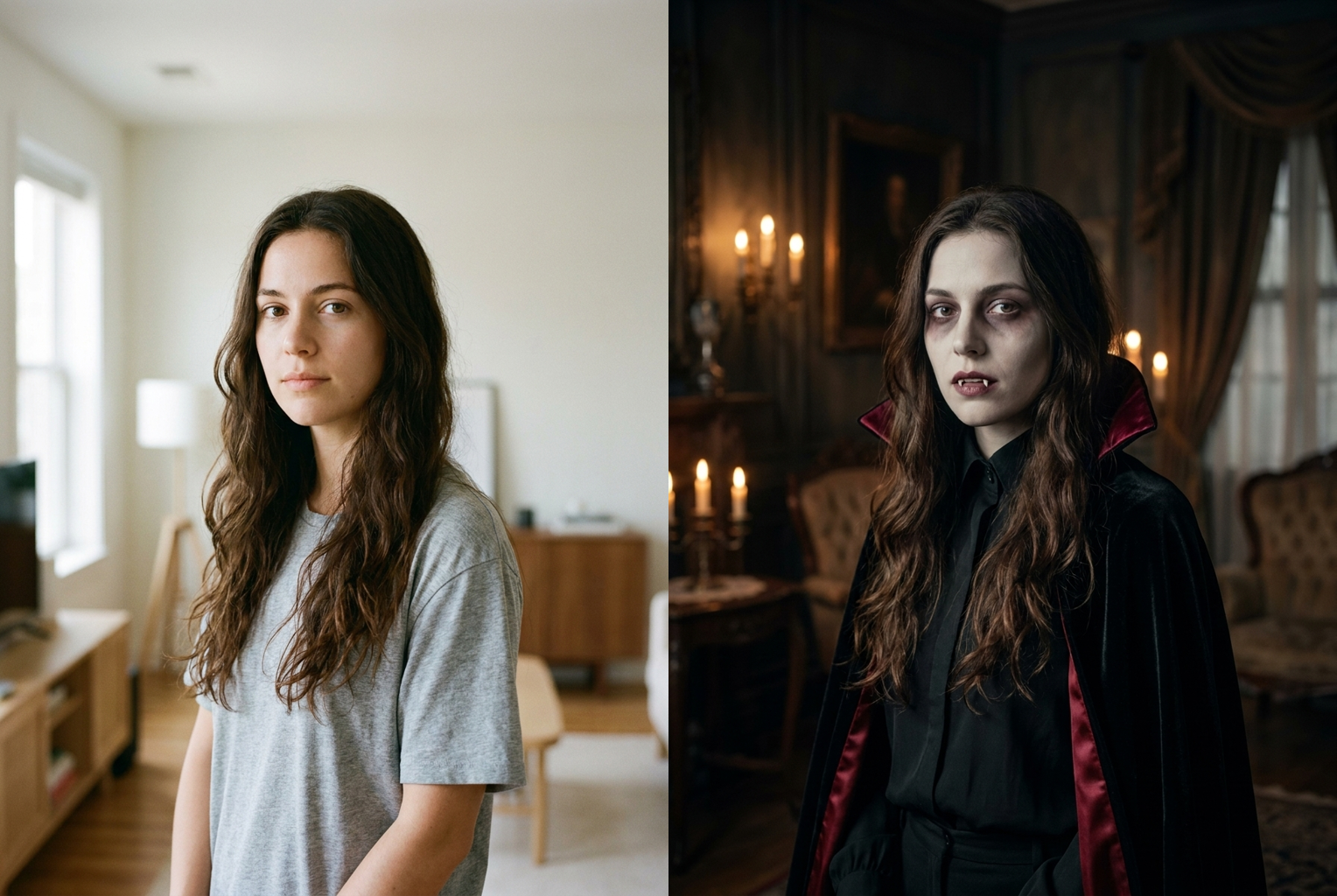
Casual tee → gothic vampire
Prompt: "a gothic vampire with pale skin, fangs, and a red-lined black cape" — same face and pose, spooky new look.
AI-generated examples
AI Halloween Costume Generator
Upload a photo, describe a Halloween costume, and preview yourself wearing it in seconds — same face, same pose, spooky new look.
Drag & drop or click to upload
Supports PNG, JPG, WEBP • Max 20MB
Sign in to start generating
How it works
Upload your photo
Choose a clear photo where your face and body are fully visible. Front-facing shots with even lighting give the cleanest, most realistic costume try-ons.
Describe the costume
Type the Halloween look you want — the character, the outfit, the makeup, the mood. Be specific: 'a gothic vampire with pale skin and a red-lined cape' beats 'something scary'.
Get your costume
The AI adds the costume, makeup, and atmosphere while keeping your face, hair, body, and pose intact. Download the result or try another costume for free.
See the AI Halloween Costume Generator in action
Every example below was made by uploading one photo and describing a Halloween costume — same face, same pose, a completely new look.
Casual tee → gothic vampire
Prompt: "a gothic vampire with pale skin, fangs, and a red-lined black cape" — same face and pose, spooky new look.
Prompt: "a gothic vampire with pale skin, fangs, and a red-lined black cape" — same face and pose, spooky new look.
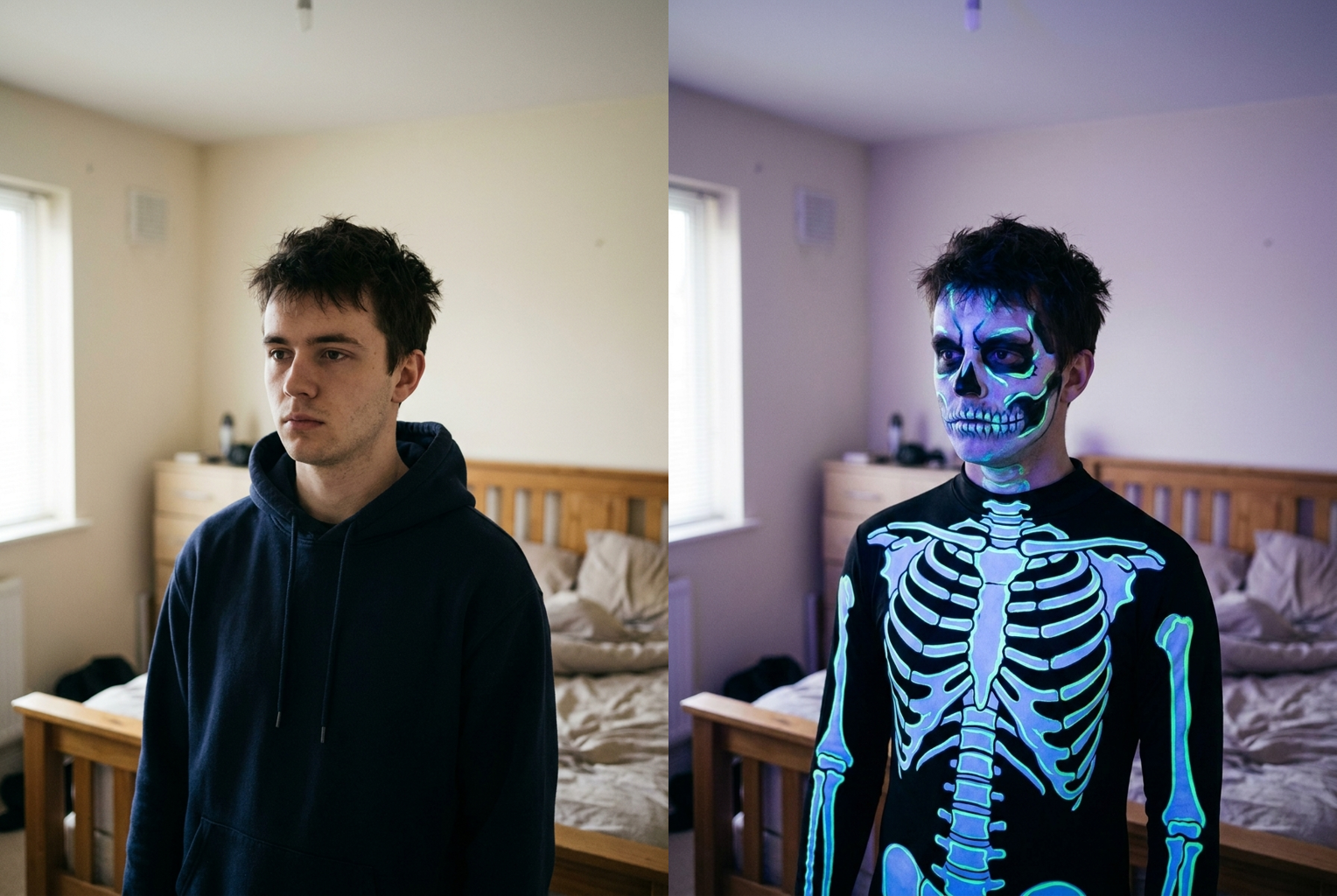
Plain hoodie → neon skeleton
Prompt: "a glowing neon skeleton with detailed bone face paint under blacklight" — identity kept, costume added.
Prompt: "a glowing neon skeleton with detailed bone face paint under blacklight" — identity kept, costume added.
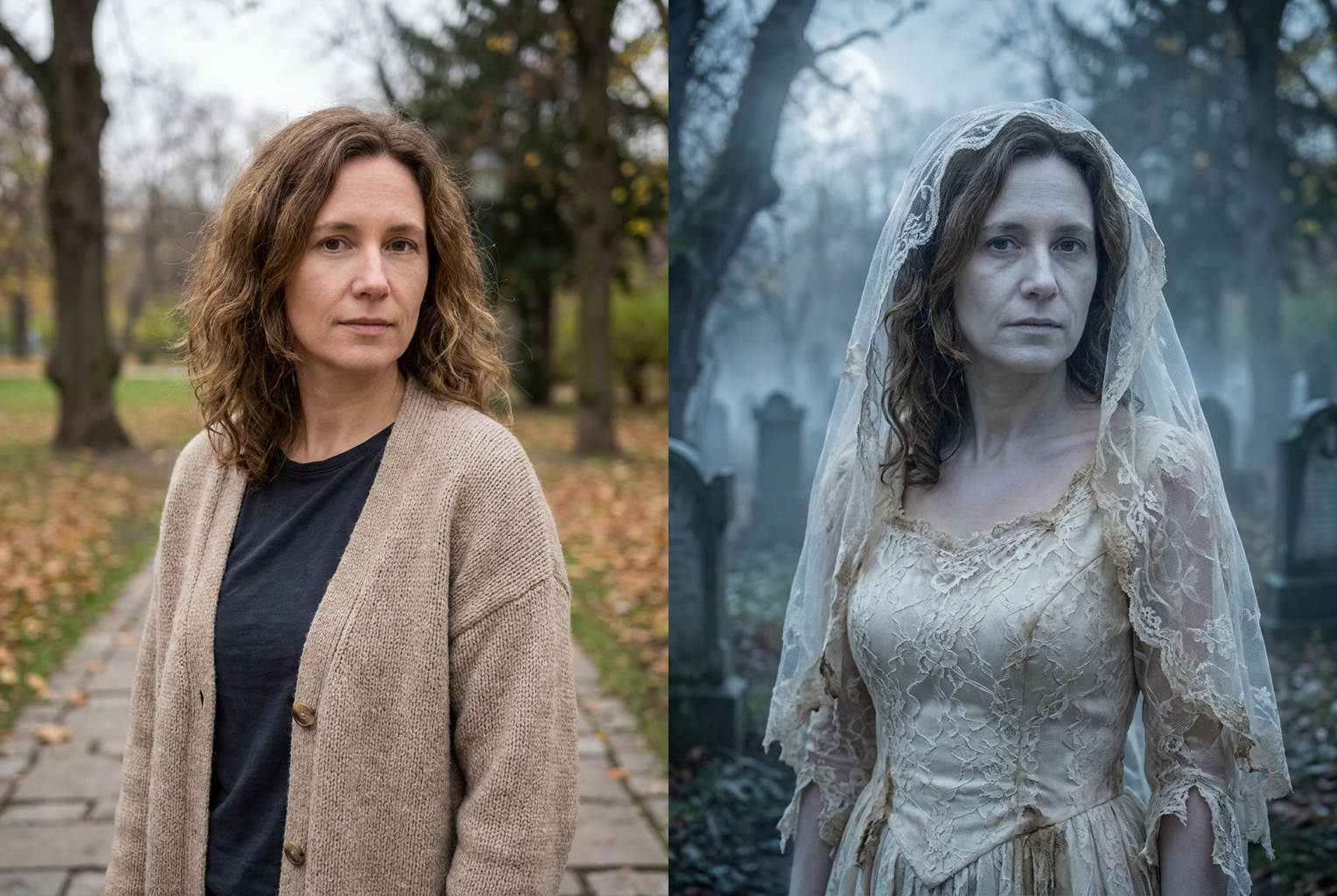
Cardigan → Victorian ghost bride
Prompt: "a Victorian ghost bride in a tattered lace gown and torn veil" — same person, haunting new costume.
Prompt: "a Victorian ghost bride in a tattered lace gown and torn veil" — same person, haunting new costume.
Why this tool
Any costume you can describe
Vampires, witches, zombies, ghosts, superheroes, classic monsters, pop-culture characters, cute or gory — if you can write it, the AI Halloween costume generator can render it.
Your face stays yours
The prompt locks your face, skin tone, hair, and body shape, so every costume is unmistakably you — just transformed for Halloween instead of turned into a stranger.
Photorealistic special-effects makeup
Costumes come with believable prosthetics, makeup, fabric texture, and shadows matched to your photo, so the look reads like a real costume shoot, not a flat overlay.
Results in seconds
No sewing, no makeup skills, no shopping trip. Type a costume and get a finished preview in moments, then iterate as many times as you want.
Spooky atmosphere included
The generator adds a fitting Halloween mood — fog, candlelight, haunted backdrops — that suits the costume while keeping you the clear focus of the shot.
Works in the browser
Nothing to install. The tool runs online on desktop and mobile, so you can try on costumes anywhere and download the result instantly.
The rundown
AI Halloween Costume Generator: Try On Any Costume From a Photo
The AI Halloween Costume Generator is an online tool that transforms any photo of you into a fully costumed Halloween look, while keeping your face, pose, and identity exactly the same. Instead of shopping through crowded stores, renting an outfit you can't return, or spending hours on makeup you're not sure will suit you, you simply upload a picture, type the costume you want in plain language, and let the model do the work. Within seconds the AI Halloween Costume Generator returns a photorealistic image of you wearing the costume — fabric drapes naturally, special-effects makeup blends into your skin, and the lighting matches the original shot. It turns a single selfie into an endless dressing room of Halloween characters you can explore one description at a time.
Under the hood, the ai halloween costume generator relies on an advanced image model that understands both the structure of a human body and the semantics of costumes and makeup. When you upload a photo, the model reads your silhouette, pose, and facial features. Your text prompt is then wrapped in careful instructions that isolate the transformation: the model is told to preserve your face, skin tone, hair, and body shape, and to add only the costume, prosthetics, and themed styling. Because the change is targeted rather than a full redraw, the result stays anchored to the real you, which is exactly what makes a halloween costume ai feel exciting instead of uncanny. That same targeted approach lets the generator handle tricky looks — heavy prosthetics, glowing effects, layered capes — more gracefully than a naive paste-over, because it reasons about the whole scene before committing to the costume.
Costume coverage is deliberately broad. The AI Halloween Costume Generator can render classic monsters like vampires, witches, werewolves, zombies, and mummies; ghosts, skeletons, and grim reapers; superheroes and comic-book villains; fairy-tale, fantasy, and mythological characters; cute pastel looks for kids-at-heart; and gory, cinematic horror makeup for those who want a fright. You are not limited to a fixed catalog of presets — because the tool is driven by your own words, the range of costumes is only as narrow as your imagination. Want a Victorian ghost bride in a tattered veil, or a neon skeleton glowing under blacklight? Describe it, and the ai costume generator will attempt exactly that. Because it works from your own photo, the AI Halloween Costume Generator makes even the most elaborate character feel personal rather than generic.
Getting a great result comes down to two things: a clean photo and a clear description. Start with a sharp, well-lit image where your face is fully visible and you stand out from the background. Then describe a single, coherent costume rather than piling on contradictory ideas. Include the character, the key garments, the colors, and the makeup — for example, 'a gothic vampire with pale skin, dark under-eyes, fangs, and a red-lined black cape' gives the tool far more to work with than 'something spooky'. Mentioning atmosphere, props, or lighting can push the result even closer to the look in your head, so when someone types put me in a halloween costume, the more vivid the words, the better the payoff.
The practical uses are everywhere. Partygoers preview costume ideas on themselves before spending money on an outfit that might not suit them. Content creators and influencers refresh their October feed with a new look every day without buying a single prop. Parents and kids brainstorm costumes together and see them come to life instantly. Cosplayers visualize a build before sewing a stitch, and friend groups plan coordinated themes by testing each idea on a real photo. Because each attempt is fast and cheap, the ai halloween costume generator fits naturally into everyday planning instead of being a rare, expensive event, and it doubles as an inspiration board when nobody in the group can agree on a theme.
Compared with the manual alternative, the advantages stack up quickly. Assembling a costume by hand means shopping, fitting, and sometimes hours of makeup, with no guarantee the finished look will read the way you hoped. Editing a costume onto a photo in traditional software takes real skill: masking, warping fabric to the body, painting believable makeup, and matching light so nothing looks pasted. The ai halloween costume generator collapses that entire process into a single sentence and a few seconds of processing. And unlike a physical costume, it lets you try wild, expensive, or impossible looks — a full monster prosthetic, a period gown, a glowing spirit — with zero cost and zero commitment, so experimentation is genuinely free.
The workflow itself is intentionally simple. Upload your photo, type the costume into the description box, and generate. If the first pass isn't perfect, refine the wording and try again — sharpen the character, specify the makeup, or add a detail you left out. Each generation is a fresh interpretation, so small changes to your prompt lead to meaningfully different results. Because the tool preserves your pose and framing every time, you can line up several versions of the same photo in different costumes and compare them side by side, using the AI Halloween Costume Generator as a fast halloween costume idea generator to settle on the look that works best for your night.
Getting started takes less than a minute. There's nothing to download and no costume-making experience required — the AI Halloween Costume Generator runs right in your browser on desktop or mobile. Upload a photo, describe the costume you're curious about, and preview yourself wearing it almost instantly. Whether you're planning what to buy, building spooky-season content, coordinating a group theme, or just having fun scaring your friends with a preview, the AI Halloween Costume Generator turns one picture into a full costume closet. Pick a photo, write your first costume, and see how quickly your Halloween look comes to life.
AI Halloween Costume Generator — Frequently Asked Questions
No. The generation prompt explicitly instructs the model to keep your face, facial features, skin tone, hair, and body shape exactly as they are in the original photo, and to add only the costume, makeup, and themed styling. That identity preservation is what makes the preview believable — you are seeing your real self in a costume, not a different person wearing it.
Almost anything you can describe in words. Classic monsters like vampires, witches, zombies, and mummies; ghosts and skeletons; superheroes and villains; fairy-tale and fantasy characters; cute or scary makeup looks; and pop-culture inspired outfits all work. The more specific your description — character, outfit, colors, and makeup — the closer the result matches what you pictured.
A three-quarter or full-body shot gives the generator the most to work with, but half-body and portrait photos also work well for costumes that focus on the head, face, and shoulders — like vampires, ghosts, or makeup-heavy looks. Just make sure your face is clearly visible and well lit so the costume sits naturally on you.
Start with a sharp, well-lit photo where you stand out from the background. Describe one coherent costume rather than mixing conflicting ideas, and mention the character, key garments, colors, and makeup. If the first result isn't quite right, refine your description and generate again — each attempt is fast and cheap, so you can dial in the look.
Yes. Many people use the tool as a costume idea generator: try on several concepts on your own photo before committing to buying, renting, or making anything. Seeing a costume on yourself — rather than on a model or a listing — makes it much easier to decide what actually suits you for the party or the night out.
Your upload is used only to generate your result. We don't publish your photos or share them. You control what you download and where you post it, so you can experiment with different costumes privately and only share the ones you love.
Each generation uses one credit, and you can try a different costume as many times as you like. There's no subscription required to experiment — describe a costume, generate, tweak, and repeat until you get a look you're excited to show off on Halloween.
You can download your results and use them for personal projects and social posts — they're made to be shared. For commercial or brand use, make sure you have the rights to the original photo and that any character or costume you depict doesn't infringe someone else's intellectual property.