
AI Glow Down Filter
Upload any selfie and let the AI glow down filter turn your best photo into a hilariously bad one — greasy hair, flash glare and all — while you stay unmistakably you.
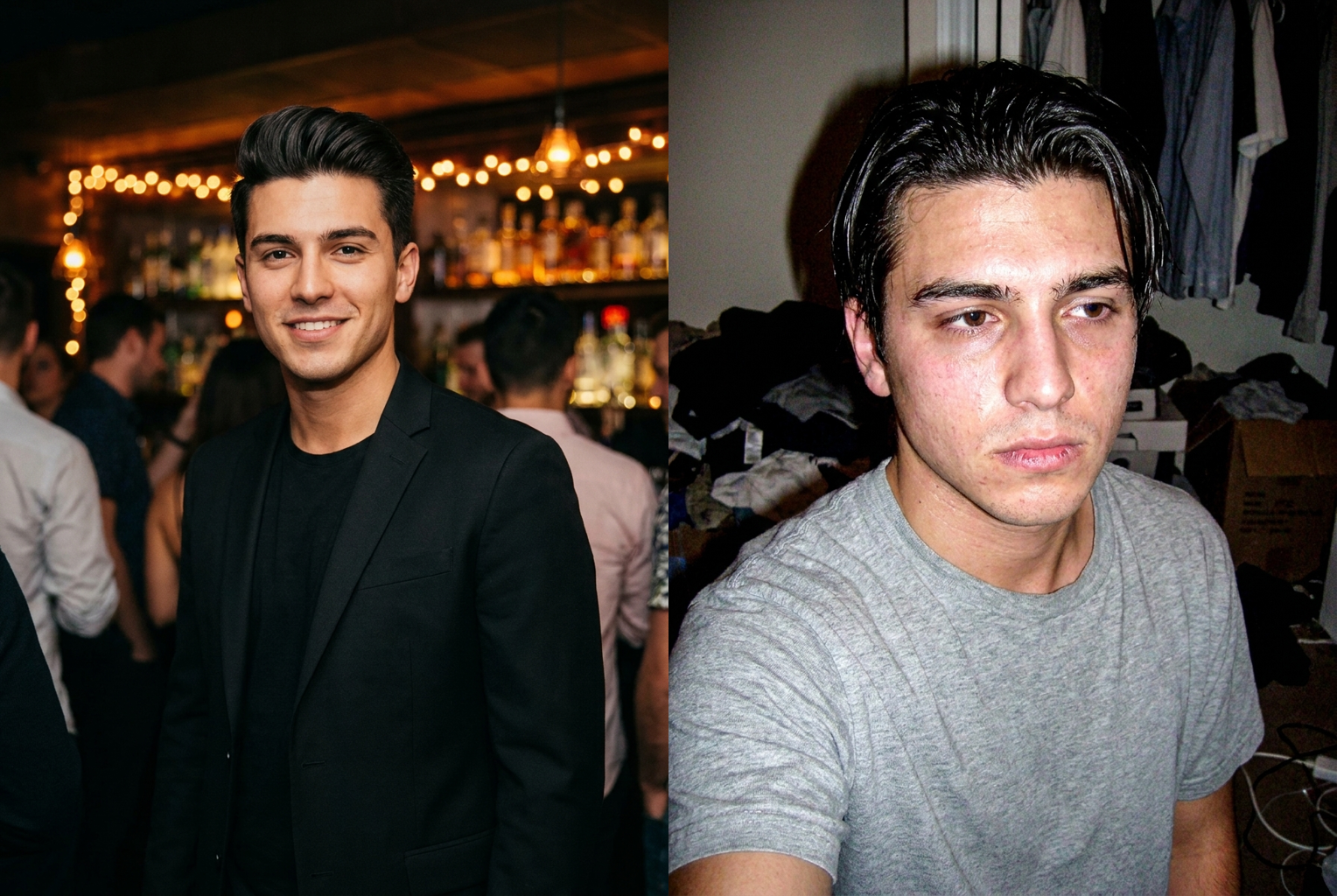
Friday-night glam → Monday-morning energy
A sharp night-out shot turned into a frumpy, flash-blasted snapshot — the 'im so sorry' before-and-after in one image.
AI-generated examples
AI Glow Down Filter
Upload a photo and get your worst, funniest self in seconds. 1 credit per generation.
Drag & drop or click to upload
Supports PNG, JPG, WEBP • Max 20MB
Sign in to start generating
How it works
How the AI Glow Down Filter Works
Three steps, about thirty seconds, no editing skills required.
Upload Your Best Photo
Drop in your most polished selfie, headshot or night-out picture. PNG, JPG and WEBP are supported up to 20MB. The better your original photo looks, the harder the before-and-after lands, so pick a front-facing shot where your whole face is clearly visible.
Let the AI Glow You Down
The model keeps your face locked and rewrites everything around it — hair, skin, lighting, outfit and image quality — into a gloriously bad version. It takes about half a minute and no two runs look exactly the same.
Download and Post the Roast
Grab a clean, high-resolution, watermark-free image and drop it straight into a before-and-after collage. Pair it with your real photo for the full 'im so sorry' effect and share it anywhere.
Before and After
Real outputs from this tool, generated with the exact prompt the page uses. The polished photo on the left, the glow-down on the right.
Friday-night glam → Monday-morning energy
A sharp night-out shot turned into a frumpy, flash-blasted snapshot — the 'im so sorry' before-and-after in one image.
A sharp night-out shot turned into a frumpy, flash-blasted snapshot — the 'im so sorry' before-and-after in one image.
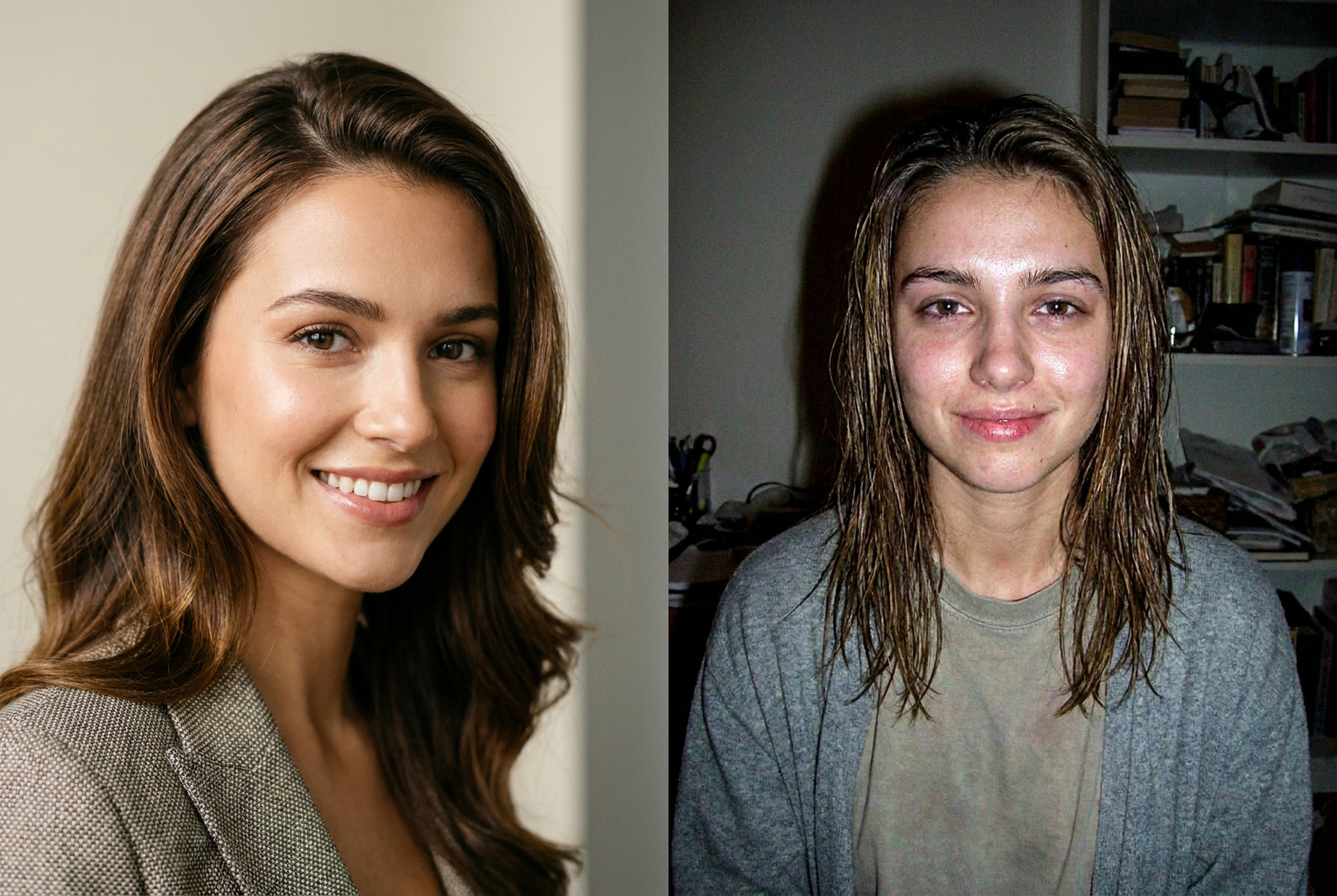
Studio headshot → webcam disaster
A glossy studio headshot rolled back into greasy hair, flat flash and 2003 webcam quality — same face, worst photo.
A glossy studio headshot rolled back into greasy hair, flat flash and 2003 webcam quality — same face, worst photo.
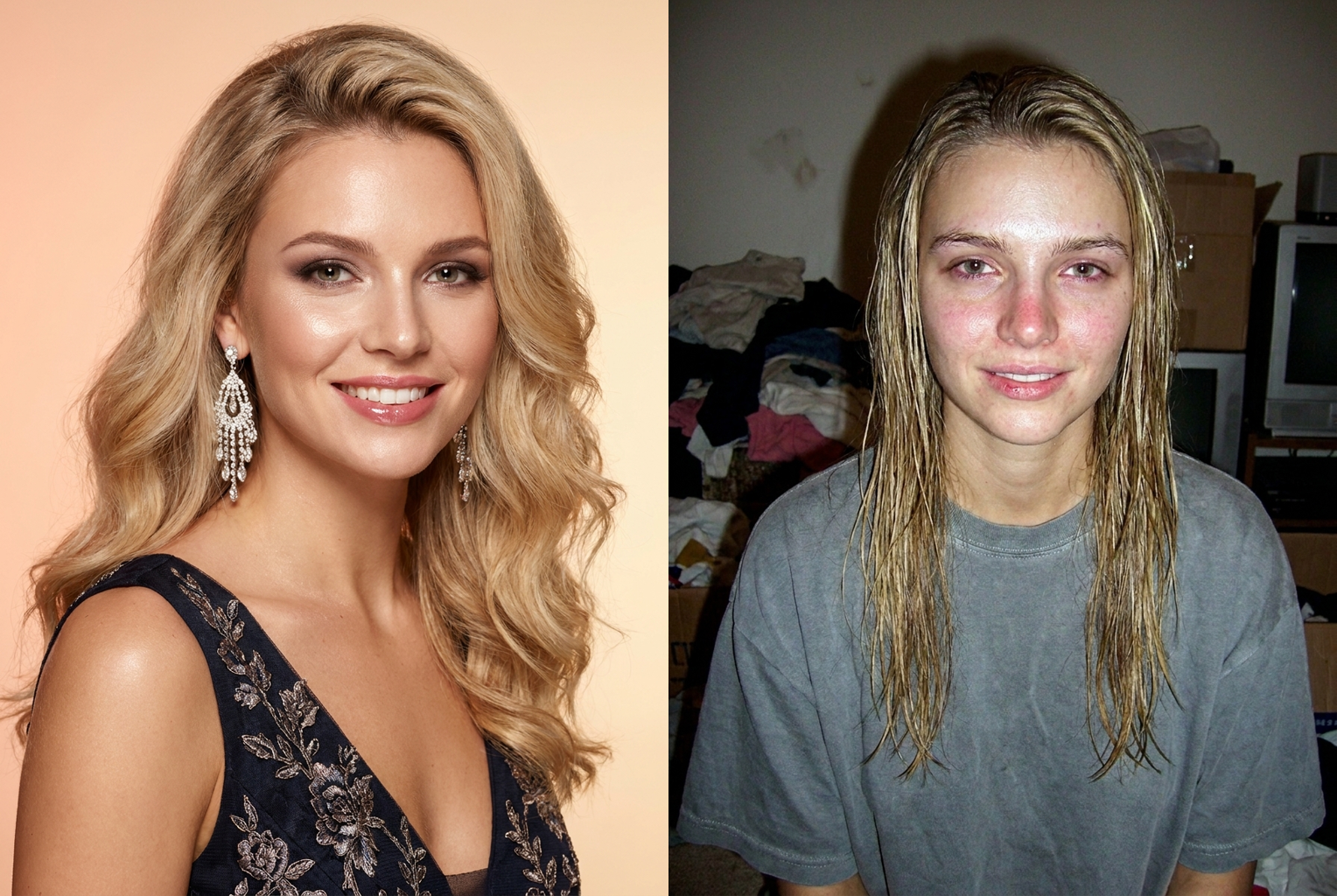
Magazine glam → reverse glow up
Full fashion-magazine glam dragged back to greasy, tired and washed-out — the bigger the glam, the harder the roast lands.
Full fashion-magazine glam dragged back to greasy, tired and washed-out — the bigger the glam, the harder the roast lands.
Why this tool
Why This Glow Down Filter Hits Different
Most filters try to make you flawless. This one does the opposite — on purpose — without turning you into a stranger.
You're Still You
The prompt explicitly locks your bone structure, jawline, nose, eye colour, skin tone and age. The joke only works if people still recognise you instantly, so nothing gets reshaped — only your grooming, lighting and photo quality get the comedic treatment.
One-Tap Roast
No sliders, no editing, no learning curve. Upload one photo and the glow down happens automatically in about thirty seconds. Run it again and the AI shuffles the details for a fresh disaster every time.
Every Flavour of Bad
From greasy-and-tired to frumpy passport energy to full early-internet webcam compression, the filter covers the whole 'the AI did me dirty' spectrum so you can pick the most unhinged result.
Authentic Bad-Photo Physics
Real glow-downs come from harsh flash, flat lighting and low resolution — not cartoon ugliness. The AI reproduces how a genuinely unflattering photo actually looks, which is exactly why the result feels believable and funny.
Clean, Watermark-Free Output
You get a high-resolution image with no watermark stamped across it, ready to slot straight into a collage, a reaction post or a thumbnail without any extra cropping or cleanup.
Safe-for-Work Fun
The prompt keeps things lighthearted — no injuries, blood or anything grotesque. The results stay affectionate and shareable, so you can roast yourself or a friend on any platform without crossing a line.
The rundown
AI Glow Down Filter: Turn Your Best Selfie Into Your Worst
The AI glow down filter is the internet's favourite way to laugh at yourself. Where a beauty app tries to make you flawless, the glow down filter does the opposite: it hands you greasy hair, tired eyes, a harsh flash and the unmistakable energy of a photo taken on a cheap webcam in 2003. The joke only works because it is still clearly you, which is exactly what this tool protects. Upload one photo and the ai glow down filter reimagines your grooming, lighting and styling at their comedic worst while keeping your real face intact. It is fast, free to try, and built for the kind of post that makes your group chat reply with crying-laughing emojis instead of compliments.
Behind the laughs is a serious image model doing careful work. When you run the glow down filter, the AI reads your photo as a structured portrait — it maps your facial geometry, skin tone, hair and expression — and then applies a targeted set of unflattering changes on top of that identity layer. The prompt steering the ai glow down filter explicitly locks your bone structure, nose, jawline, eye colour and age, then degrades everything around them: it dulls the skin, flattens the lighting into a point-blank flash, mattes down the hair, and drops the overall image quality to that nostalgic low-resolution webcam look. Because the degradation is applied as a style rather than a reshape, you come out looking like a worse-photographed version of yourself, not a stranger.
The glow down generator covers the whole spectrum of 'the AI did me dirty.' You can get the classic tired-and-greasy look, the awkward passport-photo stare, the frumpy going-nowhere outfit, the unflattering overhead angle, or the full early-internet webcam aesthetic with washed-out colour and compression noise. Each run of the ai glow down filter shuffles these details slightly, so two attempts on the same photo rarely look identical — great for picking the most unhinged result. It handles solo selfies, couple shots and group photos, and it works on any face, hairstyle or skin tone because it enhances the existing person rather than swapping in a template. Small touches sell the effect: a smudge of flash glare on the forehead, a collar that sits slightly wrong, a background that looks like a dorm room at midnight. Those are the details that make people zoom in, screenshot, and send it straight to the group chat.
For the funniest results, feed the glow down filter your most polished photo — a clean headshot, a well-lit portrait, or a flattering night-out picture. The bigger the gap between your real photo and the glow-down, the harder the before-and-after lands. Front-facing shots where your whole face is visible give the AI the most to work with, and a neutral or smiling expression tends to produce the best comedic contrast. Avoid heavily filtered or already-blurry images, since the ai glow down filter then has less room to exaggerate. If you want to lean into a specific era, a straight-on photo against a plain wall reads most convincingly as a bad 2000s webcam capture once the filter is applied.
People use the glow down filter for all kinds of posts. It is the engine behind the 'im so sorry' and reverse glow up trends, where you pair your real photo with the roasted version for a punchline. Friends send each other glow-downs as affectionate insults, couples make matching 'worst selfie' sets, and creators use it as a reaction image or a scroll-stopping thumbnail. It is also a gentle way to make fun of your own old photos without digging through a shoebox, and a surprisingly good icebreaker when you want a profile picture that does not take itself seriously. Dating-app bios, finsta accounts, birthday roasts and 'expectation versus reality' posts all pull from the same well. Because the glow down ai keeps things lighthearted and safe-for-work, the results stay shareable on any platform, and nobody is left genuinely embarrassed — the laugh is always with you, never at you.
Doing this by hand would mean hours in a photo editor dodging and burning skin, repainting hair, faking flash glare and crushing the resolution — and it would still look forced. The ai glow down filter compresses all of that into a single automated pass that understands how a genuinely bad photo actually looks. It knows that real glow-downs come from lighting and grooming, not from cartoon ugliness, so it never turns you into a monster. There is no software to install and no skills required: the glow down generator does the heavy lifting and you just pick your favourite disaster from the results.
The workflow is deliberately simple. Drop in a photo, let the glow down filter process it for around half a minute, and download a high-resolution result you can post anywhere. Each generation costs a single credit, so you can run the same selfie a few times and keep the most ridiculous outcome. The tool returns a clean image with no watermark, ready to drop straight into a before-and-after collage. If the first pass is too tame or too harsh, just run it again — the ai glow down filter varies its details every time, so your next attempt will land differently.
Getting started takes seconds. Upload any selfie, run the glow down filter, and watch the AI transform your best angle into your worst one while keeping you completely recognisable. Whether you are chasing the 'im so sorry' trend, roasting a friend, or just want to see how far the ai glow down filter will take your look, it is free to try and ready right now. There is nothing to download, no account hoops to jump through, and no editing knowledge required — the AI handles the lighting, the grooming and the grainy webcam finish for you. Save your favourite result, build a side-by-side with your original, and post it while the trend is still hot. Stay you, but funnier — that is the whole point of a good glow down.
AI Glow Down Filter — Frequently Asked Questions
Only your styling, not your identity. The prompt locks your facial structure, features, skin tone and age, and forbids reshaping. What changes is everything around you — greasy hair, tired eyes, harsh flash, bad outfit and low photo quality. You come out as a worse-photographed version of yourself, still instantly recognisable to anyone who knows you.
It is the comedic opposite of a glow-up or beauty filter. Instead of smoothing your skin and perfecting your look, a glow down filter deliberately makes your photo worse in a funny way: flat greasy hair, puffy eyes, blotchy skin, an awkward angle and that unmistakable early-2000s webcam quality — all while keeping it clearly you.
Yes. You can try the tool and each generation costs a single credit, so running the same selfie a few times to find the most ridiculous result is cheap. The output is a clean, full-resolution image with no watermark, ready to download and post wherever you like.
Feed it your most flattering photo. The bigger the gap between your polished original and the glow-down, the harder the punchline hits. Use a clear, front-facing shot with good lighting and your whole face visible. Avoid heavily filtered or already-blurry images, since they give the AI less to exaggerate.
Yes. The filter works on solo selfies, couple shots and group photos alike. It applies the glow-down treatment to each face in the frame while preserving everyone's identity, which makes it perfect for matching 'worst selfie' sets or roasting the whole group at once in a single image.
No. The prompt specifically rules out injuries, blood or anything grotesque and keeps the result safe-for-work. The humour comes from bad grooming, lighting and photo quality — the stuff of a genuinely unflattering snapshot — not from horror effects, so your glow-down stays funny and shareable on any platform.
They are the same idea. A reverse glow up and a glow down both take your best photo and roll it backwards into your worst. This tool is built specifically for that effect, pairing your real image with a believable degraded version so the before-and-after reads as one clean joke.
Absolutely — that is the main use case. Run your selfie through the filter, then post the real photo and the glow-down side by side with an 'im so sorry' caption. Because the output has no watermark and stays recognisable, it drops straight into the trend's before-and-after format.