
AI Flash Photo Effect
Upload any photo and the AI Flash Photo Effect turns it into a harsh 2000s direct-flash snapshot — bright flash, dark background, grainy party color — in about fifteen seconds.
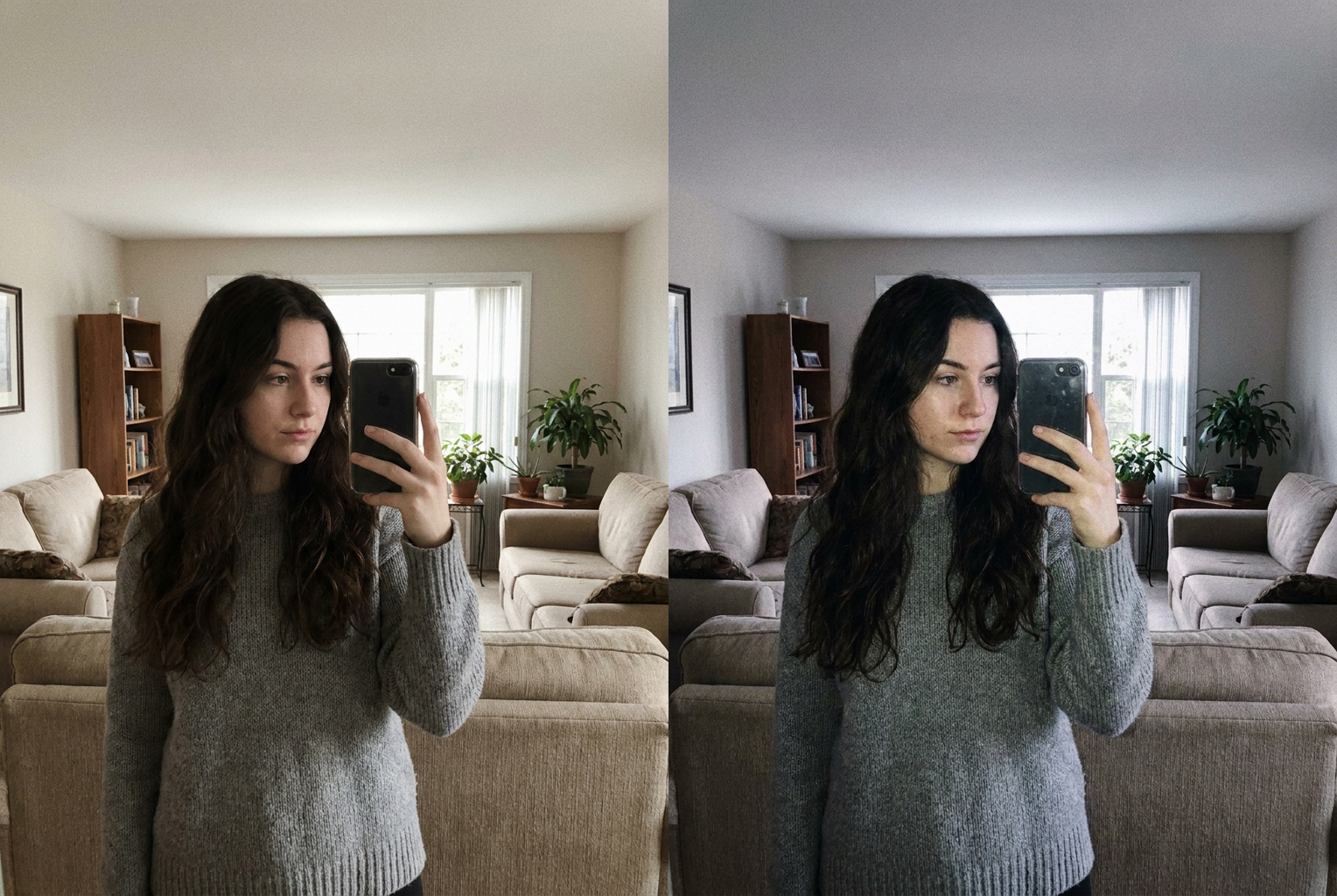
Selfie
Before → After: flat daylight selfie relit as a harsh 2000s flash snapshot
AI-generated examples
Upload & Flash
Upload a photo and get the harsh direct-flash, early-2000s digicam look in one click.
Drag & drop or click to upload
Supports PNG, JPG, WEBP • Max 20MB
Sign in to start generating
How it works
How the AI Flash Photo Effect Works
Three steps to the grainy, flash-lit party aesthetic — no editing skills, no presets to fiddle with.
Upload Your Photo
Drop in any portrait, selfie, group shot, or full-body photo. PNG, JPG, and WEBP up to 20MB are supported. Photos with a clear subject and some background depth give the flash the most dramatic falloff.
AI Adds the Flash Look
The AI relights your photo with a hard frontal flash — bright highlights on skin, deep shadows behind you, a darkened background, and the punchy grainy color of an early-2000s point-and-shoot. Your face, outfit, and pose stay exactly as they were.
Download & Post
Get your flash-lit photo in seconds at high resolution with no watermark. Perfect for Instagram carousels, close-friends stories, and profile pictures that need that candid night-out energy.
Before & After — Real AI Flash Photo Effect Results
Each example shows the original photo on the left and the flash-lit version on the right. Hard frontal flash, darkened background, and grainy 2000s color — with the subject fully preserved.
Selfie
Before → After: flat daylight selfie relit as a harsh 2000s flash snapshot
Before → After: flat daylight selfie relit as a harsh 2000s flash snapshot
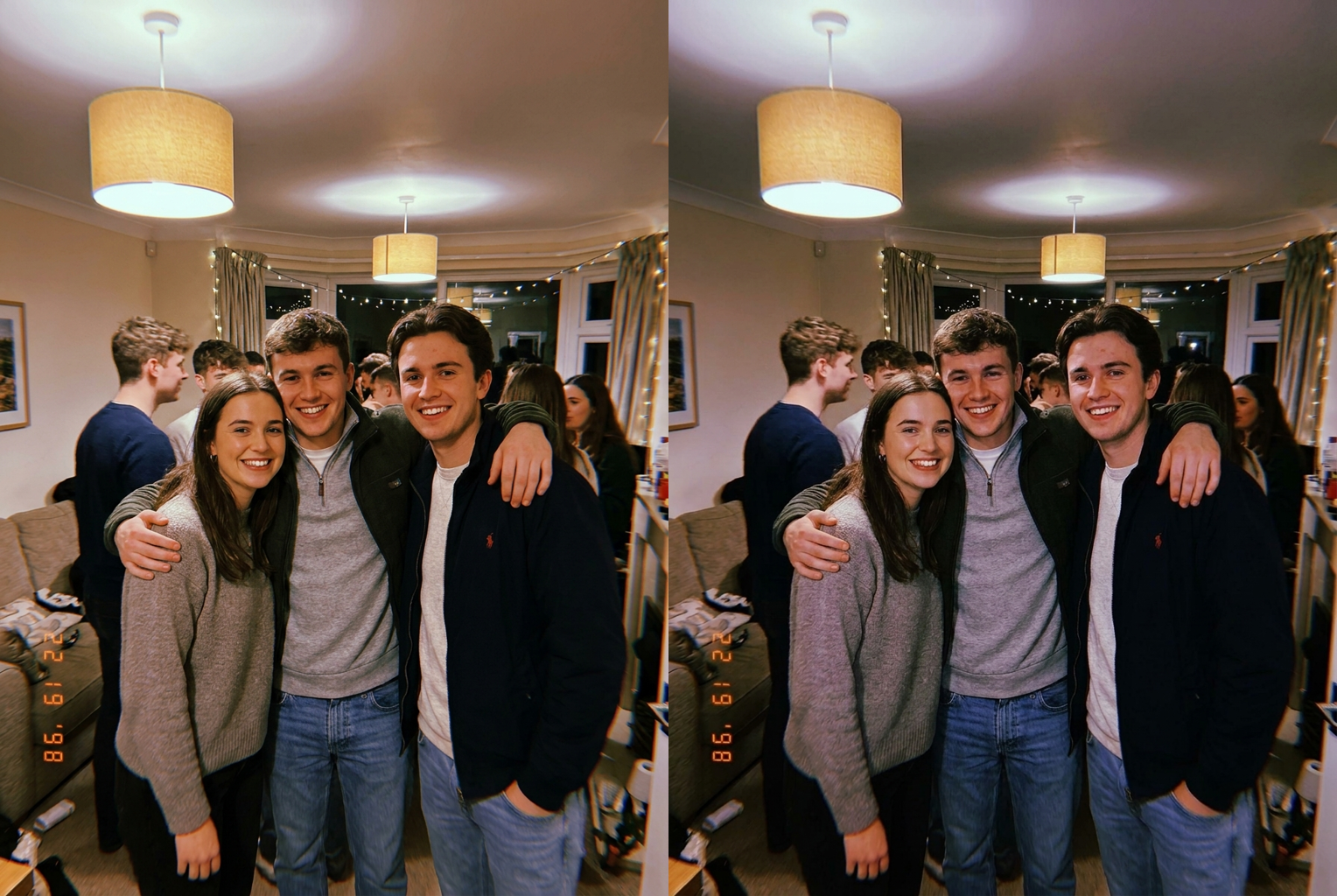
Group Photo
Before → After: evenly-lit group shot turned into a candid flash party pic
Before → After: evenly-lit group shot turned into a candid flash party pic
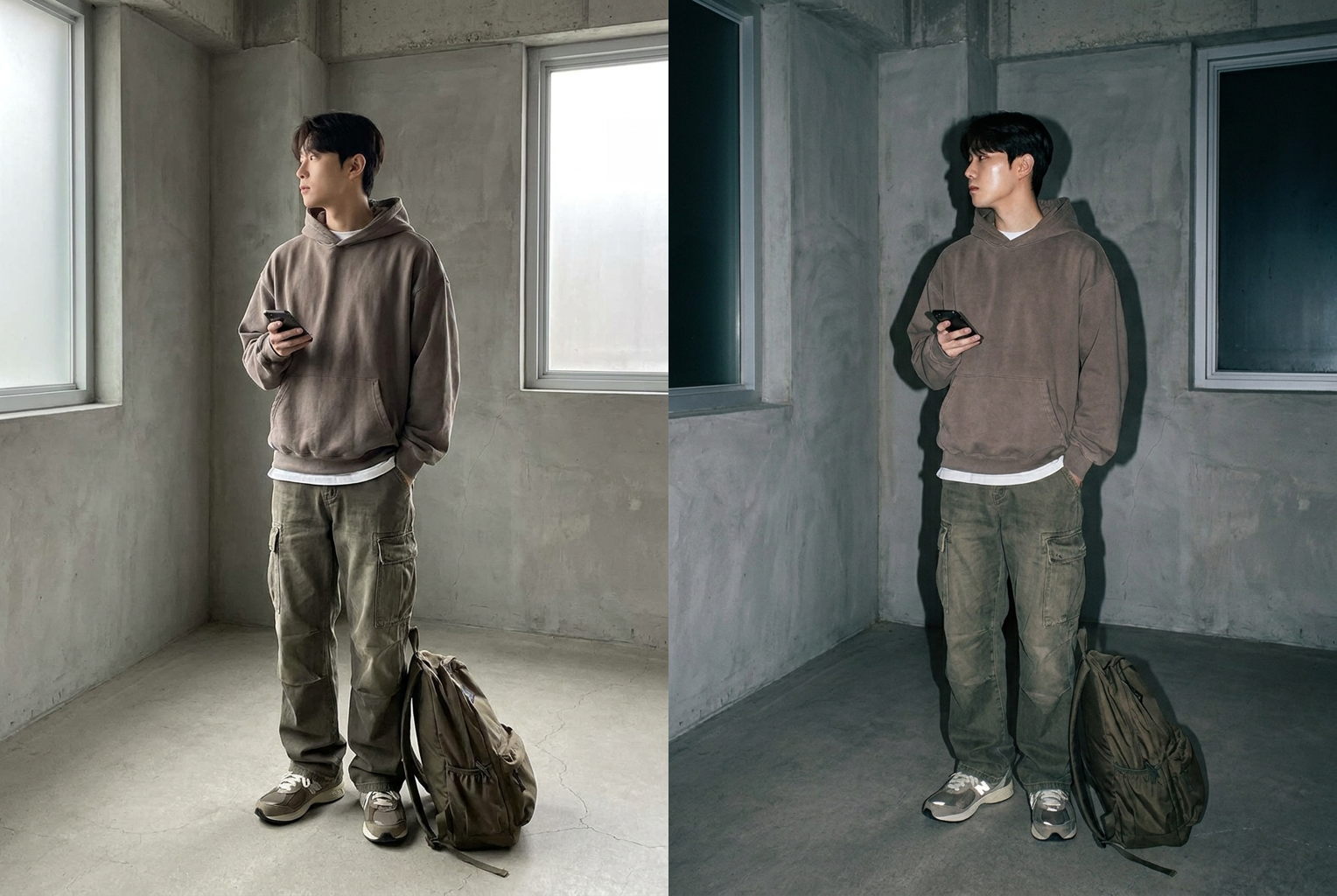
Full-Body Outfit
Before → After: flat daytime outfit shot relit with a hard flash and wall shadow
Before → After: flat daytime outfit shot relit with a hard flash and wall shadow
Why this tool
Why Use This AI Flash Photo Effect
Everything about the harsh-flash aesthetic, generated automatically — without staging a real flash shoot.
Authentic Harsh Flash
Not a fake glow overlay. The AI actually relights the scene — hard highlights, blown-out nearest surfaces, and shadows that fall off behind you the way a real on-camera flash behaves in a dark room.
Real 2000s Digicam Color
The cool, slightly punchy color and sensor grain of an early-2000s point-and-shoot — the exact palette that makes a photo read as a candid party snapshot instead of a polished phone picture.
Your Face Stays Yours
The AI only changes lighting and color. Your facial features, expression, hairstyle, outfit, and pose are preserved exactly — you get the aesthetic without becoming a different person.
One-Click, No Presets
No sliders, no LUT hunting, no manual dodging and burning. Upload and the AI applies the whole flash-photo grade at once, tuned to your specific image and its lighting.
Works on Any Photo
Selfies, mirror shots, group photos, full-body outfits, even old daytime pictures — the AI adapts the flash direction and shadow falloff to whatever you upload.
High-Res, No Watermark
Results come back at high resolution in clean PNG with no watermark stamped across them — ready to post, print, or drop straight into a feed.
The rundown
AI Flash Photo Effect: Turn Any Picture Into a 2000s Direct-Flash Snapshot
There is a very specific kind of photo that has quietly taken over feeds again: bright frontal flash, a face lit hard against a background that drops into total darkness, a little grain, and colors that feel just slightly off in the best possible way. It looks like it was taken at a party in 2004 on a camera someone pulled out of a jacket pocket. The AI flash photo effect exists to give you exactly that look from any photo you already have. Upload a picture, click once, and in about fifteen seconds the AI relights the whole scene as if a hard on-camera flash had fired — turning a flat, ordinary phone photo into a candid, of-the-moment snapshot. No camera, no editing suite, and no waiting. A good ai flash photo effect is the difference between a photo that merely looks brighter and one that genuinely reads like it came off a disposable camera.
Recreating this aesthetic by hand is harder than it looks, which is why an ai flash photo effect is so useful. A real direct flash does three things at once: it overexposes whatever is nearest the lens, it casts a hard shadow directly behind the subject, and it lets everything past that falloff sink into darkness. You cannot fake that with a single color preset, because a preset shifts hue and brightness uniformly and has no idea where the light is coming from. This tool works differently. The model reads your photo, decides where a frontal flash would blow out and where shadows would land, and then rebuilds the lighting from scratch — which is why the flash photo filter result actually behaves like light instead of sitting on top of your image like a sticker.
The color is half the magic. Early-2000s digital point-and-shoot cameras had small sensors and simple processing, and they rendered flash-lit scenes with a distinctive slightly-cool, punchy palette and a fine layer of grain. That specific digicam flash effect is what makes a photo read as authentically period rather than as a modern picture with the exposure cranked. The AI reproduces that palette on purpose: the cooler skin tones under harsh flash, the deepened blacks in the background, and the subtle sensor noise that a clean phone camera would never produce. The point of the 2000s flash photo look is imperfection, and the model leans into it instead of polishing it away. Nailing that grain and palette is exactly where a convincing ai flash photo effect earns its keep.
Getting a great result is mostly about what you upload. Photos with a clear subject and a bit of depth behind them give the flash something to fall off into, so a shot with space or a room behind you beats one taken flat against a wall. Selfies, mirror pics, full-body outfit shots, and group photos all convert well. And you do not need a dark original — the ai flash photo effect rebuilds the lighting entirely, so an evenly-lit daytime photo becomes a convincing night-flash snapshot just as easily as an already-dim one. If you want the strongest version, pick an image where the background can plausibly go dark; that contrast is what sells the harsh-flash mood.
The use cases are everywhere once you start looking. The whole reason the harsh flash photo filter trend came back is that this aesthetic reads as candid and unposed even when the original shot was carefully framed — which is exactly the energy people want for Instagram carousels, close-friends stories, and dump posts. Musicians and creators use it for cover art and promo shots because the look carries a nostalgic, lo-fi authenticity that polished photography cannot buy. It is a favorite for birthday and night-out recaps, where a batch of photos run through the same ai flash photo effect suddenly feels like one cohesive roll of film shot on the same disposable camera.
A recurring worry with any AI photo tool is that it will quietly change your face, and it is a fair concern. This ai flash photo effect is explicitly built not to. The model is constrained to preserve your facial features, expression, hairstyle, outfit, and pose exactly as they appear in your original — it only touches lighting, contrast, and color. You are not being beautified, reshaped, or turned into a different person; you are the same you, just relit as if a flash had gone off. That restraint is what separates a believable night flash photo ai result from the uncanny output of tools that reshape everything, and it is why an ai flash photo effect like this one works on real photos of real people.
Compared with the alternatives, a one-click flash photo generator is simply faster and more forgiving. You could buy a real flash rig, stage a shoot in a dark room, and try to nail the falloff manually — a lot of effort for a party aesthetic. You could learn to fake it in a desktop editor with curves, masks, and hand-painted shadows, which takes real skill and a long time per image. Or you can run the photo you already have through the ai flash photo effect for one credit and get the whole grade — flash, shadows, grain, and color — applied at once in about fifteen seconds. For anyone who wants the look rather than a new hobby, that trade is not close.
Getting started takes less time than reading this paragraph. Create a free VO3 account and you get free credits on sign-up, enough to try the ai flash photo effect on your own pictures before spending anything. Upload a photo, generate, and compare the flash-lit result with your original — check that the background dropped into shadow, that the highlights landed where a real flash would hit, and that you still look exactly like you. Then run a whole batch through it so a set of photos shares one consistent roll-of-film feel. The best way to understand the ai flash photo effect is to watch one of your own flat photos turn into a grainy, flash-lit 2000s snapshot right now.
AI Flash Photo Effect — Frequently Asked Questions
It is a one-click tool that relights any photo to look like it was shot with a harsh direct on-camera flash, the way early-2000s digital point-and-shoot cameras captured party photos. The AI adds bright frontal flash, a darkened background, hard shadows, and grainy period color — turning an ordinary picture into a candid night-out snapshot without any editing skills.
No. The AI is instructed to keep your facial features, expression, hairstyle, outfit, and pose exactly as in your original photo. It only changes lighting, contrast, and color grade. You get the flash aesthetic layered onto the real you — not a redrawn or beautified face that no longer looks like your actual self.
Photos with a clear subject and some space behind them work best, because the flash needs a background to darken and fall off into. Selfies, mirror shots, group photos, and full-body outfit pictures all work well. Even flat, evenly-lit daytime photos convert nicely — the AI rebuilds the lighting, so it does not need your original photo to already be dark.
A preset just shifts colors uniformly across the whole image and cannot invent shadows or highlights. This tool actually relights the scene: it decides where a frontal flash would blow out, where shadows would fall, and how the background should drop into darkness. That is why the result reads as a genuine flash photo rather than a color tint sitting on top of your picture.
Yes. Group shots are one of the strongest use cases, because the classic 2000s flash-photo look was built on candid group party pictures. The AI lights everyone in the frame with the same frontal flash and lets the background fall into shadow, giving the whole group that shared, of-the-moment snapshot feeling.
Each generation costs 1 credit, and new users get free credits on sign-up to try the effect first. Credits are shared across every VO3 AI tool, so the same balance works for this flash effect, other photo tools, and video generation. There is no separate subscription just for this one tool.
No. Your photo is processed securely only to generate your flash-effect result. We do not use uploaded photos for model training and do not share them with third parties. Once your image is generated you can download it, and your original stays yours.
Results are delivered at high resolution in clean PNG format with no watermark, suitable for social media, profile pictures, and standard-size printing. The grain and flash character are baked into the image itself, so the aesthetic survives resizing and re-uploading to any platform.