
AI Film Grain Filter
Add authentic 35mm film grain and analog color to any photo in one click.
Portrait
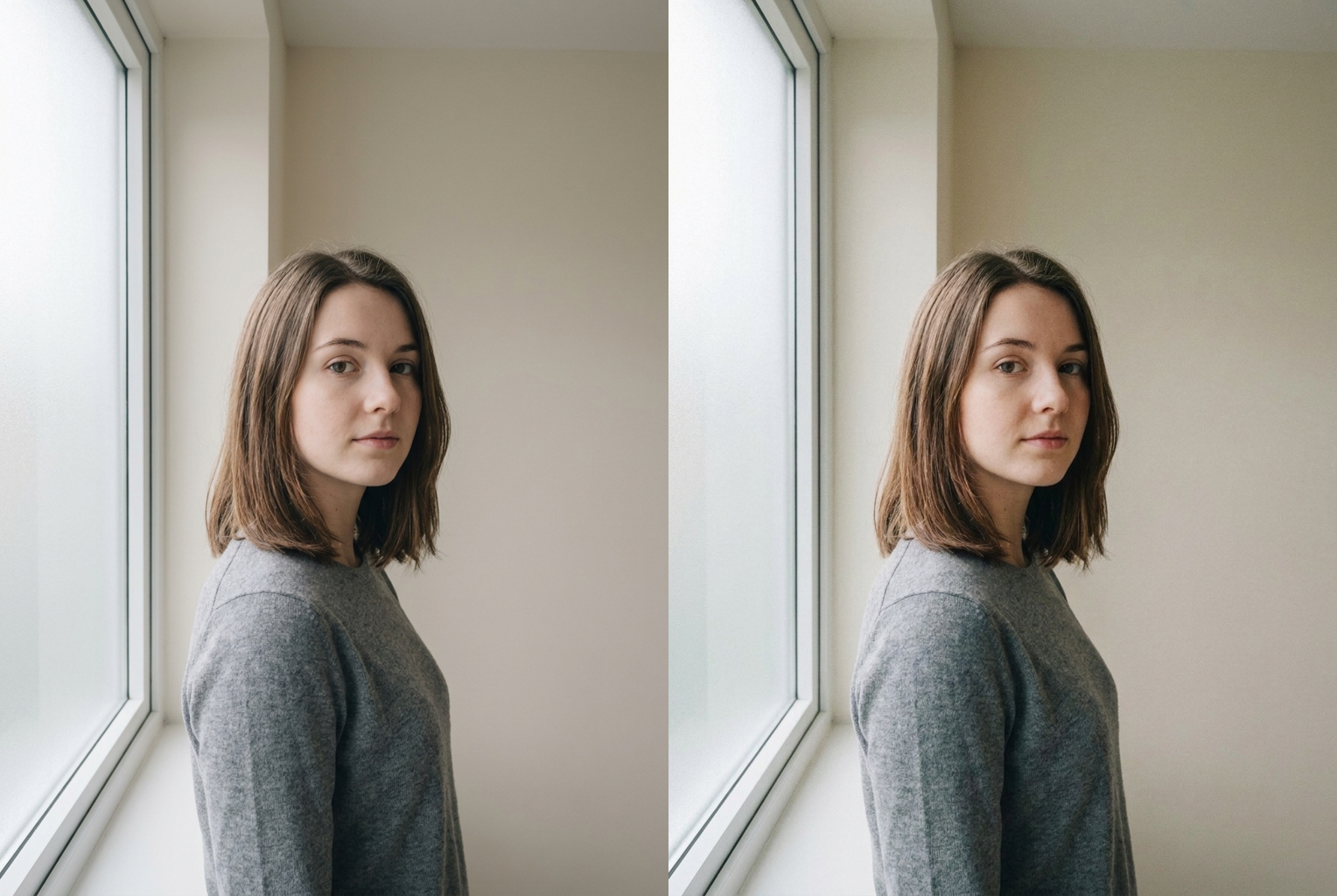
Before → After: a flat window-lit digital portrait regraded with warm 35mm film grain and analog color
AI-generated examples
AI Film Grain Filter
Upload a photo and get an authentic 35mm analog film look — real grain, warm color, and celluloid texture — in one click.
Drag & drop or click to upload
Supports PNG, JPG, WEBP • Max 20MB
Sign in to start generating
How it works
How the AI Film Grain Filter Works
Three steps to turn any flat digital photo into a warm, grainy analog film shot.
Upload Your Photo
Drop in any portrait, selfie, street shot, or landscape. PNG, JPG, and WEBP up to 20MB are supported. Photos with real light and some tonal range take the film grain best, but the AI handles flat phone shots just as well.
AI Adds the Film Look
The AI regrades your image with organic 35mm grain, soft filmic contrast, warm analog color, gentle highlight rolloff, and a faint halation glow — the texture of real celluloid. Your face, outfit, pose, and framing stay exactly as they were.
Download & Share
Get your film-look photo in seconds at high resolution with no watermark. Perfect for Instagram, film-photography feeds, mood boards, album art, and anywhere a digital shot needs an analog soul.
Before & After — Real AI Film Grain Filter Results
Flat digital originals on the left, the same shots regraded with authentic 35mm film grain on the right.
Portrait
Before → After: a flat window-lit digital portrait regraded with warm 35mm film grain and analog color
Before → After: a flat window-lit digital portrait regraded with warm 35mm film grain and analog color
Street
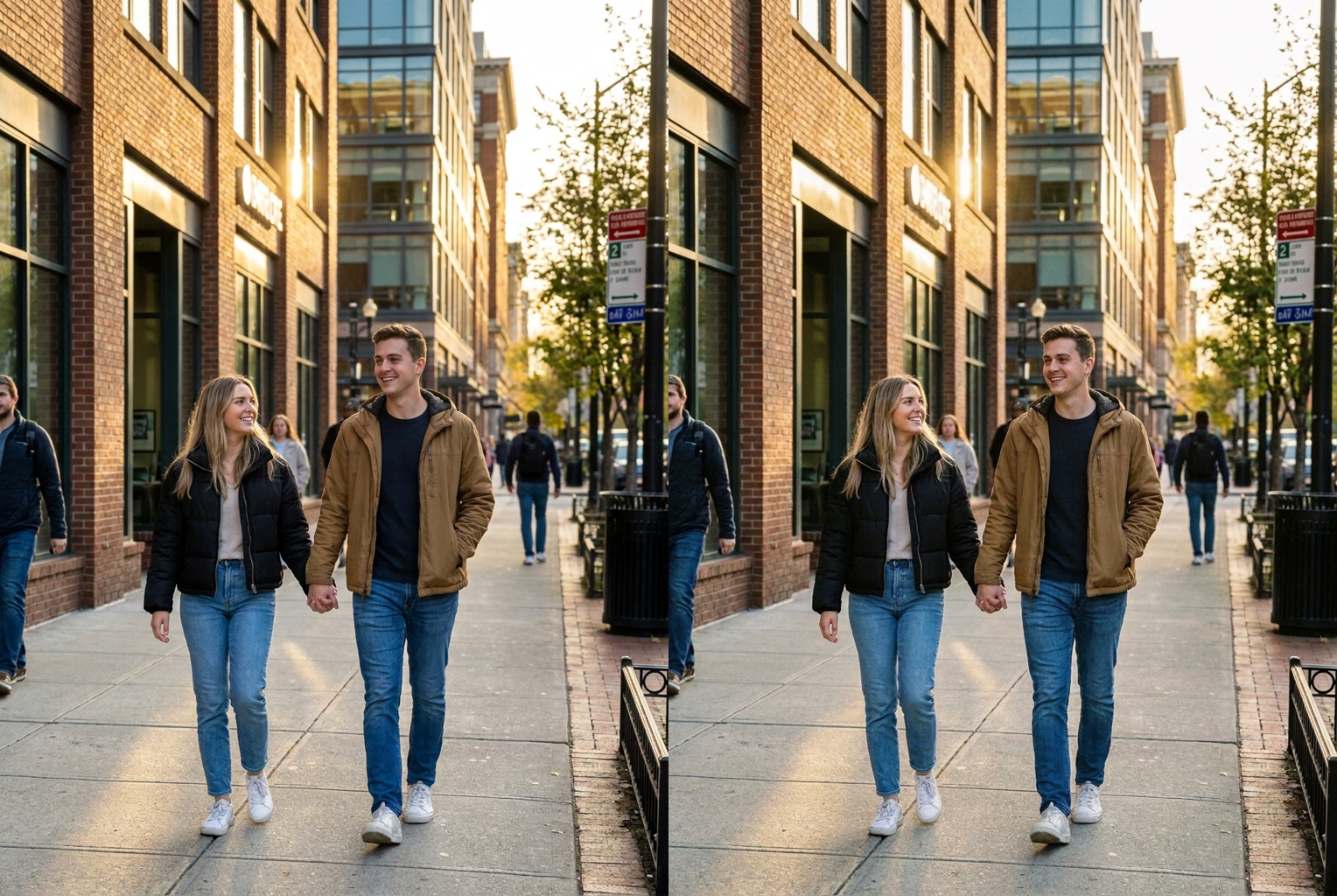
Before → After: a sharp golden-hour street shot given filmic contrast, halation, and organic grain
Before → After: a sharp golden-hour street shot given filmic contrast, halation, and organic grain
Landscape
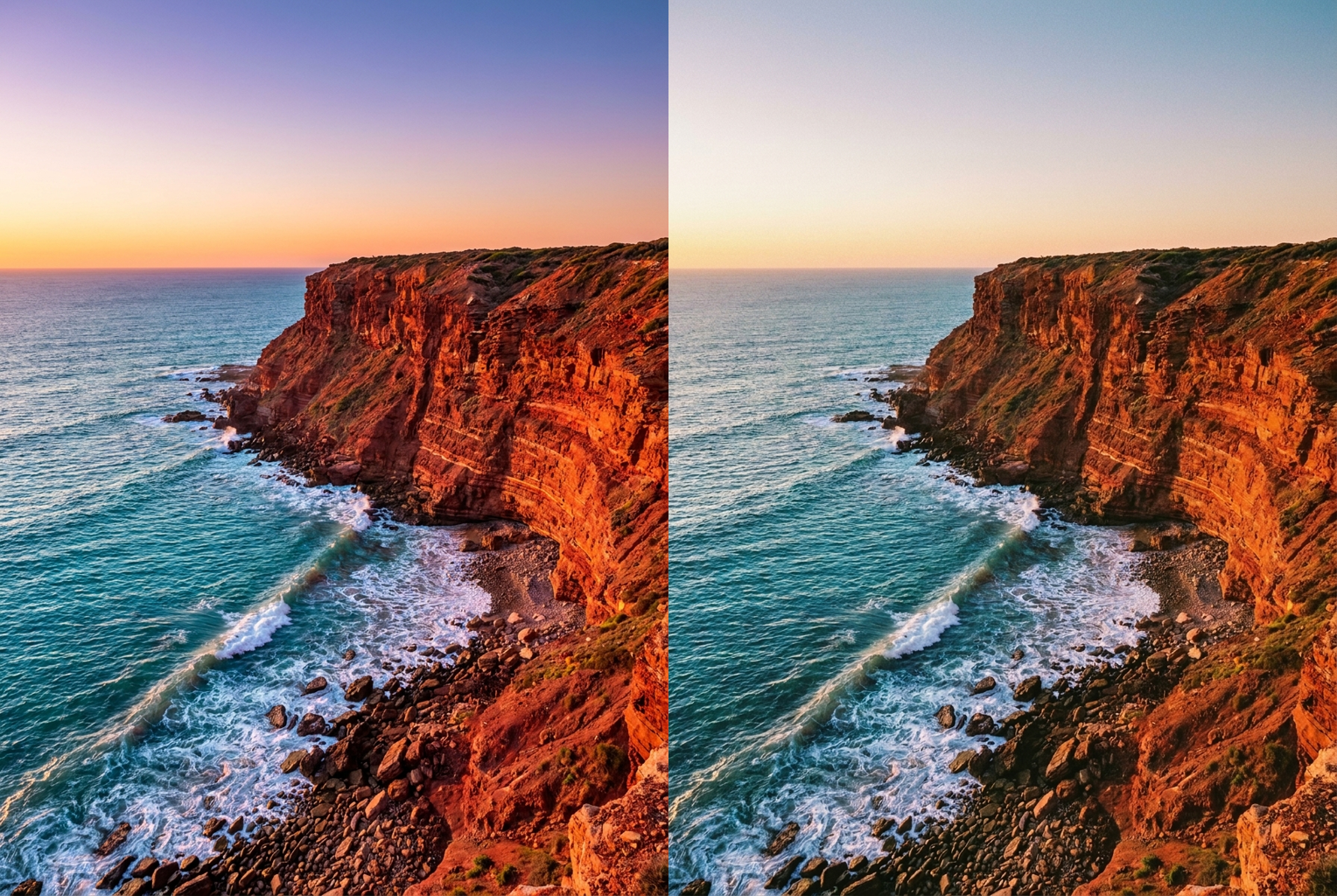
Before → After: a vivid digital landscape softened into a warm, grainy analog film scan
Before → After: a vivid digital landscape softened into a warm, grainy analog film scan
Why this tool
Why Use This AI Film Grain Filter
Not a flat noise overlay — a full analog regrade that reads as genuine film.
Authentic Organic Grain
Not uniform digital noise. The AI lays down fine, irregular grain that clusters naturally in shadows and midtones, exactly the way real 35mm film emulsion behaves when scanned.
Analog Color Grade
Muted, warm tones with a subtle amber-and-teal shift and softened saturation — the signature color science of classic photographic film stock, not a cranked Instagram preset.
Highlight Halation & Rolloff
Bright areas bloom with a gentle halation glow and roll off smoothly instead of clipping to harsh white, giving highlights the dreamy, forgiving quality that film is loved for.
Your Face Stays Yours
The filter changes grain, tone, and texture only. Facial features, expression, hairstyle, clothing, pose, and composition are preserved exactly — it still looks unmistakably like you.
One Click, Seconds Later
No sliders, no plugins, no film-emulation software to learn. Upload a photo, hit generate, and the full analog look is applied automatically in a few seconds.
High-Res, No Watermark
Download a clean, high-resolution result ready to post or print. No watermark, no sign-up wall, no cropping — just your photo with a real film soul.
The rundown
AI Film Grain Filter: Give Any Digital Photo a Real Analog Film Look
The AI film grain filter turns flat, over-sharp digital photos into warm, textured images that look like they were shot on real 35mm celluloid. Digital cameras and phones capture clean, clinical files — crisp, saturated, and a little lifeless. Film has soul: organic grain, gentle color shifts, forgiving highlights, and a texture that makes a moment feel remembered rather than recorded. This ai film grain filter rebuilds all of that in a single click, so you do not need a darkroom, a scanner, or a shelf of expensive film-emulation plugins to get the analog look everyone is chasing.
Under the hood, this is not a simple noise overlay. Cheap grain effects drop a uniform gray dither over the whole frame, which reads as digital sensor noise, not film. A real film grain effect is irregular: grain clusters more heavily in shadows and midtones, thins out in bright areas, and interacts with color. The AI in this ai film grain filter understands that behavior. It analyzes your image and lays down organic, photographic grain with the right structure, then pairs it with the color science and tonal response of classic film stock so the result holds together as one convincing photograph. That difference is easy to see side by side: a fake overlay sits on top of the image like static, while a real film grade feels baked into the light itself, part of how the photo was captured rather than something added afterward.
The regrade goes well beyond texture. This analog film filter softens digital contrast into a smoother, filmic curve, rolls highlights off gently instead of clipping them to harsh white, and adds a faint halation glow around the brightest points — the dreamy bloom that film lovers prize. Color is nudged toward a muted, warm palette with a subtle amber-and-teal analog shift and slightly reduced saturation, echoing beloved photographic stocks without any brand-name preset. Together these touches are what separate a genuine film scan from a digital picture with a filter slapped on top, and this ai film grain filter dials them in automatically.
Crucially, the tool restyles only the look, never the content. When you run a portrait or selfie through this ai film grain filter, your facial features, expression, hairstyle, clothing, pose, and the composition of the shot are all preserved exactly. The AI is instructed to change grain, tone, and color alone, so you still recognize yourself and your scene — it simply feels as though the same moment had been captured on film and scanned. That fidelity is what makes the film grain effect usable for real photos of real people, not just abstract art.
For the best results, feed the analog photo filter an image with genuine light and a range of tones. Golden-hour portraits, window-lit interiors, street scenes, and travel shots all show off the grain and highlight rolloff beautifully. Flat, evenly-lit phone snaps still gain warmth and character, but a little contrast in the original gives the grain something to bite into. Upload at the highest resolution you have — the more detail the AI has to work with, the more convincing and fine-grained the final film look becomes. Because the ai film grain filter reads the actual light in your photo rather than stamping a fixed overlay, a portrait, a landscape, and a night shot each come back with grain and color tuned to that specific image, so results stay believable across an entire shoot instead of all looking identical.
One of the fastest-growing uses of an ai film grain filter is making AI-generated images look real. Text-to-image renders are often too clean: skin is flawless, edges are perfect, and lighting is suspiciously even, and that plastic perfection is exactly what tips viewers off. A light pass of film grain and analog color breaks up that digital sheen and reintroduces the imperfection of a real camera, so it is one of the quickest ways to make AI photo look real. Creators run renders through the film grain effect before posting to give them the lived-in texture that sells the shot.
Photographers, designers, and everyday posters all reach for this analog film filter for different reasons. Instagram and film-photography feeds use it to keep a consistent grainy, cinematic aesthetic without carrying a film camera everywhere. Musicians and labels use it for moody album and single art. Brands use it to warm up product and lifestyle shots so they feel handmade rather than stock. Wedding and travel photographers use it to give a whole gallery the timeless quality of film. Because the ai film grain filter applies the same coherent look every time, it is easy to build a unified, on-brand set of images. Content creators and editors who post daily lean on the ai film grain filter as a finishing step, running every shot through it so their whole feed shares one warm, analog signature instead of a jarring mix of raw phone photos and heavy presets. The consistency is the point: a recognizable film look becomes part of the brand.
Getting started takes seconds: upload your photo, hit generate, and the ai film grain filter returns a finished, high-resolution image with authentic grain, analog color, and celluloid texture — no watermark, no sliders, no software to learn. Each render costs a single credit, so you can experiment freely across a whole shoot until the grain and tone feel right. Whether you are rescuing a flat digital snapshot, unifying a feed, or making an AI render read as a real photograph, this film grain effect gives your images the analog soul that clean digital files are missing. Try the ai film grain filter on your favorite shot and see how much warmth a little grain and honest color can bring back to a picture.
AI Film Grain Filter — Frequently Asked Questions
It is a one-click tool that regrades any photo to look like it was shot on 35mm analog film. The AI adds organic film grain, warm muted color, soft filmic contrast, a gentle highlight glow, and celluloid texture — turning a flat digital picture into an authentic film photograph without any editing skills, plugins, or film-emulation software.
Yes. The filter only changes grain, tone, texture, and color. Your facial features, expression, hairstyle, clothing, pose, and the framing of the shot are all preserved exactly as in your original photo. It still looks unmistakably like you and your scene — just as if the same moment had been captured on real film and scanned.
It is designed to be. Instead of a uniform noise layer, the AI produces irregular, organic grain that clusters in shadows and midtones the way real film emulsion does, plus period-accurate color and highlight halation. The goal is a photo that reads as a genuine film scan, not a digital image with a cheap grain overlay pasted on top.
Almost anything works — portraits, selfies, street photography, travel shots, landscapes, and still life. Images with real light and a range of tones show off the grain and highlight rolloff most, but even flat indoor phone photos gain warmth and texture. High-resolution uploads give the cleanest, most convincing film look.
Yes, that is one of the most popular uses. Adding subtle film grain and analog color breaks up the too-clean, plastic perfection that gives AI images away, so it is a fast way to make AI photo look real. Run any AI render through the film grain filter and it instantly gains the texture and imperfection of a real camera capture.
You can create film-look photos here as part of your VO3 credits, and each generation costs just one credit. There is no separate subscription for this tool, no watermark on your download, and no forced sign-up wall before you see the result. You get a clean, high-resolution image ready to post or print.
Just a few seconds. Once you upload your photo and hit generate, the AI applies the full analog regrade — grain, color, contrast, and halation — automatically and returns a finished high-resolution image. There are no sliders to tweak and nothing to render manually, so most people have their film-look photo almost instantly.
You own the images you create and can use them for personal or commercial projects like album covers, brand feeds, mood boards, and prints. Because the tool only restyles a photo you upload, make sure you have the rights to the original image before adding the film effect and publishing the result.