
AI Decade Photo Generator
Upload one photo, name a decade, and AI sends you back in time — your face stays exactly yours while the hair, clothes, and film grain all belong to another era.
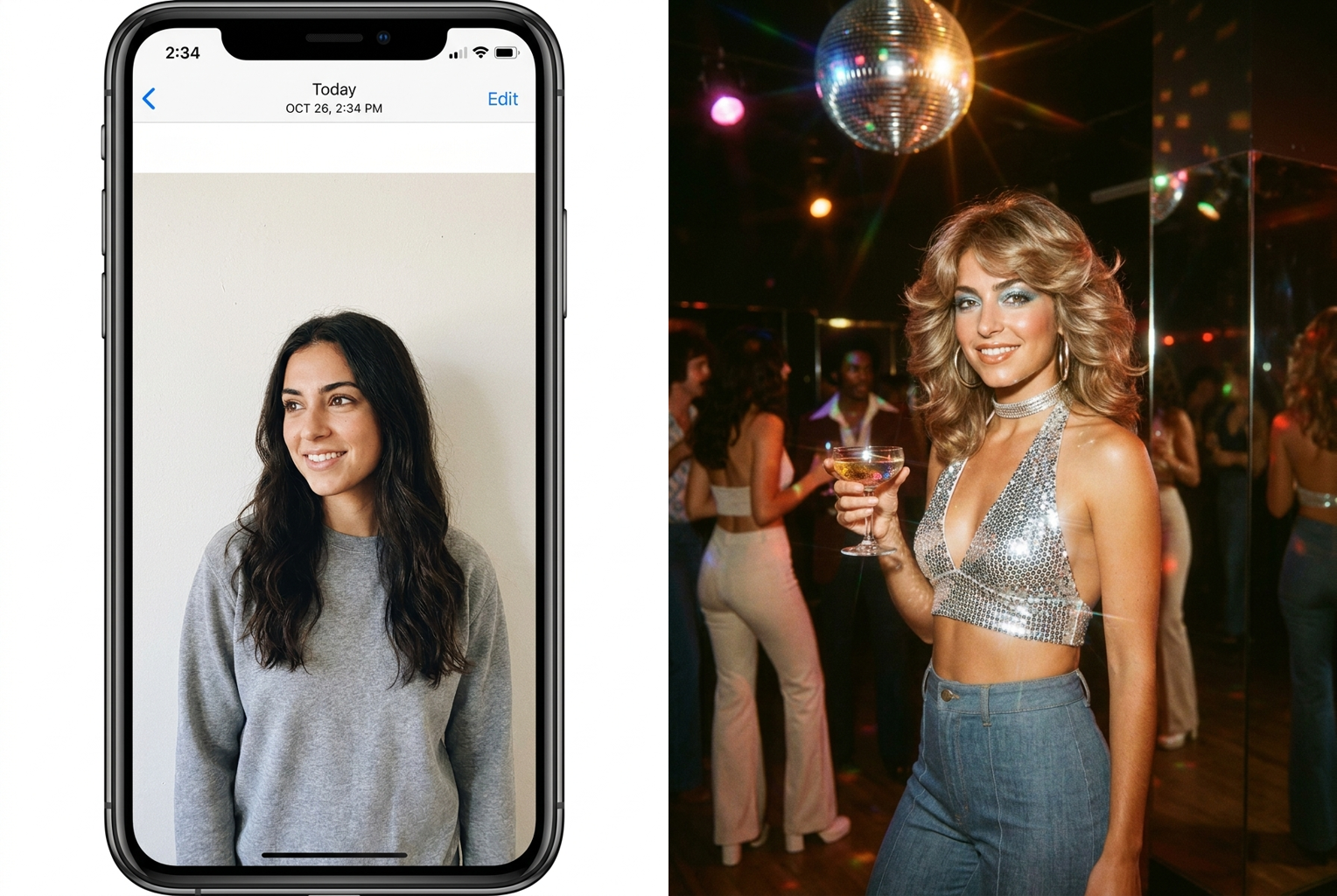
Selfie → 1970s Disco
Prompt: "1970s disco" — feathered hair, wide collar, and warm faded Kodachrome grain, same face throughout
AI-generated examples
Turn Your Photo into Any Decade
Drag & drop or click to upload
Supports PNG, JPG, WEBP • Max 20MB
Sign in to start generating
How it works
Upload a Photo
Pick a clear, well-lit photo where your face is easy to see — a selfie, a portrait, or a half-body shot all work well.
Name Your Decade
Type the era you want: 1920s jazz age, 1950s diner, 1970s disco, 1980s neon, 1990s film camera — or anything in between.
Download & Share
Your period portrait is ready in about a minute — save it in full resolution and post the before-and-after.
Decade Transformations Made with This Tool
Real before-and-after results generated with the exact prompt this page uses — upload your photo, name a decade, and get the same treatment.
Selfie → 1970s Disco
Prompt: "1970s disco" — feathered hair, wide collar, and warm faded Kodachrome grain, same face throughout
Prompt: "1970s disco" — feathered hair, wide collar, and warm faded Kodachrome grain, same face throughout
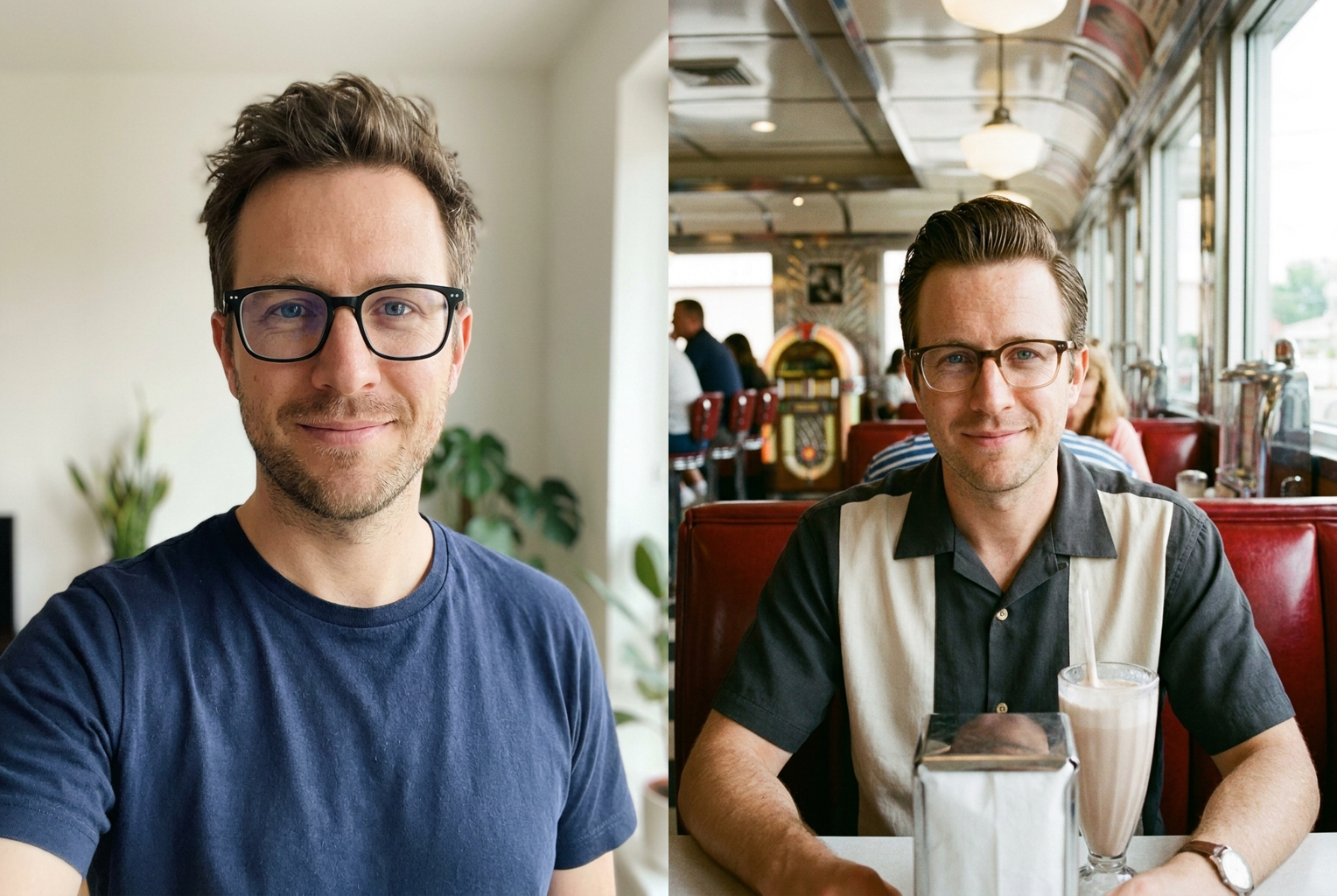
Portrait → 1950s Diner
Prompt: "1950s diner" — pomade hair, period frames, chrome booth, saturated early color film
Prompt: "1950s diner" — pomade hair, period frames, chrome booth, saturated early color film

Selfie → 1980s Neon
Prompt: "1980s neon arcade" — hard flash, bold synthetic color, and an arcade glow behind the same face
Prompt: "1980s neon arcade" — hard flash, bold synthetic color, and an arcade glow behind the same face
Why this tool
Your Face Stays Your Face
The AI is instructed to preserve your facial structure, skin tone, eye color, and expression exactly. The era changes around you — you don't turn into a stranger in vintage clothing.
Any Decade You Name
From 1920s jazz age glamour to 1990s camcorder grain, just type the era. The AI handles the hair, the wardrobe, the props, and the photographic look together.
Authentic Film Character
Each era gets its real photographic signature — the grain, color shift, contrast, and lens softness of the period, not a flat filter dropped over a modern photo.
Period-Accurate Styling
Hairstyles, collars, eyewear, makeup, and accessories are all restyled to match the decade you asked for, so the details survive close inspection.
One Credit, One Minute
No settings to learn and no editing skills required. Upload, type a decade, and the full transformation arrives in about a minute for a single credit.
Built for Before-and-After
The results are made to be posted side by side with the original — that contrast is exactly what makes decade photos travel across social feeds.
The rundown
AI Decade Photo Generator: Put Yourself in Any Era
There is something irresistible about seeing your own face in another era. An AI decade photo generator takes a single photo of you and rebuilds the entire world around it — the hairstyle, the wardrobe, the room, the light, even the film the picture was supposedly shot on — while leaving the one thing that matters completely untouched: you. Upload a selfie, type 1970s, and what comes back is not a stranger in vintage clothing. It is recognizably you, with your bone structure, your skin tone, your eye color and your expression intact, standing in a decade you never lived through. That combination of familiar face and unfamiliar era is exactly why the AI decade photo generator produces images people post immediately, usually side by side with the original.
The technology behind an AI decade photo generator is image-to-image generation rather than a filter. A filter sits on top of your photo and shifts its colors; it cannot give you a different haircut or change what you are wearing. This tool works differently. The model reads your photo as a description of a real person — the geometry of your face, your features, your expression — and then generates a new image of that same person under a completely different set of instructions. The prompt driving every generation carries a strong identity-preservation clause, telling the model to hold your facial structure and expression fixed while it rewrites hair, clothing, accessories, background and photographic treatment. That separation between who you are and how you are styled is what makes an AI decade photo generator feel like a genuine AI time travel photo instead of a costume overlay.
Every decade gets its own full treatment, because eras differ in far more than clothing. The 1920s bring jazz-age glamour, soft focus, and the high-contrast look of early portrait photography. The 1950s deliver diner chrome, structured tailoring, and saturated early color film. The 1970s arrive with warm, slightly faded Kodachrome tones, wide collars, and heavy grain. The 1980s hit with neon, hard flash, and bold synthetic color. The 1990s land on point-and-shoot film with a date stamp in the corner. Seeing your photo in different decades back to back makes those differences obvious in a way no single image does. The AI decade photo generator changes hair, wardrobe, props, background and photographic character together, which is why the results survive a close look — the period detail extends past the outfit into how the image itself was made.
Getting a great result comes down to two things: the photo you upload and the decade you type. For the photo, choose something clear and well lit where your face is fully visible and takes up a decent share of the frame. Front-facing shots in natural light preserve identity best; heavy shadows, sunglasses, and distant group photos all make it harder for the model to keep you looking like you. The AI decade photo generator rewards a good source image more than any other input. For the decade, specificity pays. Typing 1980s works, but 1980s neon arcade with hard flash gives the model a far clearer target. Naming a setting — a 1950s diner, a 1970s living room, a 1990s school portrait — gives the background something authentic to become rather than leaving it generic.
People use a decade photo generator for more than curiosity. Multi-era grids, where one portrait runs through five decades in a single post, consistently outperform single images on social feeds. Couples generate matching portraits from the era they wish they had met in. Families run photos of parents and grandparents through the decades those relatives actually lived, which turns a retro photo AI experiment into a genuinely moving gift rather than a gag. Creators build themed profile pictures and content series around a chosen aesthetic. Because each run of the AI decade photo generator costs one credit and takes about a minute, experimenting across eras is cheap enough that most people do exactly that instead of settling for one attempt.
The alternative is doing it by hand, and the gap is enormous. A convincing period portrait made manually means sourcing period-correct wardrobe and hair, staging a set, shooting with the right lens and lighting, then grading the image to match a specific film stock — or spending hours in a photo editor compositing, retouching, and hand-building grain and color shifts. That is a professional project measured in days and real money. A vintage photo AI collapses the entire chain into an upload and a few typed words, and because the model generates the whole scene coherently, the lighting on your face matches the lighting in the room instead of betraying an obvious cut-and-paste job.
What you get back is a full-resolution image built for comparison. The AI decade photo generator is designed around the before-and-after moment, because the transformation only lands when people can see where it started. That contrast is the entire appeal — the same face, the same expression, dropped into a different decade with everything else rewritten around it. Each generation is independent, so running the same photo through several eras produces a consistent set where only the decade varies, which is exactly the format that works as a grid, a carousel, or a series of profile pictures. Nothing about your original photo is altered; every result the AI decade photo generator returns is a new image you can download and keep.
Getting started takes about a minute. Upload a clear photo, type the era you want to visit, and let the AI decade photo generator handle the hair, the wardrobe, the room, and the film look in one pass. New accounts get free credits at signup, so you can try several decades before spending anything, and there are no sliders, layers, or settings to learn along the way. If you are not sure where to begin, the 1970s and the 1980s are the most immediately striking — their looks are distinctive enough that the transformation reads instantly. From there, most people work backward through the 1950s and 1920s and end up with a full AI decade photo generator time-travel set from a single upload.
AI Decade Photo Generator — Frequently Asked Questions
It keeps you and rebuilds everything else. Your face, bone structure, skin tone, and expression are preserved, while your hairstyle, clothing, accessories, and background are restyled to match the decade you name. On top of that, the image is reprocessed to look like it was shot on that era's film, with the right grain, colors, and contrast.
Yes — that is the core instruction in the prompt. The AI is explicitly told to leave your facial structure, skin tone, eye color, and expression untouched so the person in the result is unmistakably you. Everything that changes is styling and photography: hair, wardrobe, props, lighting, and film character.
Any era you can name. The 1920s, 1950s, 1960s, 1970s, 1980s, and 1990s all have strong, distinctive looks the AI renders well. You can also get specific — 1950s diner, 1970s disco, 1980s neon arcade, 1990s film camera — and the extra detail usually produces a sharper, more convincing result.
A clear, well-lit photo where your face is fully visible and fills a good part of the frame. Front-facing shots in natural light give the strongest resemblance. Avoid heavy shadows, sunglasses, or busy group shots — the more clearly the AI can read your features, the better it preserves them through the transformation.
More specific is usually better. Typing 1970s works, but 1970s disco with warm Kodachrome color gives the AI a clearer target for wardrobe, lighting, and film look. Naming a setting helps too — a 1950s diner or a 1980s bedroom gives the background something authentic to become.
Yes, for any photo of a person you have permission to use. Decade portraits of parents and grandparents in their own era are especially popular, and running the same photo through several decades makes a series people love to share. Group shots work when each face is clearly visible.
Most decade portraits are ready in about a minute, and each generation costs one credit. New users get free credits at signup, so you can try several eras before paying anything. There are no settings to configure — upload, type a decade, and the AI handles the rest.
Absolutely, and it is worth doing. Each run is independent, so you can send one portrait through the 1920s, 1950s, 1970s, and 1980s and lay the results out as a time-travel grid. That multi-era set is the format that performs best when posted, far more than any single image on its own.