
AI Claymation Filter
Upload any photo and watch yourself become a handmade stop-motion clay character — fingerprints, seams and all — while still looking unmistakably like you.
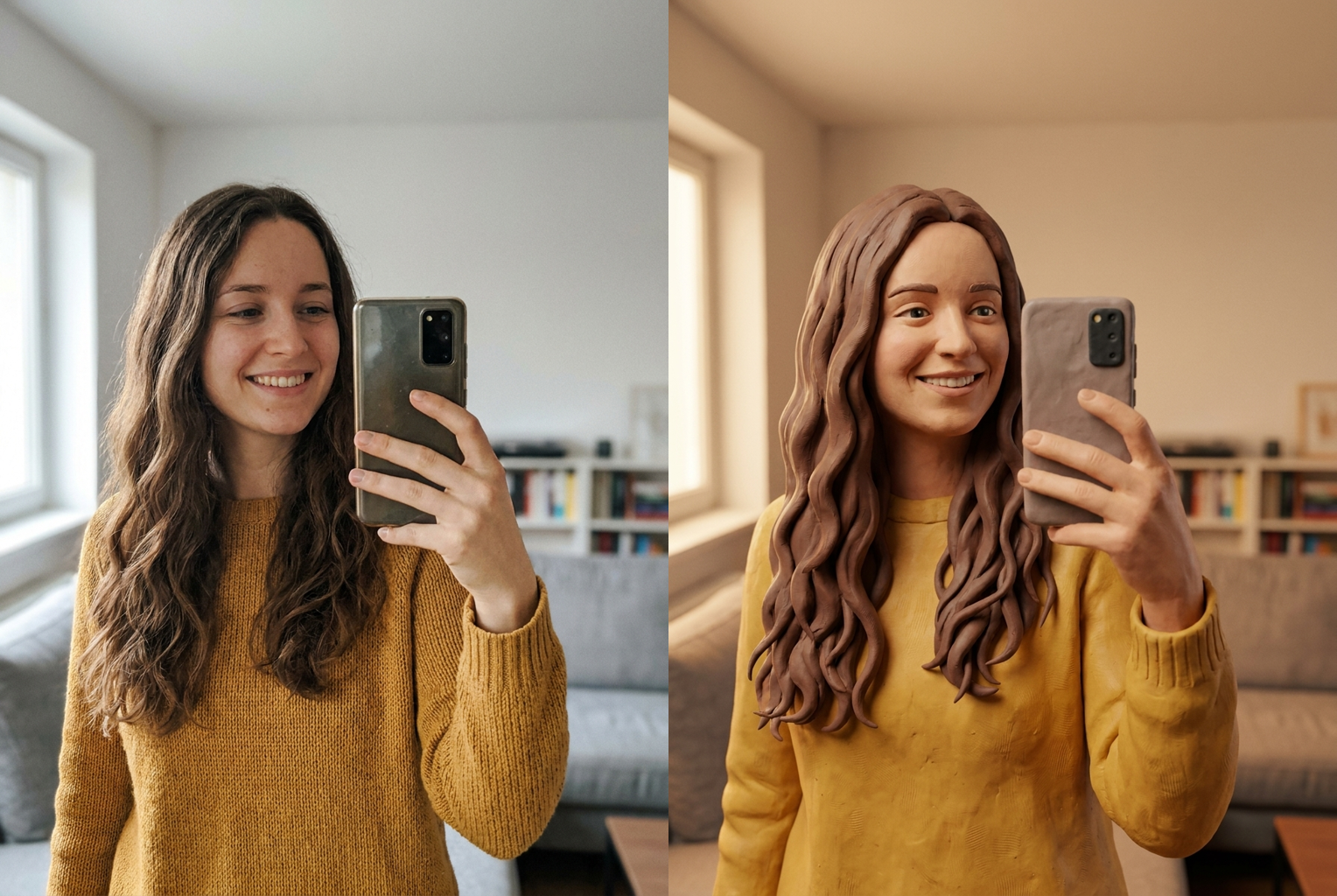
Selfie to Clay
Before → After: a casual selfie sculpted into a fingerprinted plasticine puppet
AI-generated examples
AI Claymation Filter
Upload a photo and become a handmade clay figure in seconds. 1 credit per generation.
Drag & drop or click to upload
Supports PNG, JPG, WEBP • Max 20MB
Sign in to start generating
How it works
How the AI Claymation Filter Works
Three steps, about thirty seconds, no sculpting or software skills required.
Upload Your Photo
Drop in any selfie, portrait, or full-body snapshot. PNG, JPG, and WEBP are supported up to 20MB. A clear, well-lit photo where your face is visible gives the AI the most detail to sculpt from.
The AI Sculpts You in Clay
The model rebuilds your photo as a plasticine puppet — fingerprints, tool marks, seams and chunky hand-molded proportions — on a cozy miniature stop-motion set, all while keeping your face and identity recognisable.
Download and Share
Your claymation portrait is ready in under a minute at full resolution with no watermark. Download it, post it, or run the same photo again for a slightly different sculpt.
Before and After
Real outputs from this tool, generated with the exact prompt the page uses. Source photo on the left, handmade clay figure on the right.
Selfie to Clay
Before → After: a casual selfie sculpted into a fingerprinted plasticine puppet
Before → After: a casual selfie sculpted into a fingerprinted plasticine puppet
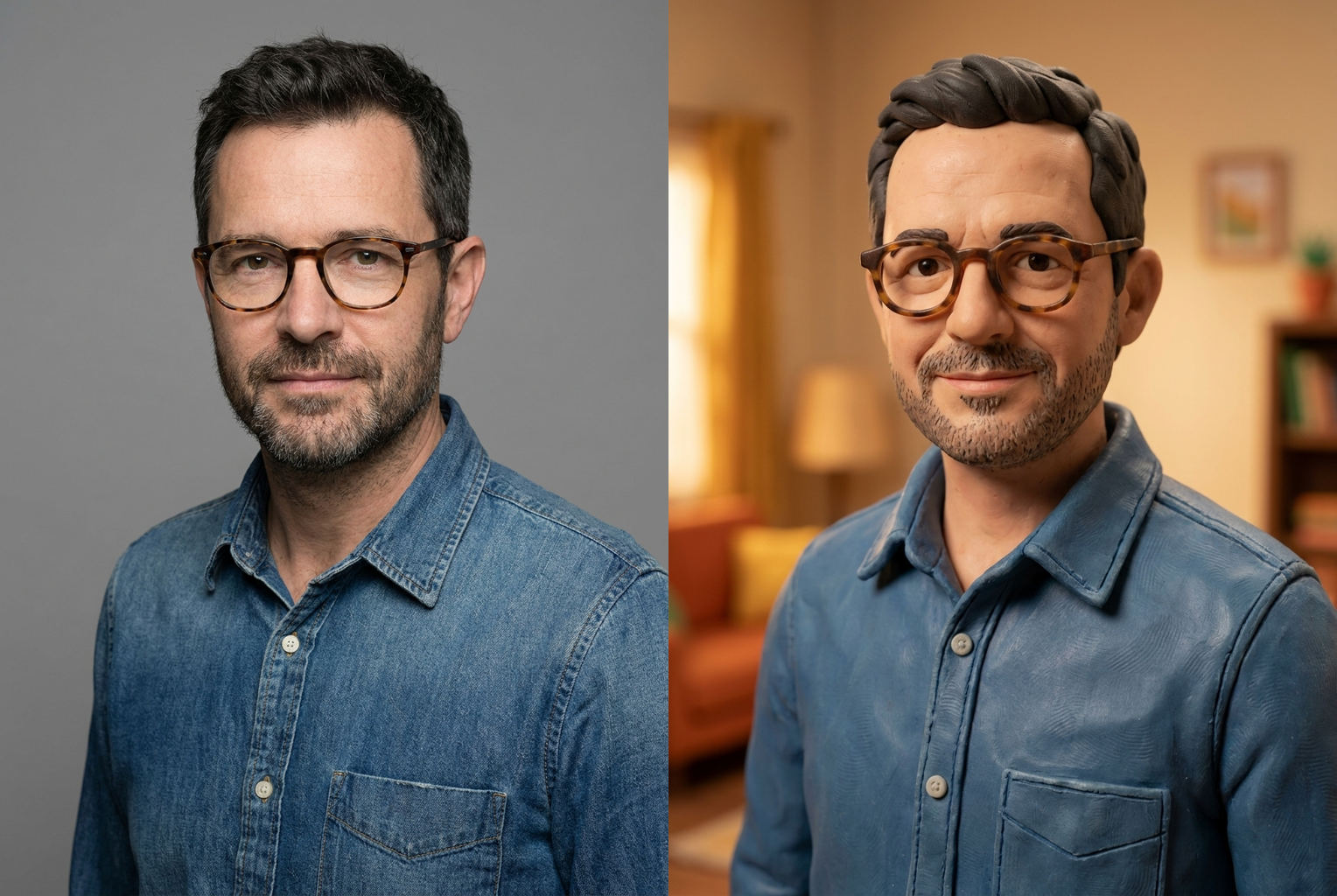
Portrait to Clay
Before → After: beard, glasses and denim shirt rebuilt in matte modeling clay
Before → After: beard, glasses and denim shirt rebuilt in matte modeling clay
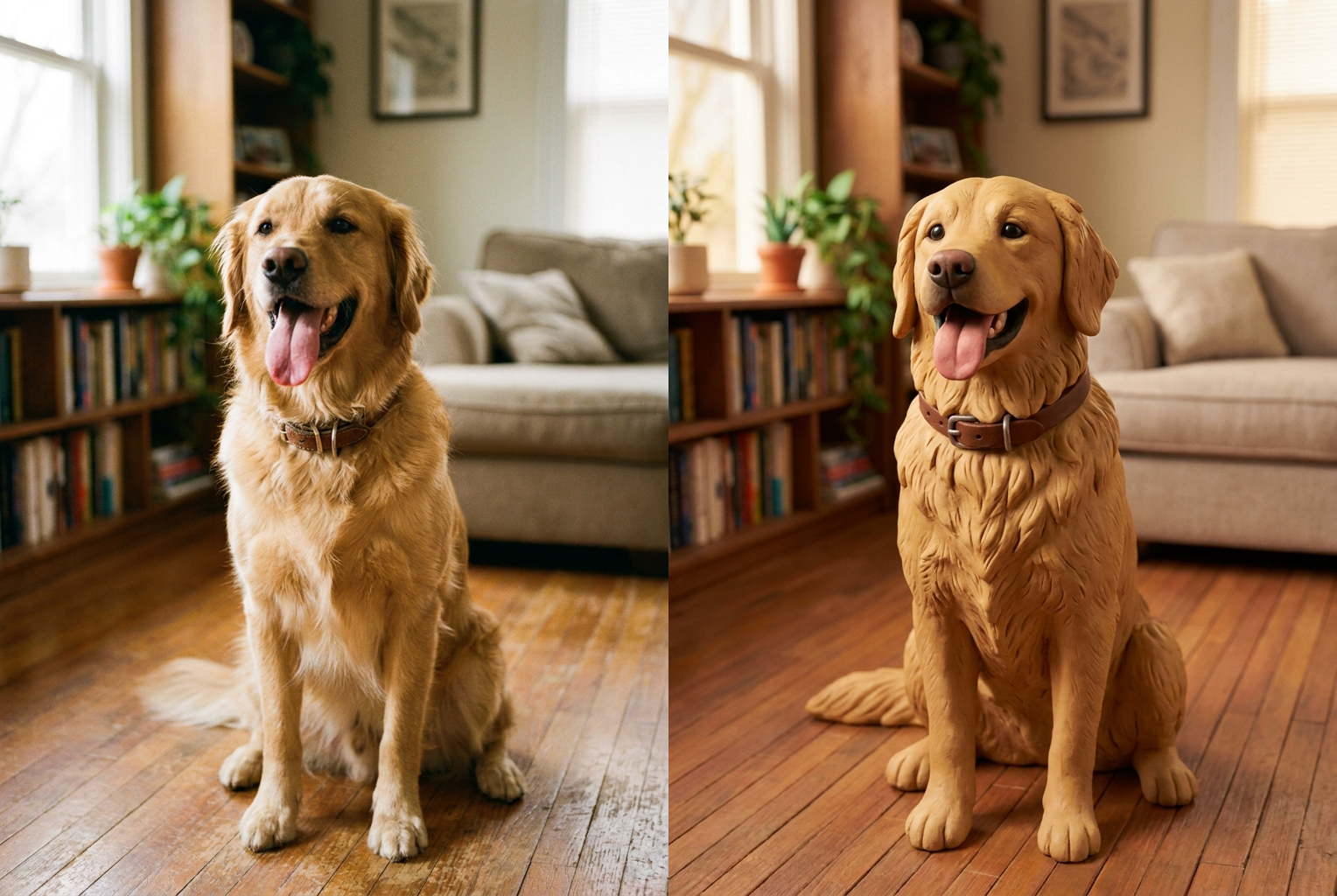
Pet to Clay
Before → After: a golden retriever turned into an adorable clay animal figure
Before → After: a golden retriever turned into an adorable clay animal figure
Why this tool
Why This Claymation Filter Looks Handmade
Most cartoon filters flatten your face into a smooth vector. This one gives you the tactile, fingerprinted look of real modeling clay.
Real Clay Texture
Visible fingerprints, tiny tool marks, and hand-molded seams sit on a soft matte clay surface. The result reads as a physical plasticine puppet someone sculpted by hand, not a digital cartoon.
Still Recognisably You
The prompt locks your face, hairstyle, skin tone, expression, and clothing colours. Friends should spot who it is instantly — you are the same person, just rendered in clay.
Stop-Motion Film Look
Warm soft studio lighting and a shallow depth of field mimic the lamp-lit set of a real stop-motion short, giving the figure that cozy handcrafted movie-still feel.
Chunky Sculpted Proportions
Rounded, slightly oversized features and simplified shapes echo how clay characters are actually built, so the figure looks molded rather than shrunk down from a photo.
Miniature Diorama Backdrop
The background becomes a soft, blurred handcrafted set, so your clay self sits inside a tiny world instead of floating on a flat colour.
One Credit, One Click
No sculpting, no 3D software, no armatures or baking. Upload, press one button, and get a finished high-resolution clay portrait for a single credit.
The rundown
AI Claymation Filter: Turn Any Photo Into a Handmade Clay Figure
The AI claymation filter takes an ordinary photo and rebuilds it as a handmade stop-motion clay character — fingerprints, tool marks, seams and all — while keeping the subject clearly recognisable. That last part is what separates it from a generic cartoon effect. Most stylising filters push every face toward the same smooth, glossy template, and the output could be anyone. This AI claymation filter does the opposite: it treats your likeness as fixed and changes only the material, translating your real face, hair, and clothing into plasticine the way a stop-motion studio would sculpt a puppet based on a reference photo. The result feels handmade rather than mass-produced, because that tactile, slightly-imperfect clay surface is exactly what the model is trained to reproduce.
Under the hood, the AI claymation filter runs a large image-to-image model with an identity-locked instruction set. When you upload a photo, the model receives both your image and a carefully tuned prompt that describes the clay medium in detail — visible fingerprints, tiny tool marks, gentle seams, a soft matte sheen, and rounded chunky proportions — alongside a hard rule to preserve your face, hairstyle, skin tone, expression, and clothing colours. Because that instruction is baked into the page rather than left for you to write, every run gives you a convincing clay sculpt with consistent identity preservation, even if you know nothing about prompt engineering. The claymation photo generator quietly handles the hard part so you only have to upload and click.
What makes clay read as clay is texture, and texture is where this tool spends its effort. Real stop-motion figures are molded by hand, so they carry fingerprints pressed into the surface, faint scrape marks from sculpting tools, and seams where pieces of plasticine were joined. The AI claymation filter reproduces those micro-details deliberately, then wraps them in the soft matte sheen of modeling clay rather than the shiny plastic look of a toy. Proportions are rounded and simplified the way a sculptor exaggerates features to make a character legible on screen. Together these choices are what turn a flat photo into something that looks like it was built on a workbench, one thumb-press at a time.
Lighting and set finish the illusion. A convincing clay figure needs to sit in a believable little world, so the AI claymation filter rebuilds the background as a soft, blurred miniature diorama and lights the scene with the warm, lamp-lit glow of a stop-motion film set. A shallow depth of field keeps your clay self sharp while the tiny handcrafted backdrop falls gently out of focus, mimicking the macro lenses used to shoot real puppets. This is the same trick that makes stop-motion movies feel cozy and tactile, and it is the reason a good clay filter result looks like a frame lifted from a short film rather than a sticker pasted onto a plain colour.
Photo choice matters more than anything else you control. Give the AI claymation filter a clear, well-lit image where your face is visible and reasonably sharp, ideally a front-facing portrait or half-body shot. That gives the model plenty of facial structure, hairstyle, and clothing colour to translate into clay. What holds results back is missing information rather than bad information: a heavily backlit silhouette, a face hidden behind sunglasses, an extreme angle, motion blur, or a tiny low-resolution crop. The model can restyle real detail into plasticine beautifully, but it cannot sculpt detail the camera never recorded in the first place.
People reach for this tool in a lot of playful situations. Profile pictures and avatars are the most common — a clay version of yourself stands out far more than another ordinary selfie. Pet owners love turning a cat or dog into an adorable clay animal, and couples and friends turn group shots into a little set of figures posed together. Beyond that: birthday and holiday cards, custom stickers and emotes, quirky social posts, and small print-on-demand merch. Anywhere you want something that feels handmade and personal, running a photo through an AI claymation filter gives you a one-of-a-kind image in seconds instead of hours.
Compared with making this by hand, the gap is enormous. A real stop-motion sculptor blocks out an armature, builds up plasticine over it, sculpts and smooths the features, paints or tints the surface, then lights and photographs the figure on a set — a process that takes hours of skilled work and specialised materials for a single frame. Even a digital 3D artist would spend a long session modeling, texturing, and rendering a clay shader to match. By contrast, the AI claymation filter needs no tools or training at all. The AI claymation filter compresses all of that into roughly thirty seconds and one credit, which changes how you use it: instead of committing to one precious sculpt, you can run several photos and simply keep the best clay version.
Getting started with the AI claymation filter takes no setup at all — no account wizard, no software install, no sculpting tools to learn. Upload a photo using the tool at the top of this page, press the button, and wait under a minute for a full-resolution download with no watermark. New accounts include free credits, so your first clay portrait costs nothing, and failed generations refund automatically. Because the model is not fully deterministic, it is worth running two or three times and picking your favourite sculpt. Images you create are yours to use, including commercially, provided you hold the rights to the photo you upload and have permission from anyone else pictured. If you have ever wanted to see yourself as a stop-motion character, this claymation generator makes it a thirty-second experiment — upload a photo, pick your favourite clay figure, and share a version of yourself nobody else has.
AI Claymation Filter FAQ
Yes — that is the core design goal. The prompt tells the model to keep your face, hairstyle, hair colour, skin tone, expression, pose, and clothing colours recognisable, and forbids changing your age, ethnicity, or gender. What changes is the material: your likeness is rebuilt in plasticine with fingerprints and seams. People who know you should still recognise the clay version instantly.
Every generation costs one credit, and new accounts start with free credits, so you can try it without paying anything. There is no subscription required and no watermark on your download. If you run out, credits can be topped up, and each attempt — including re-running the same photo for a different sculpt — costs the same single credit.
A clear, well-lit shot where your face is visible and reasonably in focus. Front-facing portraits and half-body photos work especially well because the model has plenty of facial and clothing detail to translate into clay. Avoid heavy sunglasses, extreme angles, motion blur, or tiny low-resolution crops — the AI can restyle detail into clay, but it cannot invent detail the camera never captured.
Yes. The claymation look applies to almost any subject — pets become adorable clay animals, and couples or small groups turn into a set of clay figures together. Very large crowds get harder because the model has to sculpt many faces at once, so tighter shots of one to three subjects give the cleanest, most recognisable results.
Usually between fifteen and forty seconds, depending on queue load and image size. You can leave the page open while it runs. If a generation fails, your credit is returned automatically, so a failed attempt never costs you anything — just try again, ideally with a slightly clearer source photo.
Yes. The model is not fully deterministic, so running the same photo twice produces slightly different sculpts — the seams fall differently, the lighting shifts, proportions vary a little. Many people generate two or three versions and pick their favourite. Each run costs one credit.
Only with their permission. Please do not upload photos of people who have not agreed to it, and avoid using the tool on public figures or minors to create misleading images. Even a playful clay edit of someone who never consented can cause harm, so stick to yourself, friends who are happy to take part, and your own pets.
Yes. Images you generate are yours to use, including for profile pictures, stickers, greeting cards, social posts, and small merch. You are responsible for holding the rights to whatever photo you upload. Many people run a favourite portrait or pet photo through the claymation filter to create a fun, one-of-a-kind avatar.