
AI Bridal Filter
Upload one photo and the AI bridal filter shows you as a bride — gown, veil, hair and makeup — while keeping your real face exactly as it is.
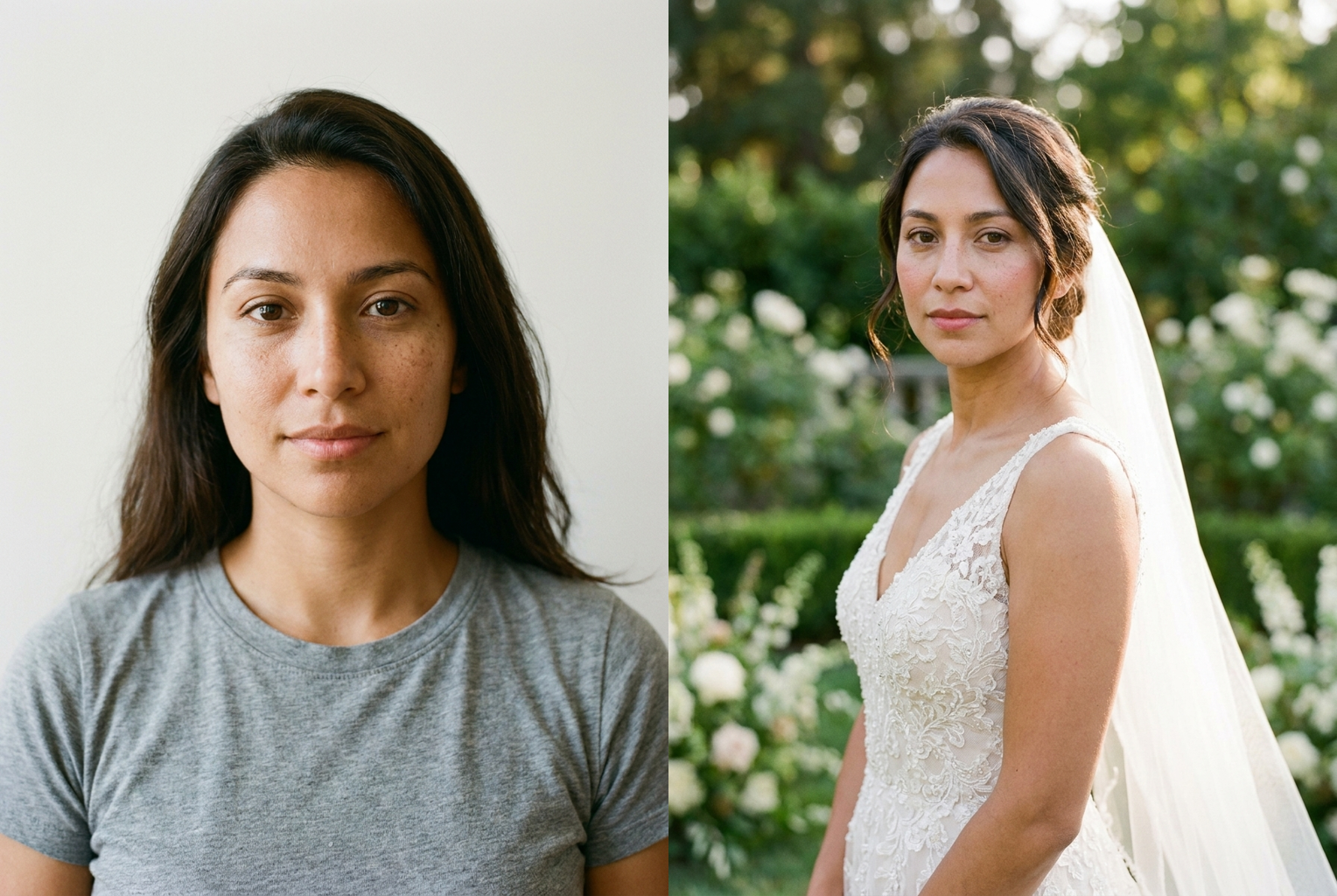
Everyday photo → classic lace bride
Prompt: "ivory lace A-line gown, cathedral veil, garden ceremony" — same face, full bridal look.
AI-generated examples
See Yourself as a Bride
Upload a clear photo, describe the wedding look you dream about, and get a photorealistic bridal portrait of yourself in seconds.
Drag & drop or click to upload
Supports PNG, JPG, WEBP • Max 20MB
Sign in to start generating
How it works
Upload your photo
Pick a clear, front-facing photo where your face and shoulders are visible. Good, even lighting gives the most realistic result.
Describe the bridal look
Type the gown, veil, hair, and setting you want — from a classic ivory ballgown to a boho lace dress in a garden. Be as specific as you like.
Generate and download
The AI bridal filter dresses you as a bride while keeping your face exactly the same. Download the portrait or try another style.
Before & After: Real Bridal Previews
Each example was generated with this tool's own prompt — one source photo, one bridal description, one click. The face stays exactly the same; only the gown, hair, and setting change.
Everyday photo → classic lace bride
Prompt: "ivory lace A-line gown, cathedral veil, garden ceremony" — same face, full bridal look.
Prompt: "ivory lace A-line gown, cathedral veil, garden ceremony" — same face, full bridal look.
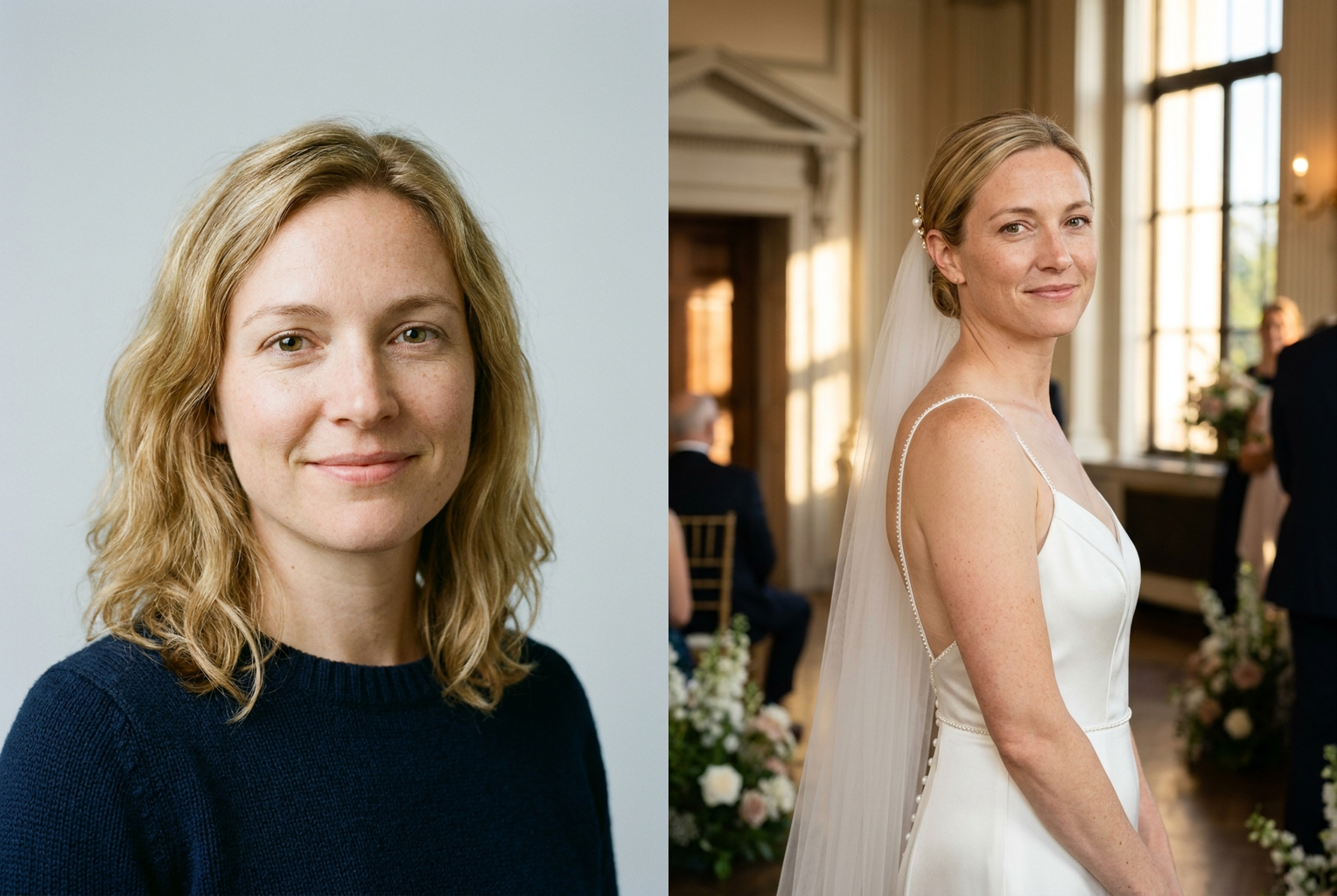
Everyday photo → modern satin bride
Prompt: "sleek satin sheath gown, minimalist bun, golden indoor venue" — same face, modern styling.
Prompt: "sleek satin sheath gown, minimalist bun, golden indoor venue" — same face, modern styling.
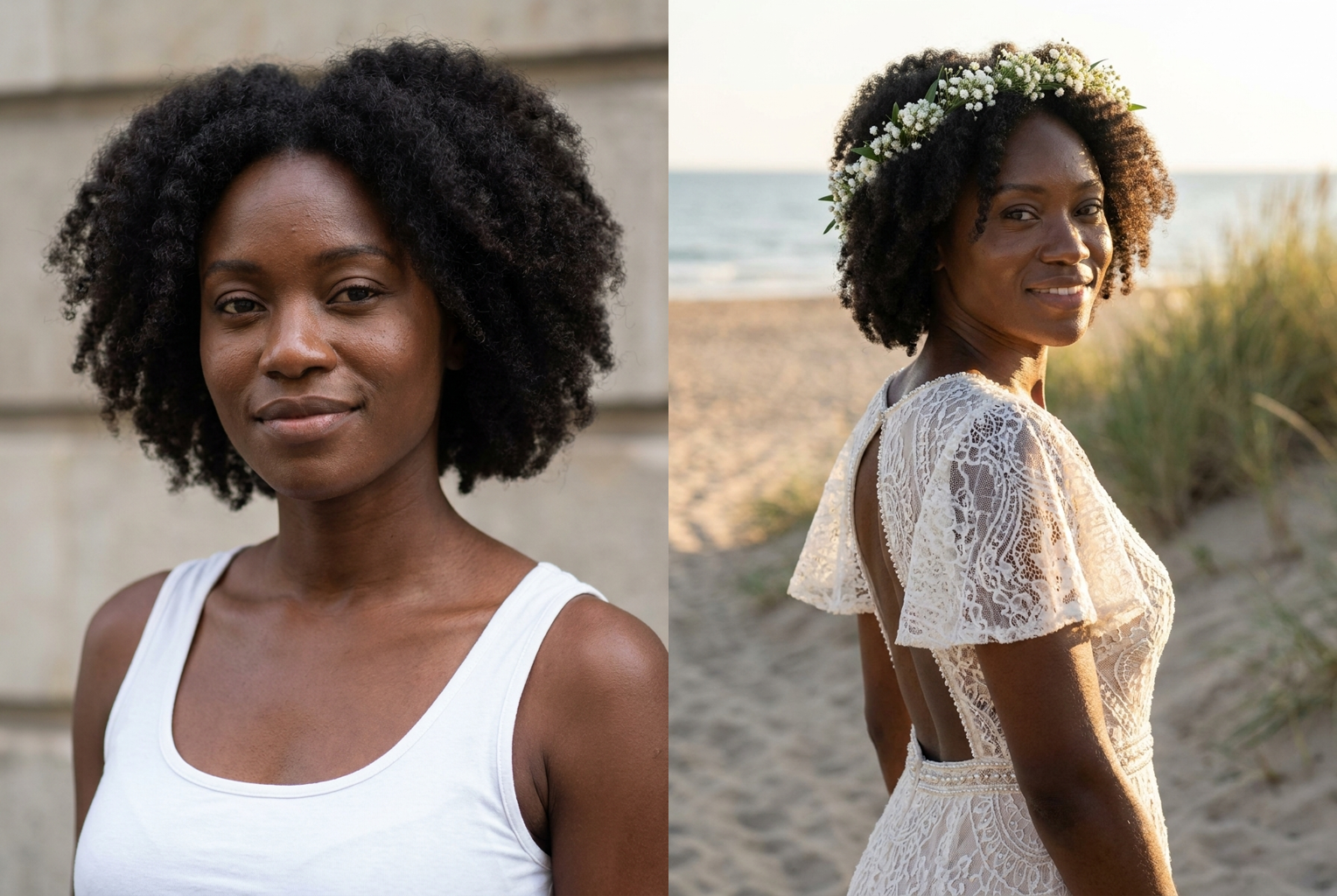
Everyday photo → boho beach bride
Prompt: "boho lace gown, flower crown, golden-hour beach" — same face, relaxed outdoor bridal look.
Prompt: "boho lace gown, flower crown, golden-hour beach" — same face, relaxed outdoor bridal look.
Why this tool
Your real face, kept
The AI is instructed to preserve your facial features, skin tone, and expression exactly. Only the gown, hair, and setting change — so the bride in the photo is genuinely you.
Any wedding style
No fixed dress menu. Describe a cathedral-veil ballgown, a boho lace slip, a sleek satin column, or a red-carpet reception look — the AI bridal filter renders it on you.
Wedding-photographer realism
Gowns are rendered with real fabric, lace, and beadwork under soft bridal light, so the result reads like a professional wedding portrait, not a sticker costume.
Bridal hair and makeup
Add an updo, loose waves, a flower crown, or soft glam makeup in the same pass. The whole look comes together in one generation.
Instant and low-cost
Each portrait costs 1 credit and generates in seconds, so you can preview a whole shortlist of gowns and settings in one sitting.
Share-ready downloads
Save your favorite bridal portrait in high resolution to share, print, or use as inspiration you bring to a real dress fitting.
The rundown
AI Bridal Filter: Turn Any Photo Into a Wedding Portrait
The AI bridal filter answers a question almost everyone has quietly wondered: what would I look like on my wedding day? Instead of booking a photo studio, renting a gown, or waiting for the real event, you upload a single photo and describe the bridal look you have in mind. Within seconds the AI bridal filter produces a photorealistic portrait of you as a bride — not a model, not a cartoon, but your own face — dressed in an elegant wedding gown with matching hair, makeup, and setting. There is nothing to install and no appointment required; a selfie and a sentence are all it takes to see the bride version of yourself.
Under the hood, the tool uses a state-of-the-art image editing model that understands the difference between your face and everything else in the frame. When you submit a request, the AI locks your facial features, skin tone, and expression in place, then regenerates your clothing, hair styling, and background into a bridal scene. This is what separates a real AI bridal filter from a cheap costume overlay: the gown is not a flat sticker pasted onto your body. Lace and beadwork catch the light, fabric falls with real weight, the veil frames your face naturally, and the whole portrait is lit like professional wedding photography. The result reads as a genuine photograph of you on your big day, which is exactly what makes it feel special rather than gimmicky.
Style coverage is effectively unlimited because you describe the look in plain English rather than picking from a fixed menu. Classic requests include an ivory A-line gown with a cathedral veil, a fitted mermaid dress with lace sleeves, or a soft ballgown with a sweetheart neckline. The AI bridal filter is equally comfortable with a boho crochet dress and a flower crown in a garden, a sleek modern satin slip with a low bun, or a bold reception jumpsuit. It also handles traditional and cultural weddings beautifully — a red-and-gold embroidered outfit, a richly detailed lehenga, or a themed elopement style — so the bride in the portrait reflects the wedding you actually imagine.
The AI bridal filter works with what you give it, so a few simple habits dramatically improve your results. Start with a clear, front-facing photo where your face and shoulders are visible — soft daylight beats harsh overhead light, and a plain background helps the AI separate you cleanly from the scene. Then be specific: 'ivory A-line gown with lace long sleeves, a cathedral veil, soft glam makeup, and loose curled hair, in a sunlit chapel' gives the model far more to work with than 'wedding dress'. Mention the silhouette, fabric, color, veil, hair, and backdrop you want. If a first attempt is close but not perfect, change one detail at a time — swap 'ballgown' for 'mermaid', or add 'with a floral bouquet' — and reuse the same photo for as many wedding makeover experiments as you like.
The most common use case is joyful curiosity, but the AI bridal filter is genuinely useful for planning too. Engaged users preview gown silhouettes and colors on their own face before dress-shopping, turning an overwhelming showroom into a short, confident shortlist. Couples create playful engagement announcements and save-the-date mockups; friends and family make surprise gifts for a bride-to-be; and plenty of people simply generate a bridal portrait for fun on a birthday or anniversary. Because the tool preserves your real features, every one of these uses lands — the person in the gown is unmistakably you, which is what makes the reveal worth sharing.
Before tools like this, your options were limited: imagine the dress in your head, hold a magazine cutout up to the mirror, or pay for a full styled photoshoot just to test an idea. None of those show you the truth, because a wedding look lives or dies by how the gown, veil, and makeup interact with your specific face shape, complexion, and coloring. An AI bridal filter renders the entire look on your actual features with photographic realism, so the preview feels decisive in a way a lookbook never can. And unlike a real fitting or shoot, a preview is instant, low-cost, and infinitely repeatable — you can try a dozen gowns in the time it takes to schedule a single appointment.
The workflow is deliberately simple: upload your photo, describe the bridal look, and generate. Each result costs a single credit and arrives in high resolution, ready to download or share. Because the ai bridal filter is fast, the tool doubles as a styling sandbox — run the same gown in three colors, or three completely different silhouettes, then place the results side by side and compare. Many users keep a small folder of AI bridal filter portraits as a personal moodboard, adding to it whenever a dress catches their eye online. When you finally walk into a bridal boutique, you arrive with something better than a vague idea: realistic photos of your own face wearing the looks you love most.
Getting started takes less than a minute. Pick a recent, well-lit photo of yourself, upload it above, and describe the wedding look you have always pictured — or one you would never expect to wear. The first portraits are free to generate with sign-up credits, so you can test the AI bridal filter on a real idea before spending anything. Whether you are planning your own wedding, dreaming a little, or making a surprise for someone you love, the bride version of you is no longer left to the imagination. Upload a photo, describe the gown, and meet yourself on the most beautiful day — as the bride you have been picturing all along.
AI Bridal Filter — Frequently Asked Questions
No. The generation prompt explicitly instructs the model to keep your facial features, skin tone, and expression exactly as they are in your original photo, and to change only your outfit, hair, and setting. That identity preservation is the whole point — you are seeing your real face as a bride, not a stranger who happens to be wearing a gown.
A clear, front-facing photo in good, even lighting where your face and shoulders are fully visible — a well-lit selfie or headshot is ideal. Avoid heavy shadows across the face, busy backgrounds, and very low-resolution images. A relaxed, natural expression tends to translate into the most believable and flattering bridal portrait.
Yes, and that is where the tool shines. Describe the gown in plain English — 'ivory A-line with lace sleeves and a cathedral veil', 'boho crochet dress with an open back', or 'sleek satin slip gown'. You can also set the hair, makeup, bouquet, and backdrop in the same description, so the entire bridal look is yours to direct.
It does. Alongside classic white gowns you can request a red or gold traditional wedding outfit, a colorful lehenga or hanbok-inspired look, a modern reception jumpsuit, or a themed elopement style. Describe the details — fabric, color, embroidery, accessories — and the AI bridal filter renders that look on your own face.
Many people use it exactly that way. Previewing gown silhouettes and colors on your own face is a low-pressure way to narrow down a style with the ai bridal filter before booking dress-shopping appointments, and the portraits make great inspiration to share with your partner, stylist, or bridal party. Treat the result as a realistic reference rather than an exact catalog of a specific designer dress.
Each bridal portrait costs 1 credit, and new users receive free credits at sign-up to try the tool. Credits are shared across every VO3 AI tool, so the same balance also works for video generation and the other image tools on the site — there is no separate subscription just for the bridal filter.
Absolutely. The high-resolution download is yours to post, print, or send. People use it for playful 'guess who's engaged' surprises, save-the-date mockups, birthday and anniversary gifts, or simply to see themselves as a bride for fun. Because your real face is preserved, the reveal actually looks like you.
Yes. Your photo is processed securely for your generation request only. We do not use your uploads to train models or share them with third parties, and you stay in control of the results — only the portraits you choose to download or share ever leave the tool.