
AI Beard Filter
Upload a clean-shaven photo, describe any beard, and see a realistic preview of yourself with facial hair — before you spend weeks growing it out.
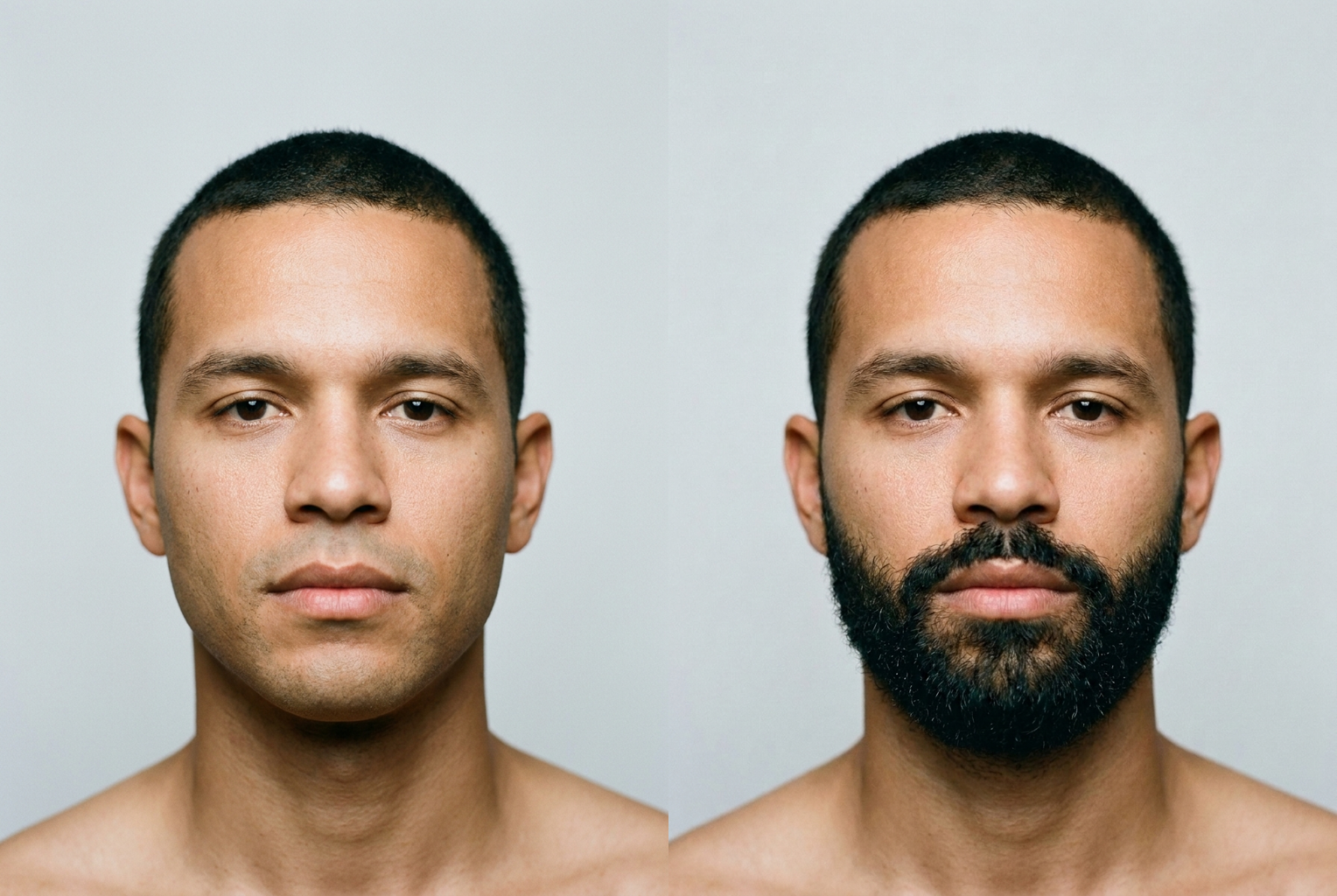
Clean-shaven → full black beard
Prompt: "full thick black beard with a faded neckline" — same face, dense realistic facial hair added.
AI-generated examples
Add a Beard to Your Photo
Upload a clear photo, describe the beard style you're curious about, and get a photorealistic preview in seconds.
Drag & drop or click to upload
Supports PNG, JPG, WEBP • Max 20MB
Sign in to start generating
How it works
Upload your photo
Pick a clear, front-facing photo where your jaw, chin, and cheeks are visible. Good, even lighting gives the most realistic beard.
Describe the beard
Type the shape, length, density, and color you want — anything from 'light stubble' to 'full thick black beard with a fade'. Be as specific as you'd be with a barber.
Generate and compare
The AI adds only facial hair and keeps your face exactly as it is. Download the preview, try more styles, and compare looks side by side.
Before & After: Real Beard Previews
Each example was generated with this tool's own prompt — one clean-shaven source photo, one beard description, one click. The face stays exactly the same; only the facial hair is added.
Clean-shaven → full black beard
Prompt: "full thick black beard with a faded neckline" — same face, dense realistic facial hair added.
Prompt: "full thick black beard with a faded neckline" — same face, dense realistic facial hair added.
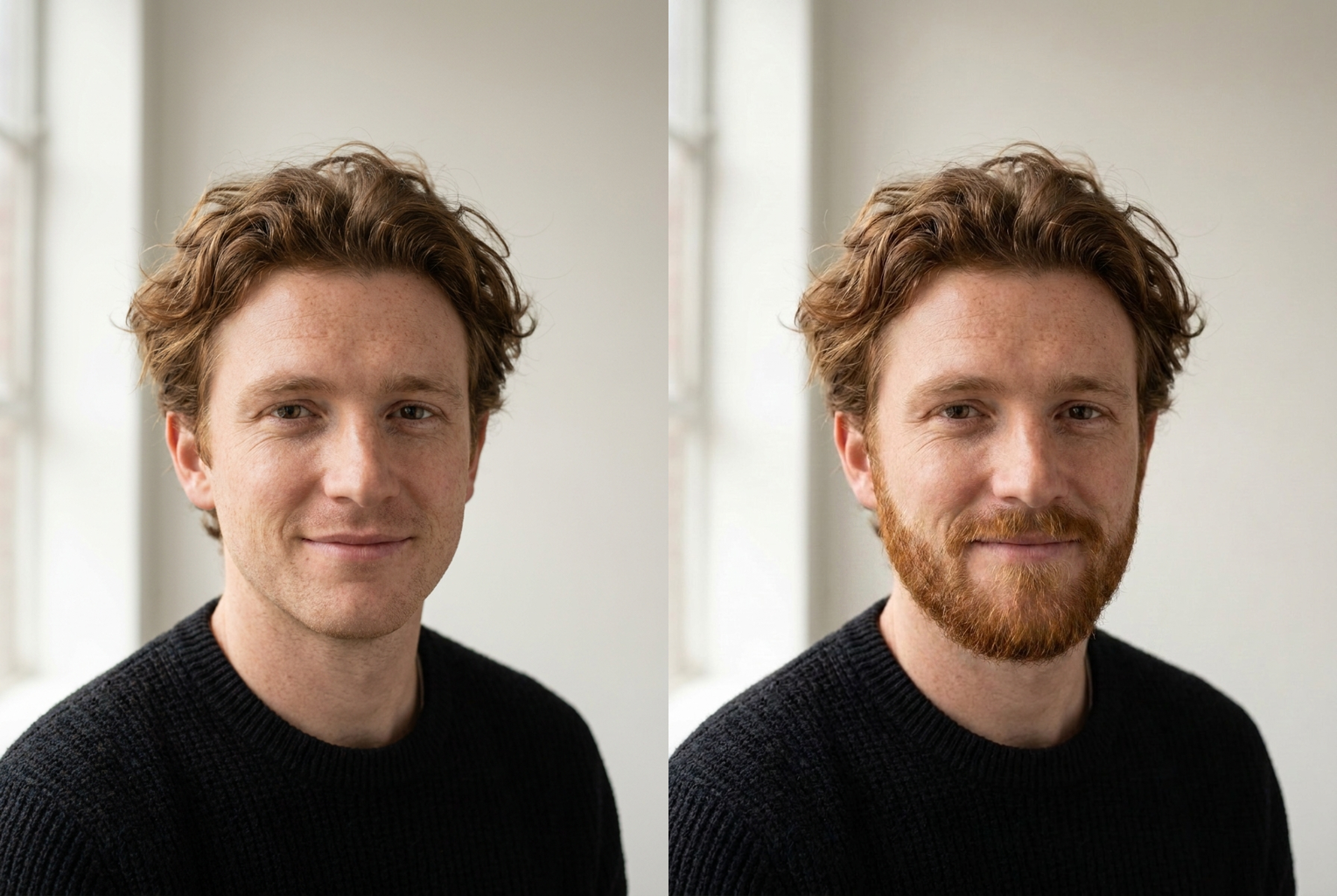
Clean-shaven → ginger boxed beard
Prompt: "ginger boxed beard with clean cheek lines" — matching hair color, natural growth line.
Prompt: "ginger boxed beard with clean cheek lines" — matching hair color, natural growth line.
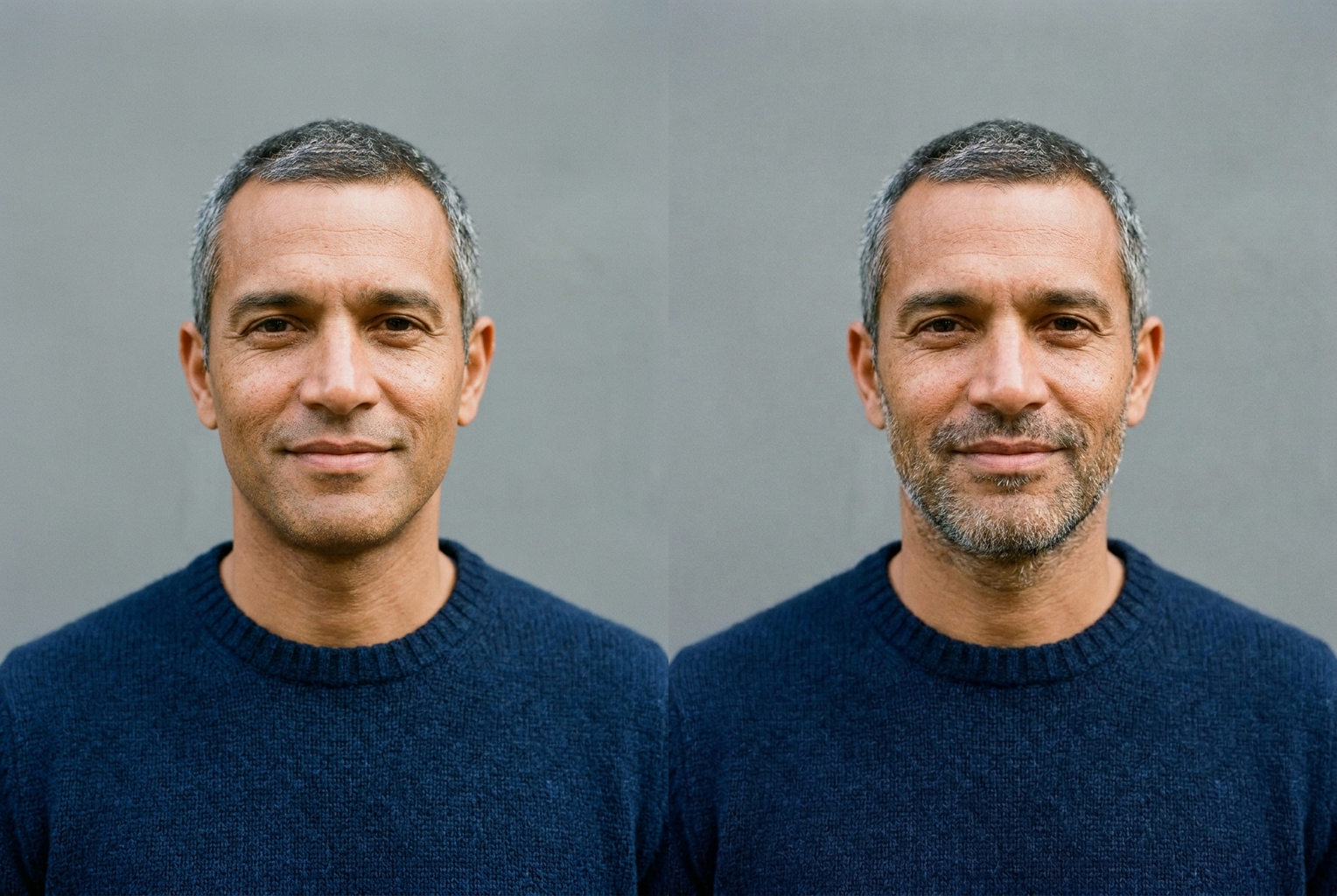
Clean-shaven → salt-and-pepper stubble
Prompt: "short salt-and-pepper stubble" — subtle, age-appropriate designer stubble.
Prompt: "short salt-and-pepper stubble" — subtle, age-appropriate designer stubble.
Why this tool
Photorealistic facial hair
The beard is rendered with realistic individual hairs, a natural growth line, and lighting matched to your photo — it looks like a real photo of you, not a sticker or a shadow drawn on your chin.
Your face stays yours
The AI is instructed to preserve your facial features, skin tone, eyes, and expression exactly. Only the facial hair is added, so the preview is an honest answer to 'would a beard suit me?'
Any style, any color
No fixed menu. Describe stubble, goatees, full beards, boxed beards, van dykes, mutton chops, salt-and-pepper or jet black — if you can ask a barber for it, you can preview it here.
Works for every face
All face shapes, skin tones, and starting points. Try a heavy full beard just as easily as a light designer stubble to see what actually fits your jawline.
Seconds, not weeks
Growing a beard to find out it doesn't suit you costs a month. A preview costs one click, so you can test five different beards before you decide to grow anything.
Try look after look
Run the tool again with a new description each time and keep every version. Line up stubble, goatee, and full beard against your bare face to pick a clear winner.
The rundown
AI Beard Filter: Try On Any Beard Style Online
An AI beard filter answers a question every mirror eventually raises: would a beard actually suit me? Growing one out to find the answer takes weeks of patchy, itchy, in-between stages, and shaving it off means starting the whole slow process over. Instead, you upload a single clean-shaven photo, describe the beard you're curious about, and within seconds you're looking at a photorealistic preview of yourself with facial hair. The ai beard filter turns a month-long experiment into a one-click decision, so you can react to a real picture of the look before you commit a single day to growing it.
Under the hood, this is not a cartoon overlay or a beard-shaped sticker dragged onto your chin. The ai beard filter uses an image-to-image model that reads the geometry of your face — your jawline, the shape of your cheeks, the angle of the shot, the direction and color of the light — and paints new facial hair that genuinely belongs in the photo. It renders individual strands, a natural growth line along the cheeks and neck, stray hairs at the edges, and density that thins and fades the way real facial hair does. Because every pixel is matched to your photo's resolution and lighting, the result reads as a genuine photograph rather than a graphic pasted on top.
Identity preservation is the feature that makes the preview worth trusting. The generation prompt behind this beard generator explicitly instructs the model to keep your facial features, skin tone, eyes, hairline, and expression exactly as they are, and to add only the facial hair. That single constraint is what separates an honest preview from a random bearded stranger — you are seeing your own face with a beard, which is the only version that actually helps you decide anything. Without it, an ai beard filter would just be generating someone else's chin, and no grooming decision could rest on that. This is also why the tool works equally well for realistic experiments and for fun ones: whether you want to see a subtle five-o'clock shadow or a dramatic lumberjack beard, the underlying face — the part that makes it recognizably you — never drifts.
There is no fixed style menu, because the tool listens to your words. Ask the ai beard filter for light designer stubble, a neatly trimmed goatee, a full thick beard, a sharp boxed beard with a faded neckline, a classic van dyke, or old-school mutton chops. Add a color — jet black, chestnut brown, ginger, blonde, auburn, or salt-and-pepper — and a length, and the model builds exactly that. If you can describe it to a barber, you can preview it here, which makes this virtual beard try on far more flexible than any preset filter that only offers three or four canned shapes.
Getting a great result comes down to the photo and the description. Upload a clear, front-facing shot with even lighting where your jaw, chin, and cheeks are fully visible, and start from a clean-shaven or lightly stubbled face so the ai beard filter has a clean canvas to work on. Then be specific: 'full thick black beard with a faded neckline and a defined mustache' gives the model far more to work with than just typing 'beard'. The more precisely you describe the shape, density, length, and color you have in mind, the closer the preview lands to the look you actually pictured.
The use cases go well beyond idle curiosity. Men weighing a new look use the ai beard filter to see whether stubble or a full beard flatters their jaw before committing weeks to growing it out. Grooms and groomsmen preview a wedding-day look, actors and cosplayers plan a character's face, content creators mock up a thumbnail, and anyone building a costume tests facial hair that would take far too long to grow for real. As a beard style simulator, it replaces guesswork and imagination with a concrete picture you can actually react to, share, and compare. Barbers and stylists can even use the ai beard filter with a client mid-consultation, agreeing on a shape and density from a shared preview instead of hoping both people pictured the same thing before the trimmer comes out.
Compared to the manual alternatives, the advantage is obvious. Growing a beard just to test it costs a month and a lot of patience; a barber's mock-up costs an appointment and still relies on their eye; older photo editors need you to cut, warp, and blend a beard by hand, which almost never looks convincing under close inspection. An ai beard filter does the blending automatically in seconds, keeps your face completely untouched, and lets you line up several beards side by side — the kind of quick, low-stakes experimentation that makes the final grooming decision genuinely easy instead of a gamble.
Getting started takes almost no effort. Upload your photo, type the beard you want to see, and let the ai beard filter generate a preview; then run it again with a different description to line up stubble against a full beard against a goatee. Keep every version you like, share the best ones for a second opinion, and use each add beard to photo result to walk into your next grooming decision already knowing the answer — instead of finding out the hard way, one slow and patchy week at a time. It is the fastest, lowest-risk way to see the bearded version of yourself before it exists. There is nothing to download and nothing to install — the whole preview happens right in your browser, from any device, so you can test a look on your lunch break and know exactly what you're asking your barber for by the weekend.
AI Beard Filter — Frequently Asked Questions
No. The generation prompt explicitly instructs the model to keep your facial features, skin tone, eyes, and expression exactly as they are in the original photo and to add only facial hair. That identity preservation is what makes the preview trustworthy — you are seeing your real face with a beard, not a lookalike wearing one.
A clear, front-facing photo with even lighting where your jaw, chin, and cheeks are fully visible. Avoid heavy shadows, extreme angles, and anything covering the lower half of your face. A clean-shaven or lightly stubbled starting photo gives the AI the cleanest canvas to add a realistic beard onto.
Yes. Type any description you like — full beard, goatee, stubble, boxed beard, van dyke, mutton chops — and add a color such as jet black, brown, ginger, blonde, or salt-and-pepper. The more specific your description of length, density, and shape, the closer the preview matches what you had in mind.
It works best on a clean-shaven or lightly stubbled photo, because the AI is adding facial hair rather than reshaping existing hair. If you already have a full beard, the preview may blend the new style with what's there. For the most accurate reshaping result, start from a photo with minimal facial hair.
The model renders individual hairs, a natural growth pattern along the jaw and cheeks, and texture matched to your photo's lighting and resolution, so previews look like real photographs rather than drawn-on shapes. It is a strong visual guide for deciding whether to grow a beard, though a real beard's exact fill depends on your own growth pattern.
Usually a few seconds. You upload a photo, type a short description of the beard you want, and click generate. There is no app to install, no account setup marathon, and no waiting on a barber's calendar — just upload, describe, and see the preview.
Yes. The tool simply adds the facial hair you describe to whatever photo you upload, so anyone curious about how a beard, stubble, or styled facial hair would look on their face can try it. It's popular for costume planning, drag looks, theater, and general curiosity as much as for everyday grooming decisions.
As many as you like. Each run uses one description, so change a few words — swap 'stubble' for 'full beard', or 'brown' for 'salt-and-pepper' — and generate again. Keeping several previews side by side is the easiest way to compare styles and pick the one that suits your face.