
AI Bald Filter
Upload a photo, click once, and see a realistic preview of yourself with a shaved head — before you ever pick up the clippers.
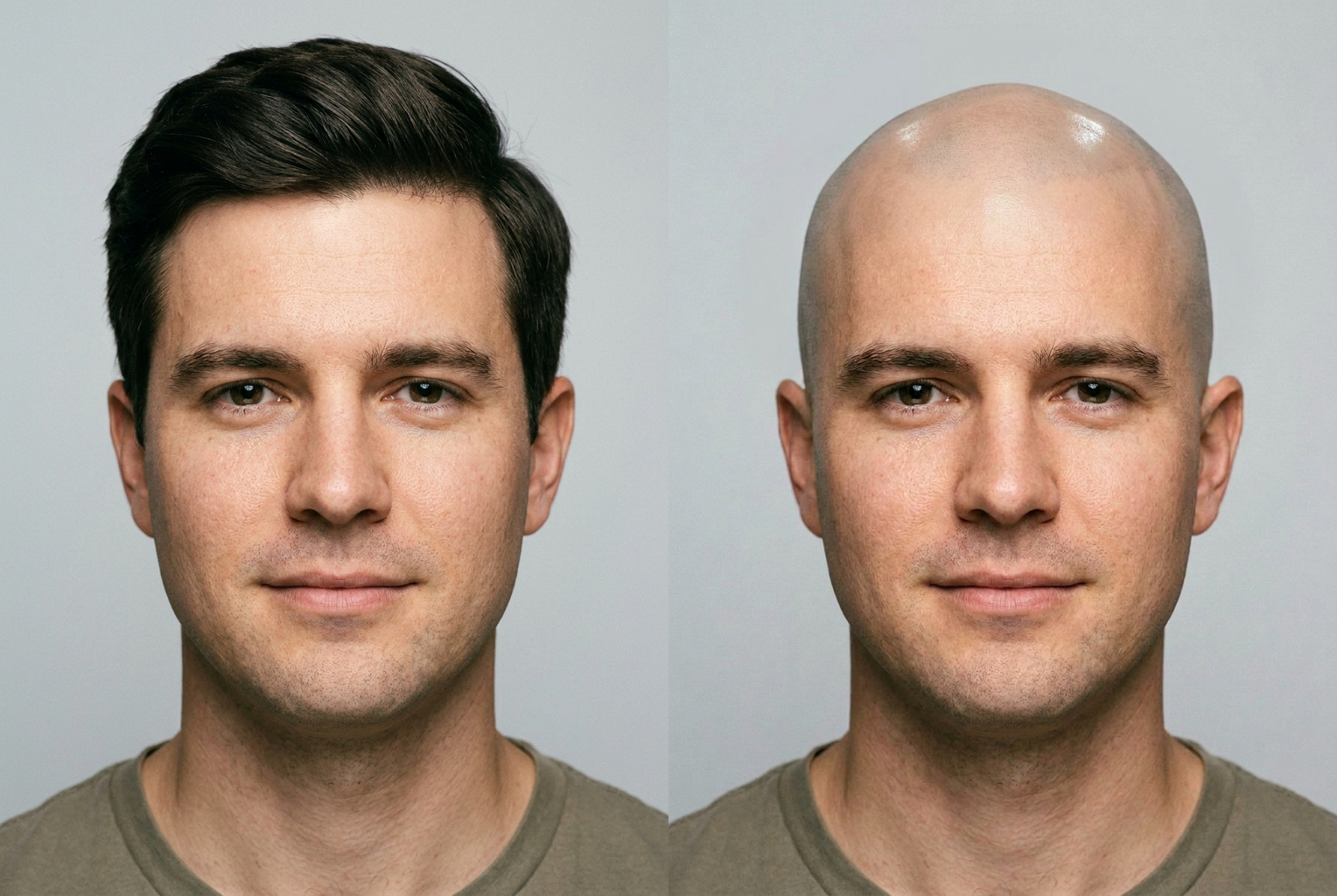
Full head of hair → smooth shaved head
Prompt: "fully shaved smooth head" — same face, hair fully removed with a realistic scalp.
AI-generated examples
AI Bald Filter
Drag & drop or click to upload
Supports PNG, JPG, WEBP • Max 20MB
Sign in to start generating
How it works
Upload your photo
Add a clear, front-facing selfie where your whole head and hairline are visible. Even lighting and a plain background give the AI the cleanest starting point.
Describe the look (optional)
Leave it blank for a fully shaved head, or type a variation — a buzzed shadow, a receding hairline, or 'keep the beard' — to steer the result.
See yourself bald
In seconds you get a photorealistic preview with your face untouched and only the hair removed. Save it, share it, or run it again with a new description.
See the bald look before you shave
Every result below was generated from an ordinary photo with the AI bald filter — the face stays exactly the same, only the hair comes off.
Full head of hair → smooth shaved head
Prompt: "fully shaved smooth head" — same face, hair fully removed with a realistic scalp.
Prompt: "fully shaved smooth head" — same face, hair fully removed with a realistic scalp.
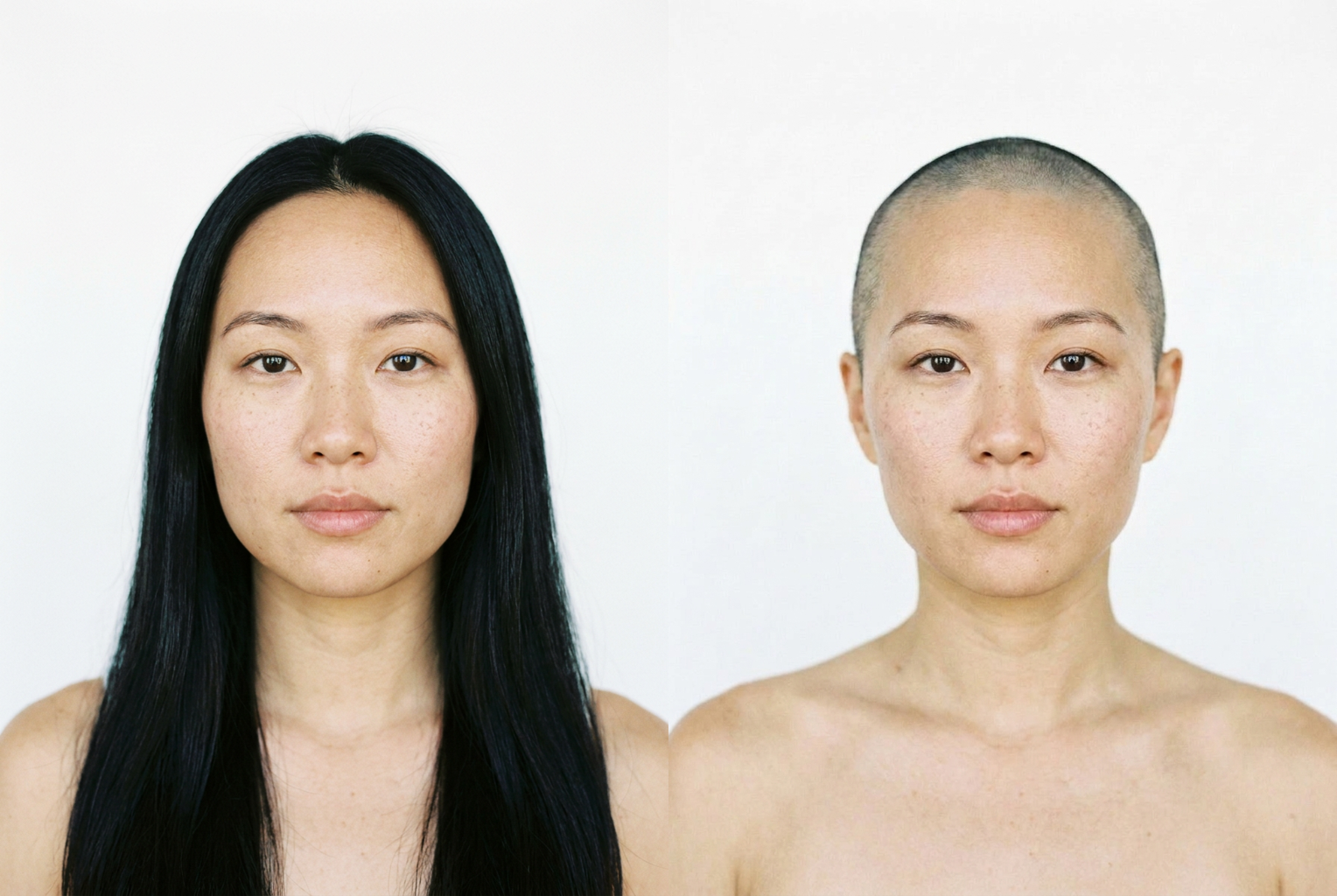
Long hair → buzzed shadow
Prompt: "very short buzzed shadow" — a near-shaved look that keeps the exact same face.
Prompt: "very short buzzed shadow" — a near-shaved look that keeps the exact same face.
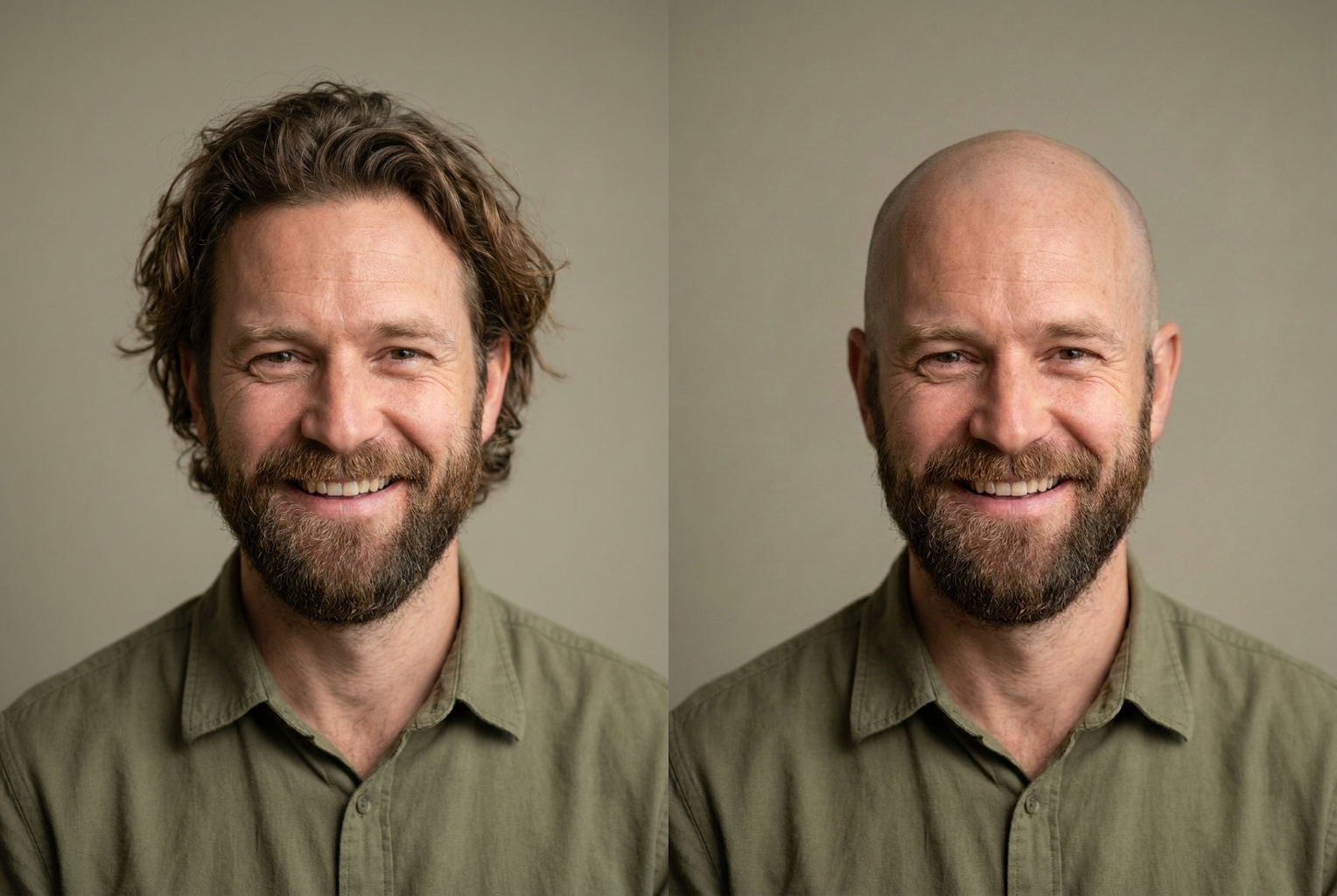
Full hair + beard → shaved head, beard kept
Prompt: "shaved bald head, keep the full beard" — hair removed on top, beard preserved.
Prompt: "shaved bald head, keep the full beard" — hair removed on top, beard preserved.
Why this tool
Photorealistic shaved head
The AI renders a real bald scalp — skin texture, pores, subtle highlights and a natural shaved hairline — lit to match your photo, so it reads like a real picture, not a cartoon or a smudge.
Your face stays yours
The model is instructed to keep your facial features, skin tone, eyes, expression and identity exactly the same. Only the hair is removed, so the preview is an honest answer to 'would bald suit me?'
Fully shaved or in between
No single fixed effect. Preview a smooth clean-shaven scalp, a closely buzzed shadow, or an early receding hairline — whatever stage of going bald you actually want to see.
Works for everyone
All head shapes, hair types and skin tones. Curious about a big chop, planning a charity shave, or just wondering — the AI bald filter handles every starting photo the same way.
No regret, no clippers
Shaving your head to find out it doesn't suit you means weeks of growing it back. A preview costs one click, so you can test the look risk-free before committing.
Compare every version
Run it again with a new description each time and keep every result. Line up fully shaved, buzzed and receding side by side against your current hair to decide with confidence.
The rundown
AI Bald Filter: See Yourself Bald Online in Seconds
An ai bald filter settles a question a lot of people ask their mirror but never dare to test: what would I look like bald? Actually shaving your head to find out is a one-way decision — if the look doesn't suit you, you are stuck with weeks of awkward regrowth before you can change your mind. Instead, you upload a single photo, click once, and within seconds you are looking at a photorealistic preview of yourself with a shaved head. The ai bald filter turns an irreversible gamble into a risk-free experiment, so you can react to a real picture of the look long before any hair actually comes off.
This is not a blur or a hair-shaped eraser dragged across the top of your photo. The ai bald filter uses an image-to-image model that reads the geometry of your head — the shape of your skull, your hairline, the angle of the shot, the direction and color of the light — and rebuilds a believable bald scalp where the hair used to be. It renders real skin texture, pores, gentle highlights across the crown, and the faint shadow of a freshly shaved hairline, with shading and reflections matched to your photo. Because every pixel is fitted to your image's resolution and lighting, the result reads as a genuine photograph rather than a graphic pasted on top.
Identity preservation is the feature that makes the preview worth trusting. The generation prompt behind this bald head filter explicitly instructs the model to keep your facial features, skin tone, eyes, eyebrows and expression exactly as they are, and to change only the hair on your head. That single constraint is what separates an honest preview from a random bald face — you are seeing your own head shaved, which is the only version that actually helps you decide anything. Without it, an ai bald filter would just be inventing someone else's scalp, and no grooming decision could rest on that. It is also why the tool is equally useful for a serious 'should I shave?' moment and for a bit of fun with friends: the underlying face, the part that makes it recognizably you, never drifts.
There is no single fixed effect, because the tool listens to what you type. Leave the description blank and the ai bald filter gives you a fully shaved, smooth head. Or steer it: ask for a closely buzzed shadow, an early receding hairline, a pronounced widow's peak, or tell it to keep your beard while everything on top comes off. If you can picture a specific stage of going bald, you can describe it and preview exactly that — which makes this far more flexible than a one-tap novelty filter that only knows how to do a single cartoonish chrome dome.
Getting a great result comes down to the photo and the description. Upload a clear, front-facing shot with even lighting where your whole head and hairline are visible, skip hats and heavy shadows, and choose a plain background so the ai bald filter has a clean canvas to work on. Then be specific if you want a particular look: 'smooth fully shaved head, keep the beard, natural scalp shine' gives the model far more to work with than a blank box. The more precisely you describe how bald you want to look, the closer the preview lands to the exact result you had in mind.
The use cases go well beyond idle curiosity. People with thinning hair use the ai bald filter to see whether owning the shave looks better than fighting the retreat, before they ever commit. Anyone planning a charity head-shave previews the big reveal in advance, actors and cosplayers plan a character's bald look, and friends talk each other into (or out of) a buzz with a shared preview instead of a dare. As a way to see yourself bald without consequences, it replaces imagination and guesswork with a concrete picture you can actually react to, save and send around for a second opinion before a single strand hits the floor.
Compared to the manual alternatives, the advantage is obvious. Shaving your head just to test the look costs you weeks of regrowth if you hate it; older photo editors need you to mask, clone and blend a scalp by hand, which almost never survives close inspection; and a barber can only tell you what they think, not show you. An ai bald filter does the blending automatically in seconds, keeps your face completely untouched, and lets you line up a fully shaved head, a buzz and a receding hairline side by side — the kind of quick, low-stakes comparison that makes the final call genuinely easy instead of a leap of faith.
Getting started takes almost no effort. Upload your photo, optionally type the bald look you want to see, and let the ai bald filter generate a preview; then run it again with a different description to compare a smooth shave against a buzzed shadow against an early receding hairline. Keep every version you like, share the best ones, and walk into your next grooming decision already knowing the answer instead of finding out the hard way. There is nothing to download and nothing to install — the whole preview happens right in your browser, from any device, so you can test the look on your lunch break and know exactly what a shaved head does for you before the clippers ever come out. For the price of a single click, the ai bald filter hands you the one thing a razor never can: a clear look at the bald version of yourself with a full undo button, so the only decision left is whether you like what you see.
AI Bald Filter — Frequently Asked Questions
No. The generation prompt explicitly tells the model to keep your facial features, skin tone, eyes, eyebrows and expression exactly as they are in the original photo, and to change only the hair on your head. That identity preservation is the whole point — you are seeing your own face with a shaved head, not a bald stranger who happens to look a bit like you.
A clear, front-facing photo with even lighting where your entire head and hairline are visible. Avoid hats, heavy shadows, extreme angles and anything cropping the top of your head. A plain background and a neutral expression give the AI the cleanest canvas to remove the hair and render a realistic scalp onto.
Yes. Leave the description blank for a fully shaved smooth head, or type a variation such as a closely buzzed shadow, a receding hairline, a widow's peak or 'keep my beard'. The more specific you are about how bald you want to look, the closer the preview matches the exact stage you had in mind.
Yes. The tool targets the hair on top of your head and is instructed to preserve your eyebrows, eyelashes and any facial hair unless you ask otherwise. If you want a completely hairless look, just say so in the description — for example 'remove the beard too' — and the model will take that into account.
The model renders a real scalp with skin texture, subtle highlights and a natural shaved hairline, all matched to your photo's lighting and resolution, so previews look like genuine photographs rather than blurred-out hair. It is a strong visual guide for deciding whether to shave, though the exact shape of your real scalp only fully reveals itself once the clippers come out.
Usually just a few seconds. You upload a photo, optionally type a short description, and click generate. There is no app to install, no lengthy signup and no waiting — far faster than booking a barber or, worse, shaving first and finding out afterwards whether the look suits you.
Yes. The tool simply removes the hair from whatever photo you upload, so anyone curious about a shaved head — for a charity buzz, a bold new style, a costume, or medical-related planning — can preview it. It is popular for cosplay and theatre looks as much as for everyday grooming curiosity.
As many as you like. Each run uses one description, so tweak a few words — swap 'fully shaved' for 'buzzed shadow', or add 'receding hairline' — and generate again. Keeping several previews side by side is the easiest way to compare looks and decide whether to actually reach for the razor.