
AI Angel and Devil Filter
Upload one photo and watch the AI split you into a glowing haloed angel and a horned red-lit devil, side by side, both still unmistakably you.
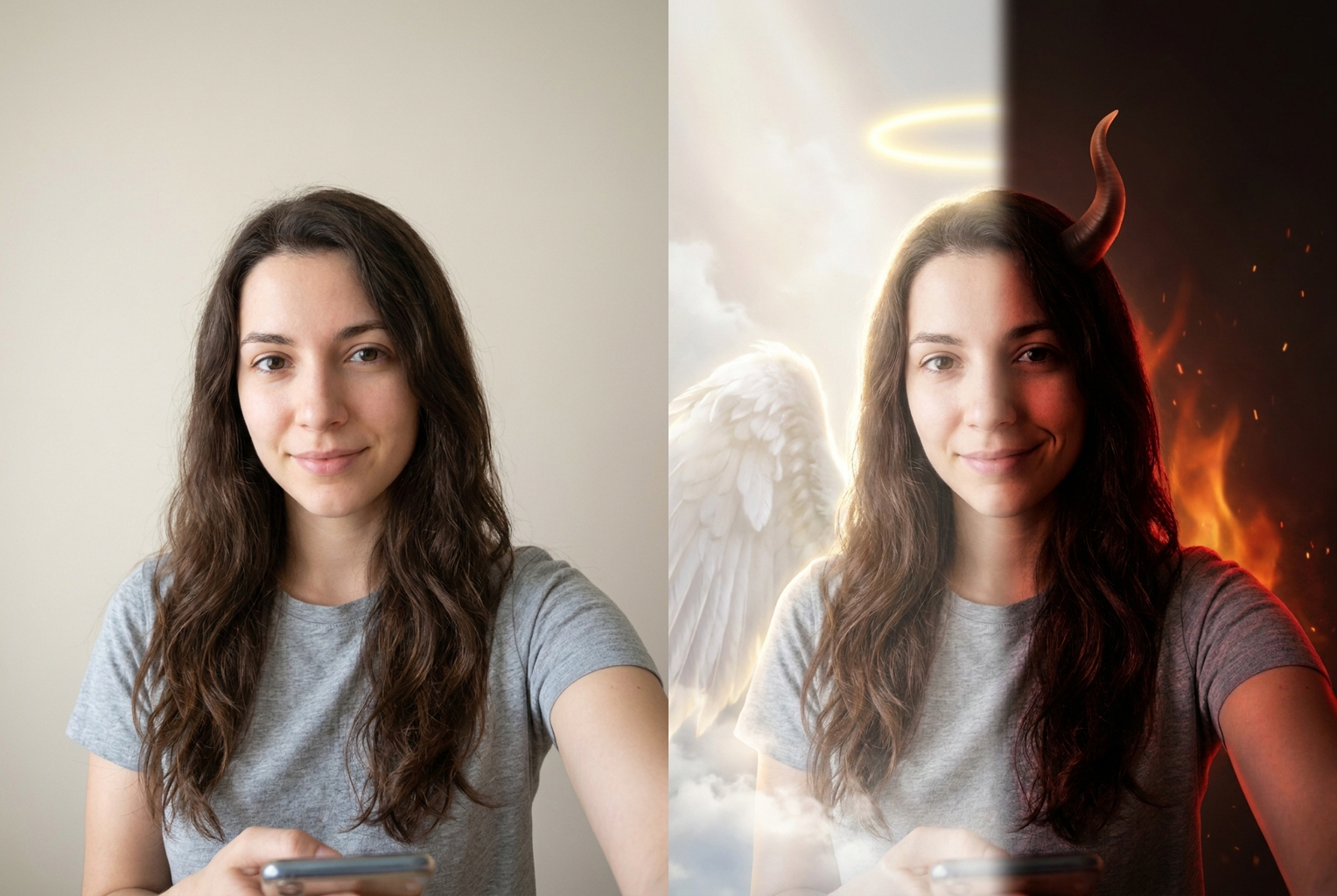
Selfie to Angel & Devil
Before → After: a plain selfie split into a haloed angel and a horned devil, same face on both sides
AI-generated examples
AI Angel and Devil Filter
Upload a photo and see your angel and devil selves side by side in seconds. 1 credit per generation.
Drag & drop or click to upload
Supports PNG, JPG, WEBP • Max 20MB
Sign in to start generating
How it works
How the AI Angel and Devil Filter Works
Three steps, about thirty seconds, no editing skills or double exposures required.
Upload Your Photo
Drop in any clear selfie or portrait. PNG, JPG, and WEBP are supported up to 20MB. A well-lit, front-facing shot where your whole face is visible gives the AI the most detail to duplicate cleanly on both sides.
The AI Splits You in Two
The model rebuilds your photo as a mirrored dual portrait: a haloed, white-winged angel bathed in soft golden light on the left, and a horned, red-lit devil with a mischievous smirk on the right, both kept recognisably you.
Download and Share
Your angel-and-devil portrait is ready in under a minute at full resolution with no watermark. Download it, post it, or run the same photo again for a slightly different halo, horns, and lighting.
Before and After
Real outputs from this tool, generated with the exact prompt the page uses. Source photo on the left, angel-and-devil split portrait on the right.
Selfie to Angel & Devil
Before → After: a plain selfie split into a haloed angel and a horned devil, same face on both sides
Before → After: a plain selfie split into a haloed angel and a horned devil, same face on both sides
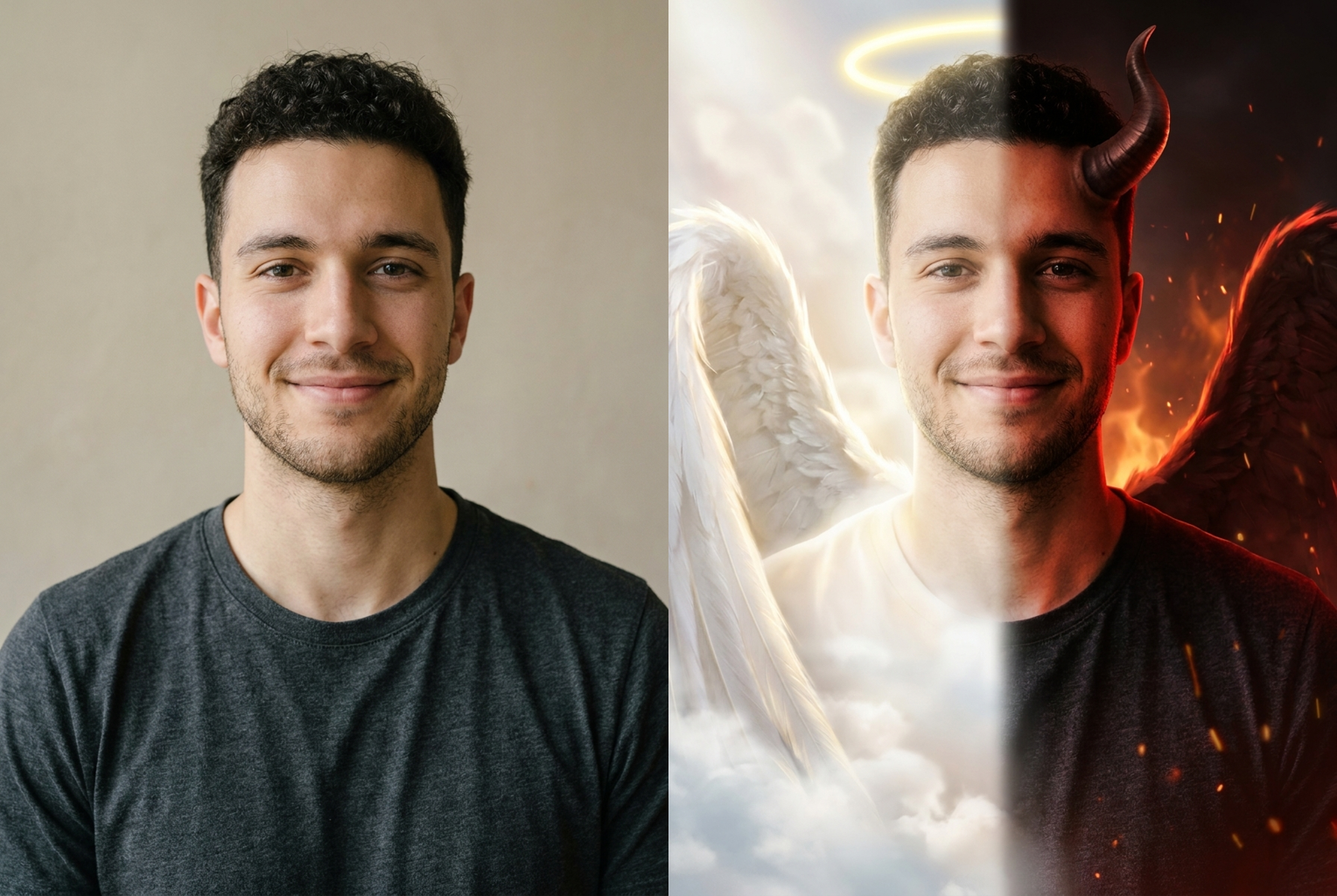
Portrait to Angel & Devil
Before → After: beard and dark shirt rebuilt as a serene winged angel and a fiery smirking devil
Before → After: beard and dark shirt rebuilt as a serene winged angel and a fiery smirking devil
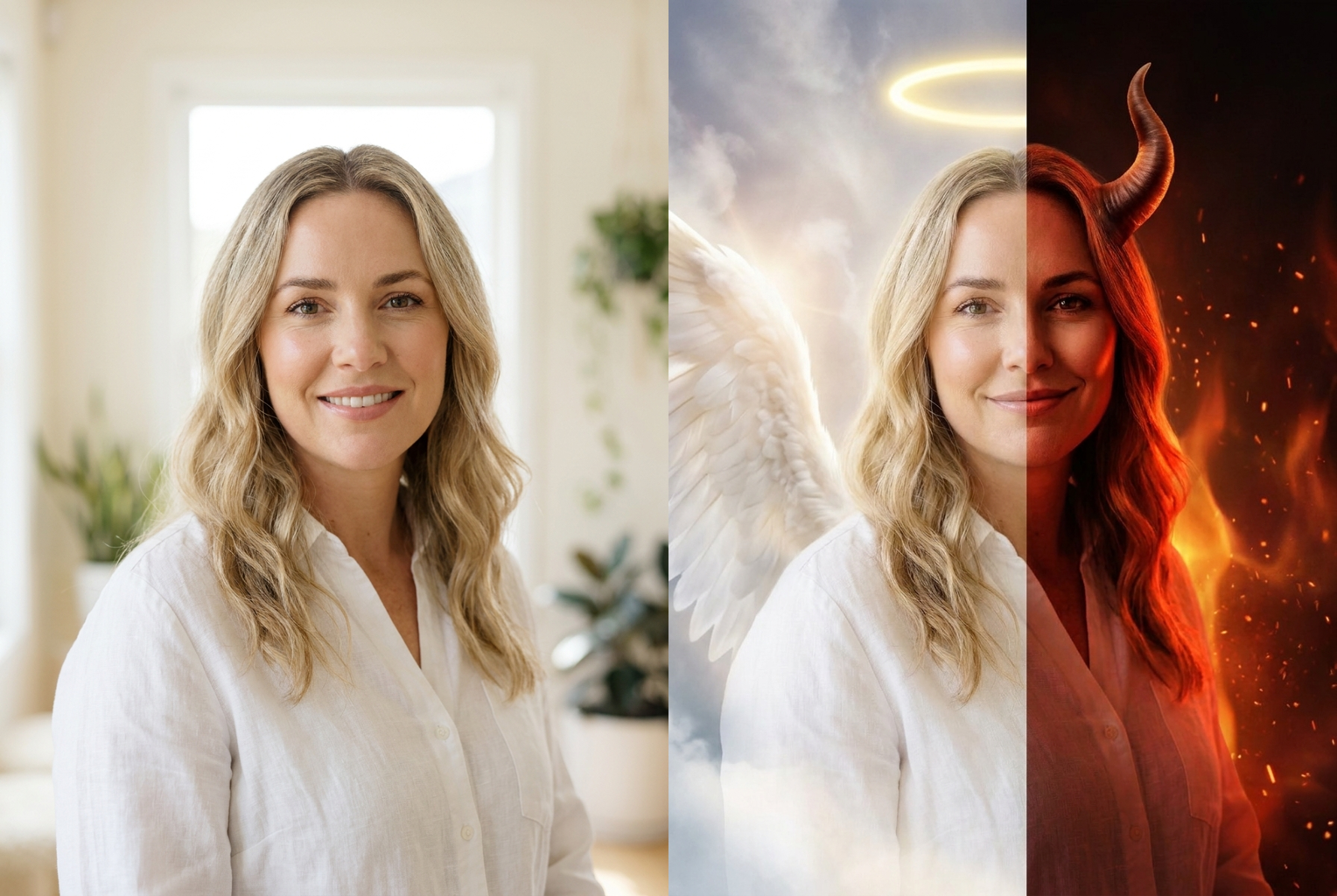
Blonde Portrait to Angel & Devil
Before → After: a soft blonde portrait becomes a glowing angel beside a red-lit horned devil
Before → After: a soft blonde portrait becomes a glowing angel beside a red-lit horned devil
Why this tool
Why This Angel and Devil Filter Looks Cinematic
Most split filters just recolour half your face. This one builds two fully styled versions of you and keeps both unmistakably the same person.
Glowing Angel Half
A floating golden halo, large feathered white wings, and soft luminous rim light turn your left side into a serene heavenly version of you, complete with wisps of cloud and a gentle light bloom.
Fiery Devil Half
Curved horns, a smouldering red-orange glow, deep contrasty shadows, and faint drifting embers give your right side a confident, mischievous demonic mood that plays off the angel perfectly.
Still Unmistakably You
The prompt locks your face shape, features, hairstyle, hair colour, and skin tone on both sides, so friends recognise you instantly. Only the styling, lighting, and expression change between the halves.
Mirrored Split Composition
Your two selves sit in a balanced, symmetrical layout with a seamless soft transition down the centre, so the good-and-evil contrast reads clearly at a glance instead of looking like two separate photos.
Cinematic Portrait Lighting
Heavenly bloom on one side and smoky red backlight on the other mimic real studio portrait lighting, giving the finished image a polished movie-poster feel rather than a flat overlay.
One Credit, One Click
No masking, no layers, no double exposures, no editing software. Upload, press one button, and get a finished high-resolution angel-and-devil portrait for a single credit.
The rundown
AI Angel and Devil Filter: Turn One Selfie Into Your Angel and Devil Selves
The angel and devil filter takes a single ordinary photo and splits you into two dramatically styled versions of yourself, side by side: a haloed, white-winged angel bathed in soft golden light on one half, and a horned, red-lit devil with a mischievous smirk on the other. What makes this angel and devil filter different from a plain overlay is identity. Cheap split effects just recolour half a face or paste on clip-art wings, and the two sides barely look connected. This tool instead treats your likeness as fixed and builds two complete, fully lit portraits of the same person, so the good-and-evil contrast lands because it is clearly one individual wearing two opposite moods.
Under the hood, the angel and devil filter runs a large image-to-image model with an identity-locked instruction set. When you upload a photo, the model receives both your image and a carefully tuned prompt that describes each half in detail, a golden halo, feathered white wings, and heavenly bloom on the angel side, curved horns, smouldering red backlight, and drifting embers on the devil side, alongside a hard rule to preserve your face shape, features, hairstyle, hair colour, and skin tone on both. Because that instruction is baked into the page instead of left for you to write, every run gives you a convincing twin portrait with consistent likeness, even if you know nothing about prompt engineering. The good and evil filter quietly handles the hard part so you only upload and click.
The magic of the effect is contrast, and this angel and devil filter spends its effort making both halves feel distinct yet balanced. The angel side leans into pale ethereal colour, a serene expression, and soft luminous rim light so it reads as calm and heavenly. The devil side flips every one of those choices: warm red and orange glow, deep contrasty shadows, a confident smirk, and a moody dark grade. Placing them in a symmetrical mirrored layout with a seamless soft transition down the centre is what turns two ideas into one striking image, rather than two unrelated photos stuck together. That mirrored framing is the signature look people expect from a good angel-versus-devil portrait.
Getting a great result is mostly about the photo you feed it. Give the angel and devil filter a clear, well-lit, front-facing shot where your whole face is visible, ideally a portrait or half-body image. The model has to reproduce your likeness twice in a single frame, so the more facial structure, hairstyle, and detail it can see, the cleaner both twins come out. What holds results back is missing information rather than bad information: a backlit silhouette, a face hidden behind sunglasses, an extreme side angle, motion blur, or a tiny low-resolution crop. The AI can restyle real detail into halos and horns beautifully, but it cannot invent detail the camera never recorded.
People reach for this angel and devil filter in a lot of playful situations. Profile pictures and avatars are the most common, because a split angel-and-devil portrait stands out far more than another ordinary selfie and hints at a personality in a single glance. It is a favourite for band and DJ artwork, gaming and streaming avatars, dramatic couple posts where each partner picks a side, Halloween and costume content, and bold story graphics. Anywhere you want an image that feels a little theatrical and captures two sides of a personality at once, the good and evil filter gives you a finished, shareable result in seconds instead of an evening of editing.
Compared with making this by hand, the gap is enormous. To build an angel-and-devil composite manually, a photo editor would shoot or source the portrait, cut out the subject, duplicate and mirror it, hand-paint separate lighting for each side, composite in wings, a halo, horns, glow, and embers on different layers, then blend the centre seam and colour-grade both halves so they feel like one scene. That is hours of skilled work in professional software. The angel and devil filter compresses all of it into roughly thirty seconds and one credit, which changes how you use it. Instead of committing to a single laborious edit, you can run several photos and simply keep the best split.
Because the model is not fully deterministic, running the same photo twice gives you slightly different results, the halo sits at a new angle, the wings spread differently, the horns curve another way, and the red glow shifts. That variation is a feature. Many people generate two or three versions of the angel and devil ai portrait and pick their favourite balance between the serene half and the fiery half. Each run costs the same single credit, and failed generations refund automatically, so experimenting is cheap. If one attempt leans too far toward the devil or washes out the angel, a second run of the angel and devil filter with the same photo usually lands the mood you were picturing.
Getting started with the angel and devil filter takes no setup at all, no account wizard, no software install, no masking or layers to learn. Upload a photo using the tool at the top of this page, press the button, and wait under a minute for a full-resolution download with no watermark. New accounts include free credits, so your first angel-and-devil portrait costs nothing, and you keep the rights to use your images, including commercially, as long as you hold the rights to the photo you upload and have permission from anyone else pictured. If you have ever wanted to see both sides of yourself in one bold frame, this angel and devil filter makes it a thirty-second experiment, upload a selfie, reveal your half angel half devil twin, and share a version of yourself nobody else has.
AI Angel and Devil Filter FAQ
Yes, that is the whole point. The prompt tells the model to keep your face shape, features, hairstyle, hair colour, and skin tone recognisable on both the angel and the devil side. What changes is the styling: a halo and white wings on one half, horns and a red glow on the other. People who know you should instantly recognise both versions as the same person, just in two very different moods.
Every generation costs one credit, and new accounts start with free credits, so you can try it without paying anything. There is no subscription required and no watermark on your download. If you run out, credits can be topped up, and each attempt, including re-running the same photo for different horns or a different halo, costs the same single credit.
A clear, well-lit, front-facing shot where your whole face is visible works best, because the model has to reproduce your likeness twice in one image. Portraits and half-body photos are ideal. Avoid heavy sunglasses, extreme side angles, motion blur, or tiny low-resolution crops, since the AI can restyle detail it can see but cannot invent detail the camera never captured.
By default the angel appears on the left and the devil on the right, which is how the tool is tuned for the cleanest, most balanced result. Because the model is not fully deterministic, small details like the halo shape, wing spread, and horn style vary slightly each run, so generating two or three times lets you pick the composition you like best.
Usually between fifteen and forty seconds, depending on queue load and image size. You can leave the page open while it runs. If a generation fails, your credit is returned automatically, so a failed attempt never costs you anything. Just try again, ideally with a slightly clearer or better-lit source photo for sharper twin portraits.
It works best on a single clear subject, since the tool builds an angel and a devil version of one person. You can run a couple or a pet through it and often get a fun result, but with multiple faces the model has more to reproduce twice, so tighter single-subject shots give the most recognisable and cleanly split angel-and-devil portraits.
Only with their permission. Please do not upload photos of people who have not agreed to it, and avoid using the tool on public figures or minors to create misleading images. Even a playful angel-and-devil edit of someone who never consented can cause harm, so stick to yourself, friends who are happy to take part, and your own pets.
Yes. Images you generate are yours to use, including for profile pictures, stickers, posters, album art, and social posts. You are responsible for holding the rights to whatever photo you upload. Many people run a favourite portrait through the angel and devil filter to create a bold, eye-catching avatar that captures both sides of their personality.