
AI Ancestor Photo Generator
Upload one photo, name an era, and AI hands you back an heirloom portrait of your own ancestor — your face stays exactly yours while the costume, pose, and aged film grain belong to another century.
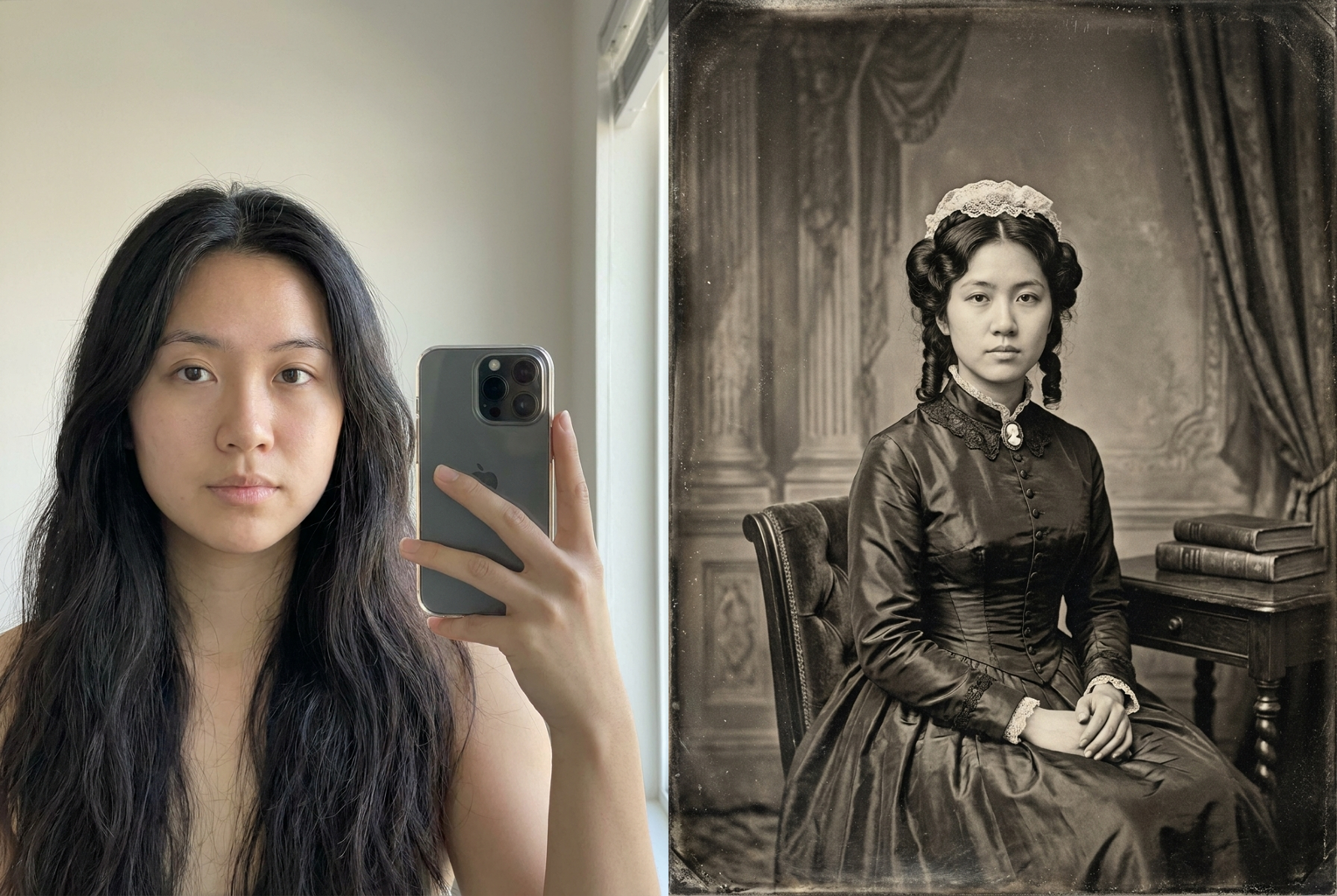
Selfie → 1800s Daguerreotype
Prompt: "1800s daguerreotype" — sepia tone, plate texture and a stiff studio pose, same face throughout
AI-generated examples
AI Ancestor Photo Generator
Drag & drop or click to upload
Supports PNG, JPG, WEBP • Max 20MB
Sign in to start generating
How it works
Upload a Photo
Pick a clear, well-lit photo where your face is easy to see — a selfie, a portrait, or a half-body shot all work perfectly.
Name the Era
Type the period you want: 1800s daguerreotype, Victorian, Renaissance noble, ancient Greece, or a 1920s sepia studio portrait.
Download & Share
Your ancestor portrait is ready in about a minute — save it in full resolution and post the before-and-after reveal.
See Your Ancestor Across the Centuries
Real outputs from the AI ancestor photo generator — the same modern face reimagined as an heirloom portrait, each shown next to its original.
Selfie → 1800s Daguerreotype
Prompt: "1800s daguerreotype" — sepia tone, plate texture and a stiff studio pose, same face throughout
Prompt: "1800s daguerreotype" — sepia tone, plate texture and a stiff studio pose, same face throughout
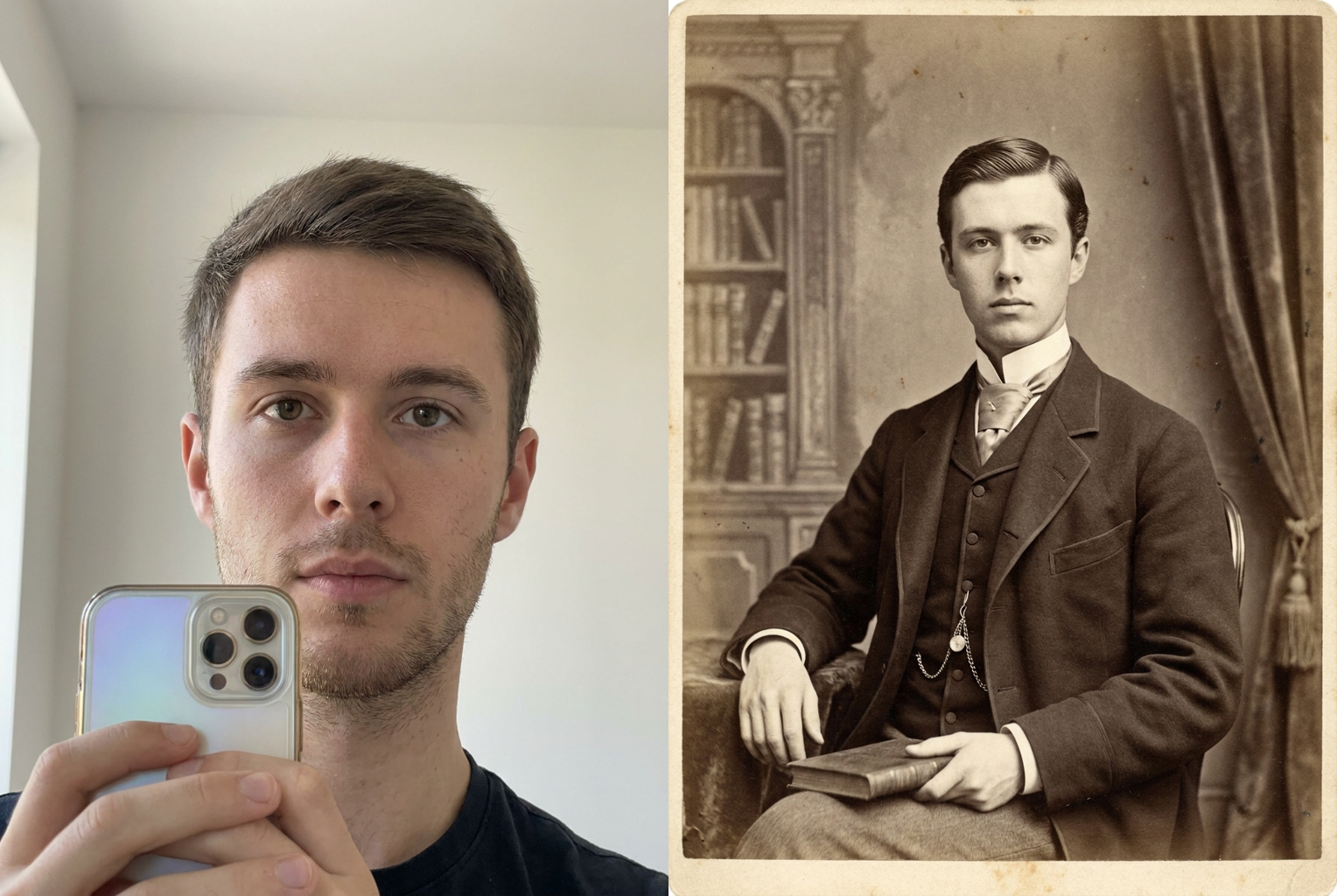
Selfie → Victorian Portrait
Prompt: "Victorian era" — buttoned collar, somber studio pose and aged sepia processing, same face throughout
Prompt: "Victorian era" — buttoned collar, somber studio pose and aged sepia processing, same face throughout
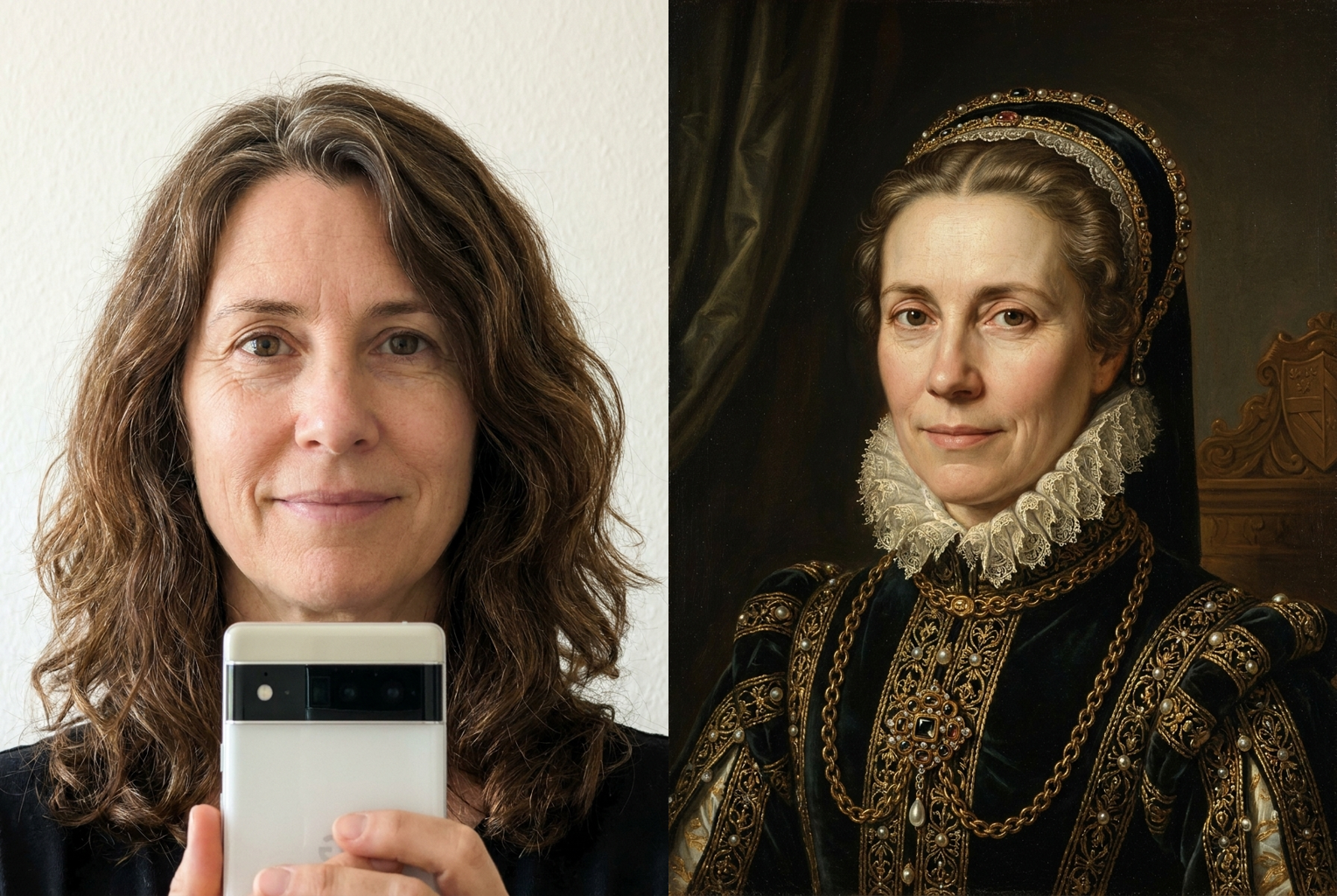
Selfie → Renaissance Noble
Prompt: "Renaissance noble" — oil-on-canvas brushwork and chiaroscuro lighting, same face throughout
Prompt: "Renaissance noble" — oil-on-canvas brushwork and chiaroscuro lighting, same face throughout
Why this tool
Your Face Stays Your Face
The AI is instructed to preserve your facial structure, skin tone, eye color, and expression exactly. Only the era changes around you — the portrait still reads as unmistakably you.
Any Era You Name
From an 1800s daguerreotype to a Victorian studio sitting or a Renaissance oil portrait, just type the period. The AI handles the costume, the pose, the props, and the aged look together.
Authentic Antique Character
Each era gets its real photographic signature — sepia tone, plate texture, heavy grain, soft focus, scratches, and faded edges — not a flat filter dropped over a modern selfie.
Period-Accurate Styling
Hairstyles, high collars, headwear, jewelry, and grooming are all restyled to match the century you asked for, so the details survive close inspection.
One Credit, One Minute
No settings to learn and no editing skills required. Upload, type an era, and the full ancestor transformation arrives in about a minute for a single credit.
Built for the Reveal
The results are made to sit side by side with your original photo — that ancestor-versus-you contrast is exactly what makes these portraits travel across social feeds.
The rundown
AI Ancestor Photo Generator: Turn Your Selfie Into a Portrait From the Past
There is something uncanny about seeing your own face staring back from a hundred years ago. An AI ancestor photo generator takes a single photo of you and rebuilds the world around it — the costume, the collar, the studio backdrop, the stiff formal pose, even the aged film the picture was supposedly printed on — while leaving the one thing that matters completely untouched: you. Upload a selfie, type 1800s, and what comes back is not a stranger in old clothes. It is recognizably you, with your bone structure, skin tone, eye color and expression intact, sitting for a portrait in a century you never lived through. That collision of familiar face and unfamiliar era is exactly why the ancestor photo generator trend produces images people post the moment they see them, almost always side by side with the original.
The technology behind an AI ancestor photo generator is image-to-image generation, not a filter. A filter sits on top of your photo and nudges its colors; it cannot give you a Victorian hairstyle, dress you in a high lace collar, or reposition you into a formal antique studio pose. This tool works differently. The model reads your photo as a description of a real person — the geometry of your face, your features, your expression — and then generates an entirely new image of that same person under a completely different set of instructions. The prompt driving every generation carries a strong identity-preservation clause, telling the model to hold your facial structure and expression fixed while it rewrites hair, clothing, jewelry, background and photographic treatment. That separation between who you are and how you are styled is what makes an AI ancestor photo generator feel like a genuine heirloom rediscovery rather than a costume overlay.
Coverage across eras is where this tool earns its place. Ask for an 1800s daguerreotype and you get monochrome or sepia tones, heavy grain, soft focus, plate texture, scratches and the rigid, unsmiling pose of an early studio sitting. Ask for the Victorian era and the ancestor photo generator dresses you in the buttoned collars, elaborate hair and somber formality of the period. Push further back and it will paint you as a Renaissance noble in oil-on-canvas brushwork, a figure from ancient Greece or Rome, or a medieval subject — each with the right costume, lighting and surface texture for that time. Come forward instead and you can request a 1920s sepia studio portrait with the softer glamour of early twentieth-century photography. One tool, many centuries, and a consistent likeness running through all of them.
Getting a great result starts with the photo you upload. A clear, front-facing shot with even lighting and your face plainly visible gives the model the most to work with, and the antique portrait it builds around you comes out sharper and more convincing. Avoid heavy shadows, sunglasses, extreme angles and cluttered group scenes, all of which hide the facial detail the AI ancestor photo generator needs to preserve. When you name your era, be specific: 'Victorian studio portrait,' '1800s tintype,' 'Renaissance oil painting' and '1920s sepia' each steer the model toward a distinct and recognizable look, which beats a vague request like 'make it old.'
The use cases go well beyond a single viral post. People run the ancestor photo generator on their whole family to build a gallery of matching heirloom portraits, turn a favorite pet into a dignified Victorian sitter, or create a themed set spanning several centuries from the same face. Others use it for reunion slideshows, genealogy projects, costume and cosplay reference, birthday cards, or simply to answer the question every family asks — what would I have looked like as my own great-great-grandparent? Because the likeness holds steady across eras, a series made from one selfie hangs together as a coherent set rather than a pile of unrelated filters.
Compared with the manual alternative, the time savings are enormous. Producing a convincing period portrait by hand once meant sourcing period wardrobe, staging a shoot, and then spending hours in photo software painting on grain, sepia tone and plate damage — or commissioning an artist for a painted portrait. An AI ancestor photo generator collapses all of that into one upload and one short prompt. There is no wardrobe to rent, no studio to book, no editing skills required, and no waiting days for a result. You describe the century you want and the finished ancestor portrait arrives in about a minute, which is why the AI ancestor photo generator has become the fastest way to try the ancestor trend without any design experience.
The workflow is deliberately simple, but a couple of habits sharpen the output. Generate more than once — small variations in pose, lighting and costume appear between runs, and picking the best of two or three gives you a stronger final portrait. Keep your era prompt focused on one period rather than mixing centuries in a single request, and lean on concrete cues like 'sepia,' 'daguerreotype,' 'oil painting' or 'tintype' to lock the medium. When you post, place the antique result next to your original photo; that before-and-after is what makes an ancestor photo generator portrait land, because the whole appeal is the distance between the modern you and the ancestor version.
Getting started takes less than a minute. Upload a clear photo, type the era you want your ancestor to come from, and let the AI ancestor photo generator rebuild the costume, the pose, the background and the aged film character around your unchanged face. Each generation costs a single credit, downloads in full resolution, and is ready to share straight to your feed or family group chat. Whether you want a single haunting 1800s portrait or a full set of ancestors spanning the Renaissance to the Roaring Twenties, this is the quickest way to see your own face reach back across the centuries — same you, brand-new past.
AI Ancestor Photo Generator — Frequently Asked Questions
It keeps you and rebuilds everything else. Your face, bone structure, skin tone, and expression are preserved, while your hairstyle, clothing, collars, jewelry, and background are restyled to match the era you name. On top of that, the image is reprocessed to look like a genuine antique portrait — sepia or monochrome tones, film grain, soft focus, and the faded, scratched texture of an old photograph.
Yes. Every generation runs with a strong identity-preservation instruction telling the model to hold your facial structure, features, and expression fixed. The costume, pose, lighting, and aged processing all change around you, but the person in the portrait stays recognizably you — that is the whole point of the ancestor trend, seeing your own face a century back.
Almost any historical period. Popular choices are the 1800s daguerreotype, the Victorian era, the Renaissance, ancient Greece or Rome, the medieval period, and 1920s sepia studio portraits. You just type the era in plain words and the AI fills in the correct costume, hairstyle, pose, and photographic or painted look for that time.
A clear, front-facing photo with good lighting and your face plainly visible gives the best result. Avoid heavy shadows, sunglasses, extreme angles, or busy group shots. A simple selfie or portrait is ideal, because the model has more of your face to work from when it rebuilds the antique portrait around you.
You can try it, and each generation costs a single credit — no subscription required to make your first ancestor portraits. There are no complex settings or timelines to learn: you upload, name an era, and the finished portrait arrives in about a minute, ready to download in full resolution.
You can, but a sharp, well-lit source always produces a cleaner ancestor portrait. If your input photo is blurry or dark, the model has less facial detail to preserve, so the result may drift slightly. For the strongest likeness, start from the clearest recent photo of yourself you have.
Yes. Upload a photo of a relative, a friend, or even a pet, and the tool applies the same era styling and antique processing to whoever is in the frame. Family group members each get their own portrait, which makes it easy to build a whole gallery of matching heirloom-style ancestor photos.
A vintage filter only shifts colors on top of your existing photo — it cannot change your haircut, dress you in period clothing, or give you an antique studio pose. The AI ancestor photo generator regenerates the whole image, restyling costume, hair, background, and pose while aging the photograph itself, so it reads as a real historical portrait rather than a tinted selfie.