
AI 3D Cartoon Filter
Turn any photo into a polished 3D cartoon character in seconds — your face, restyled as a feature-film CGI render.
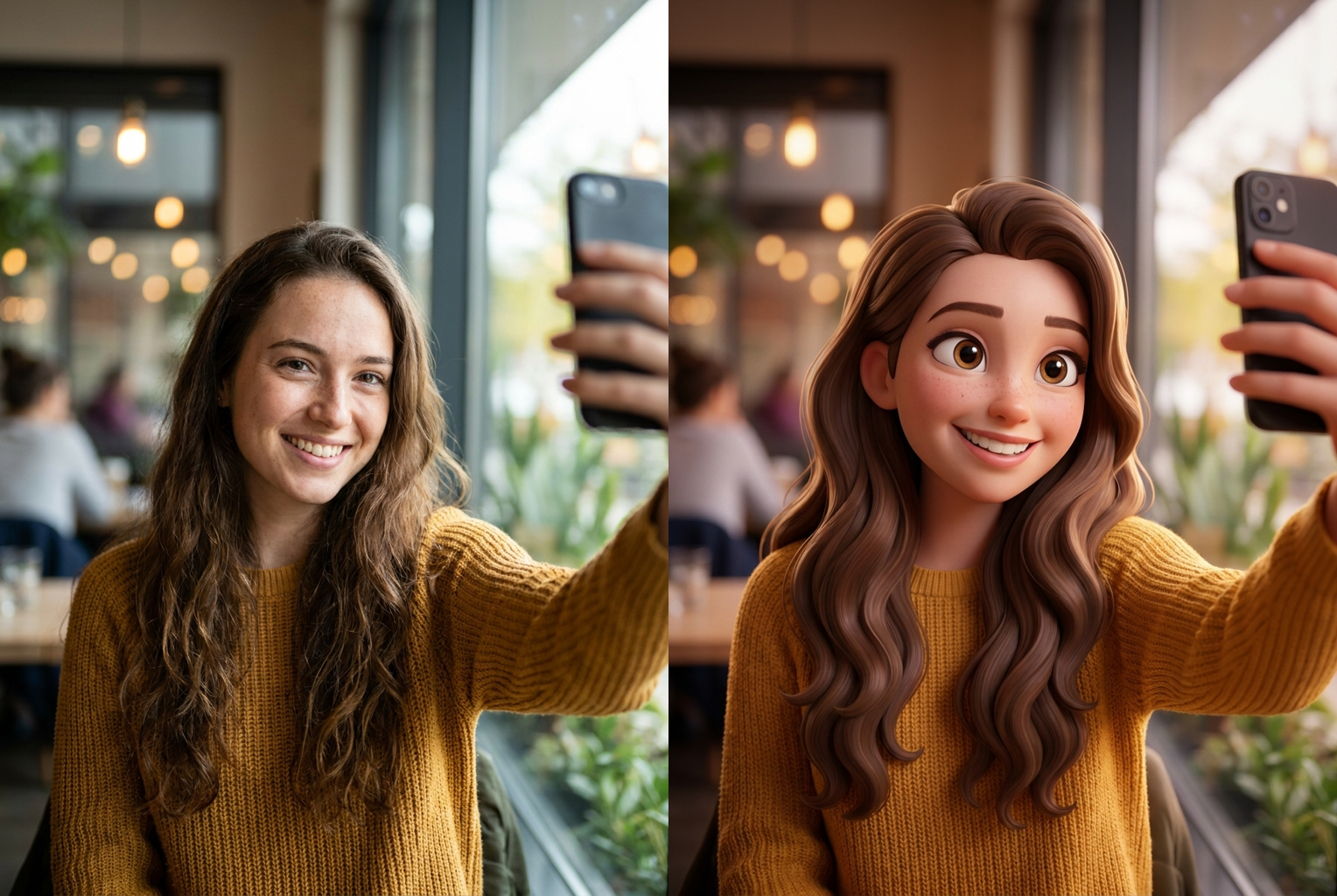
Selfie to 3D Cartoon
Before → After: a casual cafe selfie rebuilt as a glossy 3D cartoon character
AI-generated examples
AI 3D Cartoon Filter
Upload a photo and become a 3D cartoon character in seconds. 1 credit per generation.
Drag & drop or click to upload
Supports PNG, JPG, WEBP • Max 20MB
Sign in to start generating
How it works
How the AI 3D Cartoon Filter Works
Three steps, about thirty seconds, no modeling or design software required.
Upload Your Photo
Drop in any selfie, portrait, or full-body snapshot. PNG, JPG, and WEBP are supported up to 20MB. A clear, well-lit photo where your face is fully visible gives the AI the most detail to rebuild into a 3D cartoon.
Let the Filter Sculpt You
The AI 3D cartoon filter reads your features and rebuilds them as smooth 3D geometry — bigger expressive eyes, sculpted hair, soft studio lighting — while keeping your face, expression and outfit recognizable. No prompt writing needed.
Download and Share
In about thirty seconds you get a high-resolution 3D cartoon character of yourself. Save it, set it as a profile picture, or drop it straight into a story. Each generation costs one credit.
Before and After
Real outputs from this tool, generated with the exact prompt the page uses. Source photo on the left, 3D cartoon character on the right.
Selfie to 3D Cartoon
Before → After: a casual cafe selfie rebuilt as a glossy 3D cartoon character
Before → After: a casual cafe selfie rebuilt as a glossy 3D cartoon character
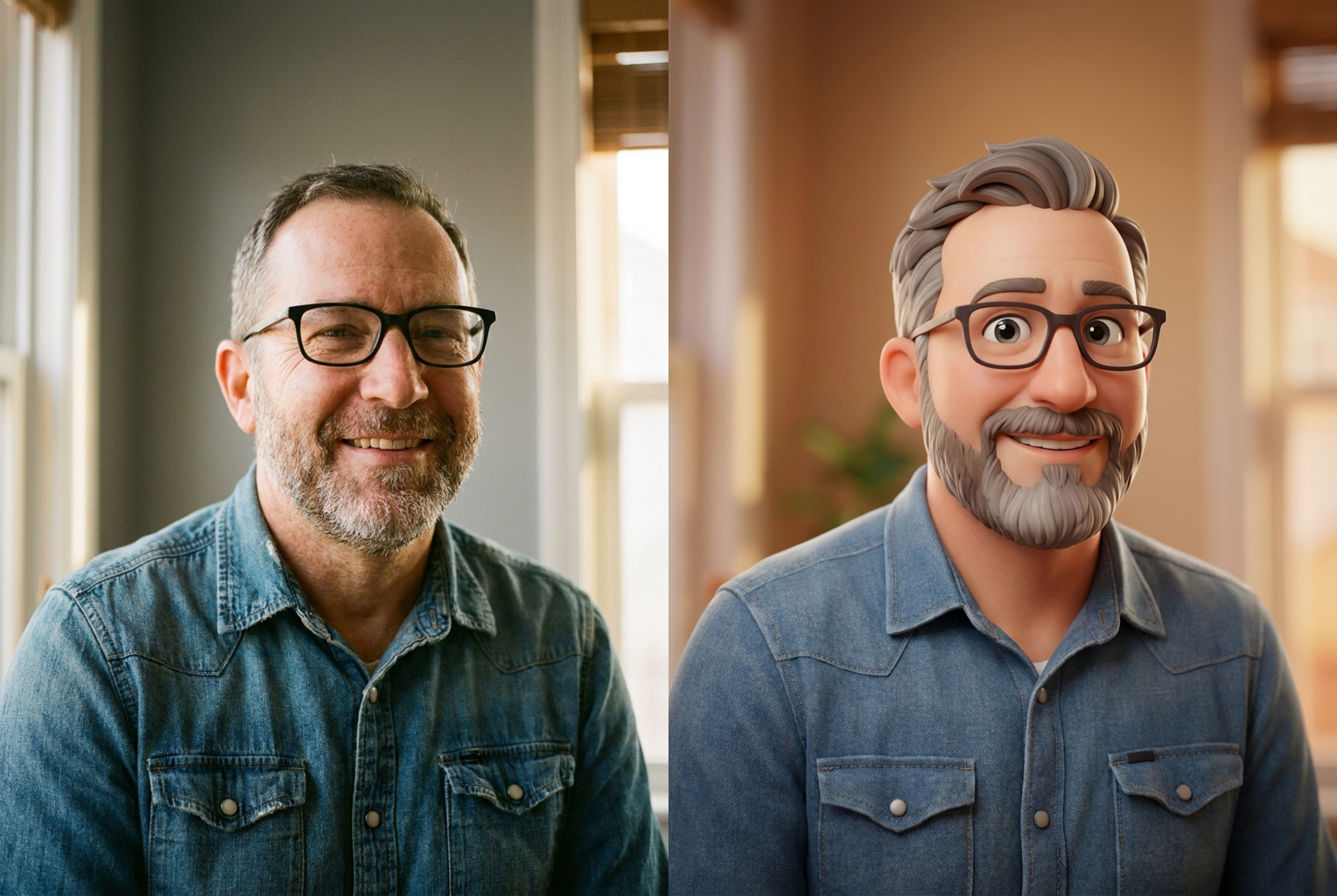
Portrait to 3D Cartoon
Before → After: beard, glasses and denim shirt kept, rebuilt in clean 3D CGI
Before → After: beard, glasses and denim shirt kept, rebuilt in clean 3D CGI
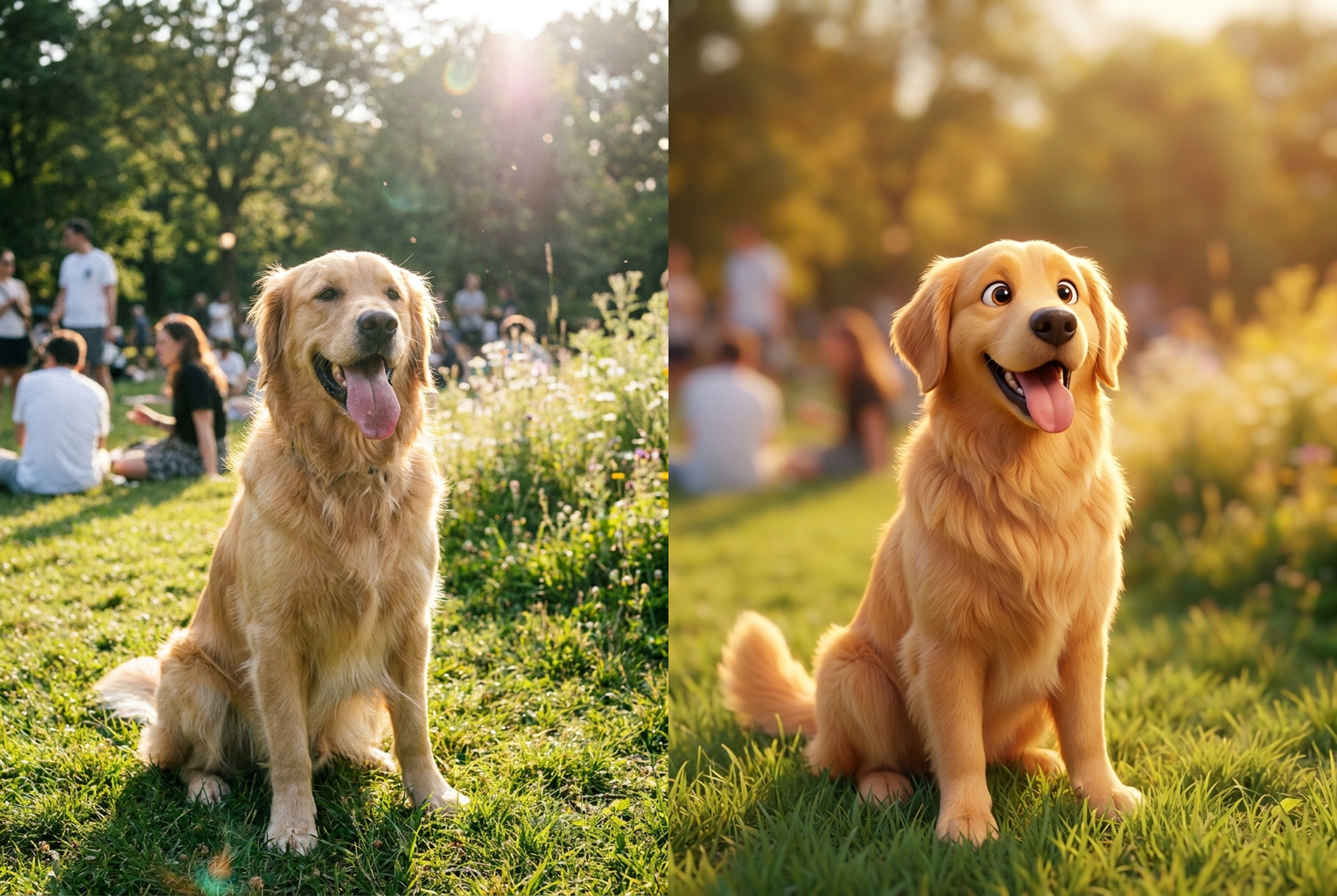
Pet to 3D Cartoon
Before → After: a golden retriever turned into an adorable 3D cartoon animal
Before → After: a golden retriever turned into an adorable 3D cartoon animal
Why this tool
Why This 3D Cartoon Filter Looks Like a Real Render
Most cartoon apps flatten your face into a generic sticker. This one rebuilds you with true 3D depth, lighting and character design.
Feature-Film CGI Look
Soft rounded geometry, subsurface-scattering skin, glossy catchlights and cinematic three-point lighting give the output the polished look of a modern animated movie, not a cheap filter overlay.
Keeps Your Likeness
The filter preserves your face shape, hairstyle, glasses, expression and outfit, so the 3D cartoon is unmistakably you — not a random character the AI invented.
Rich, Natural Color
Vibrant but believable color grading with warm rim light and a soft complementary background makes every render feel intentionally art-directed rather than auto-filtered.
Ready in Seconds
No sculpting, no rigging, no design skills. Upload once and the AI 3D cartoon filter returns a finished character in roughly thirty seconds.
Works on Any Photo
Selfies, couple shots, pets, kids, full-body poses — the filter handles portraits and wider frames, rebuilding whatever it sees into clean 3D cartoon form.
High-Resolution Output
You get a crisp, share-ready image large enough for profile pictures, phone wallpapers, stickers, prints and social posts without visible compression.
The rundown
AI 3D Cartoon Filter: Turn Any Photo Into a 3D Cartoon Character
The AI 3D cartoon filter takes an ordinary photo and rebuilds it as a polished 3D cartoon character — smooth geometry, expressive eyes, cinematic lighting and all — while keeping the subject clearly recognizable. That last part is what sets it apart from a generic cartoon app. Most stylizing tools push every face toward the same flat sticker, and the output could be anyone. This AI 3D cartoon filter studies your actual features first, then re-sculpts them in three dimensions, so the finished character still reads as unmistakably you. Instead of a novelty overlay, you get a genuine character portrait that looks designed rather than auto-generated.
Under the hood, the tool doesn't just paste a texture over your photo. When you upload an image, the AI 3D cartoon filter interprets your face shape, hairstyle, expression, skin tone and clothing, then re-renders all of it with soft rounded 3D forms, subsurface-scattering skin, sculpted volume in the hair, and warm studio lighting. The result looks like a single frame lifted from a modern animated feature rather than a phone filter. Because the transformation is driven by a carefully tuned prompt behind the scenes, you get the full 3D cartoon look without writing a single word, dragging a slider, or knowing anything about rendering. Every part of the AI 3D cartoon filter is preset for you, so the same upload that a beginner makes produces the same feature-film finish an artist would spend hours chasing.
The style coverage is deliberately broad. The 3D cartoon filter handles tight selfies, half-body portraits, full-body poses, couples, groups, kids and pets. A front-facing selfie becomes a friendly animated avatar with big bright eyes and sculpted hair. A full-body shot keeps the pose and outfit but rebuilds everything in clean CGI form. A pet photo turns into an adorable cartoon animal with the same markings and personality. Whatever you feed it, the goal is the same: a high-detail, glossy 3D cartoon character that keeps the original subject at its center instead of swapping in a stranger. That reliable likeness is exactly why people search for a way to turn photo into 3D cartoon form rather than settling for a random generated face.
Getting a great result is mostly about the photo you start with. Use a sharp, well-lit image where your face is clearly visible and facing roughly toward the camera. Natural daylight or soft indoor light beats harsh direct flash. Avoid heavy motion blur, deep shadows across the face, or angles where features are half-hidden, because the more detail the AI can see, the more faithfully the AI 3D cartoon filter can rebuild you. If the first render isn't quite right, try a cleaner photo — a better source almost always produces a better 3D cartoon. A plain or softly blurred background also helps the subject stay the clear focus of the render.
People reach for the AI 3D cartoon filter for all kinds of reasons. It's a fast way to make a profile picture or avatar that actually looks like you, a fun surprise for a friend's birthday card, a personalized sticker pack for chats, a playful YouTube thumbnail, or an eye-catching post that stands out in a feed of ordinary photos. The same ai cartoon effect that makes a single selfie pop also scales: because you can run it as many times as you like, it's easy to build a whole set of matching 3D cartoon avatars for a family, a friend group, a couple, or a small team — everyone rendered in the same charming animated style so the collection feels like one poster. Turning a photo to 3D cartoon character art this consistently by hand would take a designer days.
Compare that to the manual alternative. Turning a real person into a convincing 3D cartoon character the traditional way means modeling geometry, sculpting details, painting textures, rigging, and lighting a scene inside professional 3D software — hours of skilled work, or a paid commission that can run into real money. The AI 3D cartoon filter compresses that entire pipeline into a single upload and about thirty seconds of processing. You get the polished, art-directed look of a studio render without owning any software, learning any tools, or hiring anyone. It removes both the skill barrier and the cost barrier at once, which is why the AI 3D cartoon filter has become a go-to for people who want studio-quality results but don't have a studio's time or budget.
The workflow itself is intentionally simple. Upload your photo, let the filter sculpt you, then download the finished character — three steps, one credit, no account gymnastics. There's nothing to configure and no queue to babysit. Each run of the 3D cartoon filter produces a fresh high-resolution image that's ready for profile pictures, wallpapers, prints and social posts straight away, and if you want a few variations you can generate them one after another for a credit each. Keep the ones you love and discard the rest — there's no lock-in and no watermark clutter to work around.
To get started, just drop a clear photo into the uploader above and let the AI 3D cartoon filter do the rest. In under a minute you'll have a share-ready 3D cartoon version of yourself that keeps your likeness while giving you the depth, polish and charm of a feature-film character. Whether you want a new avatar, a gift, or simply to see yourself reimagined in three dimensions, this AI 3D cartoon filter turns the idea into a finished image faster than it takes to scroll through the filters in a regular photo app — and the result actually looks like the version of you a real animation studio might design.
AI 3D Cartoon Filter FAQ
It takes an ordinary photo and rebuilds the subject as a polished 3D cartoon character, in the style of a modern animated feature film. You keep your recognizable face, hair and outfit, but everything is re-rendered with soft 3D geometry, expressive eyes and cinematic lighting. Upload a photo and the whole transformation happens automatically in about thirty seconds.
Yes. The filter is tuned to preserve your identity — face shape, skin tone, hairstyle, glasses, expression and clothing all carry over. It restyles you as a 3D cartoon rather than replacing you with a generic character, so friends should recognize you instantly. For the closest likeness, use a clear, front-facing photo with good lighting and your face unobstructed.
A sharp, well-lit photo where your face is clearly visible gives the best result. Front-facing selfies and portraits work great, but full-body shots and group photos also convert well. Avoid heavy motion blur, extreme shadows, or faces that are turned far to the side or half-covered, since the AI has less detail to rebuild from in those cases.
Each generation takes roughly thirty seconds and costs one credit. There is no queue to manage and no software to install — you upload a photo, the AI 3D cartoon filter does the work, and you download the finished character. If you want variations, just run it again for another credit.
Absolutely. The filter isn't limited to solo selfies. Pets turn into adorable 3D cartoon animals, kids become charming animated characters, and couple or group photos get rebuilt with everyone kept recognizable. Just make sure each face you want captured is reasonably clear in the original photo.
None at all. Traditionally, turning a photo into a 3D cartoon character means hours of modeling, texturing, rigging and lighting in professional software. This tool collapses all of that into a single upload. You don't touch a slider or write a prompt — the tuned template handles the entire 3D cartoon look for you.
The high-resolution output is perfect for profile pictures, avatars, stickers, phone wallpapers, birthday cards, party invites, YouTube thumbnails, and fun social posts. Because it keeps your likeness, it makes a personal avatar that actually looks like you. The image is yours to download and use however you like.
Your uploaded photo is used only to generate your 3D cartoon result and isn't shared publicly or sold. We recommend uploading images you own or have permission to use. Once you've downloaded your result, you're free to save, post, or print it wherever you want.