
1920s AI Photo Generator
Upload one photo and instantly restyle yourself as an authentic 1920s portrait — flapper glamour, Great Gatsby elegance, jazz-age film grain — with your real face kept exactly the same.
1920s AI Photo Generator
Drag & drop or click to upload
Supports PNG, JPG, WEBP • Max 20MB
Sign in to start generating
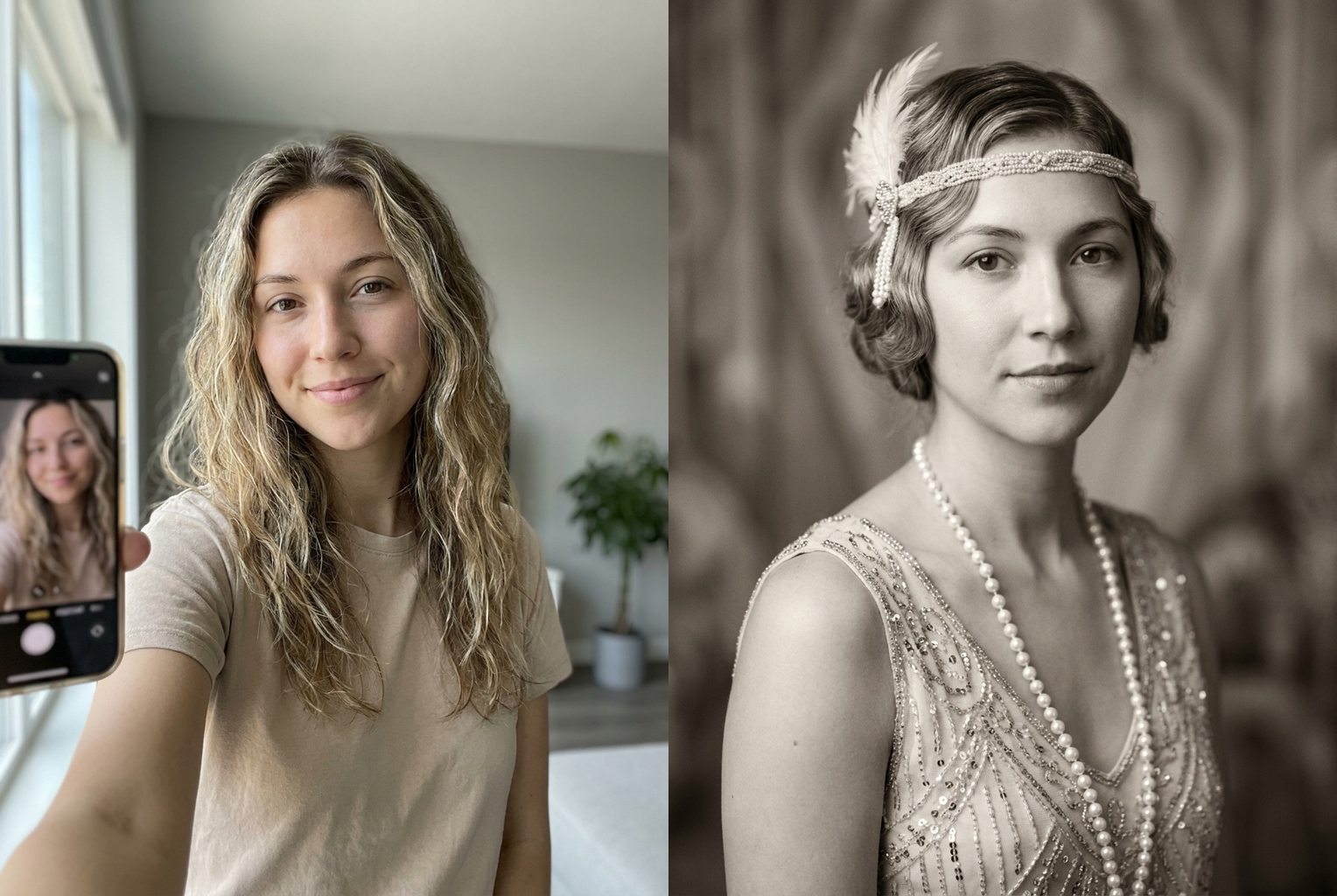
Selfie → 1920s Flapper
Same face, restyled with a finger-wave bob, feather headband and beaded flapper dress in warm sepia film grain
AI-generated examples
1. Upload your photo
Drop in any clear selfie or portrait. A front-facing shot with good lighting gives the sharpest, most recognizable Roaring Twenties result.
2. AI restyles the era
Our model rebuilds your hair, wardrobe, lighting and film grain in authentic 1920s style while locking your real face in place.
3. Download & share
In seconds you get a high-resolution 1920s AI photo ready to post, print, or use as a jazz-age profile picture.
See the Roaring Twenties transformation
Real modern photos on the left, the AI 1920s portrait on the right — the face stays the same, only the era changes.
Selfie → 1920s Flapper
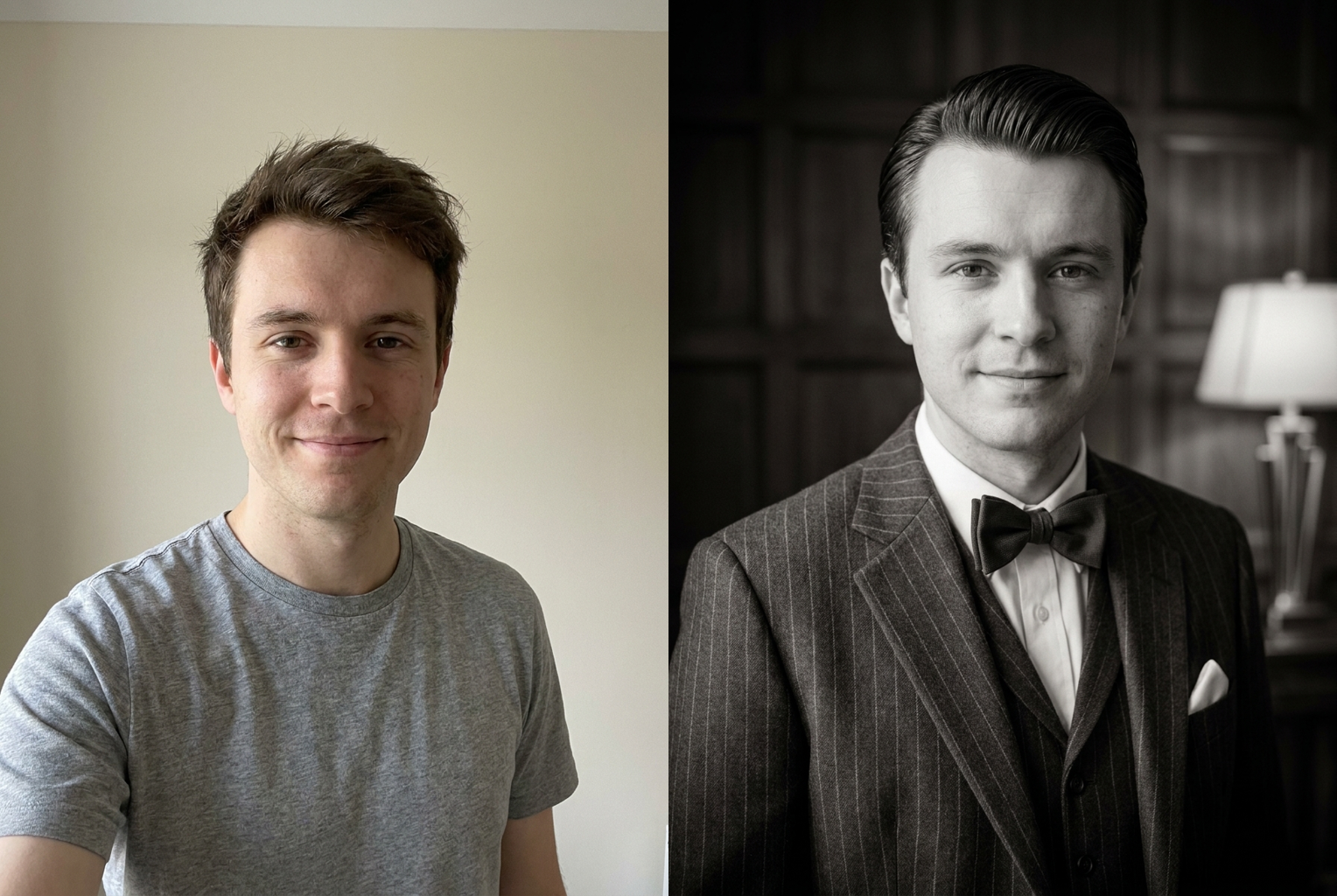
Photo → Great Gatsby
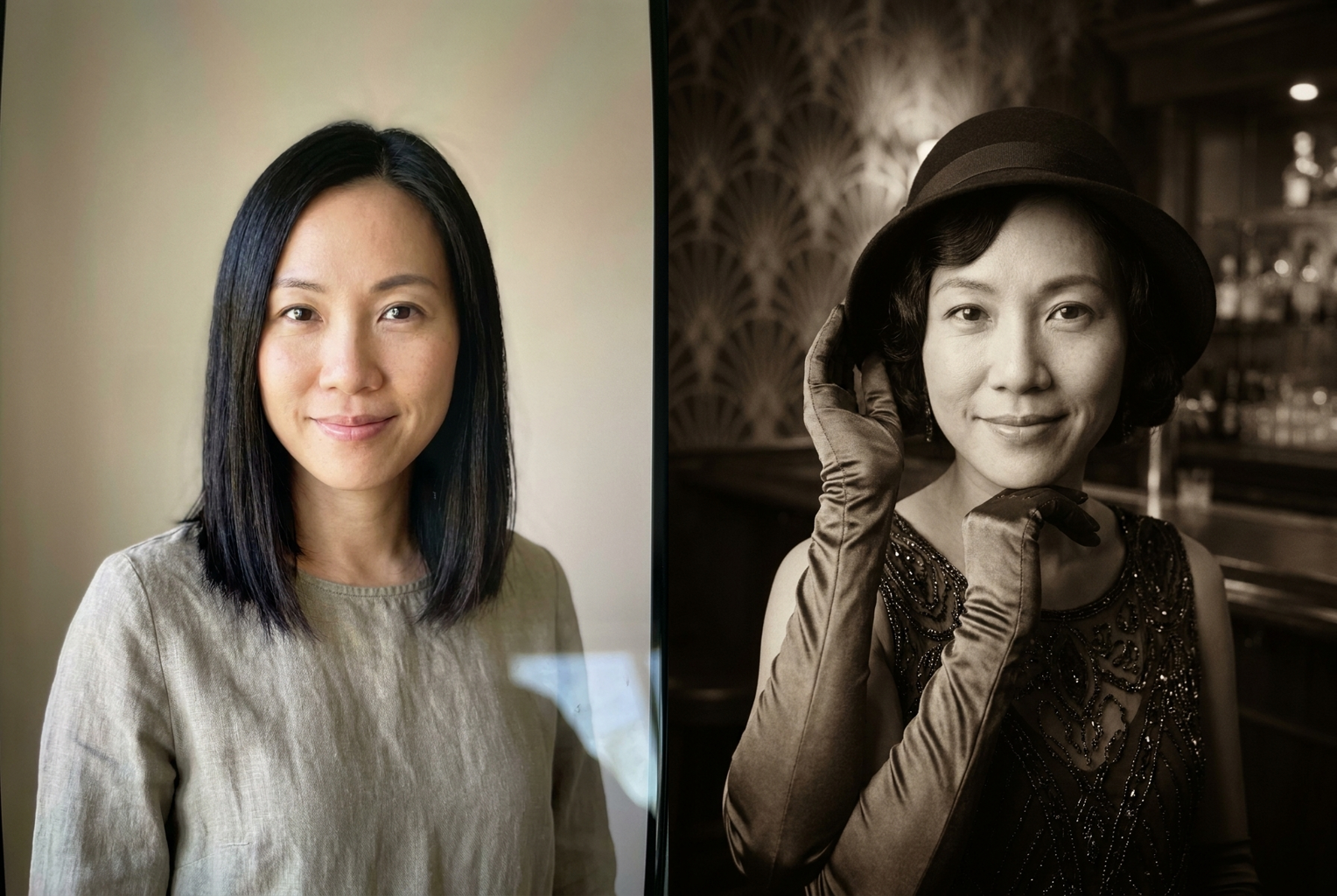
Portrait → Speakeasy Glam
Your real face, kept exact
Identity preservation locks your bone structure, eye color and expression so you stay instantly recognizable — only the era around you changes.
Authentic 1920s styling
Finger waves, bob cuts, cloche hats, flapper dresses, pinstripe suits and pearl strands — every detail is period-accurate to the Roaring Twenties.
True vintage film look
Silver-gelatin grain, soft studio light, gentle vignette and warm sepia tones recreate the feel of a real 1920s large-format portrait.
Results in seconds
No darkroom, no costume rental, no photographer. One upload turns into a finished 1920s AI photo in under a minute.
High-resolution output
Every portrait renders crisp and print-ready, perfect for framed prints, party invites, or a Great Gatsby themed profile picture.
Flattering and elegant
The style is tasteful jazz-age glamour — polished, cinematic and safe for work, so you look your best in every era.
1920s AI Photo Generator: Step Into the Roaring Twenties
The 1920s AI photo generator turns any modern selfie into an authentic Roaring Twenties portrait in seconds. You upload a single picture, and the model rebuilds your hairstyle, wardrobe, lighting and film grain in jazz-age style while keeping your real face completely intact. Instead of renting a costume, booking a studio and hiring a photographer, you get a polished, photorealistic 1920s AI photo on your phone or laptop with a single click. It is the fastest way to see yourself as a flapper, a dapper gentleman, or a guest at a Great Gatsby party.
Under the hood, the tool combines face-aware restyling with a period-accurate style engine. When you upload your photo, the AI first locks your identity — your bone structure, skin tone, eye color and expression — so the person in the finished image is unmistakably you. It then reimagines everything around that face: your hair becomes a finger wave or a slick side part, your clothing turns into a beaded dropped-waist dress or a pinstripe three-piece suit, and the whole scene is bathed in the soft light and warm sepia tones of a 1920s studio portrait. The result is a 1920s AI photo that feels like a real antique print rather than a cheap overlay filter.
Style coverage is deliberately broad so the generator flatters everyone. Women lean into classic flapper glamour: bob or marcel-wave hairstyles, cloche hats, feather headbands, long pearl strands, satin gloves and beaded gowns that shimmer under jazz-club lighting. Men get the sharp, confident look of the era: pomade-slicked hair, waistcoats, bow ties, pocket squares, and fedora or newsboy caps. Backdrops range from an art deco photo studio to a smoky speakeasy or a lavish Gatsby mansion. Because the styling is drawn from genuine 1920s fashion references, every 1920s AI photo stays historically believable instead of looking like a generic vintage template.
Getting a great 1920s ai photo generator result starts with a good source image. Choose a clear, front-facing photo with even lighting and an unobstructed face — skip sunglasses, deep shadows and extreme angles. A simple headshot or upper-body shot gives the AI the most facial detail to preserve, which keeps your likeness crisp through the transformation. If your first output leans too dark or too bright, try a photo with softer, more balanced lighting; the cleaner the input, the more convincing the roaring twenties photo you get back.
The use cases go far beyond a quick laugh. People generate a 1920s AI photo for Gatsby-themed parties and invitations, for costume and Halloween inspiration, for profile pictures with a vintage twist, and for framed prints that make unusual, personal gifts. Writers and small publishers use the tool for period book covers and author portraits; event planners use it for jazz-age promotional material; history teachers use it to make the era feel tangible for students. Because each render costs a single credit and finishes in seconds, it is easy to try several looks and pick the one that fits your project.
Compared with the manual alternative, the advantage is obvious. A traditional period portrait means sourcing an accurate costume, styling authentic 1920s hair and makeup, finding a photographer who understands vintage lighting, and editing the final frame to match old film stock — hours of work and real expense. An AI great gatsby ai portrait collapses all of that into one upload. You still get the wardrobe, the grain, the lighting and the art deco atmosphere, but without the logistics, and you can regenerate instantly if you want a different hat, a different backdrop, or a warmer tone.
The workflow is intentionally simple: upload, generate, download. After you drop in your picture, the AI restyles the era while holding your face steady, then delivers a high-resolution image ready to post, print or share. If you want variety, run the tool again with a different photo or a different framing — a smiling selfie and a serious headshot produce noticeably different moods, one playful and one cinematic. Every finished 1920s AI photo downloads at full quality, so it looks sharp whether it lives on a phone screen or a framed wall print.
Ready to see yourself in the Roaring Twenties? Upload your first photo now and let the 1920s ai photo generator do the rest. Whether you want flapper sparkle, speakeasy cool, or full Great Gatsby opulence, you are one click away from a portrait that keeps your real face and drops it straight into the golden age of jazz. Try a few looks, download your favorite, and step into 1929 without leaving your chair — an authentic 1920s AI photo is only seconds away.
1920s AI Photo Generator — Frequently Asked Questions
It is an online tool that turns any modern selfie into an authentic Roaring Twenties portrait. You upload one picture and the AI restyles your hair, clothing, lighting and film grain into 1920s style while keeping your real face unchanged. The result is a photorealistic jazz-age photo that still looks unmistakably like you.
Yes. Identity preservation is built into every generation. The model holds your facial structure, skin tone, eye color and expression in place and only changes the era around you — hairstyle, wardrobe, backdrop and photographic look. You stay instantly recognizable, just dressed for the 1920s.
A clear, front-facing photo with even lighting works best. Make sure your face is unobstructed — no sunglasses, heavy shadows or extreme angles. A simple headshot or upper-body shot gives the AI the most detail to build an accurate 1920s AI photo, but casual selfies work well too.
Absolutely. Women get flapper glamour: finger waves or bobs, cloche hats, beaded dropped-waist dresses, feather headbands and long pearl necklaces. Men get dapper jazz-age style: slicked hair, three-piece pinstripe suits, waistcoats, bow ties and fedora or newsboy caps. The AI reads your photo and applies period-accurate styling to match.
Yes, that classic Great Gatsby look is exactly what this tool captures — art deco backdrops, speakeasy elegance, luxurious 1920s fashion and warm vintage film tones. It is ideal for Gatsby-themed parties, invitations, book covers, or simply reimagining yourself in the glamour of the Roaring Twenties.
Each 1920s AI photo takes only a few seconds to generate and costs a single credit. There is no costume, no studio booking and no editing skill required. You can experiment with multiple photos quickly to find the portrait you love most before downloading the full-resolution image.
The images you generate from your own uploaded photos are yours to use for personal projects, social posts, party invitations and prints. For commercial campaigns, make sure you have the rights to the source photo and any people in it, and follow our standard usage terms.
No. The generator aims for photorealistic vintage results, not cartoon filters. It layers real silver-gelatin grain, soft period lighting and authentic wardrobe so the final 1920s AI photo reads like a genuine antique portrait that happens to feature your modern face.
Still have questions? Contact Support