Seedance 2.5 Flash Pricing vs VO3 AI: Real Cost Per Finished Video

Seedance 2.5 Flash is being sold as the fast, cheap way to turn a photo into video. We worked out what one usable 8-second image-to-video clip costs once you count retries, resolution and audio, and when VO3 AI is the better buy.
Seedance 2.5 Flash Is Getting Cheaper. Here's What a Usable Clip Really Costs
ByteDance's Seedance 2.5 Flash has been all over this week's AI video news. One roundup says Perfect Corp is adding it to its YouCam apps and pitching it as faster, cheaper text-to-video and image-to-video. We couldn't find a primary announcement for the YouCam deal, so treat that part as reported, not confirmed. The pricing is easier to check. Eachlabs' Seedance 2.5 Flash image-to-video listing shows $0.144–$0.309 per second depending on resolution, with 480p and 720p output and 4–30 second durations. Dreamina's Seedance 2.5 Flash page calls it a speed-optimized edition with "near-original quality."
A per-second price is not the same as a price per finished video. If you're doing image-to-video, meaning you animate one product photo, portrait or illustration into a clip you can post, you pay for every attempt, including the ones you throw away. Below we work out that number for Seedance 2.5 Flash and for the image-to-video workflow in VO3 AI, then say honestly which one fits which creator.
▶ Try in VO3 AI: Animate your first photo with image-to-video →
Why This Matters for Image-to-Video Creators
In single-image animation, the source photo sets the first frame, so the model only decides how things move. That sounds easy. In practice it's where models fail in small, costly ways: a face drifts off-model by second 5, a logo warps, or the camera move fights the composition. fal.ai's Seedance 2.5 docs describe this mode as using your image as the first frame and generating motion, camera work and synchronized audio from it. That's the same contract every photo-to-video tool offers. What actually differs between tools is how often you get a keeper and what each attempt costs.
For this post we assume a 1-in-3 keep rate: three generations per clip you would actually publish. That's a fair middle estimate for photo-to-video with people or branded products in frame. Simple landscapes do better. Hands and text do worse.
🎬 VO3 AI Workflow: Product Photo → 8s Social Clip
Input: one clean product or portrait photo (1080px+ on the short side, subject centered, uncluttered background)
Prompt (paste verbatim):
Animate this photo as a slow cinematic push-in. Keep the subject's face,
shape, colors and any logo exactly as in the source image. Subtle natural
motion only: soft hair or fabric movement, gentle light shift across the
surface, faint background parallax. Camera: smooth dolly-in, no cuts,
no zoom snap. Ambient room tone with a soft warm whoosh at the end.
8 seconds, 9:16 vertical.
Recommended model: Veo 3 Fast AI video generator. It produces native audio and holds identity well on 8-second clips, and its credit cost suits retry-heavy work.
Credits: on the $2.99 starter pack you get about 2 Veo 3 Fast clips (≈ $1.50 per attempt at the trial rate).
Output: 8 seconds, 720p-class, with audio. Generation usually takes 1–3 minutes.
Tip: if the identity drifts, re-run with the line "face and logo must not change" moved to the start of the prompt. That alone often turns a 1-in-3 keep rate into 1-in-2.
If you'd rather not write a prompt, the photo animation template has these motion settings preloaded for portraits and old family photos.
▶ Try in VO3 AI: Run this prompt on your own photo →
Normalized Cost: One Usable 8s Clip, 1-in-3 Keep Rate
The previous version of this comparison put a 5-second 480p silent clip next to an 8-second clip with audio. That isn't a fair comparison. Here both sides are set to 8 seconds, with three attempts per keeper.
| Setup | Cost per attempt | × 3 attempts | Cost per usable clip |
|---|---|---|---|
| Seedance 2.5 Flash, 480p ($0.144/s) | $1.15 | 3 | $3.46 |
| Seedance 2.5 Flash, 720p ($0.309/s) | $2.47 | 3 | $7.42 |
| VO3 AI, Veo 3 Fast 8s + audio, starter-pack rate | ~$1.50 | 3 | ~$4.50 |
| VO3 AI, paid plan | your plan's $/credit × credits per clip | 3 | see per-model pricing |
How to read this table:
- Seedance prices come from one reseller. We assume Eachlabs' $0.309/s top of the range is its 720p tier; the listing only says pricing varies "depending on resolution." Other hosts (fal.ai, WaveSpeed, Atlas Cloud, BytePlus directly) price differently, so check your own provider before you budget.
- Check audio before you compare. Base Seedance 2.5 image-to-video generates audio according to fal.ai's docs. Whether the Flash tier includes audio on your host isn't clearly documented. If it doesn't, add the time and cost of a separate voiceover or sound pass.
- The VO3 starter rate is the worst case. $2.99 is the trial pack, so it's usually the highest cost per credit. Monthly plans bring the cost per credit down, and you can do the math for your plan with the formula in the last row.
At 720p with audio, the setup most social posts need, VO3 AI's trial price already comes in under Seedance 2.5 Flash on this reseller. At 480p, Seedance is cheaper per keeper, as long as 480p is good enough for where you're posting.
Side-by-Side: Seedance 2.5 Flash vs VO3 AI for Photo-to-Video
| Seedance 2.5 Flash (via API resellers) | VO3 AI | |
|---|---|---|
| Pricing model | Per second, pay-as-you-go ($0.144–$0.309/s on Eachlabs) | Credits; $2.99 starter, cheaper per credit on plans |
| Max resolution | 720p (Flash tier) | 720p-class on Veo 3 Fast; higher tiers on other models |
| Audio | Base 2.5 yes; Flash depends on host | Native audio on Veo 3 / 3.1 |
| Duration | 4–30s | 8s per generation; extend or stitch for longer |
| Speed | Built for speed ("Flash") | 1–3 min typical on Veo 3 Fast |
| Interface | API / developer playgrounds mostly | No-code web app + templates |
| Model choice | Seedance only | Veo 3, Veo 3.1, Kling, Seedance, Hailuo, Wan and more in one account |
| Best fit for image-to-video | High-volume 480p drafts, long single shots | Publish-ready 8s clips with sound, teams without devs |
What It Looks Like in Practice
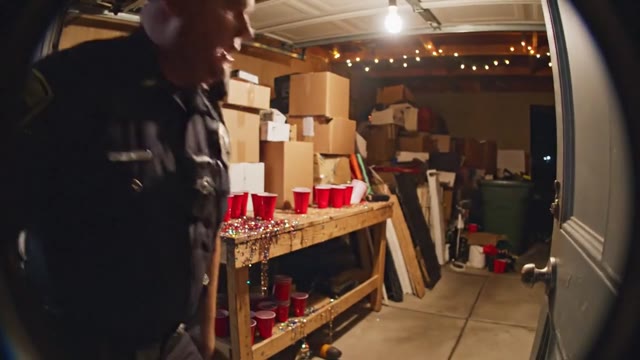
Here's a VO3 AI showcase clip, so you can judge motion, framing and native audio quality before spending credits. To be clear, this one started from a text prompt, not a photo, so use it to judge motion and audio quality, not as proof of image-to-video fidelity. For that, run the workflow above on your own photo. Two starter-pack credits are enough for a real side-by-side.
Generated with VO3 AI: a bodycam comedy where a deadpan, exhausted cop answers a noise complaint and finds an absurdly polite, monocle-wearing tiny dragon hosting his 500th "hatchday" party. (Text-to-video showcase, multi-shot.)
A fair head-to-head test you can run in about 10 minutes: take one photo, ideally a person holding a branded product, which is the hardest case. Run it through Seedance 2.5 Flash at 720p and through VO3 AI's AI image-to-video generator using the same motion prompt. Count how many attempts each needs before you'd actually post the result. Your own keep rate is the only number that matters in the cost table above.
If you don't have a good source photo yet, make one first with an AI image generator. A clean, well-lit still with a simple background raises the keep rate on any model.
Verdict: Who Should Pick Which
Choose Seedance 2.5 Flash through a reseller if:
- You're comfortable with APIs and want to script bulk generation.
- You only need one model and 480p is fine, for example draft storyboards or internal previews.
- You need single shots longer than 8 seconds without stitching.
Choose VO3 AI if:
- You want a no-code workflow: upload a photo, paste a prompt, download the clip.
- You need native audio in the same generation, with no separate sound pass.
- You want to try the same photo on Veo 3, Kling, Seedance and others without juggling separate accounts and billing.
- You're publishing at 720p, where our normalized math puts VO3's trial rate below Seedance Flash's 720p reseller rate.
To sum up: Seedance 2.5 Flash is a real price cut and a good engine for developers. For most creators who just want a finished, postable clip from one photo, the deciding factors are retries and audio, and those are where a managed multi-model workflow pays off.
Try It Yourself
Pick your best photo, use the prompt from the workflow block, and see what your own keep rate is. The $2.99 starter pack covers two full attempts on Veo 3 Fast, enough to settle the comparison with your own footage. Start at VO3 AI or go straight to https://vo3ai.com.
▶ Try in VO3 AI: Open the AI video tool and animate your photo now →
Ready to Create Your First AI Video?
Join thousands of creators worldwide using VO3 AI Video Generator to transform their ideas into stunning videos.
📚 Related Posts:
What is VO3 AI Video Generator: The Ultimate AI-Powered Video Creation Platform
Discover VO3 AI Video Generator - the revolutionary AI video creation platform
Read More →VO3 AI vs. Veo3 — What's the Difference?
Understand the key differences between VO3 AI and Google's Veo3
Read More →How to Use VO3 AI Video Generator: Complete Guide
Master VO3 AI Video Generator with our comprehensive tutorial
Read More →VO3 AI Video Generator - Where imagination meets innovation
Built on top of multiple AI video models including Veo3. Start your creative journey today and join the future of video creation.