Replace a $2,000 Promo Shoot with Photo-to-Video AI (2026 ROI)

Most small businesses already own hundreds of marketing photos they never turn into video. Here is the workflow, the per-clip cost (about $0.60–$1.20 per keeper), and the ROI math for turning existing photos into Reels, listings and ads with VO3 AI.
The $2,000 Video You Probably Don't Need to Film
A local café wants 10 short Reels for its holiday menu. A videographer quotes $1,200 for a shoot day (8 hours × $150/hr), plus about $450 for editing (6 hours × $75/hr). That comes to $1,650 for roughly 12 usable clips, or about $137 per clip, and you wait 1–2 weeks for delivery.
The café already has 300 professional photos from last year's menu shoot sitting in a Google Drive folder. Every one of them is a still frame waiting to move.
That gap is the business case for image-to-video. You upload a photo you already own, describe the camera move and the motion you want, and get a 5–8 second clip back in minutes. You don't book a crew or a location, and nobody has to reshoot because the light changed.
This post covers the exact workflow, the real per-clip cost, and two scenarios (a real estate agent and a social media agency) with the math worked out.
Why Animate Photos Instead of Filming?
Short-form video now gets more of the feed on Instagram, TikTok and YouTube Shorts than static posts do. For a small business the problem was never wanting video. It was the cost of making enough of it. One shoot gives you a dozen clips, and a healthy posting schedule eats a dozen clips in two or three weeks.
Photo-to-video fixes the volume problem. Your photo library stops being a dead archive and becomes a backlog of video you can produce whenever you need it.
The Workflow: One Photo → One Marketing Clip
🎬 VO3 AI WORKFLOW CALLOUT
Input: One high-resolution photo you own the rights to (product, interior, dish, storefront, portrait)
Recommended model: Seedance. It holds the source composition well and handles subtle, realistic motion (steam, fabric, light, slow camera moves) without warping logos or faces. See the Seedance AI video generator page for specs.
Estimated cost: The $2.99 starter pack covers roughly 5–10 generations, which works out to $0.30–$0.60 per generation. Plan for about 2 attempts per keeper, so budget $0.60–$1.20 per finished clip.
Output: 5–8 seconds per clip, vertical or horizontal, typically ready in about 1–3 minutes.
Here's the prompt template I use for food and interior shots. Swap the motion line for your subject:
Animate this exact photo. Keep the subject, colors, logo and layout unchanged.
Camera: slow push-in, about 10% zoom over 6 seconds, perfectly steady, no cuts.
Motion: steam rises gently from the coffee cup; soft window light shifts slightly;
background patrons stay blurred with subtle natural movement.
Style: photoreal, natural color grade, shallow depth of field.
Do not add new objects. Do not change any text or signage.
Three tricks matter more than anything else in the prompt:
- Lead with a "keep unchanged" line. Marketing photos are approved assets. Telling the model what not to touch cuts down on drifting logos and reinvented packaging.
- Specify one camera move only. A push-in, a slow pan, or a parallax drift. If you stack moves, the clip looks like a drone crash.
- Describe small, physical motion. Steam, hair, curtains, water, light. Subtle motion reads as "premium", while big motion is where artifacts show up.
If you want one-click presets instead of writing prompts, the photo animation template bundles common motions for portraits and products. For a deeper look at model options and settings, see the image-to-video AI guide page.
Real Numbers: Filming vs Animating Your Photos
Every figure below uses the same assumptions: $0.30–$0.60 per generation, 2 generations per keeper.
| Freelance videographer | Agency production | VO3 AI photo-to-video | |
|---|---|---|---|
| How the cost is built | 8 hr × $150 shoot + 6 hr × $75 edit | Quoted per finished spot | 2 generations × $0.30–$0.60 |
| Cost per finished clip | ~$137 (≈$1,650 ÷ 12 clips) | $400–$1,000 | $0.60–$1.20 |
| Cost for 12 clips | ~$1,650 | $4,800–$12,000 | $7.20–$14.40 |
| Turnaround | 1–2 weeks | 2–4 weeks | Same afternoon |
| Your time | ~1 day on set + review rounds | Briefs + 2–3 review rounds | ~3–5 min per clip |
| Monthly volume at $200 budget | ~1.5 clips | <1 clip | 160+ clips |
At the extremes: 12 clips for $1,650 or 12 clips for under $15. Your time also drops from a day on set to about an hour at your desk.
What this doesn't replace: anything that needs real footage of real events, testimonials, or the actual product in use when buyers need to see function. Animated photos are best for atmosphere, scroll-stopping motion and making your feed look alive.
Generated with VO3 AI — Mini nature-documentary parody: a pompous Attenborough-style narrator observes an office worker as wild prey hunting the last coffee, until the worker breaks the fourth wall and offers the narrator a truce — professional-narration meets deadpan human warmth.
That clip is a longer, multi-shot piece, but it shows the realism ceiling: skin, fabric and office lighting all hold up. A single animated photo is a much easier job than this.
Scenario 1: Real Estate Agent With 12 Listings a Month
A listing video from a local videographer usually costs $300–$500 per property. At 12 listings a month, that's $3,600–$6,000/month. Most agents skip it and post a photo carousel instead.
With photo-to-video, the agent takes the 5 best photos per listing (exterior, kitchen, living room, primary bedroom, backyard) and gives each a slow push-in or lateral glide:
- 5 clips × 12 listings = 60 finished clips/month
- 60 clips × 2 generations = 120 generations
- 120 × $0.30–$0.60 = $36–$72/month
Stitch the five clips into a 30-second tour, add a voiceover, and the listing has video in the same afternoon the photos come back. The real estate video template is a good starting point.
One rule you can't skip: animate only what's in the photo. Don't let the model add a pool, change the view, or "improve" the finishes. Misrepresenting a property is a legal problem, not a style choice. Keep the "do not add new objects" line in every prompt, and check each clip frame by frame before posting.
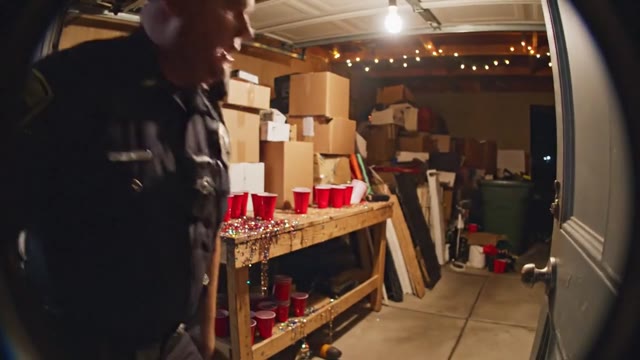
A frame from another VO3 AI generation. Fine detail like faces, fabric and practical lighting is what makes animated listing and lifestyle shots look filmed rather than generated.
Scenario 2: Social Media Agency Running Restaurant Retainers
A small agency manages Instagram for 8 local restaurants at $800/month each. The contract promises 20 Reels per client per month. Shooting those would wreck the margin: even at the freelance rate of ~$137 per clip, 20 Reels cost $2,740, which is more than three times the retainer.
With the client's existing food photography:
- 20 Reels × 2 generations = 40 generations per client
- 40 × $0.30–$0.60 = $12–$24 per client per month
- Across 8 clients: $96–$192/month in generation costs against $6,400/month in retainer revenue
The main remaining cost is labor, about 3–5 minutes per clip plus captioning. That's where an agency's margin actually lives. Many agencies resell this as a "motion refresh" add-on, and it's one of the easier upsells in AI video for small business packages, because the client already paid for the photos.
ROI Math: Cost per Finished Video
Here is the formula, so you can plug in your own numbers:
Cost per finished clip = (generations per keeper) × (cost per generation)
- VO3 AI: 2 × $0.30–$0.60 = $0.60–$1.20
- Freelance: ($1,200 shoot + $450 edit) ÷ 12 clips = ~$137
- Agency spot: $400–$1,000+
Even if your prompts are rough and you need 4 generations per keeper, you land at $1.20–$2.40 per clip. That's still over 50× cheaper than the freelance rate. Cost stops being the bottleneck, and the new one is how quickly you can choose which photos deserve motion.
Your 3-Step Action Checklist
- Pick 5 photos from your existing library: your best-performing product, interior or hero shots. Start with images that already got engagement as static posts.
- Run two prompts per photo: the slow push-in template above, plus one parallax or pan variant. Keep whichever looks more natural.
- A/B test against the static post. Post the animated version and compare reach, saves and click-throughs to the original still over 7 days. If motion wins, which it usually does, animate the next 20.
Try It Yourself
You already paid for the photos. The only thing left is a few dollars of generation credit and an afternoon. Head to VO3 AI, upload your strongest marketing photo, and start with the push-in prompt from this post. Everything runs in the browser at https://vo3ai.com, and the $2.99 starter pack covers your first test batch.
Once you've got a winning clip, open the VO3 AI workflow to batch the rest of your library.
Ready to Create Your First AI Video?
Join thousands of creators worldwide using VO3 AI Video Generator to transform their ideas into stunning videos.
📚 Related Posts:
What is VO3 AI Video Generator: The Ultimate AI-Powered Video Creation Platform
Discover VO3 AI Video Generator - the revolutionary AI video creation platform
Read More →VO3 AI vs. Veo3 — What's the Difference?
Understand the key differences between VO3 AI and Google's Veo3
Read More →How to Use VO3 AI Video Generator: Complete Guide
Master VO3 AI Video Generator with our comprehensive tutorial
Read More →VO3 AI Video Generator - Where imagination meets innovation
Built on top of multiple AI video models including Veo3. Start your creative journey today and join the future of video creation.