5 Reasons VO3 AI Workspace Transforms Team Collaboration

VO3 AI Team Workspace turns AI video creation into real team collaboration. Share credits, view all team creations in one workspace, and manage multi-client projects with ease — built for studios, agencies, and production teams.
VO3 AI Team Workspace: Built for Real Team Collaboration in AI Video Creation
As AI video generation becomes part of real creative workflows, teams face a common frustration:
Most “team plans” only share credits — not collaboration.
VO3 AI Team Workspace was built to solve exactly this problem.
Instead of adding heavy enterprise features, VO3 AI focuses on one thing in Team V1:
A truly shared workspace for teams creating AI videos together.
This article explains how VO3 AI Team Workspace works, who it’s for, and why it feels fundamentally different from basic “multi-user” plans.
Why Most AI Video Tools Don’t Really Work for Teams
What You Get with VO3 AI Team Workspace
1. A Shared “My Creations” Space for the Whole Team
When you switch to a Team workspace:
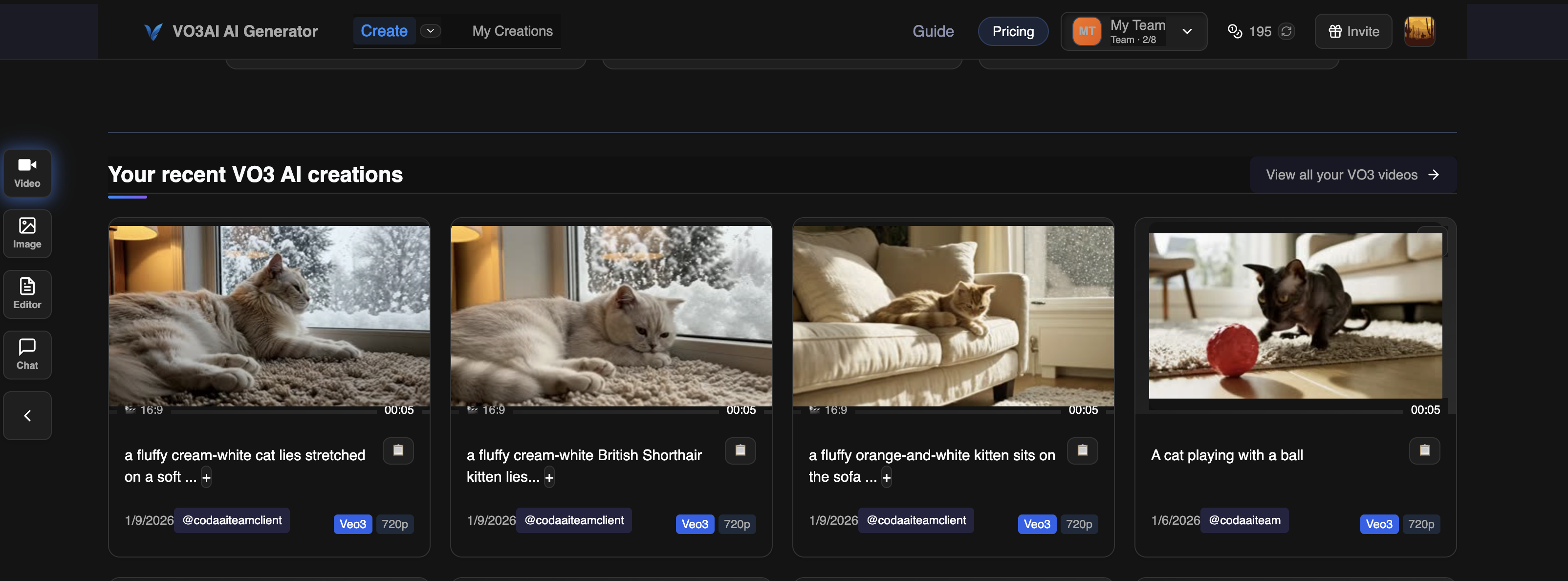
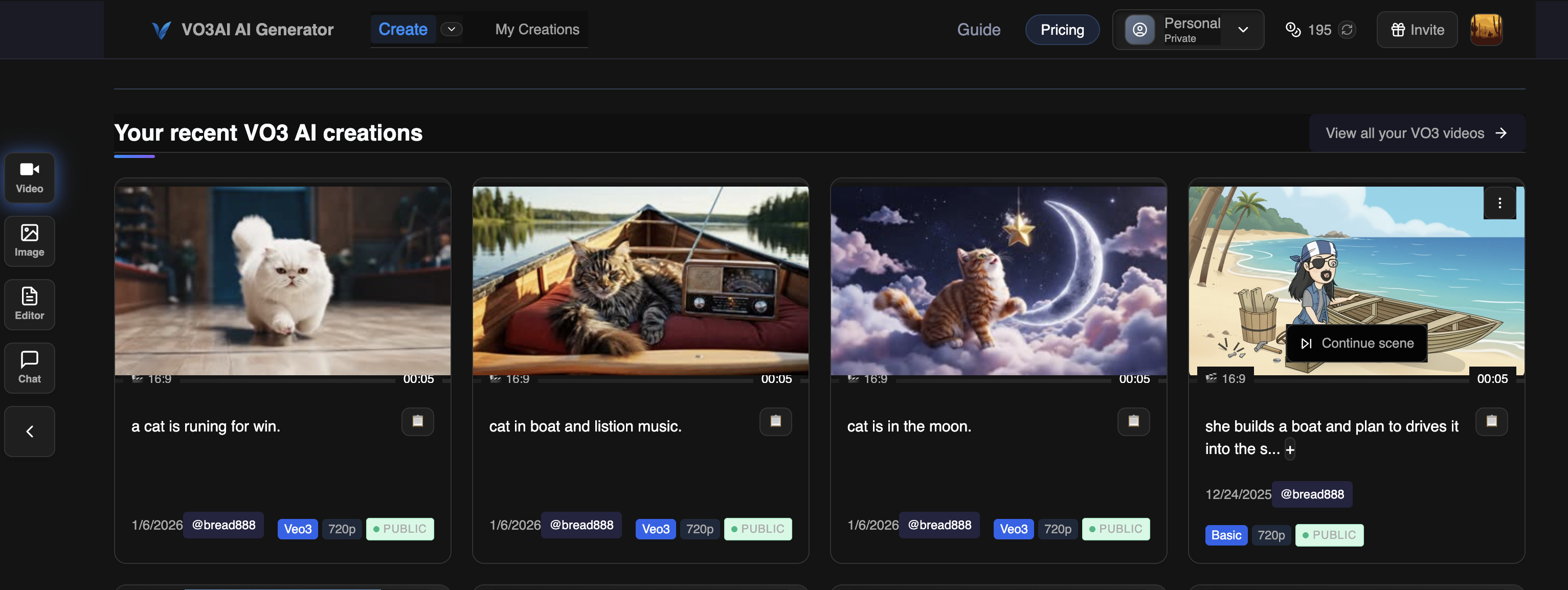
- My Creations shows everything created by the team
- Videos and images from all members appear in one timeline
- Newest content always appears first
Each item clearly shows:
- Preview thumbnail
- Model used (Veo3, Wan, Sora, etc.)
- Created by @username
- Public / Private status
This makes reviewing, iterating, and collaborating feel natural.

2. Easy Workspace Switching for Multi-Client Creators
Many creators work with multiple teams or clients.
VO3 AI supports this natively.
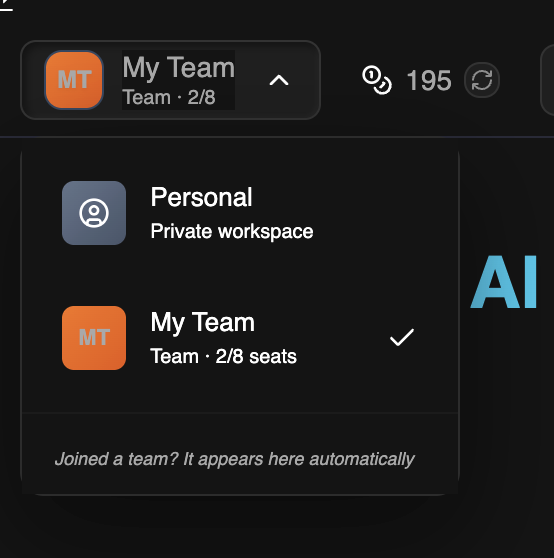
From the workspace switcher, users can move between teams instantly:
Workspace: VO3 Studio ▼
- VO3 Studio — Owner
- Client A — Member
- Client B — Member
Switching workspace automatically updates:
- Visible content
- Active credit pool
- Ownership of new generations
Nothing ever leaks between teams.
3. Clear Credit Sharing — No Confusion
In a Team workspace:
- Credits belong to the team
- Every generation uses team credits
- Usage is tracked at the team level
This makes budgeting and collaboration simple — especially for agencies and studios managing ongoing work.
4. Simple Roles That Just Work
VO3 AI Team V1 keeps roles intentionally simple:
- Owner — manages members and billing
- Member — creates and views team content
No approval steps.
No complex permission trees.
Everyone focuses on creating, not managing software.
5. Content Always Stays with the Team
Every video or image created in a Team workspace belongs to that team.
If someone leaves:
- The content stays
- Nothing disappears
- Ownership remains clear
This is critical for long-term projects and client work.
Who VO3 AI Team Is Built For
Agencies & Studios
- Multiple creators producing assets daily
- Shared review and iteration
- One central content space
Freelancers Working with Clients
- Join a client’s workspace
- Keep client content fully isolated
- Switch back to personal or other teams instantly
What VO3 AI Team V1 Does Not Try to Be
To keep the experience fast and usable, Team V1 does not include:
- Complex role hierarchies
- Approval workflows
- Project-level permissions
- Enterprise audit logs
Those belong in future enterprise plans — not in a creator-focused Team product.
Why This Approach Matters
The difference between “shared credits” and a real workspace is huge.
- Shared credits save money
- Shared workspaces save time
VO3 AI Team Workspace is designed for teams that:
- Create together
- Review together
- Deliver together
Summary: What VO3 AI Team Really Is
Team V1 = Shared Workspace + Shared Content + Shared Credits
No unnecessary complexity.
No fake collaboration.
Just a clean, powerful environment for teams creating AI videos at scale.
👉 Explore VO3 AI Team plans on the Pricing page
👉 Start collaborating in one shared workspace today
Ready to Create Your First AI Video?
Join thousands of creators worldwide using VO3 AI Video Generator to transform their ideas into stunning videos.
📚 Related Posts:
What is VO3 AI Video Generator: The Ultimate AI-Powered Video Creation Platform
Discover VO3 AI Video Generator - the revolutionary AI video creation platform
Read More →VO3 AI vs. Veo3 — What's the Difference?
Understand the key differences between VO3 AI and Google's Veo3
Read More →How to Use VO3 AI Video Generator: Complete Guide
Master VO3 AI Video Generator with our comprehensive tutorial
Read More →VO3 AI Video Generator - Where imagination meets innovation
Built on top of multiple AI video models including Veo3. Start your creative journey today and join the future of video creation.