Turn Your c2story Picture Books Into AI Videos in One Click
Paste your c2story book's URL into the VO3 AI chat agent, confirm the credit estimate, and watch each illustrated page animate into a clip — then auto-merged into a finished short film. Full walkthrough with pricing.
You already poured creativity into your c2story picture book — the characters, the settings, the gentle pacing of each illustrated page. Now imagine those exact pages moving: the wind drifting through the trees, your characters blinking, the camera slowly pushing in on a tender moment.
That's what VO3 AI does in two messages — no editor, no timeline, no per-scene re-prompting. Paste the link to your book, confirm the cost, and a few minutes later you've got a finished short film.
This guide walks through the full flow.
What you'll get
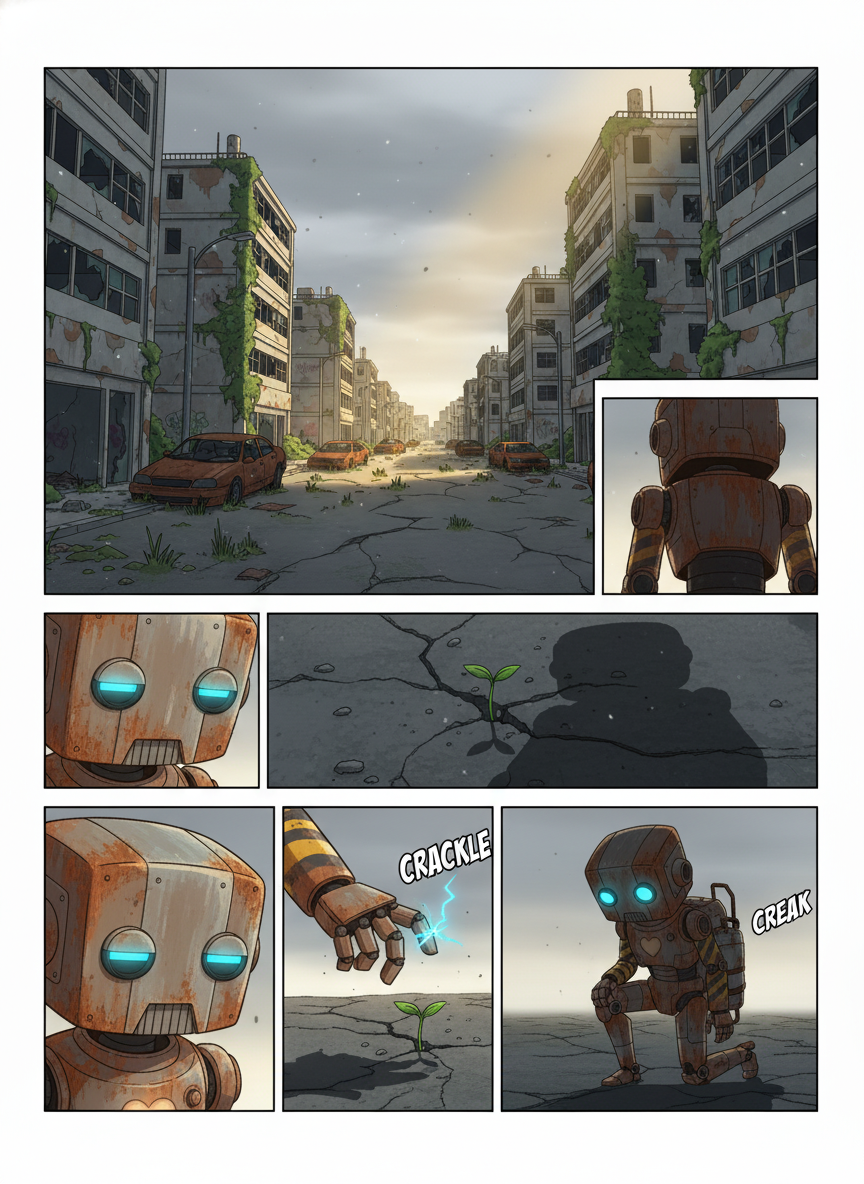
Starting with this kind of c2story book page (still illustrations + narration):
Page 1 — Deep in a silent, empty city, a rusty robot named Rusty wandered alone. One day, he noticed a tiny sprout pushing through a crack in the pavement…
VO3 AI produces an animated clip per page, then stitches them into a single video with audio. Roughly 8 seconds per page, so a 4-page book becomes a ~32-second film. A 10-page book becomes a minute and a half. The story stays exactly the same — every illustration becomes its own moving scene.
Step 1 — Make your c2story book public
The integration reads books via c2story's public-book API. In your c2story dashboard, open the book you want to animate and flip the isPublic toggle to on. Books stay yours; making them public just means our integration can read the pages and illustrations by URL.
(If you'd rather keep a book private, that works too — c2story supports owner-key auth — but the simplest path is making the book public.)
Step 2 — Open the VO3 AI chat agent
Head to vo3ai.com/chat-agent. This is the conversational interface for everything VO3 does — image, video, multi-scene chains, you name it.
Step 3 — Paste your book's URL
Type something like:
"Turn this into a video: https://c2story.com/book/your-book-slug"
Or simply:
"Make this a movie: https://c2story.com/book/your-book-slug"
The agent calls its import_url_content tool, which recognizes c2story URLs and pulls down each page's illustration plus a short visual description of what's happening in the scene. A green trace card appears showing every page as a thumbnail.
Behind the scenes, all the illustrations are also dropped into your Workspace — that's the right-side panel under the Workspace tab. You'll see them as #1, #2, #3, etc. The agent uses them as references for the per-page animation, but you can also pull them out later for other shots or remixes.
Step 4 — Confirm the cost
The agent estimates the total credits and asks you to confirm before spending anything:
"Importing 'The Brave Robot Gardener' (4 pages). Animating each page with VEO 3.1 Fast (1 credit per page, 8-second clip with audio) + merging into one video = 4 credits total. Reply 'go' to start."
This confirmation gate is mandatory for any chain that costs credits — no surprises, no runaway tool calls. Reply go (or yes, ok, 好) and it kicks off.
Step 5 — Watch the chain run
The agent runs four jobs in parallel:
- Page 1 → 8-second animated clip
- Page 2 → 8-second animated clip
- Page 3 → 8-second animated clip
- Page 4 → 8-second animated clip
Each clip animates the original illustration. The agent uses each scene's pre-written visual description (c2story already wrote one when generating the page) as the motion prompt — so the camera moves and the action lines up with what the page actually depicts.
A multi-clip grid appears on the right side, with a spinner on every tile. As each clip finishes, the spinner becomes a thumbnail you can hover-play.
When all four clips are done, a fifth job runs:
- Merge → stitch all four clips into a single video with a smooth transition between pages
The Merge banner becomes a video player as soon as the long-form clip is rendered. Hit play, download, or push it back into Workspace for a remix.
Why this works so well
VO3 AI's chat agent isn't just a chatbot wrapped around a video model. It's a pipeline orchestrator with three things going for it in this scenario:
- Real prompts, not your typing. c2story's per-page
sceneDescriptionis already a high-quality visual description (it's what generated the illustration in the first place). The agent feeds that directly into the animation model, plus a short motion clause ("gentle camera push, particles drifting"). Better prompt → better video. - Image-to-video, not text-to-video. Each scene starts from the original c2story illustration as a literal first frame. The animated clip preserves the art style, the character design, the color palette — nothing drifts. This is animate-this-painting territory, not invent-something-new-each-time territory.
- A cost gate before any spend. The agent estimates the bill, surfaces it, and waits. You see exactly what 4 (or 10, or 20) pages will cost before a single credit is touched.
Pricing at a glance
| Book length | Per-page model | Total credits |
|---|---|---|
| 4 pages | VEO 3.1 Fast (1c each) | 4 credits |
| 6 pages | VEO 3.1 Fast | 6 credits |
| 10 pages | VEO 3.1 Fast | 10 credits |
| 4 pages | VEO 3.1 (premium, 4c each) | 16 credits |
Merging is free (rate-limited 20/day per account, so plenty of headroom). VEO 3.1 Fast is the recommended default — cinematic enough, has audio, and the cheapest. Step up to the premium VEO 3.1 if you need maximum fidelity for a hero clip.
A few patterns that work
Bedtime story → animated lullaby. A 6-page picture book becomes a 48-second video your kid can replay. Their face when the same illustration suddenly starts moving — chef's kiss.
Marketing storyboard → social cuts. Wrote a 10-frame brand story in c2story? Animate it, post 8-second clips to TikTok, post the full minute to YouTube Shorts.
Pitch deck → walk-through. Replace static "this is the user's journey" slides with an animated picture book showing it.
Practice run. Make a 4-page book in c2story for $0–2, animate it on vo3 for 4 credits, see what works before investing in longer-form content.
Try it yourself
You'll need:
- A c2story account with at least one finished, public book — c2story.com
- A VO3 AI account — vo3ai.com
- About 5 minutes plus the actual render time (3–5 minutes per page, in parallel)
Then go to the chat agent and paste:
Turn this into a video: https://c2story.com/book/<your-book-slug>
Reply go when prompted. Watch it happen.
What's next
Coming up: the same agent can use the resulting video as raw material for further mixing — extracting frames, generating B-roll, swapping the audio track for music or voiceover. The "story → finished short film" pipeline keeps getting shorter.
If you've got a book you'd like animated and the agent hits an edge case, hop into the support thread and send us the URL — we'll figure it out together.
Ready to Create Your First AI Video?
Join thousands of creators worldwide using VO3 AI Video Generator to transform their ideas into stunning videos.
📚 Related Posts:
What is VO3 AI Video Generator: The Ultimate AI-Powered Video Creation Platform
Discover VO3 AI Video Generator - the revolutionary AI video creation platform
Read More →VO3 AI vs. Veo3 — What's the Difference?
Understand the key differences between VO3 AI and Google's Veo3
Read More →How to Use VO3 AI Video Generator: Complete Guide
Master VO3 AI Video Generator with our comprehensive tutorial
Read More →VO3 AI Video Generator - Where imagination meets innovation
Built on top of multiple AI video models including Veo3. Start your creative journey today and join the future of video creation.