5 Reasons Nano Banana Pro Is Taking AI Image Generation by Storm
Nano Banana Pro is revolutionizing AI image generation, offering near-instant results, high identity preservation, and video-ready visuals for creators of all levels.
Nano Banana Pro Explained: Why This AI Image Model Is Going Viral
How Nano Banana Pro Powers Video Generator Models and Image-to-Video Workflows
Over the past few months, a specific image model has surged in popularity among AI creatives, storytellers, and digital producers. That model is Nano Banana Pro—a refined, expressive, and surprisingly versatile AI image generator that has quickly become a go-to choice for visual content designed to flow directly into motion-based workflows and modern video generator models.
In this article, we break down what Nano Banana Pro is, why it’s generating real buzz online, and how creators are using it within the best AI image-to-video pipelines. You’ll also find practical prompt templates, real-world use patterns, and clear guidance on avoiding common mistakes.
What Is Nano Banana Pro and Why It Matters
At its core, Nano Banana Pro is an AI image model optimized for high-quality, creator-grade image generation. It is one of several models available on platforms like VO3 AI, alongside VO3 Basic and VO3 Advance, which together support text-to-image, image-to-video, and full video generation workflows.
On VO3 AI’s image generation page, Nano Banana Pro is positioned as the highest-quality option for creators who care about photorealism, detailed composition, and clean text rendering across languages, with support for high-resolution outputs suitable for professional use.
Unlike many basic image generators, Nano Banana Pro is designed to balance visual clarity and creative depth. Its outputs tend to feature strong composition, consistent lighting logic, and stylized details that translate well when images are later animated. This makes it especially valuable for creators who plan to use still images as inputs for video generator models, where structural stability directly affects motion quality.
Why Nano Banana Pro Is Going Viral
Nano Banana Pro’s rise isn’t just about novelty. Its popularity reflects broader shifts in how creators build AI-powered visual content.
Accessibility to High-Quality Visuals
Nano Banana Pro consistently produces images with rich detail, readable text, and coherent style—qualities that make them usable not only as standalone images but also as assets for image-to-video generation.
Seamless Integration with Video Pipelines
Platforms like VO3 AI allow users to convert images into animated video clips with sound and motion. Because Nano Banana Pro outputs are visually structured and “motion-ready,” they tend to produce smoother, more natural transitions when passed into video models.
Prompt Flexibility for Fast Iteration
Compared with more restrictive models, Nano Banana Pro responds well to descriptive prompts that combine subject, mood, and cinematic intent. This flexibility shortens the trial-and-error cycle and makes experimentation easier for both beginners and experienced creators.
Together, these strengths position Nano Banana Pro as more than just another image model—it functions as a creative bridge between static visuals and dynamic video content.
Anatomy of a Viral Visual Output
To understand why Nano Banana Pro images perform well in short-form video contexts, it helps to look at what makes a visual compelling in the first place.
- Hook Frame: The first image should immediately capture attention through composition, contrast, or lighting.
- Narrative Clarity: Even a single still image can suggest a story when elements are intentionally arranged.
- Atmosphere and Mood: Color palette, light direction, and implied motion (such as wind or blur) shape emotional impact.
- Video Readiness: For use in video generator models, images should feel cinematic and dynamic before animation begins.
Below is an example of the kind of image Nano Banana Pro excels at producing—visually rich, atmospheric, and well-suited for animation:
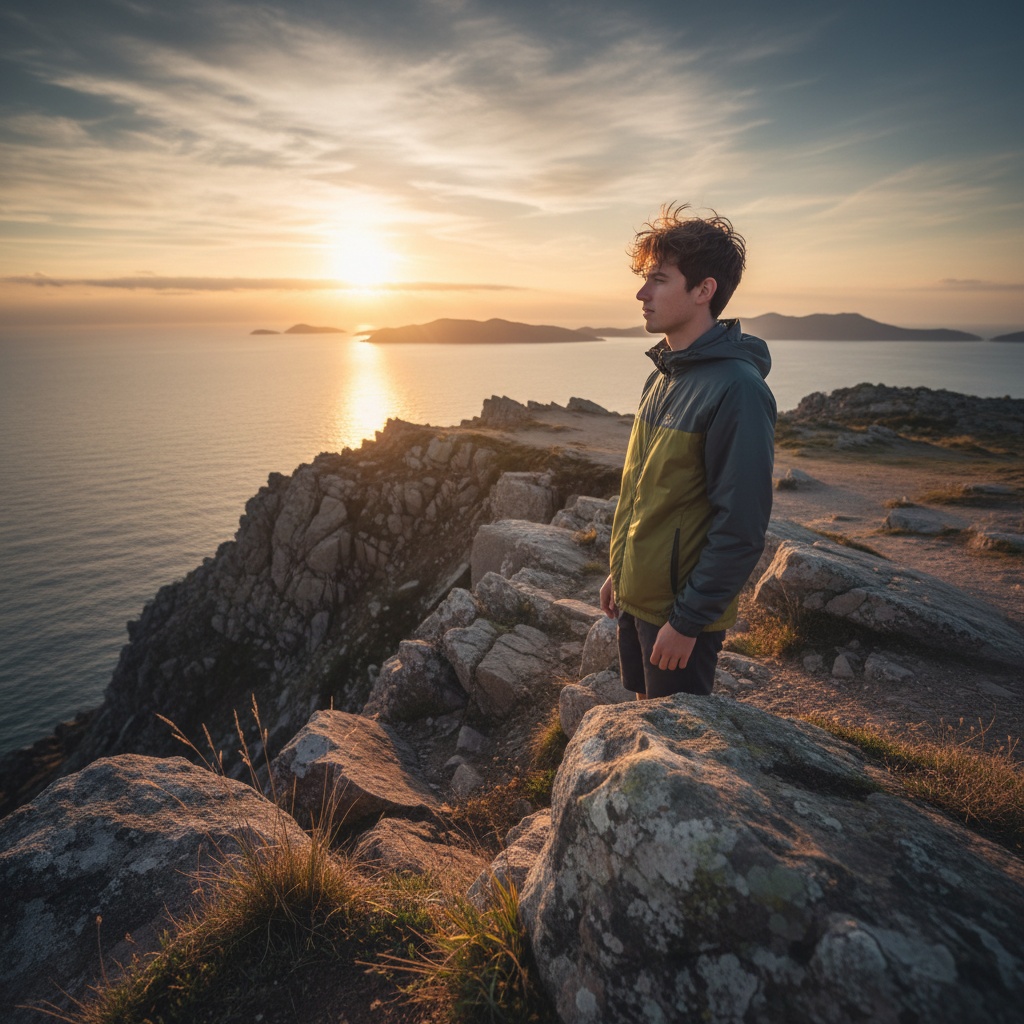
Images like this work particularly well as opening frames or anchor visuals in image-to-video workflows.
Prompt Template for Strong Nano Banana Pro Output
A reliable way to get consistent results is to follow a structured prompt format:
“A [primary subject] in a [setting] with [mood or style], captured as if through [lighting and camera cues], detailed composition, ready for motion.”
This structure ensures your prompt clearly communicates:
- The subject
- The environment
- The emotional or stylistic direction
- Cinematic or photographic intent
Clear intent at this stage leads to images that translate more smoothly into motion later.
10 Starter Prompts That Work Well
These example prompts are designed to generate visually rich images that pair naturally with video generator models:
- “A futuristic knight standing on a rain-soaked bridge, neon reflections, cinematic lighting.”
- “A cozy reading nook in morning sunlight, dust motes floating in golden rays.”
- “A lone surfer riding a massive blue wave at sunrise, dynamic motion blur.”
- “Portrait of a jazz musician on stage under warm amber lighting, emotional intensity.”
- “A desert caravan moving at dusk, long shadows and wind-blown sand.”
- “A cyberpunk alley with glowing signs and drifting fog, rich color contrast.”
- “A forest waterfall during golden hour, mist and sunbeams weaving through trees.”
- “A vintage car racing along coastal cliffs, sharp turns and sea spray.”
- “A serene monastery on a snowy peak, soft glow under a starlit sky.”
- “A bustling marketplace at twilight, lanterns and subtle crowd movement.”
Each prompt includes environmental and emotional cues that help Nano Banana Pro generate layered, video-friendly visuals.
Controlling Camera Feel and Motion Readiness
Small wording choices can significantly influence how an image behaves in a video pipeline.
- Terms like wide shot, close-up, or panoramic view guide spatial composition.
- Implied motion—such as wind through hair or rippling water—adds dynamism.
- Photographic language like shallow depth of field, backlit glow, or soft focus helps shape how an image feels when animated, especially when layered motion or camera movement is applied later.
How to Add Emotion and Atmosphere
Emotion in AI-generated visuals often comes from context rather than complexity. Effective prompts usually combine:
- Mood descriptors: melancholic, serene, dramatic, vibrant
- Lighting cues: sunrise backlight, diffused twilight, strong side light
- Environmental details: mist, rain, dust, glowing particles
- Narrative hints: solitude, anticipation, tension
These elements help Nano Banana Pro interpret not just what to show, but how it should feel, which directly impacts the quality of downstream video generation.
Common New-User Pitfalls
New users often encounter the same challenges:
- Over-complicating prompts with conflicting ideas
- Ignoring basic composition and focal hierarchy
- Treating first outputs as final instead of iterating
- Forgetting the end goal—images intended for video need structure
Being intentional with prompts and reviewing multiple outputs usually leads to far better results.
Conclusion
Nano Banana Pro is more than a viral trend—it’s a practical image model built for the realities of modern AI content creation. Its expressive visuals, prompt flexibility, and strong compatibility with video generator models make it a valuable tool for creators who want cinematic results without unnecessary complexity.
For those exploring best AI image-to-video workflows, combining Nano Banana Pro with platforms like VO3 AI creates a flexible pipeline—from detailed still images to animated videos with motion, pacing, and sound.
If you’re curious about elevating your visual storytelling, now is the right time to experiment. Try VO3 AI and see how Nano Banana Pro images transform into engaging, dynamic video content.
Ready to Create Your First AI Video?
Join thousands of creators worldwide using VO3 AI Video Generator to transform their ideas into stunning videos.
📚 Related Posts:
What is VO3 AI Video Generator: The Ultimate AI-Powered Video Creation Platform
Discover VO3 AI Video Generator - the revolutionary AI video creation platform
Read More →VO3 AI vs. Veo3 — What's the Difference?
Understand the key differences between VO3 AI and Google's Veo3
Read More →How to Use VO3 AI Video Generator: Complete Guide
Master VO3 AI Video Generator with our comprehensive tutorial
Read More →VO3 AI Video Generator - Where imagination meets innovation
Built on top of multiple AI video models including Veo3. Start your creative journey today and join the future of video creation.